If your campaign links arrive looking like https://eur01.safelinks.protection.outlook.com/?url=https%3A%2F%2F..., nothing has gone wrong with your send. That is Safe Links, part of Microsoft Defender for Office 365, rewriting every URL in inbound mail so the destination can be checked again at the moment someone clicks rather than only at delivery.
The rewrite happens in the recipient's tenant, after your message leaves your platform, and you cannot switch it off. What you can do is understand what it changes: your click numbers gain traffic no human generated, your links get longer and uglier in plain-text view, and a chain that was already two hops deep becomes three. This guide covers what the wrapper does, how to read the numbers around it, and the parts you actually control. For the wider measurement picture, tracking email link clicks is the companion piece.
What Safe Links Actually Does to Your URL
At delivery, the service replaces each URL in the message body with a wrapper pointing at safelinks.protection.outlook.com, carrying your original address percent-encoded in a url parameter alongside tenant and message identifiers. Microsoft documents the behaviour in its Safe Links overview: the point is time-of-click protection, so a destination that was clean when the mail arrived but was compromised two days later gets caught on the click rather than on delivery.
Three consequences follow, and only the first is obvious.
The visible URL changes, so anything that relied on a recognisable domain in the text of the email loses that recognition. The link gets long, which matters in plain-text parts and in clients that wrap the address across lines. And an extra hop appears at the front of your chain, before your ESP's tracking domain and before your own short link.
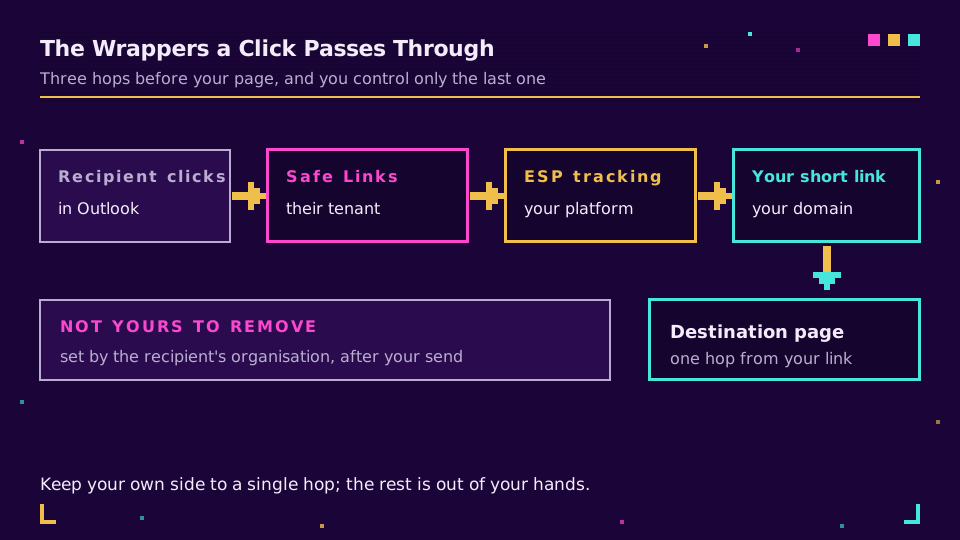
None of those hops is yours to remove except the ones you added. The wrapper belongs to the recipient's organisation, the tracking domain belongs to your email platform, and the only part under your control is keeping your own side to one hop that resolves cleanly.
Why Your Click Counts Go Strange
This is the part that costs marketers a morning every quarter. Security layers do not just rewrite links, they follow them. Scanners fetch the destination to inspect it, sometimes at delivery, sometimes at click time, sometimes both, and each fetch can register as a click in a system that counts requests.
The fingerprints are consistent once you know them. A burst of clicks arriving within seconds of delivery, long before a human would have opened the message. Clicks on every link in the email including the unsubscribe and the privacy policy, which no real reader does in one pass. Requests from datacentre networks rather than consumer or corporate ones, often in a country the recipient is not in. And identical timing across multiple recipients at the same company.
The response is not to distrust the number but to read it against something harder. Downstream sessions, form submissions, and revenue do not move when a scanner fetches a URL, so the gap between clicks and outcomes tells you what was real. That comparison is exactly what short link analytics is for, and it is also why your ESP's count and your analytics count will never fully reconcile, a discrepancy the email tracking guide covers in more depth.
What You Can Control, and What You Cannot
You cannot opt out. There is no sender-side header, setting, or shortener that exempts a message from another organisation's Safe Links policy, and any vendor claiming otherwise is describing something else. Policy configuration lives entirely with the recipient's administrators, including the do-not-rewrite list that can exempt specific URLs.
That list is worth knowing about, because it turns an impossible request into a reasonable one in the right context. Asking a public newsletter audience to change their security policy is absurd. Asking the IT contact at a partner or a large customer to allow a specific domain, when your links keep landing in their ticket queue looking mangled, is an ordinary conversation and it sometimes works.
What genuinely is yours: the domain. A branded short domain carries only your own reputation, which is the difference between a link that gets rewritten and a link that gets blocked outright. Shared free shortener domains inherit whatever their worst user did last week, which is the same mechanism behind short links blocked in Slack and Teams. Also yours: chain length, destination hygiene, and not doing anything that resembles cloaking. If you want links whose reputation, hop count, and click data all belong to you, put them on your own domain and read them in link analytics.
Reading a Rewritten Link
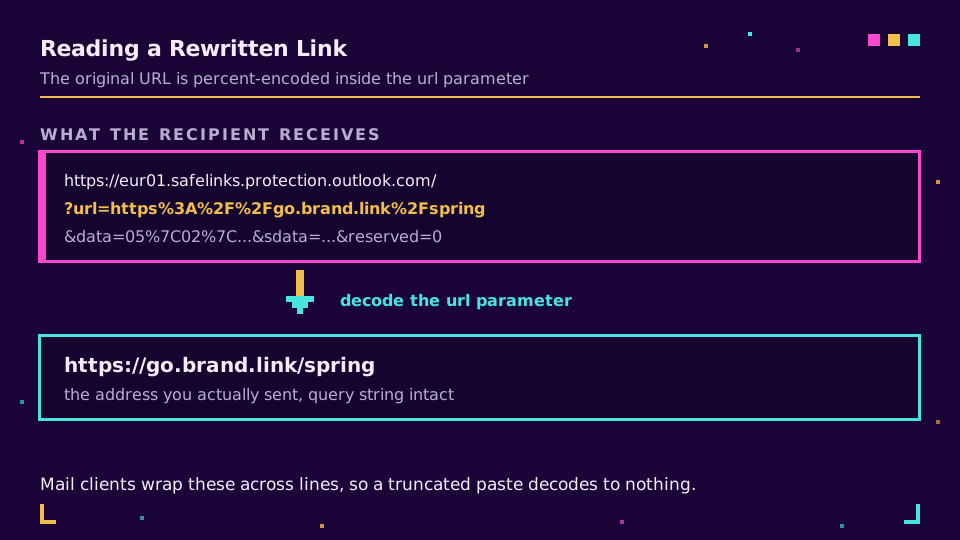
When a recipient forwards you a mangled URL and asks what it is, you can decode it in a few seconds. The original address is sitting in the url parameter, percent-encoded as RFC 3986 describes:
python3 -c "import sys,urllib.parse as u; q=u.parse_qs(u.urlparse(sys.argv[1]).query); print(q['url'][0])" "PASTE_THE_SAFELINK_HERE"
That prints the address the recipient was actually sent, which is the fastest way to confirm whether they received the link you think they did, or an older campaign, or something that is not yours at all. Watch for truncation: mail clients wrap these across lines, and a partial wrapper decodes to a partial URL or fails outright.
Test It Before the Next Send
The cheapest insurance is a Microsoft 365 mailbox on the send list. Not a personal address, not a seed list at a consumer provider, because neither reproduces the wrapper.
- Send the real campaign to a test mailbox in a tenant that has Defender enabled, which for most B2B audiences is the majority case.
- Open it, hover the link, and confirm the wrapper decodes to the URL you meant, query string and UTM parameters intact.
- Follow it once and trace the whole chain with
curl -sIL, confirming your side is a single hop, as covered in how to redirect a URL. - After the send, check the first hour of clicks against sessions before you report anything.
I still remember a launch where the click-through rate looked extraordinary for about ninety minutes, and the landing page had recorded eleven sessions. Every "click" was one company's security appliance walking the whole email. Nothing was broken, and nothing was real either. Now the first hour of any B2B send is something I look at with suspicion rather than joy.
Read the Cornerstone Series
This post sits in the tutorials cluster. For the measurement half, track email link clicks covers the plumbing, and do short links hurt email deliverability covers the reputation half that decides whether a link is rewritten or refused.
Related on the Blog
- Track email link clicks: a marketer's how-to guide
- Do short links hurt email deliverability?
- Why your short links get blocked in Slack and Teams
- Short link analytics: what to measure and what to ignore
- How to redirect a URL: six ways, and when each is right
- Email click attribution across Mailchimp, Brevo, and Klaviyo
Frequently asked questions
Why do my links turn into safelinks.protection.outlook.com?
Because the recipient's organisation runs Safe Links, part of Microsoft Defender for Office 365, which rewrites URLs in inbound mail so it can check the destination again at the moment someone clicks. The rewrite happens on their side, after your send, and it applies to every link in the message. Your original URL is still there, carried inside the query string of the wrapper.
Does Safe Links break email click tracking?
It does not break it, but it distorts the numbers. Security scanners follow links to inspect them, so your click count picks up machine clicks that no human made, often within seconds of delivery and sometimes from a datacentre far from the recipient. The fix is filtering rather than panic: compare clicks against downstream sessions and conversions, and treat a burst of instant clicks from one network as inspection traffic.
Can I stop Outlook from rewriting my links?
Not from your side. Safe Links is configured by the recipient's IT administrators in their own tenant policy, so no sender setting, header, or shortener can opt out of it. What an administrator can do is add specific URLs to the do-not-rewrite list in their Safe Links policy, which is a reasonable ask for a partner or supplier domain but not something you can arrange for a public newsletter.
Do short links still work through Safe Links?
Yes. The wrapper resolves and hands the visitor to your short link, which resolves to the destination, so the chain simply gains one hop at the front. Keep your own side to a single hop so the total stays short, and use a domain you control, because reputation on shared shortener domains is the thing most likely to make a security layer block the link rather than merely rewrite it.
Why does a rewritten link look broken when someone pastes it to me?
Because the wrapper is long, percent-encoded, and often wrapped across lines by the mail client, so pasting it into a browser or a support ticket truncates it. Decode the url parameter inside the wrapper to get the original address back. That decoded value is also the fastest way to confirm which of your links a recipient actually received.
Is Safe Links the same as my email platform's click tracking?
No, they are two separate wrappers that stack. Your email service provider rewrites links at send time so it can count clicks, and Safe Links rewrites that already-rewritten link at delivery so it can scan the destination. A recipient can therefore pass through a security wrapper, an ESP wrapper, and your short link before reaching the page.
Try Elido
Paste a URL, get a working short link
No signup. Link lives for 30 days. Sign up to keep it forever.
Free, no signup required · 2 per day