Every URL you post on X counts as 23 characters, no matter how long it is, because X rewraps it in a t.co link before the post goes out. So shortening a link for X saves you exactly zero characters. If that was the reason you were reaching for a shortener, you can stop here.
There is still a good reason to use one, and it is not length. A branded short link changes what the reader sees, who owns the click data, and what happens when the destination has to move after the post is live. This guide covers the character math, what the double wrap actually does to your URL, why previews break, and how the numbers in X analytics differ from the ones in your own dashboard. The rest of the platform series, including how to track social media links, covers the cross-channel version.
The 23-Character Rule
X charges a flat rate for links. Its own developer documentation on counting characters puts it plainly: all URLs are wrapped with the t.co shortener and count as 23 characters, regardless of the original length. A nine-character link and a two-hundred-character one cost the same.
That gives a 280-character post 257 characters of room once a link is in it. The count is fixed before you can influence it, which is why the old habit of shortening a URL to squeeze in another clause has been pointless for years. The wrapper happens at publish time, on X's side, to every link in the post.
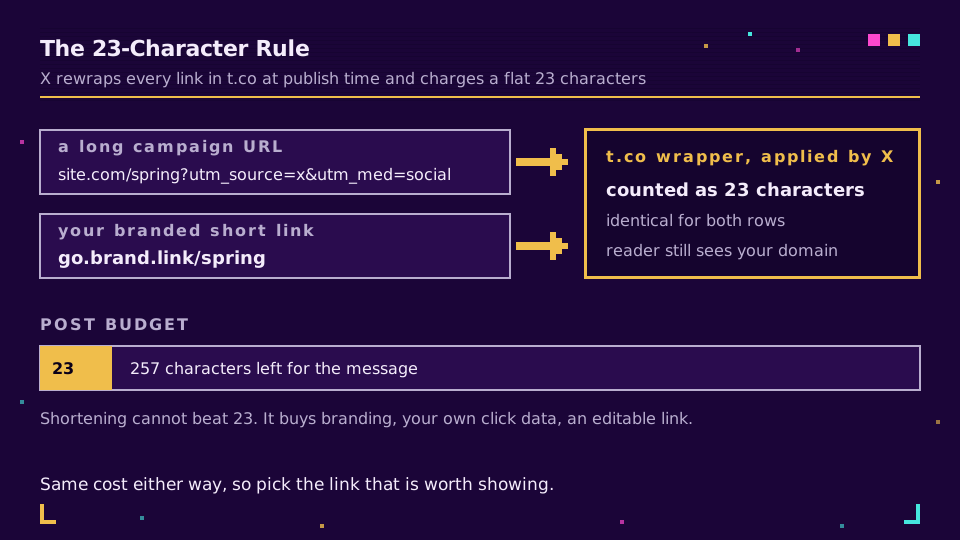
One caveat worth knowing: the 23 characters are charged, but the reader never sees a t.co address in a modern client. The interface shows the destination domain instead, which is precisely why the domain in your link is doing branding work, planned or not.
What a Short Link Buys You Instead
Strip out the character argument and three real reasons survive.
The first is what the reader sees. A post carrying yourbrand.link/spring reads as deliberate; the same post carrying a UTM-laden URL with four parameters reads as machinery. That perception gap is the whole point of a branded link, and it survives the wrapper because clients display the destination domain.
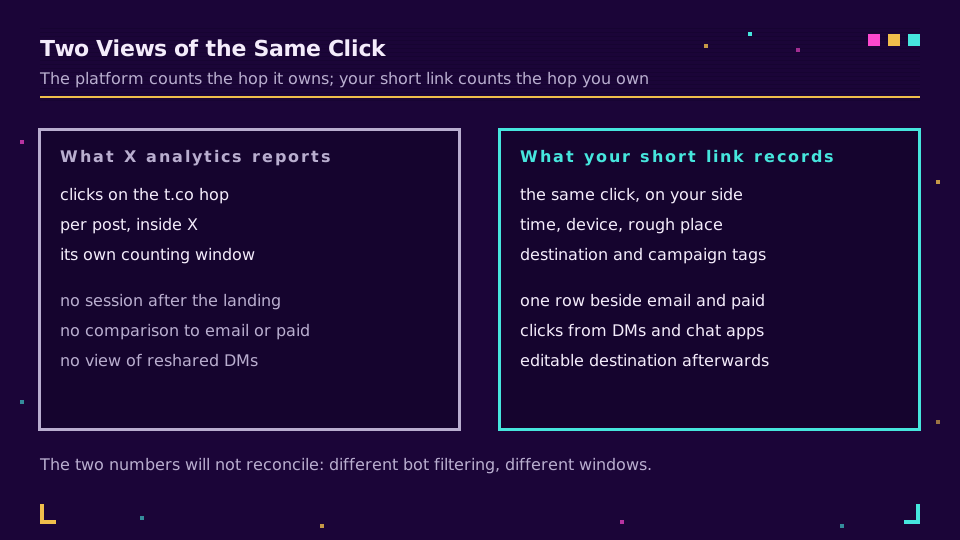
The second is ownership of the click. X counts clicks on the t.co hop and reports them inside X analytics, and that number stays inside X. A short link you own logs the same click on your side, in the same table as your email, paid, and print campaigns, so channel comparison stops being an exercise in exporting spreadsheets.
The third is editability, and it is the one people appreciate later. A post on X cannot be edited by most accounts, but the destination behind a short link can be repointed at any time. The campaign page moves, the offer ends, the article gets a better version, and the link in that post keeps working.
Double Wrapping: What the Chain Actually Looks Like
Posting your own short link means the visitor passes through two redirects: t.co first, then your domain, then the destination. That sounds worse than it is, and it is worth understanding exactly what each hop does.
Any Twitter URL shortener you have used in the past sat in the same position: the t.co hop resolves and hands over the full URL you posted, query string included. Your hop then resolves to the final page. Both are server-side redirects measured in milliseconds, and the reader notices nothing. What matters is that the chain stops there: if your destination itself redirects twice more, you are stacking hops that each add latency and each give a query string another chance to get dropped. Keep your side to a single hop and check it with one command before the post goes out.
This is also why utm_source survives the wrapper. The parameters ride along on the destination URL rather than being stored by X, so they arrive intact at your analytics unless something further down the chain strips them, which is the failure mode described in UTM parameters not showing in GA4. If UTM tagging is new to you, UTM parameters explained is the primer, and tracking UTMs end to end is the version with the plumbing attached.
Link Previews and Why They Break
The card under your post does not come from the link you typed. X follows the chain to the destination and builds the preview from the tags on that final page, using the card markup it documents for websites. A redirect in the middle is fine; a broken destination is not.
Three things account for most missing cards. A page with no og:image gives the crawler nothing to render. A consent wall or bot-blocking rule serves the crawler an interstitial instead of the page, so the tags it reads belong to the wrong document. And a destination that returns a soft error, or redirects somewhere unexpected, ends the chain in a place with no card markup at all. Our guide to fixing broken link previews walks the diagnosis, and the Open Graph checker shows you what a crawler sees before you post rather than after.
What X Analytics Will Not Tell You
X reports link clicks per post, and that number answers one question: did this post work. It cannot answer the ones that follow.
It does not tell you what those visitors did after landing, because the session belongs to your site. It does not compare cleanly against your other channels, because the counting rules differ from your analytics and your ad platforms. And it says nothing about the same link shared onward in a DM or a group chat, which is the dark social traffic that every social report quietly loses. A short link you own catches all three, because the hop belongs to you rather than to the platform.
Expect the two numbers to disagree. Bot filtering, prefetching, and the counting window all differ between a platform's click metric and a redirect log, so treat them as two measurements of related things rather than one number that should reconcile. If you want them side by side with the rest of your campaigns, start a workspace and put your own domain on the link, then read both in link analytics.
Setting It Up Without Getting Flagged
The practical steps are short, and the only one people skip is the one that matters.
- Put the link on a domain you own, not a shared free shortener domain, since reputation on shared domains belongs to everyone who ever used them. Setting up branded short links covers the setup and custom domains covers the DNS and certificate side.
- Tag the destination with UTM parameters before you generate the short link, so the parameters live on the stored destination rather than in the posted text.
- Post the link once from a test account, or preview it, and confirm the card renders and the destination is right.
That reputation point is not theoretical. Shared shortener domains get filtered in messaging apps and behind corporate gateways for reasons that have nothing to do with you, which is the same mechanism behind short links blocked in Slack and Teams. I have watched a launch post get an interstitial warning on a free domain and open cleanly on a branded one an hour later, with identical destinations. Same link, different neighbourhood.
The summary is short enough to keep: shortening buys you no characters on X, and everything else it buys is worth having anyway.
Read the Cornerstone Series
This post sits in the tutorials cluster. For the cross-channel version of the same problem, how to track social media links covers clicks by channel, and how to shorten a URL is the general primer under all of it.
Related on the Blog
- How to shorten a YouTube link and keep the timestamp
- How to shorten a LinkedIn link: profile and posts
- Fix a broken link preview on social and chat apps
- Why your short links get blocked in Slack and Teams
- What is a branded link, and why it converts better
- Dark social attribution: the traffic every report loses
- Open Graph image size: one file for every platform
Frequently asked questions
Do short links save characters on X?
No. Every URL in a post counts as 23 characters whether it is nine characters long or two hundred, because X replaces it with a t.co wrapper before the post is published. A shortener cannot beat that number, so the reason to use one is branding and measurement, not space. The only text you save is what the reader sees, since a tidy link reads better than a raw query string.
How many characters does a link take up in a post on X?
Exactly 23, and that is a fixed count set by X rather than a property of your URL. X documents this as part of how it counts characters: all links are wrapped with the t.co shortener and charged at 23 characters regardless of the original length. With a 280-character post, that leaves 257 for the message itself.
Does X still wrap links in t.co?
Yes. Every link posted on X, including one that is already short, is rewritten to a t.co address before delivery. That wrapper is how X measures clicks and screens destinations, so you cannot opt out of it. Your own short link still works, it simply sits one hop below the wrapper.
Do UTM parameters survive the t.co wrapper?
Yes. The t.co hop preserves the full destination URL, query string included, so utm_source and its siblings arrive at your analytics intact. What breaks UTMs is usually something else: a destination that redirects again and drops the query string, or an app browser stripping parameters. Test the exact link you plan to post before the campaign, not a similar one.
Why does my link preview not show up on X?
Because the card is generated from the destination page, not from the link you posted. X follows the redirect chain and reads the Open Graph and card tags on whatever page it lands on, so a missing og:image, a consent wall, or a page that blocks crawlers leaves you with a bare link. Fix the tags on the final page and the card comes back.
Can I use a URL shortener on X without getting flagged?
Yes, if the domain is yours. Shared free shortener domains carry the reputation of everyone else using them, which is how ordinary marketing links end up behind a warning interstitial. A branded domain you control carries only your own history, and that is the practical difference between a link that opens and one that scares people off.
Try Elido
Paste a URL, get a working short link
No signup. Link lives for 30 days. Sign up to keep it forever.
Free, no signup required · 2 per day