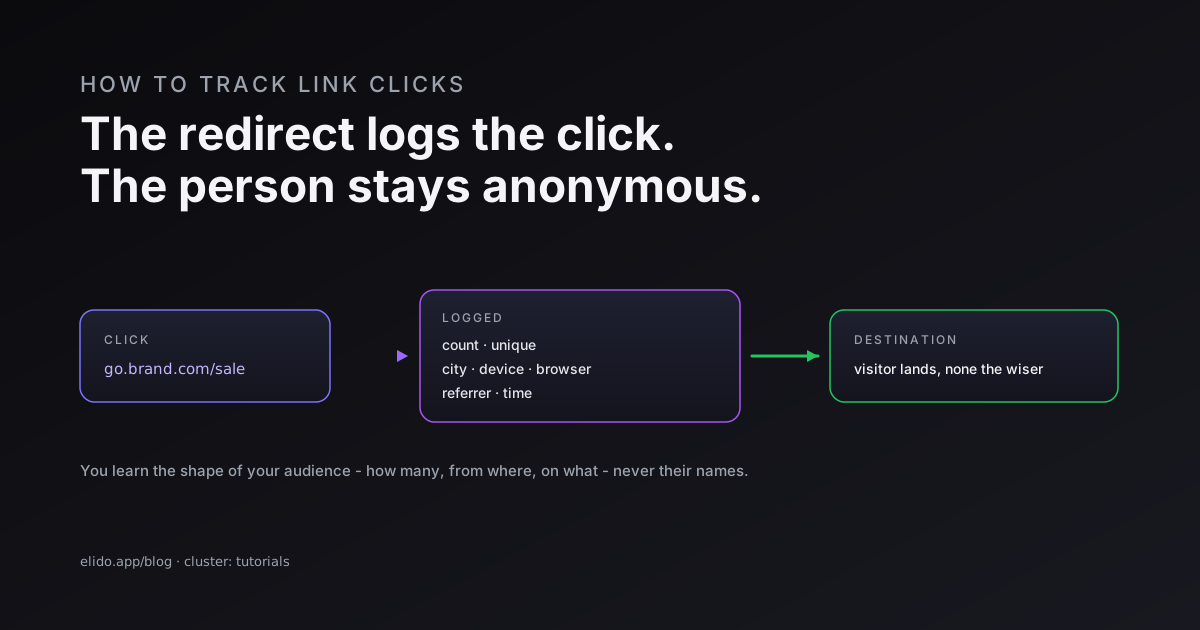
To track link clicks, you share a tracking link - a short link that routes each click through a service that logs it before redirecting to the real destination. That one extra hop is the whole mechanism: when someone clicks, the service records the click with its time, rough location, device, and referrer, then sends the visitor on without them noticing a thing. You read the results in a dashboard. Because the logging happens on the redirect, you can track a link to any page, even one you do not own.
The honest part most guides skip: tracking tells you the shape of your audience, not their names. You learn how many people clicked, from roughly where, on what device, and from which source - real, useful signals. You do not learn who they are. That distinction matters both for setting expectations and for staying on the right side of privacy law, and it runs through this whole guide.
If you are new to the format, how to shorten a URL covers creating the link itself, and the end-to-end UTM tracking guide is the cornerstone for tying clicks back to campaigns.
How Click Tracking Actually Works
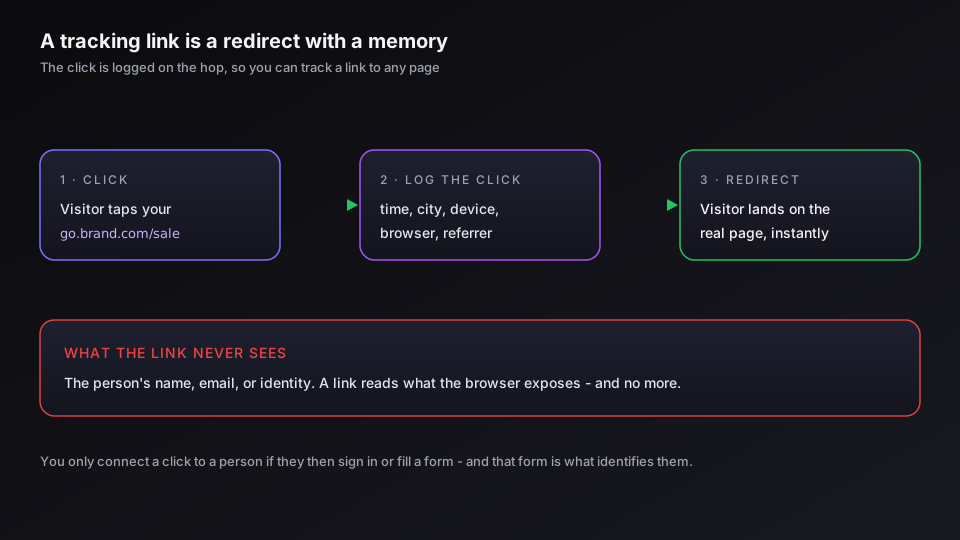
A tracking link is a redirect with a memory. The visitor clicks go.brand.com/sale, the service writes down the click, and the browser is forwarded to the real page. From the visitor's side it is an ordinary redirect; from yours, a row of data just landed.
That design has one big consequence: you do not need to own the destination to measure the click. A normal analytics tool only sees visits to pages where you installed it. A tracking link sees the click itself, wherever it goes, which is why it works for links to a partner's blog, an app store, or a shared file. The tradeoff is that the data is about the click and the device, not the person - the redirect can read what the browser sends, and no more. The mechanics of that redirect, and why an editable tracked link should use a temporary one, are in 301 vs 302 redirects.
What You Can See, and What You Can't
This is the part to be clear-eyed about, because it sets both your expectations and your obligations.
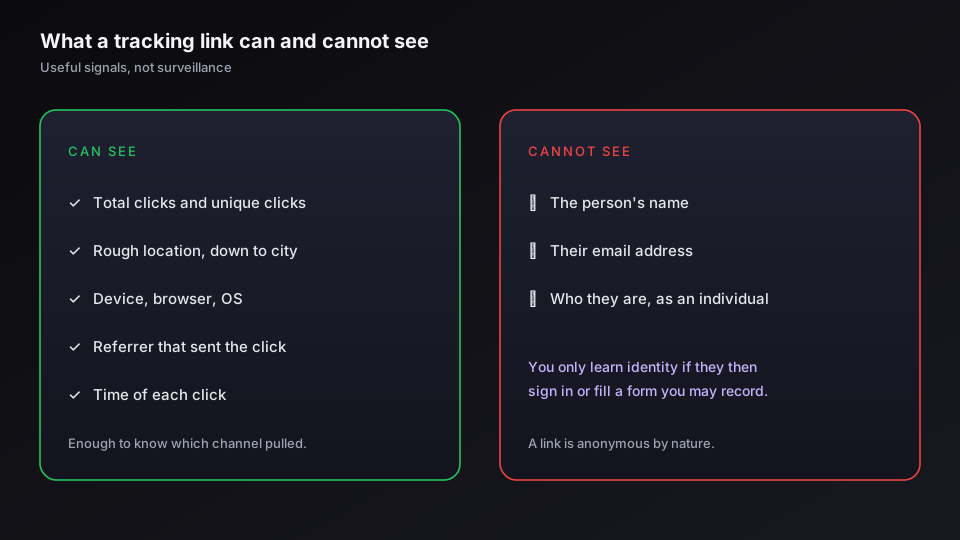
What a tracking link can show you: total clicks and unique clicks, the rough geography of each click down to city level, the device type, browser, and operating system, the referrer that sent the click, and the time it happened. Stacked up, that paints a real picture - which channel drove a campaign, when your audience is active, whether mobile or desktop dominates. The short-link analytics guide covers which of these numbers actually deserve your attention.
What it cannot show you: the name, email, or identity of the person who clicked. A link is anonymous by nature; it reads what the browser exposes and nothing more. You only ever attach a click to a known person when that person takes a separate, identifying step you are permitted to record - signing in, submitting a form, completing a purchase - and at that point the identification comes from the form or the login, not from the link. Anyone promising that a plain link reveals who clicked is overpromising.
Setting Up Click Tracking
The setup is short, and most of the work is deciding what you want to learn before you create the link.
- Create the tracking link. Shorten the destination on a shortener that records clicks, ideally on a custom domain so the link carries your brand instead of a stranger's.
- Tag it with UTM parameters. Add
utm_source,utm_medium, andutm_campaignso the click is attributable in your wider analytics, not just in the shortener. The UTM tracking guide and our link builder with UTM support cover the conventions that keep these consistent. - Share it and watch the dashboard. Clicks, locations, and devices appear in near real time. Compare links against each other to see which channel or creative actually pulled.
If you want branded tracking links with click, geo, and device analytics in one place, start a free Elido workspace and create your first tracked link.
Tracking Clicks in Email and on Websites
Two contexts deserve a note because they behave a little differently.
In email, a tracking link works the same way, and your email platform usually also knows who clicked, because it already knows who you sent the message to - that is legitimate first-party data. The catch is inflated counts: some mail clients and security tools pre-fetch links before a human ever sees them, which can fake clicks. Use a shortener or email tool that filters that prefetch and bot traffic so your open and click numbers mean something. The specifics for newsletters are in tracking email link clicks.
On your own website, you have a second option: a general analytics tool. Google Analytics 4 can track outbound and event clicks through its enhanced measurement settings, and you tie campaigns together with UTM parameters. The two approaches complement each other - the tracking link measures the click anywhere, GA4 measures behavior once the visitor lands on a page you own. For server-side accuracy, server-side conversion tracking goes a layer deeper.
The Privacy Line You Should Not Cross
Click data is personal data the moment it can be tied to an identifiable person, so tracking carries obligations alongside its capabilities. This is not a reason to avoid it - aggregate counts and coarse geography are low-risk and completely normal - but it is a reason to be deliberate.
Three habits keep you safe. Collect the minimum you actually need rather than hoarding every signal. Keep the data somewhere you can defend, which for EU audiences means an EU region, so a residency question has a clean answer. And only set non-essential cookies - the advertising and retargeting kind - after the visitor has consented, never by default on the click. We lay out the obligations specific to short links in GDPR for URL shorteners. Track the click, respect the person, and the two are not in tension.
Related on the Blog
- Short link analytics: what to actually measure
- How to track UTM campaigns end-to-end without a CDP
- How to shorten a URL: free, branded, and bulk links
- Tracking email link clicks across Mailchimp, Brevo, and Klaviyo
- GDPR for URL shorteners: what your DPO wants to see
- How to track QR code scans and read the analytics
- Amazon affiliate link shortener: the rules to know
Frequently asked questions
How do I track clicks on a link?
Create a tracking link - a short link that routes the click through a service before redirecting to the destination. That hop is what gets logged: each click is recorded with its time, rough location, device, and referrer, then the visitor continues to the real page without noticing. You read the results in the link's analytics dashboard. You do not need to own the destination site to track a link, because the counting happens on the redirect, not on the page.
Can I see exactly who clicked my link?
No - not by name, and that is by design. A tracking link records technical and aggregate signals: how many clicks, from roughly where, on what device and browser, via which referrer. It does not reveal a person's identity, email, or name. You only ever connect a click to a specific person if that person then takes an identifying action you are allowed to record, like logging in or filling a form, and even then it is the form that identifies them, not the link.
How do I track link clicks for free?
Most URL shorteners include basic click tracking on their free tier - usually a total count, sometimes a rough geographic and device split. That is enough to see whether a link is getting traction. The limits of free tracking are history depth, granularity, and export: detailed per-click data, longer retention, and the ability to download your numbers tend to sit behind a paid plan. For a single campaign a free tier is fine; for ongoing measurement, check what it withholds.
How do I track clicks without a website?
A tracking link is exactly the tool for that. Because the click is logged on the redirect rather than on a page you control, you can measure clicks on a link to anywhere - a partner's article, an app store listing, a PDF, a profile. Shorten the destination into a tracking link, share that, and you get click data even though you do not own the page it points to.
Does click tracking work in email?
Yes, with a caveat. Putting a tracking link in an email lets you count clicks the same way, and most email tools also tie a click to the recipient who clicked because they already know who you sent it to. The caveat is that some privacy features and mail clients pre-fetch links, which can inflate counts. For clean email numbers, use a shortener or email platform that filters bot and prefetch traffic.
Is tracking link clicks legal under GDPR?
Tracking clicks is legal, but the data is personal data the moment it can be tied to an identifiable person, so the usual rules apply. Aggregate click counts and coarse geography are low-risk; combining click data with identity, or setting advertising cookies on the click, moves you into consent territory. The safe posture is to minimize what you collect, keep it in a region you can defend, and only set non-essential cookies after consent. The compliance detail is in our GDPR guide for link tracking.
Try Elido
Paste a URL, get a working short link
No signup. Link lives for 30 days. Sign up to keep it forever.
Free, no signup required · 2 per day