A UTM builder turns a plain URL into a trackable one by adding tags that tell your analytics where each click came from. Fill in the source, medium, and campaign, and the builder appends them as utm_ parameters. Then GA4, or whatever you use, can show that 40 clicks came from the newsletter and 12 from a LinkedIn post, instead of lumping them into "direct" or "referral."
This is a practical guide to building those URLs for free: what each parameter means, how to assemble a clean one, a copy-paste template, and the step most people skip, shortening the long result so it is usable. For the full attribution picture end to end, the track UTM campaigns without a CDP cornerstone goes deeper than a single link.
What UTM Parameters Are
UTM stands for Urchin Tracking Module, a naming scheme old enough to predate Google Analytics owning it. There are five parameters, and only the first three matter most of the time:
utm_source- where the traffic comes from:newsletter,facebook,partner-site.utm_medium- the channel type:email,social,cpc,print-qr.utm_campaign- the campaign name:spring-sale,launch-2026.utm_term- the paid keyword, mostly for search ads. Optional.utm_content- which specific link or creative, for telling two versions apart. Optional.
Source, medium, and campaign are the three to always set. Term and content are there when you need finer detail, like separating two buttons in the same email.
Build a UTM URL, Field by Field
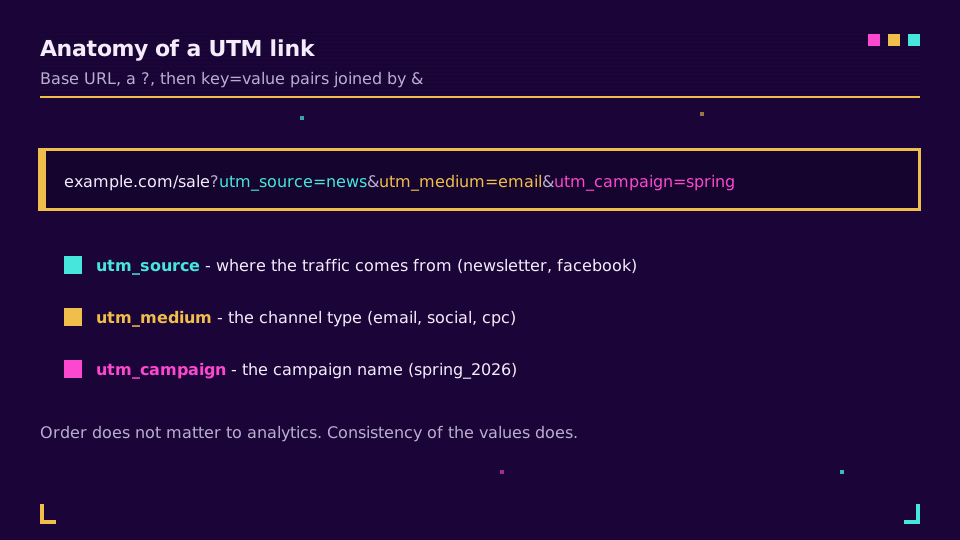
A tagged URL is just your base link plus a query string. Here is the anatomy:
https://example.com/spring-sale?utm_source=newsletter&utm_medium=email&utm_campaign=spring_2026
The ? starts the query string, each parameter is key=value, and & joins them. The order does not matter to analytics, but keeping source, medium, campaign in the same order every time makes them easier to read. That is the entire mechanic a free builder automates, so once you understand it you can write one by hand in a pinch.
A Copy-Paste Template
Most of the work is deciding your values once and reusing them. This is a starter set of consistent source and medium pairings by channel:
| Channel | utm_source | utm_medium |
|---|---|---|
| Email newsletter | newsletter | |
| Facebook post | social | |
| LinkedIn post | social | |
| Google Ads | cpc | |
| QR on a flyer | flyer | print-qr |
Keep this list somewhere shared, because the moment two people tag the same channel differently, the reports fracture. The campaign value changes per campaign; source and medium should not.
Naming Rules That Keep Reports Clean
The parameters are trivial. The discipline is where reports live or die.
Keep everything lowercase, because UTM values are case-sensitive and Facebook and facebook become two separate rows. Use dashes or underscores instead of spaces, pick one and stay consistent, since a space becomes an ugly %20. Never put personal data, names or emails, into a UTM, because it ends up in analytics logs you did not intend. And agree the vocabulary as a team, because the tool cannot fix inconsistent naming, only you can.
Shorten the Result
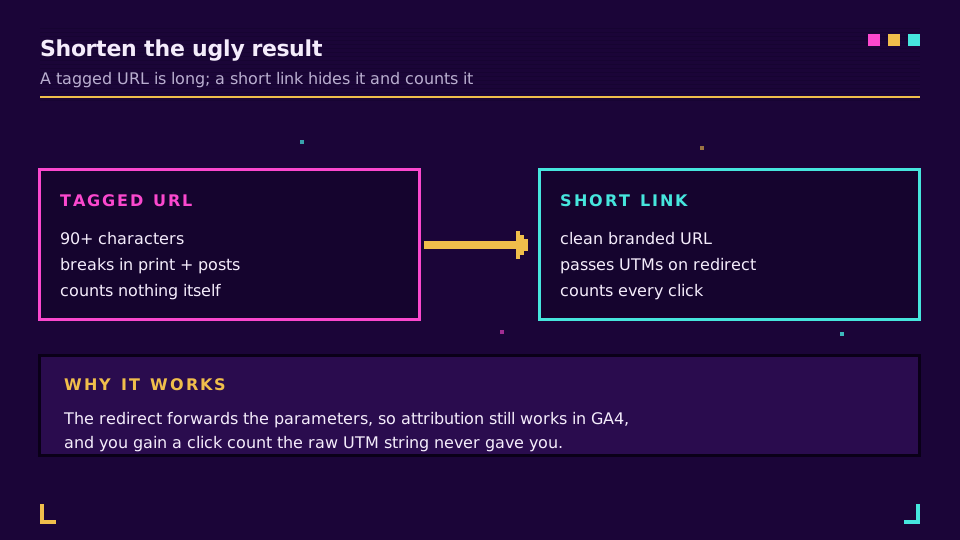
Here is the step a plain builder leaves you stranded on. A properly tagged URL is long:
https://example.com/spring-sale?utm_source=newsletter&utm_medium=email&utm_campaign=spring_2026
That is fine in an email href, where nobody sees it, and terrible everywhere else: a social post, a printed flyer, a QR code, a spoken "go to." A short link fixes it by hiding the whole UTM string behind a clean branded URL that still passes the parameters through on redirect. You also get something the UTM alone cannot give you, a click count, because a tracked short link measures the redirect itself.
Elido's builder does both in one step: build the campaign link with UTMs and shorten it together, so the tags are correct and the link is usable. You can do this on the free plan, and the campaigns feature groups the tagged links so a whole campaign reports as one.
Common Mistakes to Avoid
A few errors show up again and again, and each one quietly corrupts a report.
- Tagging internal links. UTMs are for traffic arriving at your site, not for links between your own pages. Tag an internal link and you overwrite the original source, so a visitor who came from the newsletter suddenly looks like they came from your own footer.
- Inconsistent naming.
googlein one campaign andGooglein the next split into two rows. Lock the vocabulary once. - Personal data in the values. Names and emails do not belong in a UTM; they end up in analytics logs you never meant to fill.
- Skipping
utm_medium. Without it, GA4 cannot group the click into a channel, and the visit falls back to a vague bucket. - Never shortening. A raw tagged link is fine in an email body and unusable anywhere a human sees it.
Avoid those five and your reports stay trustworthy enough to make decisions on.
Read the Data
The tags only pay off if you look at them. In GA4 the values land in the Traffic Acquisition and Campaign reports, where utm_source and utm_medium become the source and medium dimensions and utm_campaign the campaign. Google's Campaign URL Builder documents the exact fields, and Google's UTM reference explains how each maps into a report.
Check those reports a week into a campaign, see which source and medium actually drove clicks, and tag the next one with what you learned. That loop, consistent tags plus a shortened link plus reading the result, is the whole point of building UTMs at all.
Related on the Blog
Frequently asked questions
What is a UTM builder?
A UTM builder is a tool that adds tracking parameters to a URL so your analytics can attribute each visit to a specific campaign, source, and medium. You fill in fields like source, medium, and campaign, and it appends them as utm_ query parameters. The result is a link that tells GA4 or any analytics tool exactly where a click came from.
What are the five UTM parameters?
utm_source (where the traffic comes from, like newsletter or facebook), utm_medium (the channel type, like email or social or cpc), utm_campaign (the campaign name), utm_term (the paid keyword, optional), and utm_content (which specific link or creative, optional, for A/B splits). Source, medium, and campaign are the three you should always set.
Is there a free UTM builder?
Yes, many, and the underlying parameters are an open standard so no tool can charge for them. Free browser-based builders let you fill in the fields and copy the URL. The value-add worth paying attention to is whether the tool also shortens and tracks the link, since a raw UTM URL is long and ugly and a plain builder does not measure anything itself.
Do UTM parameters need to be lowercase?
Yes, keep them lowercase. UTM values are case-sensitive, so Facebook and facebook register as two different sources and split your reports. Pick one convention, lowercase with dashes instead of spaces, and stick to it across every campaign. Consistency matters more than the exact words you choose.
Should I shorten a UTM link?
Usually yes. A tagged URL can run well over 100 characters, which looks untrustworthy in a post, breaks in print, and is impossible to type. A short link hides the UTM string behind a clean branded URL while still passing the parameters through on redirect, and a tracked short link also counts the clicks the UTM alone cannot.
Try Elido
Paste a URL, get a working short link
No signup. Link lives for 30 days. Sign up to keep it forever.
Free, no signup required · 2 per day