Every Instagram profile has a QR code built in, and it takes about five seconds to find: open your profile, open the menu, pick the QR code option. Instagram builds it from your username, lets you restyle the background, and any phone camera can read it because it is an ordinary QR code containing an ordinary URL - instagram.com/yourhandle.
That is the whole feature, and for handing your profile to someone across a table it is perfect. What it cannot do is tell you how many people scanned it, or point anywhere other than your profile. If the code is going on a shop window, a flyer, a pack or a stand, those two limits are the ones that matter, and the fix is to encode a link you own instead. Both versions are below. For the printed side in general, a QR code campaign from scratch covers the workflow.
Where the Built-In Code Lives
In the app: your profile, then the menu, then the QR code entry. Instagram has moved and renamed this more than once, so look for the letters QR rather than a remembered label, and expect the styling screen to offer a colour gradient, an emoji or a selfie behind the pattern.
Two things are worth knowing about what you get. The styling is decorative only - the pattern underneath is a normal QR containing your profile URL, and the background choice has no effect on scannability. And because the payload is your username, the code follows a rename: change your handle and the same printed code resolves to the new profile, since it is Instagram doing the lookup.
A scan on a phone with the app installed usually opens the app rather than the browser, which is the behaviour you want. On a desktop webcam or a phone without the app it opens the web profile, which is a perfectly good fallback. If you need a code that opens a direct message rather than a profile, ig.me/m/yourhandle resolves for that, and what is a deep link covers why app-versus-browser routing behaves the way it does.
Nametags Are Gone, and Why That Matters
If a guide tells you to open Nametag, it was written before 2020 and half of what follows it will be wrong. Nametags were Instagram's earlier answer to this: a scannable card that only the Instagram camera could read. Instagram replaced them with standard QR codes so that any camera would work.
The change is the reason printing an Instagram code became viable at all. A mark that only scans inside one app is useless on a poster, because the person walking past has their camera open, not Instagram. Everything below assumes the modern code.
What the Built-In Code Cannot Do
Three limits, and each one only bites once the code leaves your hands.
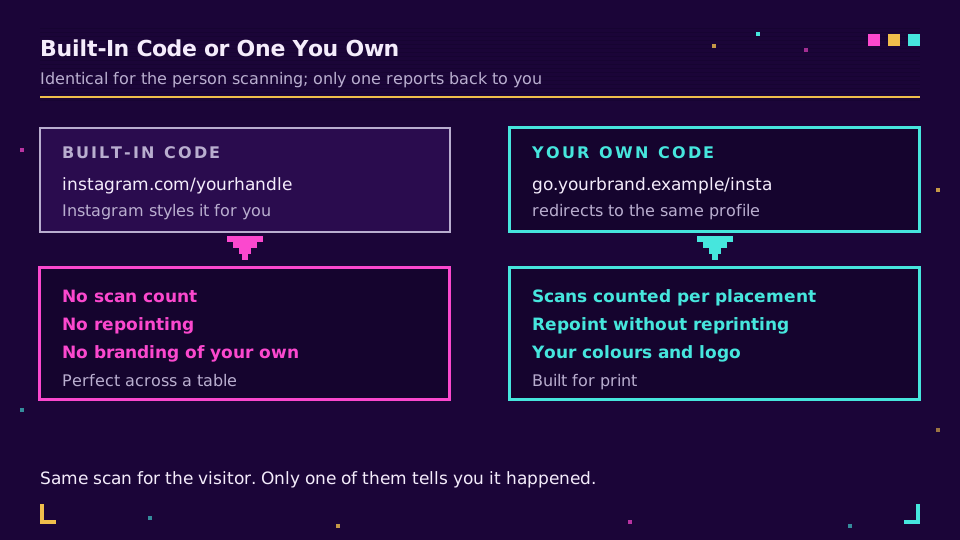
No scan count. The payload points straight at instagram.com, so there is no step you own between the camera and the profile. Instagram's own insights will show you profile visits, but they will not separate the poster from the story link from the business card. If you print codes in three places, you cannot tell which one worked.
No repointing. The code is bound to your profile. When the campaign it advertises ends, the code still says "go follow us" rather than "here is the thing you saw on the poster."
No branding beyond Instagram's styles. You get their gradients, emoji and selfie frames. You do not get your own colours, your logo in the middle, or a shape that matches the rest of the print. Branded QR code design covers what is possible when you control the generator, including how much of the pattern a logo can safely cover.
The Version You Own
One indirection fixes all three. Create a short link on your own domain that redirects to your Instagram profile, then generate the QR from that link:
go.yourbrand.example/insta -> https://www.instagram.com/yourhandle
The scan is now a request you can see. You get a scan count per code, so three placements can have three links and you learn which one earned the follows. You can repoint the link when the campaign changes, without touching anything already printed. And the code is yours to brand, at whatever size and in whatever colours the layout needs.
There is an SEO-adjacent bonus too: a link on your own domain is a link nobody blocks by reputation, which matters more on print than people expect - a generic shortener domain shared with strangers inherits their behaviour, and are URL shorteners safe covers how those reputations get made. Set up a branded domain and generate the codes from it and both problems go away at once.
Where to Put It
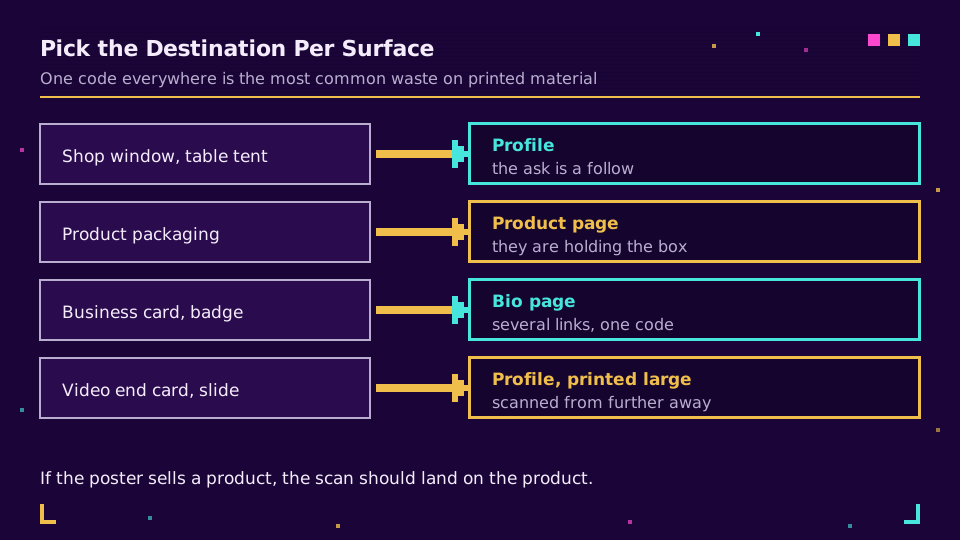
Placement decides the payload, so pick the destination per surface rather than printing one code everywhere:
- Shop window or table tent. Profile is usually right - the ask is a follow, and people scanning are already local.
- Product packaging. Point at a page, not a profile. Somebody holding the box wants care instructions, a refill, or a registration form.
- Business card or conference badge. Profile, or a bio page if you want the code to serve several links at once. Bio pages for creators covers what belongs above the fold.
- Video end card or slide deck. Profile, printed large. Screens are scanned from further away than paper, so size for the distance in how big should a QR code be.
The mistake worth avoiding is the two-tap trap: a code that lands on your profile when the thing you are advertising is three taps deeper. If the poster sells a product, the scan should land on the product.
Test It Like a Stranger
Four checks, and the first two catch nearly everything:
- Scan with the stock camera on a phone that is not logged into your account. Your own phone opens things it recognises; a stranger's does not.
- Scan the printed proof, not the screen. Ink, paper finish and shop lighting are all harsher than a monitor.
- Confirm where you land, and count the taps to the action you actually want.
- If you made your own code, click the short link once and check the scan appears in your analytics, so you know the number you will be reading later is real.
The one that surprised me the first time was gloss. A code that scanned perfectly off matte proof stock became marginal on the varnished final print under a shop's spotlights, and nothing about the file had changed. Scan the real thing, in the real place.
Read the Cornerstone Series
This post sits in the tutorials cluster. For the whole printed workflow, a QR code campaign from scratch covers planning through measurement, and add a link to your Instagram bio covers the other half of Instagram traffic.
Related on the Blog
Frequently asked questions
How do I get a QR code for my Instagram profile?
Open your profile in the app, open the menu, and pick the QR code option. Instagram generates it for you from your username and lets you restyle the background with a colour, an emoji or a selfie. Save or share it from the same screen. The exact menu wording moves around between app versions, so hunt for QR rather than for a specific label.
What does an Instagram QR code actually contain?
Your profile URL, instagram.com followed by your username. That is why any phone camera can read it and why it works when it is printed on something. It carries no tracking of its own, so nothing about the scan is reported back to you.
Is the Instagram QR code the same as a Nametag?
No. Nametags were the older feature and could only be read from inside the Instagram camera, which made them useless on print. Instagram replaced them with a standard QR code in 2020, and the current code is an ordinary QR that any scanner reads. Guides that still tell you to open Nametag are out of date.
Can I track scans of an Instagram QR code?
Not the built-in one. It points straight at instagram.com, so there is no step you own where a scan could be counted. To get the number, make your own QR from a short link on your domain that redirects to your profile, and read the clicks on the link.
Can I change where an Instagram QR code points?
Only if you made it yourself from a link you control. The built-in code is tied to your username, so it follows a username change but can never point anywhere else. A QR encoding your own short link can be repointed at a campaign page, a new profile, or anything else without reprinting.
Should the code point at my profile or my link in bio?
Point at whichever one leads to the action you want. A profile scan is right when you want a follow; a scan that lands directly on a product, booking form or bio page is right when you want a purchase or a signup. Printing a code that needs two more taps to reach the thing you are selling is the most common waste here.
Try Elido
Paste a URL, get a working short link
No signup. Link lives for 30 days. Sign up to keep it forever.
Free, no signup required · 2 per day