A phone-number QR code does not contain a URL. It contains the text tel:+14155552671, and the scanner recognises the tel: prefix and hands it to the dialer with the number already filled in. It never places the call by itself, on any phone I have tested.
The same trick covers two neighbours: SMSTO: opens a text message, mailto: opens an email. Three schemes, three payload formats, and one shared catch that the generator sites tend to skip - a code built this way encodes an action rather than a web request, so it can never be edited or counted. This post has the exact payloads, what each one does on a real phone, and when to use a link instead. For the wider print workflow, a QR code campaign from scratch covers planning through measurement.
The Three Payloads, Written Out
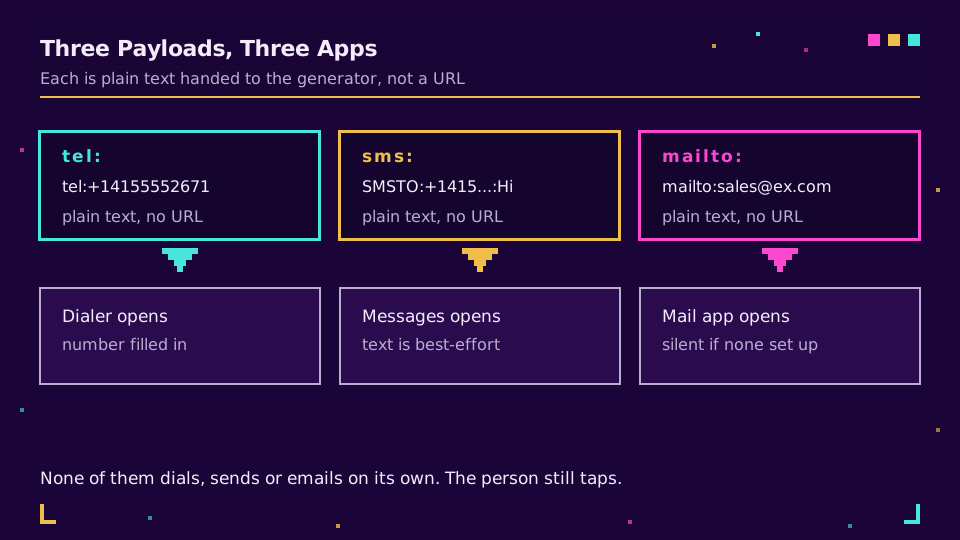
Each of these is plain text handed to any generator that accepts free text. There is no URL involved.
tel:+14155552671
SMSTO:+14155552671:Hi Acme, I saw the flyer
mailto:[email protected]?subject=Quote%20request&body=Hi%20team
The tel: scheme comes from RFC 3966, which is explicit that a telephone URI should carry a global number - the + and the country code - rather than a local one. The sms: scheme is RFC 5724; SMSTO: is not from that RFC at all but from the older QR conventions, and it remains the form with the widest scanner support, which is why generators still emit it. Email is RFC 6068, where subject and body are ordinary query parameters.
That last detail is where most hand-built payloads break. The subject and body have to be URL-encoded, so a space is %20 and an ampersand inside your message is %26. Leave a raw & in the body and everything after it is read as another parameter, so half your message disappears. URL encoding explained has the full character list if you are writing these by hand.
What Actually Happens When Someone Scans
Worth knowing before you print, because the behaviour is less automatic than the marketing copy on generator sites suggests.
A tel: scan opens the dialer with the number visible and one tap left to make. Nothing dials on its own, which is a deliberate protection rather than a bug, and it means "scan to call" is really "scan to have the number typed for you."
An SMSTO: scan opens the messaging app with the recipient set and, usually, the message in the draft box. The message is the part that varies: some phones and some third-party messaging apps drop the prefilled text and keep only the number. Design for that. If the text is load-bearing - a keyword you need for routing, say - print it beside the code as well.
A mailto: scan opens whatever the person has configured as their mail app. On a phone with no mail account set up, the scan appears to do nothing at all, which is worth remembering for a consumer audience.
| Payload | What opens | Prefilled | Main gotcha |
|---|---|---|---|
tel:+1... | Dialer | Number | Never auto-dials; needs the country code |
SMSTO:+1...:text | Messaging app | Number, usually the text | Prefilled text is not guaranteed |
sms:+1...?body=text | Messaging app | Number, sometimes the text | Standard but less widely supported than SMSTO |
mailto:a@b?subject= | Default mail app | Address, subject, body | Silent no-op if no mail app is configured |
Write the Number in E.164 or It Breaks Abroad
+14155552671, not 0415 555 2671, and not (415) 555-2671. The international format is standardised as E.164 by the ITU: a leading +, the country code, then the national number with no spaces, dashes or brackets.
A national-format number resolves correctly for a scanner in that country and fails for everyone else, which is the reason a printed call-me code often works perfectly for the team that proofed it and for nobody at the trade fair. Punctuation is the other half: some dialers strip spaces and dashes, others treat them as digits to be dialled, and a bracket has been known to end the parse early.
Put your campaign links and codes on your own domain and you get the same generator plus the analytics these direct payloads cannot give you.
The Catch: These Codes Cannot Be Changed or Counted
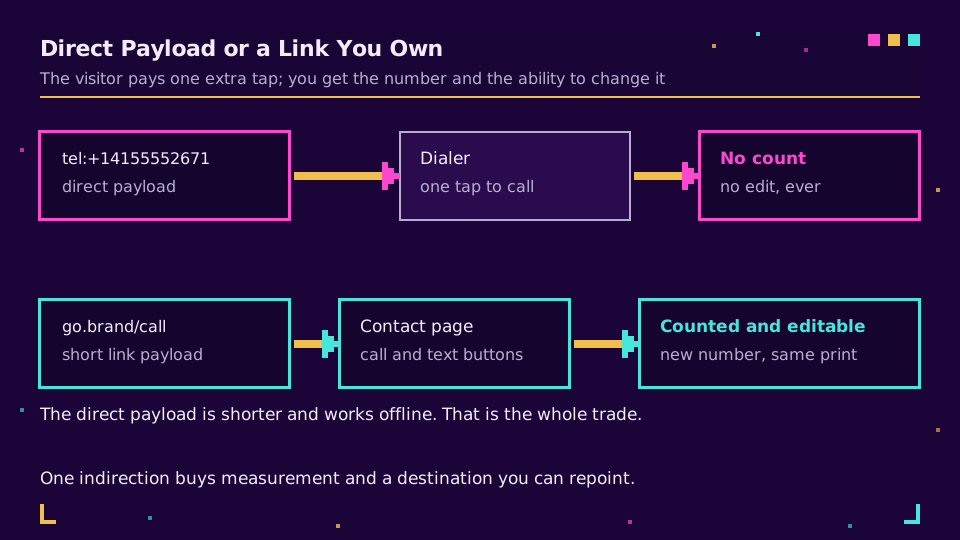
Both limits come from the same fact. A tel:, SMSTO: or mailto: payload is an instruction to the phone, not a request to a server. Nothing on the internet is contacted, so there is nothing to count and nothing to repoint.
That means two things for anything printed. The number is permanent for the life of the artifact: a new office line, a moved sales team, or a switch of messaging provider makes the code wrong and reprinting is the only fix. And you will never know whether the code worked, because a scan that opens a dialer leaves no trace anywhere you can see. Dynamic versus static QR codes covers that distinction in general, and do QR codes expire covers what else can quietly stop working after a print run.
The alternative is one indirection. Encode a short link to a small page that carries a call button, a message button and an email button, all built from the same schemes. Now the scan is a web request: it is counted, the destination is editable when the number changes, and the page can hold opening hours or a form for people who scan at 2am. The cost is one extra tap for the visitor.
When a Direct Scheme Is Still Right
Two cases, and they are real:
- A number that will not change and does not need measuring. A lift-repair sticker, an internal helpdesk line, a plaque beside a machine. The direct payload is shorter, which means a smaller code, and it works with no service behind it forever.
- Somewhere with no reliable connectivity. A
tel:scan works in a basement car park; a short link does not resolve without a network.
Outside those, the indirection earns its extra tap. How to track QR code scans covers what you get back once the scan becomes a request.
Test Before You Print
Four checks, and the second is the one people skip:
- Scan with the stock camera app on both an iPhone and an Android phone. Third-party scanner apps are more forgiving than the built-in ones, so a code that only works in a scanner app is a code that will fail in the wild.
- Scan with a phone from another country, or at least one with a different region set. This is what catches a missing country code.
- Check the prefilled message survived, and decide what happens if it did not.
- Print a proof at final size and scan it in bad light at the distance a real person will stand. How big should a QR code be has the distance rules.
The one I have been caught by is the mail app. A mailto: code proofed on a work phone with Outlook configured looks perfect, and does nothing at all on a consumer handset that has never had an email account added. If email is the primary call to action, put a link next to it.
Read the Cornerstone Series
This post sits in the tutorials cluster. For the whole build, a QR code campaign from scratch goes from planning to measurement, and how to create a QR code covers the static-versus-dynamic decision.
Related on the Blog
Frequently asked questions
How do I make a QR code for a phone number?
Encode the text tel:+14155552671 rather than a URL. Any generator that accepts free text can do it. When somebody scans it, their phone opens the dialer with the number already filled in and waits for them to press call - it never dials on its own, on either iOS or Android.
What is the payload for an SMS QR code?
SMSTO:+14155552671:Your message here is the form with the widest scanner support, and sms:+14155552671?body=Your%20message is the standard from RFC 5724. Support for the prefilled message is the part that varies between phones and messaging apps, so treat the text as a nice-to-have and the number as the thing that must work.
How do I create an email QR code with a subject line?
Encode mailto:[email protected]?subject=Quote%20request&body=Hi%20team. The subject and body are query parameters defined by RFC 6068, and both values have to be URL-encoded, which is why a space appears as %20. The scan opens the person's default mail app with the fields filled in.
Does a phone number QR code need the country code?
Yes, and with a leading plus. Write it in E.164 form, so +14155552671 and not 0415 555 2671 or (415) 555-2671. A national-format number works only for a scanner in that country and fails silently for everybody else, which is the most common reason a printed call-me code works for the team that tested it and nobody else.
Can I track how many people scanned a phone or email QR code?
Not with a direct tel:, SMSTO: or mailto: payload. Those encode an action rather than a web request, so nothing reaches a server that could count it. If you need the number, encode a short link to a small page carrying the call and message buttons instead, and read the clicks there.
What happens if the phone number changes after printing?
A direct tel: code becomes wrong permanently, because the number is baked into the pattern. Reprint or repoint - and repointing only exists if the code encodes a link you control rather than the number itself. On anything with a lifespan longer than the campaign, encode a link.
Try Elido
Paste a URL, get a working short link
No signup. Link lives for 30 days. Sign up to keep it forever.
Free, no signup required · 2 per day