Google Forms doesn't generate QR codes. You make one by copying the form's share link and encoding that URL in a QR generator, which takes about a minute. The detail that decides whether the printed code survives the next edit is which URL you encode: the form link directly, or a short link that points at the form.
That choice can't be undone with a marker pen. A QR code is a fixed pattern of modules, so the URL inside it is permanent the moment it goes to print, and pointing the code at your own short link is the only way to keep the destination editable and the scans countable. This guide covers the exact steps, the pre-filled trick that tells you which poster a response came from, and how to read scans against responses. If QR codes in general are new to you, how to create a QR code is the primer; this is the Forms-specific version.
What the QR Code Actually Encodes
A QR code for a Google Form carries a URL and nothing else. The phone camera reads the text, sees it's a link, and opens it. There is no Forms integration involved, which is why every Google Forms QR code generator works the same way underneath, and why the URL you paste in is the entire decision.
Forms hands you two candidate addresses. The long one ends in /viewform and comes from the Send dialog; the short forms.gle one is Google's own shortened version of it, documented in the Forms help for publishing and sharing a form. Both open the same form, both work fine in a QR code, and neither can be repointed or measured. Google's short link is a convenience, not a link you control.
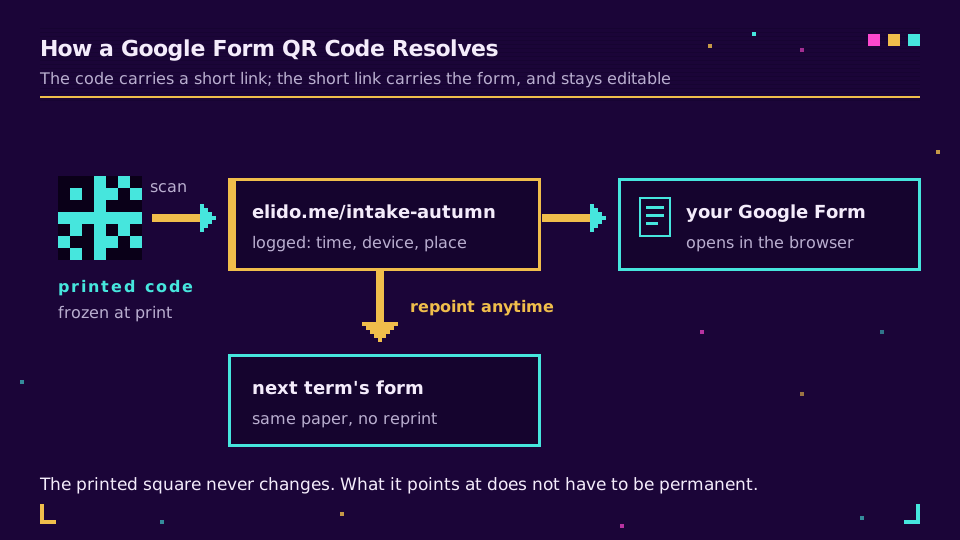
The third option is your own short link, and it changes the properties of the printed code rather than the form. The scan hits a redirect you own, which logs it, and then forwards to the form. Repoint that redirect later and every printed copy follows, which is exactly the dynamic versus static QR code split applied to a survey.
How to Create the QR Code Step by Step
The mechanics are short. Build the form first, because a form still in draft can hand you a link that changes when you publish it.
- Open the form, click Send, then the link icon, and copy the share URL. Leave "Shorten URL" unchecked if you plan to route through your own domain.
- Paste that URL into a link shortener and give the slug a name you'd recognise on a printed sheet six months later, like
/intake-autumn. - Drop the short link into a QR generator and download the result. Use SVG or PDF for anything printed and PNG only for screens.
- Scan the finished artwork with a real phone, on the paper it will actually live on, before the print run.
That last step catches more problems than it deserves to. A code that scans perfectly on your monitor can fail on a matte laminated card in a badly lit room, and you'd rather find that out before three hundred copies.
choosing between the forms.gle link and your own short link
If the code lives on a screen, in a Slack message, or in an email that you can edit tomorrow, the forms.gle link is fine. Nothing is printed, so nothing is stuck.
The moment the code goes on paper, an acrylic stand, a badge, or a wall, the calculation flips. A printed code built on a form link is frozen: close that form, replace it next term, or rename the survey, and the code is dead paper. Built on a short link, the same artwork can be repointed at a new form, a thank-you page, or next year's version, and the scans keep being counted. Short links with QR codes built in exist mostly for this reason, and you can generate one from any URL with the free QR generator.
Track Scans and Responses Separately
Forms tells you how many people submitted. It cannot tell you how many people scanned, because a Google Form QR code hands the phone to a browser before the form ever loads, and that gap is the most useful number in the whole exercise.
A dynamic QR code built on a short link logs each scan with a timestamp, device type, and rough location, which you read in QR scan analytics. Set that against the response count in Forms and you get a completion rate for the paper. Two hundred scans and thirty responses on a conference table card is not a QR problem; it's a form that asks too much of someone standing up holding a coffee. Twelve scans and eleven responses means the form is fine and nobody saw the card.
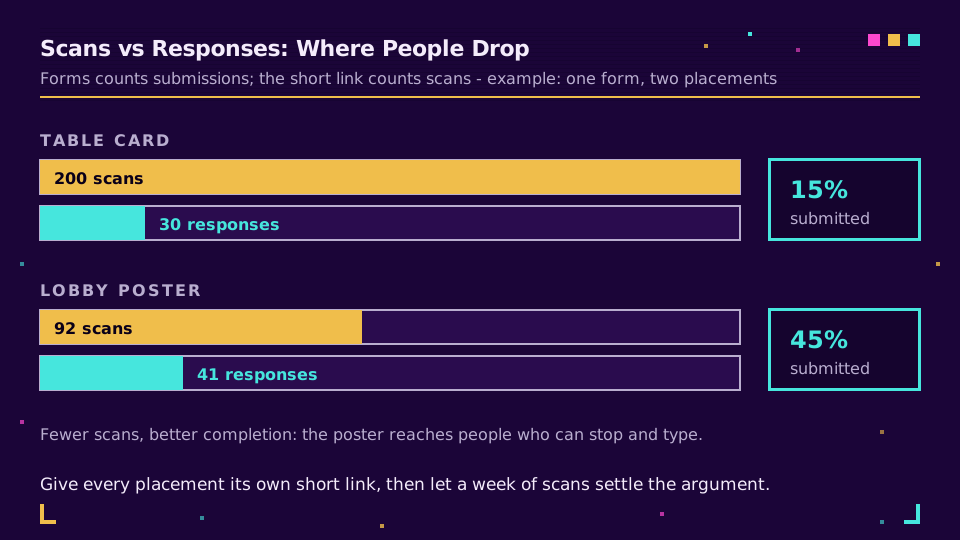
The comparison also settles placement arguments without a meeting. Give each location its own short link and its own code, print them, and let a week of scan data decide which spot earns the poster. Start a workspace and generate the codes if you want that split without hand-building UTM spreadsheets, and read the numbers in link analytics alongside every other campaign.
Tell Which Poster a Response Came From
Most QR guides stop before this part, and it is the one that quietly ruins a campaign report. Google Forms does not record UTM parameters in responses. You can append ?utm_source=lobby to a form URL, and Forms will happily open, and that value appears nowhere in your spreadsheet. Marketers discover this at exactly the wrong moment, usually while trying to attribute a hundred submissions after an event.
The workaround Google gives you is a pre-filled link, and it takes two minutes:
- Add a short-answer question to the form, called Source or Location, and put it last.
- Open the three-dot menu, choose Get pre-filled link, type the placement name into that question, then submit to generate the URL.
You get a link containing an entry.<id>=lobby parameter. Build one per placement, shorten each, and generate a code from each short link. Now every response carries its own origin in a real column you can pivot, and the scan counts on the short links tell you what happened before the form even loaded. Respondents can edit that field, so treat it as attribution rather than evidence, and keep the wording neutral enough that it doesn't look like surveillance to whoever is filling it in.
The same pattern is how the rest of your campaign links work, and if the form is one step inside a bigger funnel, tracking UTMs end to end covers the half that Forms can't see.
Print It So It Actually Scans
A form QR code fails in the physical world for the same reasons every other code does, and all of them are avoidable. Size it to the reading distance: the rough rule is a tenth of that distance, so a table card read at arm's length can be small while a code on a wall across a room needs to be much bigger. How big should a QR code be has the measurements.
Leave the quiet zone, the clear margin of roughly four modules on every side, because scanners need it to lock on. Keep the contrast strong and dark-on-light, since inverted codes fail on a surprising number of camera apps. Shorter URLs also help: fewer characters means fewer modules and a chunkier symbol, which is a quiet second argument for routing through a short link rather than encoding a long /viewform address with a pre-filled parameter hanging off it. If you want the code to carry brand colour or a logo, branded QR code design covers how far you can push it before scan rates drop.
Before You Send It to a Class or a Crowd
Two settings decide whether a scan lands on your form or on an error, and both live in Forms rather than in the code. Response limits and the close date turn a working QR into a dead end the moment they trigger, and restricting the form to your organisation means anyone scanning from a personal phone hits a sign-in wall instead of question one. Neither of those is a QR fault, but both look like one to whoever is holding the phone.
The privacy side matters more than it used to, especially in the EU. A form that collects names, emails, or student details is processing personal data, and the notice obligations under Article 13 of the GDPR don't relax because the entry point was a printed square. Say who's collecting, what for, and how long you keep it, in the form description where a phone can actually read it. QR codes and GDPR covers what the scan itself records, and URL shorteners for EdTech covers the school-specific version, which has stricter rules about minors.
I still print a test copy and leave it on a desk overnight before any real run. It's not superstition: seeing the card in ordinary room light, at the angle someone will actually hold it, catches the too-small code and the glare from a laminate pouch every single time.
Read the Cornerstone Series
This post sits in the tutorials cluster. For the full campaign version, a QR code campaign from scratch covers planning, placement, and measurement end to end, and what is a QR code covers how the scan works underneath.
Related on the Blog
- How to create a QR code: static, dynamic, trackable
- Dynamic vs static QR codes: what actually changes
- How to track QR code scans: the analytics that matter
- QR code not scanning? The fixes that actually work
- QR code for a PDF: link any document in minutes
- URL shorteners for events: links, badges, follow-up
Frequently asked questions
How do I make a QR code for a Google Form?
Publish the form, copy its share link, and encode that link as a QR code. Google Forms has no QR generator built in, so the link is the whole payload: whatever URL you paste into the generator is what a phone opens on scan. Paste the form link into a QR generator, download the code as SVG or PDF for print, and test it on a real phone before you print a batch.
Does Google Forms have a built-in QR code generator?
No. Forms gives you a share link and a shortened forms.gle address, but no QR code, so you generate the code with a separate tool. That's actually the useful part, because the tool you pick decides whether the printed code is editable and measurable later. A code built on the raw form link is neither.
Can I edit a Google Form QR code after printing it?
Only if you encoded a short link rather than the form link itself. A QR code is a printed pattern: the URL inside it can never change once it is on paper. Point the code at a short link and the destination behind it stays editable, so next term's form replaces this term's without a reprint.
How do I track how many people scanned my Google Form QR code?
Google Forms counts responses, not scans, so the scan count has to come from the link the code points at. A dynamic QR built on a short link logs every scan with its time, rough location, and device, and comparing that number against the response count in Forms gives you the drop-off between people who scanned and people who submitted.
Can I tell which poster a Google Form response came from?
Yes, with a pre-filled link and one extra question. Add a short-answer question such as Source, use the Get pre-filled link option to build a URL that fills it in, and give each placement its own version of that link and its own QR code. UTM parameters won't help here, because Forms doesn't record them in responses.
Do Google Form QR codes expire?
The code doesn't expire, but the form behind it can stop accepting responses, which looks identical to a broken code. Closing the form, hitting a response limit, or restricting it to an organisation all turn a working scan into an error page. Keep the form open, or repoint the short link at a follow-up page once the campaign is over.
Try Elido
Paste a URL, get a working short link
No signup. Link lives for 30 days. Sign up to keep it forever.
Free, no signup required · 2 per day