A QR code for data collection is a printed shortcut to a form, a survey, or a record. It stores a URL and nothing else, so the data you collect lives in whatever the URL opens. The useful decisions are upstream of the code: which type to print, how to tell your placements apart, and how little to ask for once the page loads.
One link per placement is the habit that pays off. Put every printed code behind its own short link and you get a scan count per poster, card, or badge, plus the freedom to repoint the destination without a reprint. This guide covers the main use cases, the dynamic versus static call, form and landing page rules, the GDPR basics, and an honest list of what scan analytics can't tell you. If QR codes are new to you, what is a QR code explains the mechanics first.
Where Teams Use QR Codes to Collect Data
Most uses fall into six patterns. The square is always the same. The page behind it, and how long the code must live, is what changes.
- Surveys and feedback. A card on a restaurant table or a sign at a clinic desk opens a short questionnaire. Short is the rule, because the person is standing up.
- Forms and sign-ups. Intake forms, waitlists, newsletter sign-ups, and registrations. A QR code for a Google Form is the common starting point.
- Event check-in and registration. A code on a badge or a door opens a check-in page. Pair it with short links for events so each entrance is a separate source.
- Lead capture. A booth banner or a leaflet opens a two-field form. Fewer fields beat a thorough one at a trade show.
- Inventory and asset tagging. A sticker on a machine or a crate opens its record or a log form. This is the one case where static can be the right call.
- Field reports. Technicians scan a code on site to open a pre-identified inspection form, so nobody types an asset ID by hand.
Marketing and operations use the same technique with different lifespans. A booth banner lives three days. An asset sticker might live ten years.
Dynamic or Static: Choose by Lifespan
A static QR code encodes the destination URL directly in the pattern. A dynamic one encodes a short link that redirects to the destination, so the destination is editable and every scan passes through a point where it can be counted. The dynamic versus static QR code post has the full comparison; for data collection the rule of thumb is short.
Use dynamic when the code is printed, the form might change, or you want to know how often it was scanned. That covers nearly every survey and lead capture setup. Forms get replaced, closed, and renamed. A frozen code on a laminated card is dead paper by then.
Static is defensible for an asset tag. It points at a stable URL you control, and nothing else sits in the path. If you go static, own the domain in the URL, since you can never change it afterwards.
One Short Link per Placement
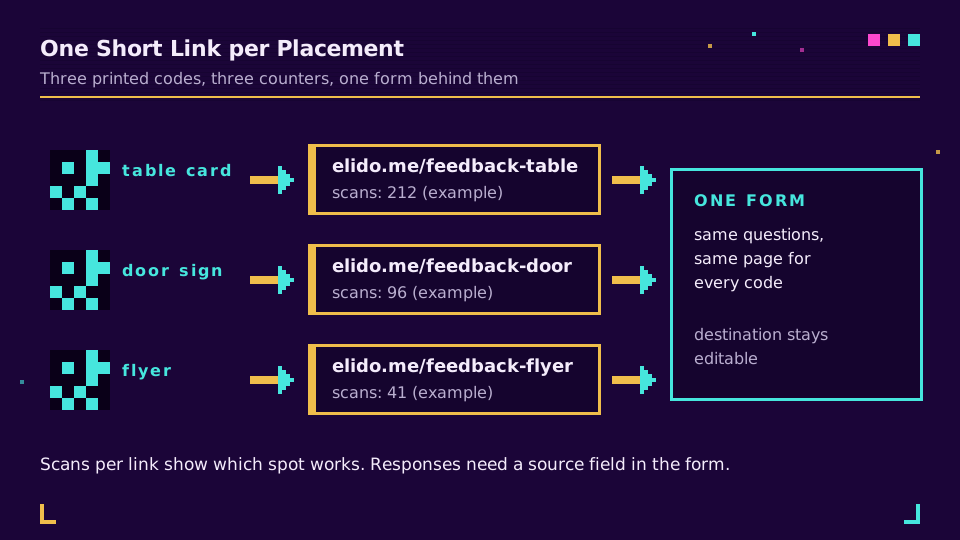
Print one code and paste it everywhere and you get a single total. 300 scans, no idea where from. Printing a separate code per placement, each on its own short link, turns that total into a comparison. The table card and the door sign each get a slug you'd recognise six months later, like /feedback-door or /checkin-hall-a.
That is the whole mechanism of QR code scan tracking, and it works the same for a form as for a menu. Tag the links by campaign so you can filter a whole event at once, and use the UTM builder when the destination page also feeds an analytics tool. Short links with QR codes built in are exactly this setup, and QR code campaign from scratch walks through planning it end to end.
One caveat I learned the slow way: the short link tells you which code was scanned, not which responses came from it. To tie submissions to a placement, the form itself needs a hidden or pre-filled source field, or a source parameter its platform stores. Check before printing.
Form and Landing Page Rules for Phones
The scan is the easy half. Whoever scans is holding a phone, usually standing, sometimes in poor light. The page has a few seconds.
- Open straight onto the first question. No homepage detour, no login wall. If the form is restricted to an organisation, personal phones will hit a sign-in screen instead of question one.
- Ask for as few fields as the goal needs. A lead form with name and email converts differently from one with eleven fields. Every extra field is also extra data you must justify and protect.
- Use phone-friendly inputs. Dropdowns, taps, and ratings over free text; the right keyboard type for email and phone fields.
- Say why, up front. One sentence on who is collecting and what for, above the first field.
- Test on the real card. A code that scans on your monitor can fail on matte laminate in dim light. How big should a QR code be has the size-to-distance rule, and QR code not scanning covers the usual failures.
Be specific on the print. A bare square gets ignored; "Scan to rate your visit, 30 seconds" tells people what they get and what it costs them.
What You Owe People: GDPR Basics
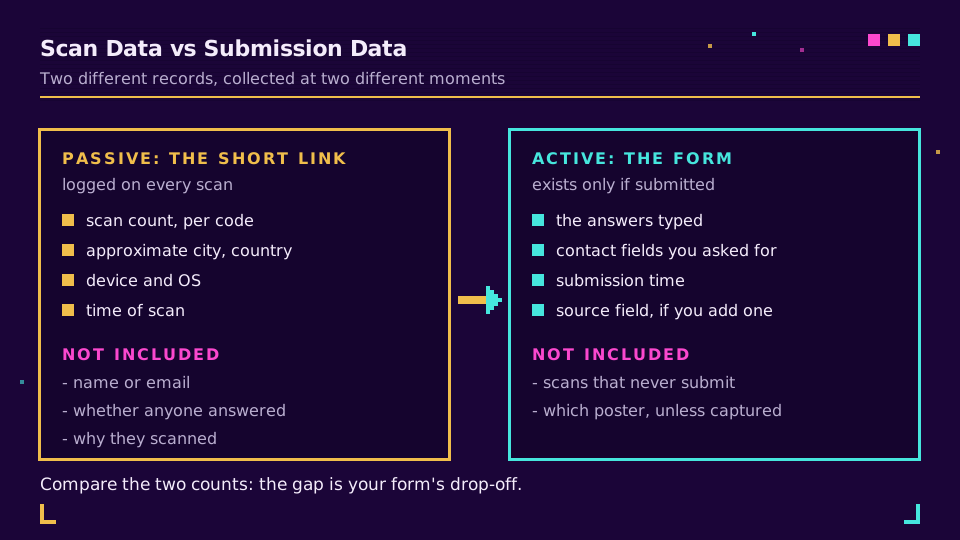
Two separate things are collected, and both fall under GDPR if the people are in the EU. The scan creates passive data on the redirect: timestamp, device, and an IP address from which a rough location is derived. The form creates active data: whatever the person types. QR codes and GDPR breaks down the scan side in detail.
The practical checklist is short:
- Lawful basis. For a feedback form or a newsletter sign-up this is usually consent, and consent has to be freely given and demonstrable. Pre-ticked boxes don't count, ever. For an event check-in you may rely on a different basis, but decide which before you collect.
- Data minimisation. Collect only what you need for the stated purpose, which is one of the core principles in Article 5. If you never use the phone number, don't ask for it.
- Notice. Article 13 requires you to say who you are and what you do with the data at the time of collection. Put it where a phone can display it, in the form description, not on a poster in tiny print.
- Retention. Pick a deletion date before the campaign starts and write it in the notice. Old check-in lists are the thing that tends to survive for years.
This is a starting point, not legal advice. Health data, children, or large-scale tracking? Talk to your data protection officer first.
What Scan Analytics Do and Don't Tell You
Scan analytics answer where and when. They are poor at who and why, and silent on what happened after the page opened.
What a short link gives you: scan counts per code, rough city and country, device type, and a timestamp curve. That is enough to compare placements or spot the hour a queue forms. It will also show you that the poster outside the building loses to the one at the desk.
What it doesn't give you:
- Responses. A scan is a page open, not a submission. The gap between scans and responses is the completion rate of your form, and it only exists if you read both numbers.
- Identity. Scans carry no name or email, by design. Don't promise a client that you can see who scanned.
- Precision. Location comes from the network and can be off by a city or more, and repeat scans from one person inflate the totals.
- Intent. Someone may scan out of curiosity and never plan to answer. A high scan count with few responses is often a form problem, not a poster problem.
Scans are not conversions, and treating them as such is the most common reporting mistake. Read scans for reach and placement, responses for outcome, and keep the two columns separate.
Start With One Placement
If you want the per-placement split without building it by hand, create a workspace and generate your first codes. Make one link per placement, name the slugs, tag them. Print a test copy before the run. A week of scan data against a week of responses beats any best-practice list. Including this one.
Read the Cornerstone Series
This post sits in the industries cluster. For the compliance side of scanning, read QR codes and GDPR, and for the full campaign workflow see a QR code campaign from scratch.
Related on the Blog
Frequently asked questions
Can a QR code collect data?
Not by itself. A QR code only stores a destination, usually a URL, and the data lives on whatever form, survey, or app that URL opens. Scanning produces passive data on the redirect (time, device, rough location), while names, emails, and answers only exist if someone submits the form.
How do I create a QR code for a form or survey?
Build and publish the form, copy its share link, put that link behind a short link, and generate the QR code from the short link. Download it as SVG for print, then scan the finished artwork on a real phone before you print a batch.
Should I use a static or dynamic QR code for data collection?
Use dynamic for anything printed that you might change or want to measure. A static code freezes the form URL into the pattern, so you can't repoint it or count scans. Static is fine for a permanent asset tag that points at a stable record.
Is it safe to collect data with a QR code?
It is as safe as the form behind it, plus the usual physical risks. Serve the form over HTTPS, ask for the minimum, and check that nobody has stuck a different code over yours. The code itself holds no personal data, but the redirect and the form both process it.
Do QR codes for data collection comply with GDPR?
The code is neutral, the way you use it is what GDPR regulates. You need a lawful basis, a privacy notice a phone can display, only the fields you actually use, and a retention limit. The redirect also logs an IP address, which counts as personal data.
How do I know which QR code placement got the most responses?
Give every placement its own short link and QR code, then compare scans per link against responses per source. The scan counts come from the short links. The response side needs a source field or a source parameter your form actually records.
Try Elido
Paste a URL, get a working short link
No signup. Link lives for 30 days. Sign up to keep it forever.
Free, no signup required · 2 per day