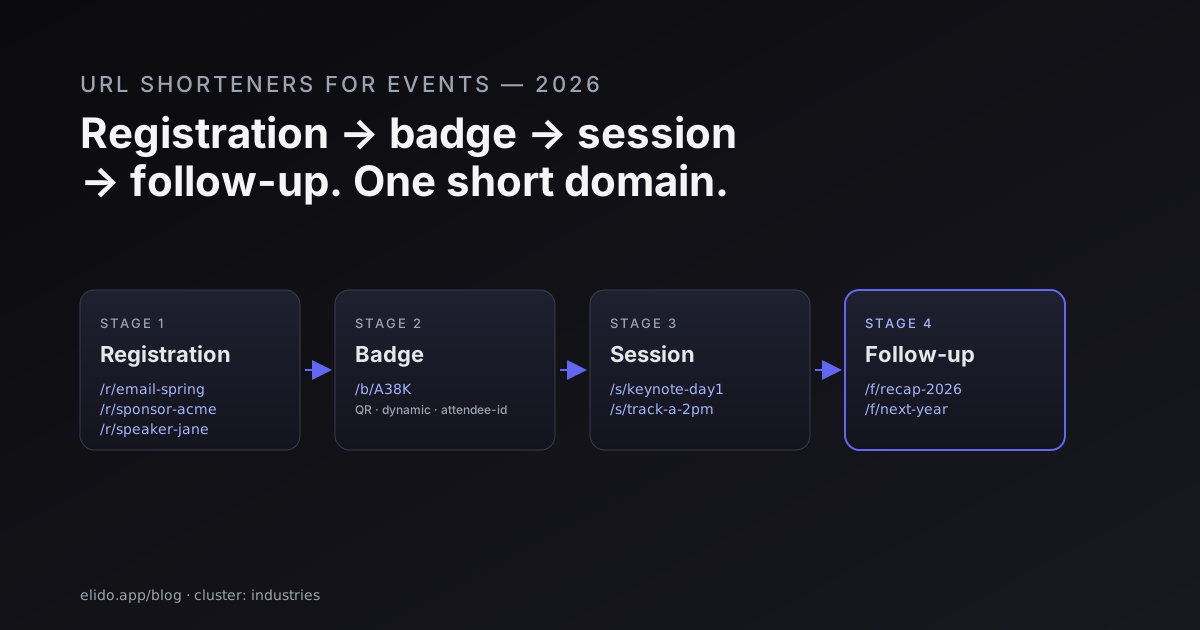
Events run on links. Registration links, speaker links, sponsor links, on-badge QR codes, follow-up sequences. When the link layer is messy - a Bitly account for the registration team, a Google form for sessions, a Sendinblue list for follow-up - the attribution is broken before the event opens. This post is the link architecture that actually works for a 200-person conference or a 2000-person trade show.
For the QR-specific deep dive, QR code campaign from scratch covers production-grade QR design and the static vs. dynamic decision. This post is the broader event-lifecycle picture.
The four stages of an event link
Every event has the same four stages. Each stage has different requirements for the underlying link.
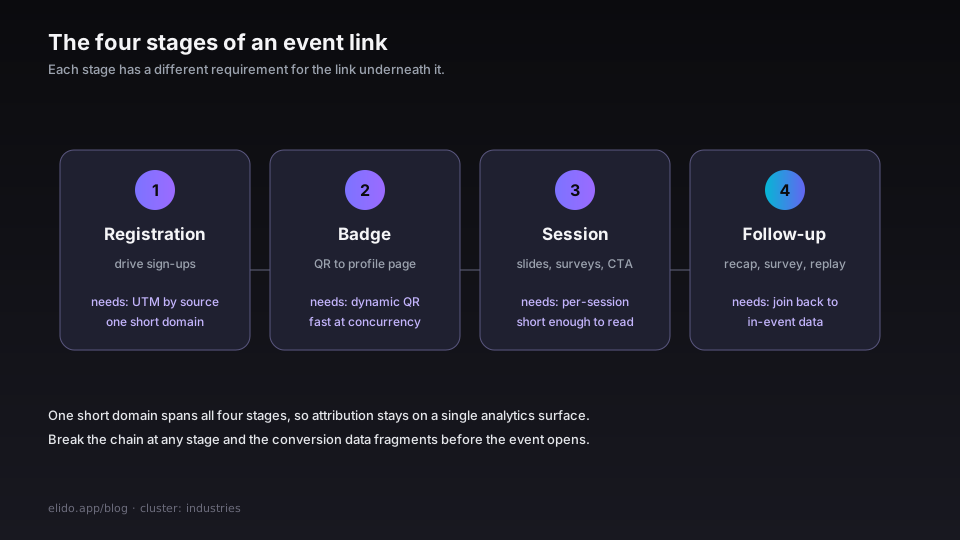
1. Registration
The links that drive sign-ups. These show up on:
- The event landing page CTA
- Email invites
- Partner promotions
- Speaker social posts ("come hear me talk about X")
- Sponsor placements
What matters: UTM attribution by source. The sponsor needs to know how many registrants came from their post; the speaker wants the same; the email team measures by send. One short domain (go.yourevent.com) for branding consistency. Each link tagged with source/medium/campaign UTMs.
Anti-pattern: raw vendor URLs (the registration form's native URL) shared everywhere. You get no attribution and no domain consistency. Worth shortening every registration URL even if you don't strictly need the short length.
2. The badge
Every attendee gets a badge. The badge has a QR code. The QR code resolves to a profile page.
What matters: the QR has to render reliably across phones (some can't read low-contrast codes, some struggle at >2m distance), and the destination has to load fast at high concurrency (the lobby on day-1 morning will hit your endpoint with 200 simultaneous scans).
Anti-pattern: baking the conference website URL into the badge as a plain QR. Now you can't change the destination after the badge prints. Static QR is permanent; dynamic QR (where the QR resolves through a short-link service) lets you change the destination after print - useful when day-2 needs the schedule to surface differently than day-1.
For the static-vs-dynamic decision in detail, the dynamic vs static QR codes post is the long read.
3. The session
Each session has a link. Slides, supplemental materials, a "join the speaker's mailing list" CTA, a "rate this session" form.
What matters: consistency across sessions, per-session attribution (which session drove the highest engagement?), and the link has to be short enough to spell out from the stage if the QR code-projection-screen play doesn't work (it never does).
Anti-pattern: every speaker brings their own short link from their own vendor account. Now you have 30 different short domains scrolling past the audience, half of them with a bit.ly you can't audit.
The clean play: pre-issue session links from your event short domain (go.yourevent.com/session-42). Hand the speaker a slug; they configure their destination URL. You retain the attribution.
4. Follow-up
Post-event sequences. The recap email. The "rate the event" survey. The "watch the recorded sessions" link. The "register for next year" CTA.
What matters: attribution back to which event drove the conversion. Did the recap email convert? Did the on-site QR poll drive newsletter sign-ups? Was the conversion ROI worth running on-site at all?
Anti-pattern: treating the follow-up as a separate marketing campaign with no link to the event session data. Now the next-year-registration conversion looks like it came from the email - but actually the user was a session attendee whose decision to come back was made on day-2 of the event itself.
Forward conversion events from the registration form back into your link analytics so that the follow-up attribution joins to the in-event data. Forwarding conversions to Meta CAPI covers the mechanics; the same forwarding pattern works for any downstream CRM or email system.
A reference architecture for a 1000-person event
This is the link architecture I recommend most often. It scales down to 100 people and up to 5000 with minor tweaks.
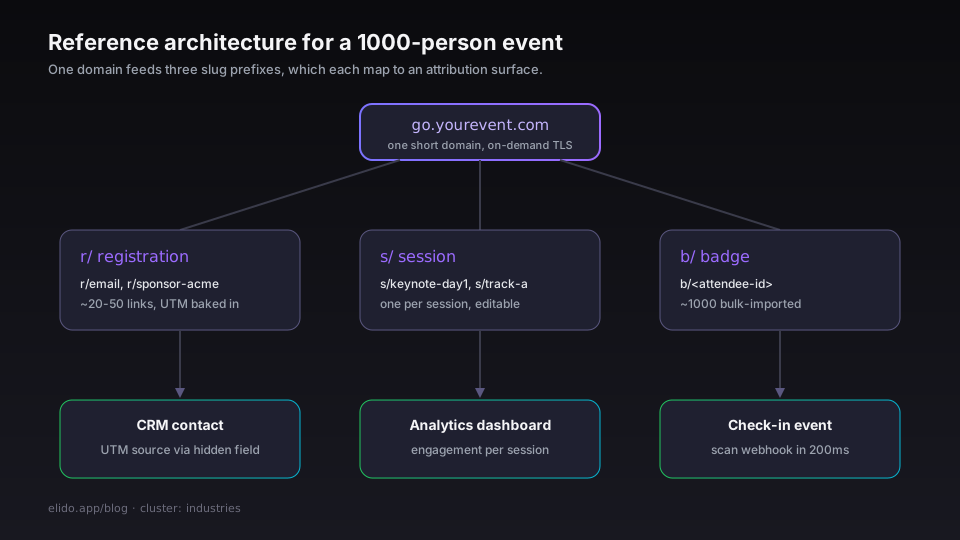
One short domain per event. go.yourevent.com. Issue via DNS + your URL shortener's custom-domain feature. automatic on-demand TLS or vendor-managed cert. The reason: branding consistency + one analytics surface to ask questions of.
Three slug prefixes:
r/- registration links.go.yourevent.com/r/email,r/sponsor-acme,r/speaker-jane. UTMs baked into the destination URL. Attribution surface for registration source.s/- session links.go.yourevent.com/s/keynote-day1,s/track-a-2pm. Per-session destination, sometimes the same for all sessions if the LMS auto-routes by user.b/- badge links.go.yourevent.com/b/<attendee-id>. Per-attendee. Resolves to a profile/agenda page. Optionally personalised for VIPs.
Three short-link "sets":
- The registration set is created at announcement time. Maybe 20-50 links. Each carries a UTM, each ships before the event.
- The session set is created when the agenda is finalised. One link per session. The destination URL points at the session detail page; the URL can be updated post-event to point at the recording.
- The badge set is created at registration close. One per attendee. Bulk-imported from the registration platform's export.
Three attribution surfaces:
- Registration tag → CRM contact via the registration form's hidden field. Capture the UTM
sourceandcampaignfrom the click; pass them to the form; the CRM sees which source drove the registration. - Session click → analytics dashboard scoped to the
s/prefix. The dashboard answers "which session had the most engagement?" - Badge scan → check-in event via webhook from the short link service to the on-site check-in system. The badge scan increments an attendance counter and (optionally) gates entry.
The architecture compiles to ~80 links + 1000 attendee badges for a 1000-person event. The setup work is ~3 hours if your registration platform exports a CSV.
The four anti-patterns that ruin event data
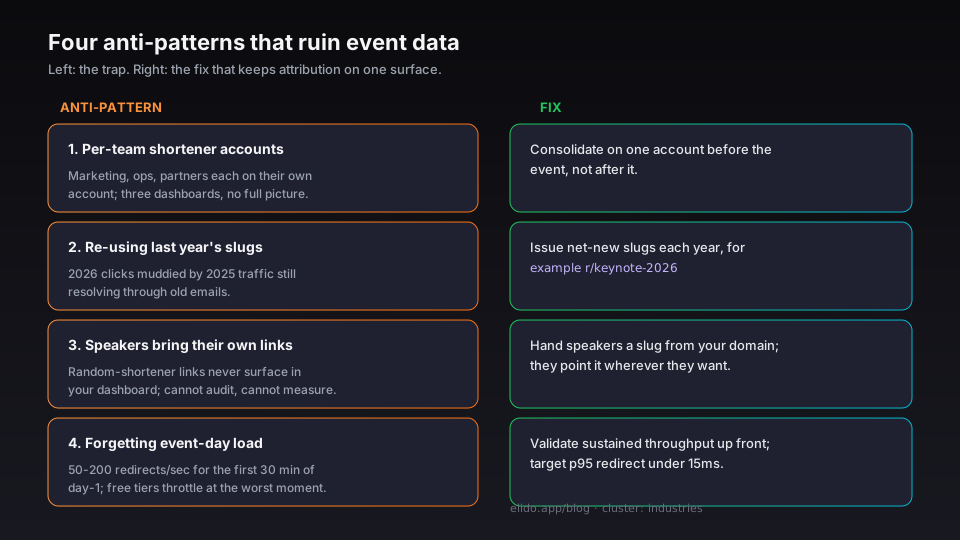
1. Per-team shortener accounts. Different teams (marketing, ops, partnerships) each have their own Bitly / Rebrandly account. Attribution is fragmented across three dashboards, none of them with a complete picture. Consolidate on one account before the event, not after.
2. Re-using last year's slugs. go.yourevent.com/r/keynote was the 2025 keynote. If you reuse it for 2026 without resetting analytics, the 2026 click data is muddied by 2025 traffic that's still resolving through old emails. Issue net-new slugs each year (use go.yourevent.com/r/keynote-2026).
3. Letting speakers bring their own. Every short link in the event is a data point. Speaker links from random shorteners don't surface in your dashboard. If you can't audit them, you can't measure them. Give the speakers slugs from your domain and let them point wherever they want.
4. Forgetting to handle event-day load. A typical event link load is 50-200 redirects per second for the first 30 minutes of day-1 (everyone scans their badge to find the venue map). Validate that your URL shortener can sustain that without sweating. Most can; a few free-tier vendors throttle at the worst moment. The redirect p95 < 15ms post covers what to look for in the redirect performance numbers.
On-site QR considerations
The QR code on the badge is the highest-stakes link in the event. Some practical notes:
Print at the right error-correction level. ECC-M (medium) is fine for most badges; ECC-H (high) is the play if you're laminating, embossing, or printing onto a textured material that may obscure modules. The trade-off is module density - ECC-H QR codes are more visually busy.
Test the contrast. Phone QR scanners need ~60% luminance contrast between modules and background. Print a sample at the chosen contrast and scan it from your own phone from 1m in three different lighting conditions before signing off on the print run. Black-on-white is the safe default; brand colours can fail the contrast test in low light.
Plan for the failure case. When the QR doesn't scan (it happens), what does the attendee do? On Elido badges, we recommend a short URL printed underneath the QR (go.yourevent.com/b/A38K) - 6-character slugs are typeable in 4 seconds, easier than the alternative of asking the attendee to find an info desk.
Don't put PII in the QR. The QR encodes a short link, not an email or attendee name. The lookup happens on the server side - the QR-scanning bystander on a crowded show floor doesn't get to read your attendees' addresses by pointing a camera at a stranger's badge.
One link type earns its own walkthrough, because attendees use it twice: the add to calendar link, in the confirmation and again in the reminder.
Post-event analysis
The data you should have within 48 hours of close:
- Total registrations by source (sponsor / partner / speaker / paid / organic)
- Per-session attendance + click-through (engagement proxy when on-floor counters aren't available)
- Top 10 sessions by attendee follow-on action (rated 5 stars, downloaded slides, signed up for the speaker's list)
- Day-1 vs day-2 vs day-3 attendance pattern
- Geo + UA breakdown of click traffic
- Forward attribution: who clicked what during the event and then converted into a next-year registration
If your URL shortener can answer all six of these out of the box, you spent the budget well. If you have to write SQL against your analytics warehouse to answer half of them, factor that into the next contract.
Where Elido sits
We didn't build Elido specifically for events - the architecture above works on any URL shortener that supports custom domains, dynamic QR, and webhooks. But events are a high-pressure validation of the platform's three core promises (latency, attribution, EU residency), so we've ended up with a few opinionated event capabilities:
- Bulk badge generation -
POST /v1/links/bulkaccepts a CSV of attendee IDs and returns a batch of dynamic-QR-ready short links in a single call. 2000 badges in 8 seconds. - On-demand TLS for
go.yourevent.com- point a CNAME at our edge, cert is issued in 30 seconds. The event team can stand up their event domain in the same morning they kick off promotion. - Webhook-on-scan - every badge scan can fire a webhook into your check-in system within 200ms. The dispatcher signs deliveries with HMAC-SHA256 so your check-in handler can verify origin without an auth header.
- EU data residency for click events - attendee scan data lives in our EU-region analytics store by default. GDPR coverage requires no per-event paperwork.
For a setup call before your next event, the events solution page has the relevant detail.
Related on the blog
- QR code campaign from scratch - the QR-specific deep dive
- Dynamic vs static QR codes - the durability/changeability trade-off
- Track UTM campaigns end-to-end without a CDP - the cornerstone for the tutorials cluster
- URL shorteners for ecommerce: the data plane behind the funnel - sibling industry post
- Hitting p95 < 15ms for redirects - the latency budget for event-day load
- Event ticket QR code fraud: how to prevent screenshots - the ticket-validation anti-fraud side
- Add to calendar link: build one that works everywhere
Try Elido
Paste a URL, get a working short link
No signup. Link lives for 30 days. Sign up to keep it forever.
Free, no signup required · 2 per day