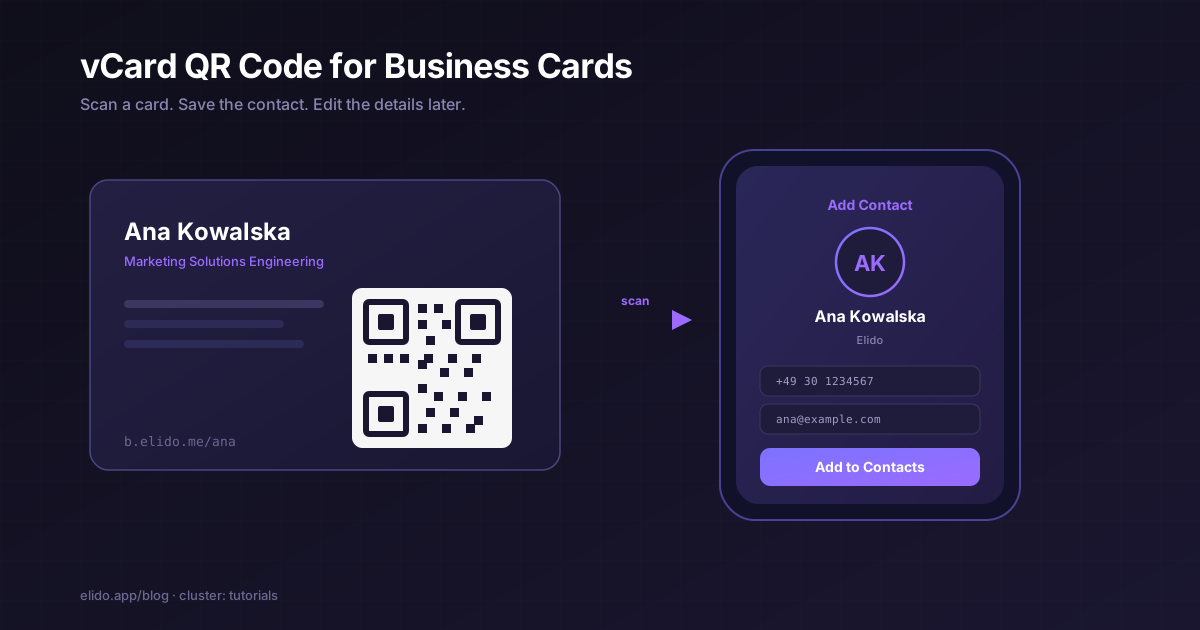
A vCard QR code is a QR that, when someone scans it with a phone camera, offers to save your contact details straight into their address book. No typing, no business-card pile on a desk, no "let me find your email later." Point, scan, tap Add Contact, done. There are two ways to build one, and picking the wrong one is the difference between a card you can fix and a card you have to reprint.
The first way encodes the contact data directly. Your name, title, phone, and email are written into the QR module pattern itself using the vCard format. The second way encodes a short link that resolves to a hosted contact or bio page. The phone fetches the page, and the page offers the save. The first is frozen at print time. The second is editable and trackable. This guide covers both, the vCard format underneath them, how to design the code so it actually scans off a small card, and a step-by-step you can follow today. Static is genuinely fine for some cases, and we will be specific about which.
What a vCard QR code encodes
The vCard format is a plain-text contact record, standardised as RFC 6350. It is the same .vcf structure Apple Contacts and Google Contacts import. A minimal one looks like this:
BEGIN:VCARD
VERSION:3.0
N:Kowalska;Ana;;;
FN:Ana Kowalska
TITLE:Marketing Solutions Engineering
ORG:Elido
TEL;TYPE=CELL:+49 30 1234567
EMAIL:ana@example.com
URL:https://elido.app
END:VCARD
A static vCard QR code writes that entire block into the module grid. The phone reads it, recognises the BEGIN:VCARD header, and offers to save the contact. Nothing on your side is contacted at scan time, which is the static version's headline trait and its main limitation at once.
That payload is not small. The block above is around 180 characters, and a real card with a second phone number, a postal address, and a company role climbs past 250. QR codes get denser as the data grows. Per ISO/IEC 18004, the standard that defines QR structure, every step up in capacity adds modules to the grid, and a denser grid is harder to scan off a small printed surface. We will come back to this in the design section, because it is the quiet reason most business-card QR codes scan badly.
The static vCard versus the dynamic-link approach
Here is the decision that shapes everything else.
A static vCard QR is self-contained. The contact data lives in the print. Scan it on a plane with no signal and it still works, because there is no server in the loop. The catch is that it is frozen. Change jobs, change your number, rebrand from a personal email to a company one, and every card in every wallet now points at the old you. You reprint, and you have no idea how many people ever scanned the old batch.
A dynamic contact QR encodes a short link, something like b.elido.me/ana, that resolves to a hosted contact or bio page. The page carries the save-to-contacts action. Because the printed code only holds the short link, the contact details behind it are editable after printing, and every scan is a redirect event you can count. This is the same indirection that separates dynamic and static QR codes in any context; we broke down the mechanics in dynamic vs static QR codes, and the contact use case inherits all of it.
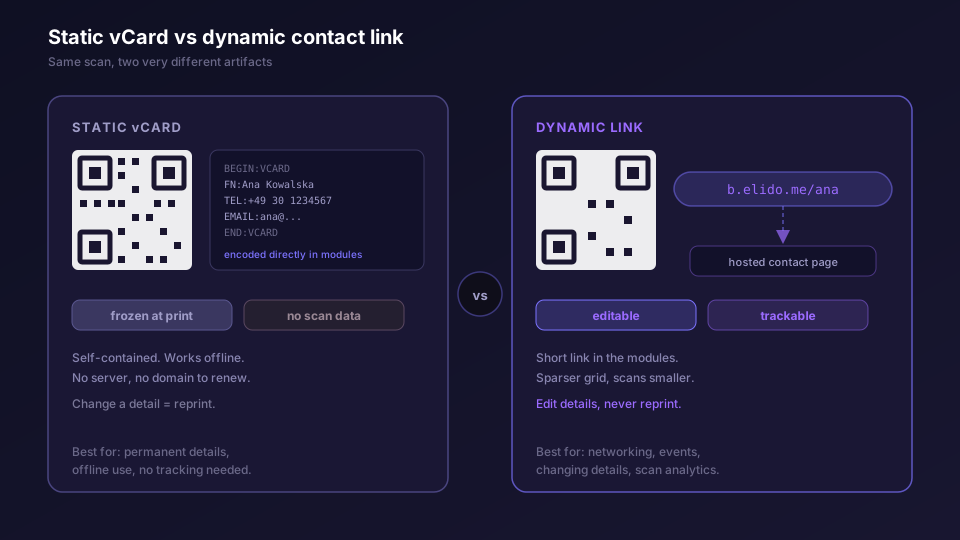
For most people whose details change, the dynamic link wins on two counts that matter for networking. You can fix a wrong number without a reprint, and you can see whether the conference badge you handed out 200 times actually got scanned. The honest exception is below.
When the static vCard is the right call
Static is not a worse choice. It is a different one, and for a narrow set of cases it is the better one.
Reach for a static vCard QR when the details are genuinely permanent and you do not care about scan counts. A direct phone line at an organisation that does not change numbers, a code etched into a metal name badge meant to outlast any service subscription, a contact code printed inside a book that ships worldwide and must work offline in ten years. In each of those, the absence of a server is a feature. There is no domain to renew, no link to keep alive, no analytics you were never going to read.
The trade is permanence for control. If you can answer "these details will not change and I do not need scan data" honestly, static is simpler and more durable. If you hesitate on either half, you want the dynamic link.
Why a dynamic link beats a frozen vCard for networking and events
Events are where the dynamic approach earns its keep, because networking details are the least stable thing about a person.
Think about a conference run. You print 300 cards in March for a May event. In April your team moves to a new email domain. With a static vCard, those 300 cards are now wrong and there is no fix short of reprinting before the event. With a dynamic contact QR, you edit the destination once and all 300 cards point at the corrected details the moment someone scans on the show floor.
Then there is the part static can never do: knowing what happened. A dynamic contact QR turns every scan into a logged event. You can see that the Tuesday afternoon session drove most of your scans, that the badge worked better than the printed handout, that a chunk of scans came from a city you did not expect. A hosted contact page can also do more than a frozen .vcf ever could. It can sit alongside your other links as a full bio or link-in-bio page, with the save-contact button as one tile among your portfolio, booking link, and socials. We laid out how to structure that page in bio pages for creators, and the same four-zone layout works for a networking contact page.
A static vCard answers one question: who are you. A dynamic contact page answers that and then keeps the conversation going, because you control where it points after the handshake.
If your short link lives on your own domain rather than a shared subdomain, the code also survives a vendor change, since the redirect resolves at a domain you own. That is the same reasoning behind pairing URL shorteners with QR codes generally: the short link is the stable layer, and everything else can move behind it.
Designing the code for a business card
If the card should lead to a LinkedIn profile rather than a contact file, the trade-offs are the same; the LinkedIn QR code guide covers the in-app code and a short-link version.
A business card is the hardest QR surface there is, because the real estate is tiny and the data wants to be large. Three constraints decide whether it scans.
Size first. A card is read at roughly 25 to 30 cm, arm's length with the phone tilted down. The rule of thumb that holds up in the field is that a QR's minimum printed size is about one-tenth of the scanning distance, which puts your floor near 2.5 cm by 2.5 cm. Below 2 cm you are gambling on the reader's camera. This is the single strongest argument for the dynamic-link approach on a card: a short link like b.elido.me/ana is roughly 15 characters, which produces a far smaller, sparser grid than a 250-character vCard block. Smaller data, lower module density, more reliable scan at 2.5 cm.
Contrast second. Dark modules on a light background is the standard for a reason. Native camera apps read it most reliably. Inverted or low-contrast colour pairings (a dark blue code on a dark grey card) look elegant and fail under bad lighting. If the card stock is glossy, a matte lamination pass over the code area prevents glare from washing out the modules under venue lighting.
Quiet zone third, and most often skipped. The QR spec requires a clear margin of at least four modules on all four sides. Design tools routinely crop it when they drop a code into a tight card layout. Check that the code is not butted up against your logo or the card edge. Without the quiet zone, scanners struggle to find the code at all.
One more habit worth keeping: print the human-readable short URL in small text under the code. If the scan fails in a dim room, the person can type six characters instead of giving up. We go deeper on visual treatment, logo overlay, and error-correction headroom in branded QR code design.
Tracking scans, and what you actually learn
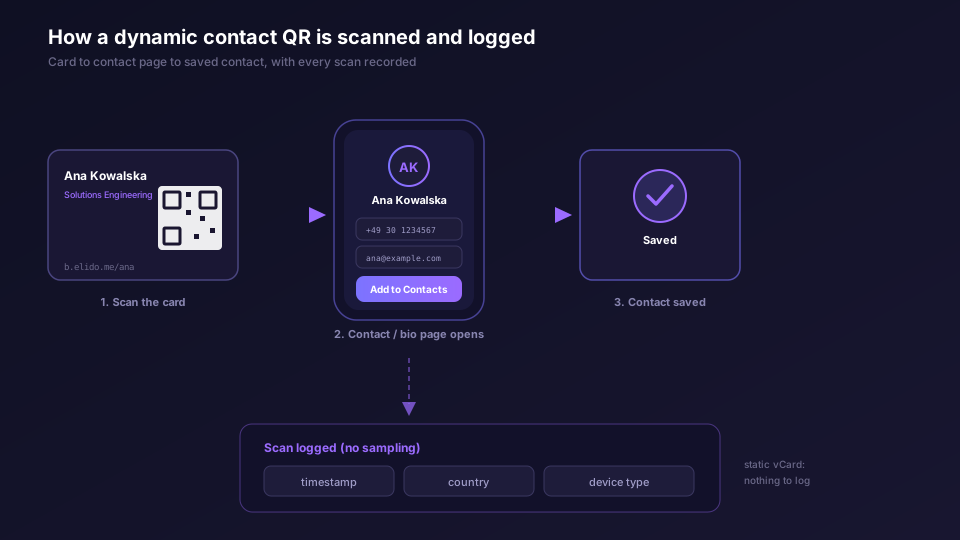
This section only applies to the dynamic approach, because a static vCard contacts no server and therefore counts nothing.
With a dynamic contact QR, every scan is a redirect through your short link, and Elido logs it to our analytics store without sampling: timestamp, resolved country, device type. For a business card or an event badge that gives you a few concrete things. You learn the raw scan count, which is the closest thing to a "how many people followed up" number that offline networking has ever offered. You learn rough geography, useful for confirming a regional event reached its market. You learn the time pattern, which on a multi-day conference tells you which sessions drove contact saves.
The numbers are most useful comparatively. Tag the links per batch or per event so you can tell the badge from the printed card from the email signature, the same per-placement discipline we walk through in the QR campaign build. The full breakdown of what the dashboard surfaces lives on the analytics feature page. The point of contact-QR tracking is modest and real: it converts a stack of handed-out cards from a black hole into a measured channel.
Step by step: build your vCard QR code
Here is the dynamic path end to end, since it covers the harder case. The static path is the same minus the link and the tracking.
Start by writing your contact details once, cleanly. Full name, the role you want to show, one phone number, one email, one URL. Resist adding a second phone and a postal address unless you truly need them; every field you add grows the payload and, for a static code, the grid.
Create the short link. In Elido, the mobile app's Create tab and the web QR Studio both produce a short link plus its QR in one flow. Point the link at your hosted contact or bio page, give it a readable slug like /ana, and if your plan includes custom domains, use your own so the code survives a vendor change.
Set the contact page behind it. A bio or contact page with a prominent save-to-contacts action is the destination. This is where the dynamic version pulls ahead, because you can edit name, number, or email here anytime and every printed card follows. The QR codes feature page and the bio pages feature cover the page builder.
Export the code as SVG, never a low-resolution PNG. Vector scales to any print size without blurring, which matters at 2.5 cm where every module edge counts. Set error correction to a higher level if you plan a logo overlay.
Hand it to your card designer with the quiet zone intact, dark-on-light, sized at 2.5 cm or more. Print a test card and scan it with both an iPhone and an Android phone before the full run.
Tag the link and, after the event, read the scans. That last step is the whole reason you went dynamic. For the deeper how-to with screenshots, the QR codes guide in the docs is the reference, and marketers running this at team scale will find the workflow on the solutions for marketers page.
Both approaches are valid. Static gives you a permanent, offline, server-free contact card. Dynamic gives you an editable, trackable one that doubles as a real contact page. For a freelancer at a conference or a sales team handing out 500 cards a quarter, the editable-and-trackable version is almost always the one worth building. Plan availability for custom domains and analytics tiers is on the pricing page, and if you are still mapping the basics, what a URL shortener is covers the layer underneath all of this. You can browse ready-made styles in the QR gallery.
Related on the blog
Frequently asked questions
What is a vCard QR code?
It is a QR code that, when scanned by a phone camera, offers to save your contact details. There are two ways to build one. A static vCard QR encodes the contact data directly inside the module pattern using the vCard format. A dynamic one encodes a short link that resolves to a hosted contact or bio page, so the details stay editable and every scan is logged.
What is the difference between a static and a dynamic vCard QR code?
A static vCard freezes your name, phone, and email into the printed grid. To change a detail you reprint. A dynamic contact QR encodes a short link instead, so you update the destination in the dashboard and every card already printed follows. The dynamic version also records scans; the static one cannot, because nothing on your side is ever contacted.
Do vCard QR codes expire?
A static vCard QR never expires on its own, because it carries the data itself with no server involved. A dynamic contact QR depends on the short link staying live, which means keeping the domain and the link active. Archive the link instead of deleting it and the code keeps working for years.
Will a vCard QR code work on both iPhone and Android?
Yes. Both read the vCard format natively through the camera app and offer to add the contact. The vCard spec (RFC 6350) is the same format Apple Contacts and Google Contacts import, so a correctly built code prompts the save dialog on either platform without an app.
What size should a QR code be on a business card?
Aim for at least 2 cm by 2 cm, and ideally 2.5 cm, with a clear quiet-zone margin around it. A business card is scanned at roughly 25 to 30 cm, so the 1/10 rule puts the floor near 2.5 to 3 cm. Keep the encoded data short to hold the module density low at that size.
Can I track how many people scan my business card QR code?
Only if it is a dynamic QR pointing at a short link. Each scan is a redirect event Elido logs with timestamp, country, and device type. A static vCard QR carries the data directly and contacts no server, so there is nothing to count.
Try Elido
Paste a URL, get a working short link
No signup. Link lives for 30 days. Sign up to keep it forever.
Free, no signup required · 2 per day