Most URL shorteners ship a QR code generator. It is a free, low-effort feature to bolt on: encode the short URL into a 2D matrix, render an SVG, hand it to the user. Where the differences emerge is what happens after that initial encode - whether the QR can be updated without reprinting, whether the export is high-quality enough for print production, whether the logo embedding survives error correction, and whether the scan analytics are usable.
This post compares the QR feature surface across six URL shortener products. The bitly alternatives cornerstone covers the broader competitive picture; this is the QR-specific comparison.
Why QR feature parity matters
A QR code is permanent in a way a URL is not. Once printed on a coffee cup or stencilled on a wall, the encoded data cannot be edited. The destination behind it can be - if the QR encodes a short URL, the short URL's destination can be repointed without changing the printed pattern.
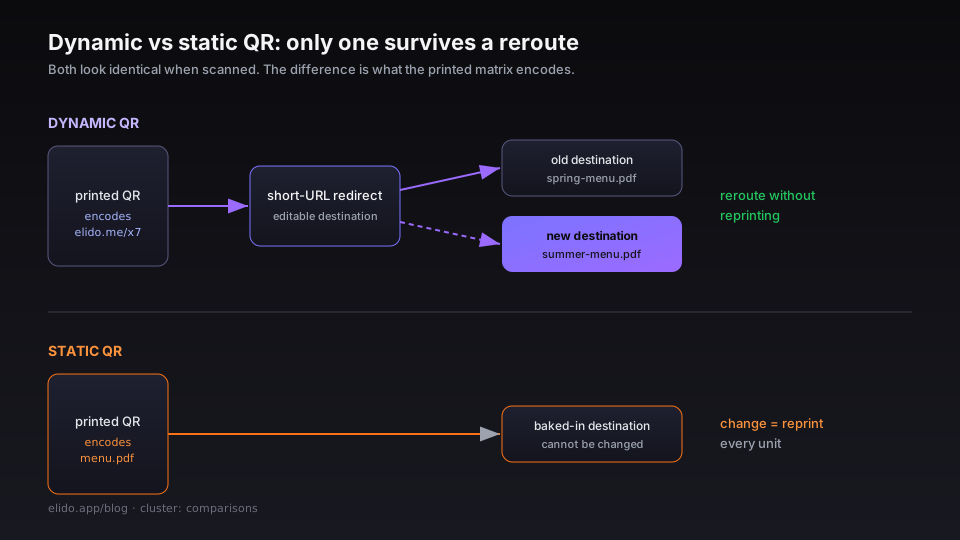
That dynamic-vs-static distinction is the largest single capability gap between QR products. A static QR encodes the destination directly; a dynamic QR encodes a short URL that redirects to the destination. The two look identical when scanned, but one survives a campaign reroute and the other does not. The dynamic vs static QR codes post covers the mechanics in detail.
Beyond that, the dimensions that matter for production use:
- Vector export quality - print needs SVG or PDF at minimum; many tools only export raster PNGs.
- Logo embedding - does the centre logo survive error correction at high redundancy levels?
- Branded QR styling - colour, rounded corners, custom finder patterns. Less critical than function but a real differentiator.
- Scan analytics - every scan logged, broken down by country, device, time-of-day.
- Bulk generation - generating 500 QR codes for a print run via CSV upload or API.
- GS1 Digital Link - for retail/CPG use cases the QR must be GS1-compliant to scan at retail POS.
The comparison matrix
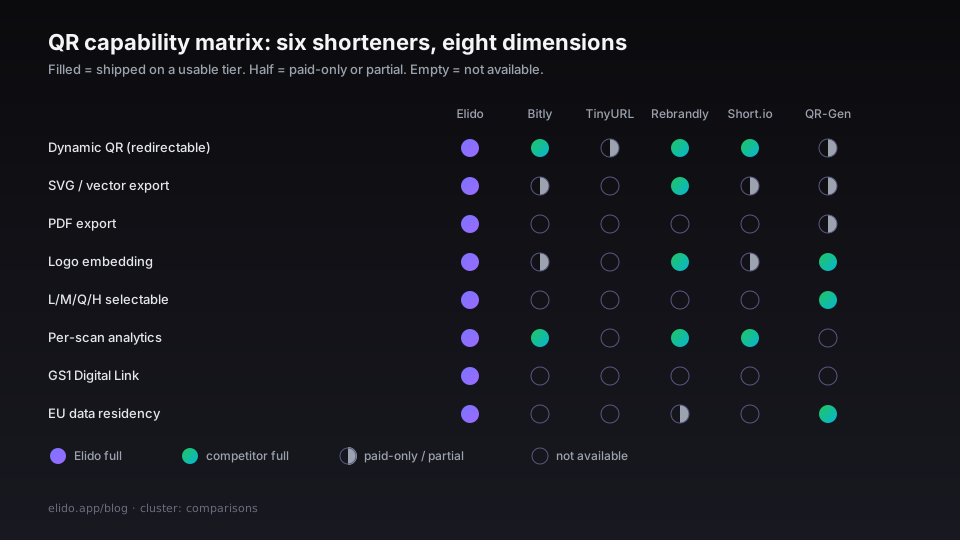
| Capability | Elido | Bitly | TinyURL | Rebrandly | Short.io | QR Code Generator (qr-code-generator.com) |
|---|---|---|---|---|---|---|
| Dynamic QR (redirectable) | yes | yes | yes (paid) | yes | yes | yes (paid) |
| Static QR export | yes | yes | yes | yes | yes | yes |
| SVG export | yes | yes (paid) | no | yes | yes (paid) | yes (paid) |
| PDF export | yes | no | no | no | no | yes (paid) |
| Logo embed | yes | yes (paid) | no | yes | yes (paid) | yes |
| Error correction L/M/Q/H selectable | yes (M/Q/H) | M only | L only | M only | M only | L/M/Q/H |
| Branded finder patterns | yes | no | no | no | no | yes (paid) |
| Per-scan analytics | yes | yes | scan count only | yes | yes | scan count only |
| Bulk generation via CSV | yes | yes (paid) | no | yes (paid) | no | yes (paid) |
| Bulk generation via API | yes | yes (paid) | no | yes (paid) | yes (paid) | no |
| GS1 Digital Link | yes | no | no | no | no | no |
| EU data residency | yes | no | no | partial | no | yes |
Most rows resolve on the same axis: free tier vs paid tier, with the paid tier paywalling the features that matter for production use. Bitly's free plan does not export SVG, which is a real friction for print teams; Rebrandly's free plan does not include bulk CSV generation. The two open-ended differentiators where Elido pulls ahead are GS1 Digital Link support and EU residency.
Dynamic vs static QR - what each tool actually ships
A static QR encodes the destination URL directly into the matrix. The data cannot be changed; only the visual encoding is on the QR. The advantage: no service dependency, no redirect overhead, scans work even if the QR product disappears.
A dynamic QR encodes a short URL that redirects to the destination. The advantage: the destination is editable. The disadvantage: the redirect adds a network hop, and the QR product must remain operational for the QR to keep working.
All six tools in the matrix ship dynamic QR. The free-tier behaviour differs:
- Elido: dynamic QR on all paid tiers; static QR generation available on the free tier as a manual export.
- Bitly: dynamic QR on Pro and above; the free tier generates short URLs but does not offer the QR designer.
- TinyURL: dynamic QR locked behind the Pro plan (accessed 2026-05-22); free tier provides static QR with TinyURL's destination.
- Rebrandly: dynamic QR on all tiers including free.
- Short.io: dynamic QR on Personal Plus and above (their
$5/motier as of 2026-05-22). - QR Code Generator (qr-code-generator.com): dynamic QR on paid tier only; free tier is static-only with their branded short URL.
For a coffee shop printing one QR on a menu, static works fine. For a campaign that might reroute, you need dynamic; the small monthly cost of a paid plan is dramatically less than reprinting laminated menu cards.
Error correction - the constraint that determines logo size
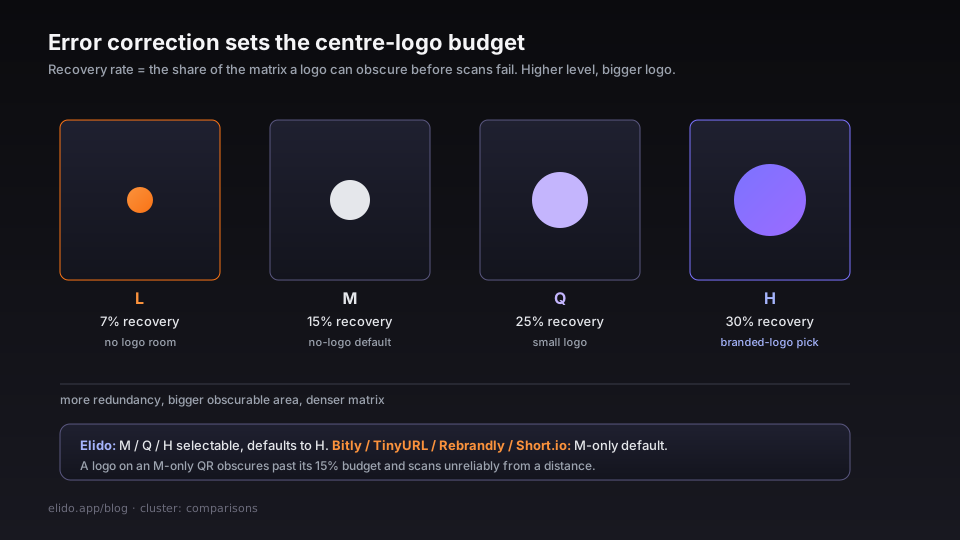
QR codes ship with four error-correction levels: L (7% recovery), M (15%), Q (25%), H (30%). The recovery rate is how much of the QR matrix can be obscured or damaged while the code still scans. Higher error correction means more redundancy bits, which means more modules in the matrix, which means a larger or denser QR for the same encoded data.
The reason error correction matters for branded QR: the centre logo obscures part of the matrix. With L error correction, even a small logo will break the scan. With H, you can obscure up to 30% of the matrix area before scans fail.
The dynamic vs static QR codes post covers the error-correction tradeoff in more depth. The short version: pick H for branded QR with a centre logo, M for QR without a logo, L only for QR that need to be as compact as possible (e.g. printed at 1cm × 1cm on packaging).
Elido lets you pick M, Q, or H. The default is H because most users embed a logo. Bitly, TinyURL, and Short.io are M-only on their default exports, which means embedding a logo on those QRs will produce codes that scan unreliably from a distance. Rebrandly is also M-only. QR Code Generator gives you the full L/M/Q/H choice.
Logo embedding - what survives the matrix
Embedding a logo is the most common branding step on a QR. The way it works: the QR is rendered, the centre N% of the matrix is masked out, and the logo image is overlaid. The error correction has to be high enough that the masked area is recoverable.
The four products that allow logo embedding (Elido, Bitly Pro, Rebrandly, QR Code Generator) take three different approaches:
- Elido: PNG, SVG, or vector logo upload. The renderer auto-detects logo size and warns if the obscured area exceeds the error-correction budget. Bulk-applied via the dashboard or API.
- Bitly Pro: PNG upload only. No SVG. The renderer enforces a fixed logo size relative to the QR.
- Rebrandly: PNG upload, SVG support on enterprise plans (accessed 2026-05-22).
- QR Code Generator: PNG and SVG upload, full control over size and position.
The detail that catches teams out: a small business with one QR on a menu will be fine on any of these. A retail brand stencilling QR codes on 50,000 packaging units cares about vector quality, error-correction headroom, and bulk-application from a single template. For that workload Elido's API-first approach matters more than the dashboard UX.
Per-scan analytics
Every dynamic QR scan is a redirect event. The interesting question is what each tool exposes.
- Elido: full scan-level analytics - timestamp, country, city, device type, OS, browser, referrer (where available from the platform), and the URL it resolved to. Available in the dashboard and via the analytics API. The short link analytics post covers which dimensions are worth tracking.
- Bitly Pro: similar surface - scans broken down by location and device, plus a time-of-day heatmap. The free tier shows total scans only.
- TinyURL: total scans only on the free tier; the Pro tier adds country and device.
- Rebrandly: country, device, browser, referrer. Solid surface but no time-of-day heatmap in the dashboard.
- Short.io: country, device, OS, browser, referrer. Comparable to Bitly Pro.
- QR Code Generator: scans by country and device on the paid tier; nothing on free.
For QR codes specifically, the time-of-day analytics tell you when people scan - which is often surprising. A restaurant QR menu sees peaks at 12:00 and 19:00 local; a conference badge QR sees a spike at the start of session breaks. That pattern is the actionable signal for campaign timing.
GS1 Digital Link - the retail case
GS1 Digital Link is a 2022 standard that lets a single QR encode both a consumer-facing URL and the product's GTIN (Global Trade Item Number), batch number, expiry date, and other supply-chain data. The same QR scans at consumer phones (resolving to a product page) and at retail POS (decoding to GS1 data).
For consumer-packaged goods, this is becoming the standard. EU's new Digital Product Passport regulation will likely make GS1 QR mandatory for many product categories by 2027.
Of the six tools in the matrix, only Elido supports GS1 Digital Link generation. The /docs/guides/qr-codes guide covers the GS1 syntax and the dashboard surface. For brands shipping product to EU retail, this is often the deciding factor - the rest of the matrix is feature parity, but GS1 compliance is the line that splits "consumer marketing QR" from "supply-chain QR".
The GS1 spec is published by GS1.org; the EU Digital Product Passport background lives at EUR-Lex 2022/0166.
Bulk generation
The bulk-generation workflow matters when you are printing hundreds or thousands of QR codes for an event, a packaging run, or a campaign mailing.
- Elido: CSV upload (column = destination URL, optional columns = logo, error correction, finder pattern style). Output is a ZIP of SVG and PNG files. Available on all paid tiers. Also exposed as a
POST /v1/qrs/bulkAPI endpoint that returns a job ID and renders asynchronously. - Bitly Pro+: CSV upload via the dashboard. Output is CSV with the generated short URLs and PNG download links.
- Rebrandly Premium+: CSV upload, output is CSV plus PNGs.
- Short.io: API-only bulk on the Personal Plus plan. No CSV import in the dashboard.
- TinyURL, QR Code Generator: no bulk generation in the free tier; the paid tiers offer it.
The CSV-upload-with-logo flow is the one that lets a marketing ops person generate 500 branded QRs for a print run in 10 minutes. Without it, the workflow is either manual one-at-a-time (untenable above 20 codes) or developer-mediated via the API (slower to ship). The bulk import from Google Sheets post covers the import side for short links; the QR variant works similarly.
EU data residency
For EU-resident brands, retail manufacturers under DPP, or any team where the DPO has to sign off on each vendor, EU data residency is the single most decisive line item. The QR scan data is personal data under GDPR (it includes IP address, which is identifying); a US-resident product processes it under the Schrems II constraints.
- Elido: EU-only. Our database and analytics store run in the EU region with click analytics replicated across the EU. The GDPR for URL shorteners cornerstone covers the full posture.
- Bitly: US-resident. Their DPA includes Standard Contractual Clauses for EU customers.
- TinyURL: US-resident.
- Rebrandly: partial - EU customers can request EU storage but the default is US.
- Short.io: US-resident.
- QR Code Generator: based in Switzerland; data plane is EU-adjacent (Frankfurt) for paid tier.
The EU data residency for marketing post covers the procurement-side answer for why this matters and how to position it to a DPO.
What to pick
Three rough decision trees:
Small business, single QR or a handful, hosted product: Bitly, TinyURL, or Rebrandly free tier. The QR is a check-box feature; you do not need vector export, GS1, or bulk generation. The one caveat: pick dynamic over static so you can reroute the destination later.
Marketing team, dozens to hundreds of QR codes, branded, with analytics: Elido or Bitly Pro. Bitly is the safe established choice; Elido is the EU-resident option with full L/M/Q/H control and a stronger API surface for bulk generation. The URL shorteners for marketers post covers the broader marketer-facing comparison.
Retail/CPG brand, thousands of QRs, GS1, EU residency required: Elido. None of the other tools ship GS1 Digital Link, and none ship EU-resident data planes by default.
The /features/qr-codes page has Elido's QR surface; the /solutions/marketers page covers the broader campaign workflow.
External references
- GS1 Digital Link standard - the GS1 spec for product QRs.
- QR Code specification (ISO/IEC 18004:2015) - the underlying QR encoding standard.
- Apple's Camera QR scanning documentation - what iOS does with QR codes natively.
Related reading
- Bitly alternatives - the actual feature gap - the comparisons cornerstone.
- Dynamic vs static QR codes - the mechanics post.
- URL shorteners for restaurants - the most common QR use case.
- Best EU URL shorteners - the EU residency comparison.
- QR code campaign from scratch - the practical end-to-end walkthrough.
- Short link vs QR code - when to tap a link and when to scan a code.
- Product surfaces:
/features/qr-codes,/solutions/marketers. - Operational guide:
/docs/guides/qr-codes.
Try Elido
Paste a URL, get a working short link
No signup. Link lives for 30 days. Sign up to keep it forever.
Free, no signup required · 2 per day