
Most agencies reach for a white-label URL shortener for the same surface reason: clients notice when your shortened links say bit.ly or s.elido.me. The deeper reasons are usually billing margin and audit defensibility. A client's IT team asking "where does click data go?" deserves a cleaner answer than "a US vendor I resell through."
This guide is written for directors of operations and agency principals who are evaluating white-label options - not for developers who want to build link infrastructure from scratch. The goal is to give you a framework for comparing what different platforms actually deliver at each branding layer, the real questions to ask vendors, and a concrete walkthrough of how reseller account setup works.
What "white-label" actually means, layer by layer
The term is used loosely. Vendors who offer custom branded domains call themselves white-label. So do vendors who let you put a logo on the dashboard. Those are not the same thing, and the difference matters to how you price and operate the service for clients.
There are six distinct layers. Not every platform implements all of them.
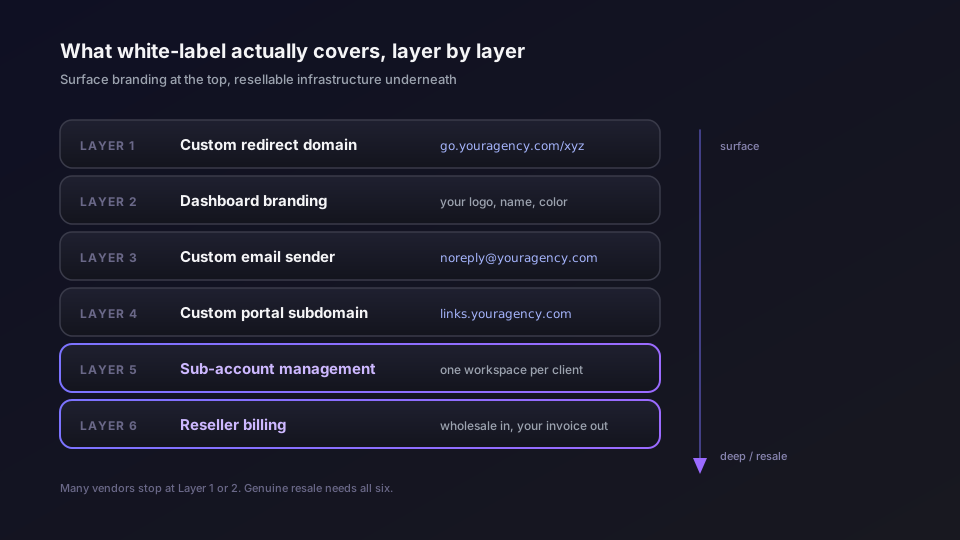
Layer 1: Custom redirect domain
The most common meaning. Instead of redirects going through the platform's domain (bit.ly/xyz), they go through a domain you control (go.youragency.com/xyz or go.clientbrand.com/xyz). This is the minimum viable white-label for most agency use cases - it removes the platform name from every link your clients share.
Implementation requires a DNS CNAME record from your subdomain to the platform's edge and an automatic TLS certificate for that hostname. All of the major shorteners handle this. The variable is at multi-tenant scale: when you manage twenty client domains instead of one, does the platform support wildcard CNAMEs (*.links.youragency.com), or do you add a DNS record per client?
Layer 2: Dashboard branding
The platform's admin interface carries your logo, brand name, and primary color instead of the platform's. Clients who log in to manage their links see your brand, not the platform's. Some platforms also let you replace the browser tab title and favicon.
This layer is what makes the service presentable when clients interact with it directly. Without it, a client who clicks "View dashboard" from your reports page lands on a Bitly or Rebrandly-branded page, and the arrangement becomes transparent.
Layer 3: Custom email sender
Password resets, click reports, link expiry alerts, and invitation emails go out from [email protected] instead of from the platform's domain. This is often overlooked until a client asks why they're getting email from a vendor they didn't agree to work with. A custom email sender also affects deliverability: domain reputation for transactional email tracks back to the sending domain.
Layer 4: Custom portal subdomain
The dashboard itself lives at a hostname you control - links.youragency.com - rather than app.someplatform.com. This requires the platform to route the links.youragency.com hostname to your workspace's tenant context, issue a TLS certificate for it, and scope user sessions accordingly. It's a meaningfully more complex implementation than a custom redirect domain, and fewer platforms ship it.
Layer 5: Sub-account management
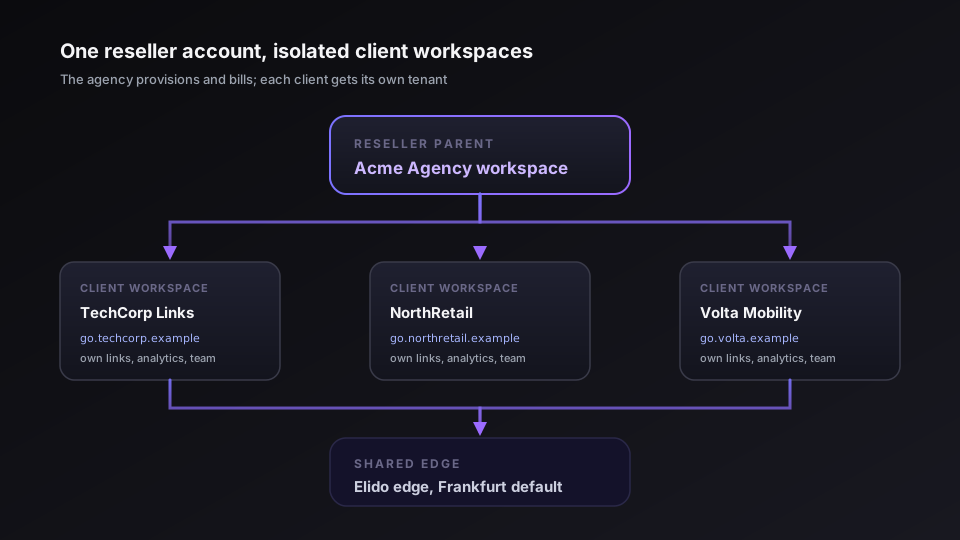
You can provision separate workspaces for each client, each with its own domain, link library, analytics, and team members - all managed from a single reseller parent account. This is the layer that separates resellable infrastructure from rebranded self-service access.
Without sub-account management, white-label breaks down operationally at scale. You either give all clients access to one shared workspace (which means they can see each other's links and data) or you maintain separate platform accounts per client (which means separate billing relationships and no consolidated view for your team).
Layer 6: Reseller billing and usage reporting
You pay the platform at a wholesale rate; you invoice clients at your own rate. The platform's billing surface is invisible to your clients. Usage reporting is scoped to each client workspace so you can justify invoices without exposing other clients' data.
This layer typically lives behind an enterprise sales conversation. Few platforms publish reseller pricing on their public pages.
The spectrum from Layer 1 to Layer 6 is what distinguishes a platform that supports branded links from one that's genuinely built for agency resale.
How the major vendors compare
Bitly Enterprise
Bitly supports custom domains on paid plans. Dashboard branding is not a published feature - Bitly's interface is Bitly-branded for all tiers. Custom email sending from your domain is not part of the standard product. Bitly's SSO integration lives behind the Premium tier ($199/month per the pricing page accessed 2026-05-11 - verify before quoting this to a client). There is no white-label entry in the feature matrix or the enterprise product sheet.
For most agencies evaluating a resale motion, Bitly is not a practical choice. The brand recognition of bit.ly in links is a known problem, not a solved one, even at Enterprise. Bitly is a strong choice for in-house marketing teams; it was not designed to disappear behind someone else's brand.
Rebrandly Pro / Business
Rebrandly has a white-label entry marked as limited in independent feature comparisons. The product has strong branded link UX and supports custom domains at every paid tier. The dashboard is Rebrandly-branded; per-workspace custom branding is not a publicly documented feature. Custom email sender is not documented on the public feature pages. Their pricing structure (Essentials $11 / Professional $32 / Growth $99 per the pricing page accessed 2026-05-11) does not include a reseller tier on the public page.
Rebrandly's strengths are its no-code automation integrations (Zapier, Make, Workato) and its polished single-domain setup flow. For an agency that wants to give clients a clean branded domain without a complex resale operation, Rebrandly works for Layer 1 and partially for Layer 2. For Layers 4–6, you would need to negotiate a custom enterprise arrangement.
Short.io
Short.io has explicit white-label support as a product feature. Their Business plan ($90/month per their pricing page accessed 2026-05-11) includes white-label settings. Custom domains are supported from the Personal plan up; the feature matrix shows white-label as available on Business tier.
Short.io's white-label appears to cover branded dashboard experience and custom domains. Five custom domains are available even on the free tier, which is unusually generous for Layers 1 setup. The platform is US-based; data residency for EU clients requires a Transfer Impact Assessment review.
Elido Business
Elido's white-label covers all six layers described above, and the implementation is documented in the codebase rather than as a marketing claim. The specific shipped features:
- Custom redirect domain with automated DNS verification and automatic on-demand TLS issuance for each tenant hostname (verified by our domain-validation service)
- Wildcard CNAME (
*.links.youragency.com) on Business plan for multi-client subdomain coverage without per-client DNS entries - Per-workspace dashboard branding -
brand_name,logo_url(HTTPS or base64 data URL, max ~512 KB),primary_color(hex or oklch),email_from_name, andportal_hostnamefields, exposed viaPUT /v1/workspaces/{id}/branding; tier-gated to Business plan - Portal subdomain routing -
portal_hostnameroutes a custom hostname (e.g.,links.acme.com) to the correct workspace;GET /v1/portal/lookupresolves a host header to a workspace_id, used by both automatic on-demand TLS and the dashboard Next.js middleware to scope sessions - Reseller accounts -
POST /v1/workspaces/{id}/resellercreates a reseller account withcompany_name,contact_email,custom_domain, andbranding_config;POST /v1/workspaces/{id}/reseller/workspacesprovisions a sub-workspace linked to the reseller account; list and remove endpoints follow the same pattern - EU-first data residency - EU region primary, no EEA egress unless workspace explicitly opts into US East or Asia-Pacific; DPA with Article 28 obligations ships in the standard contract
Branding mutation is gated to the Business plan at the API layer; the server returns 402 Payment Required if the workspace is on a lower tier. Existing branding data survives a downgrade and is recoverable on re-upgrade without re-entering it.
The solutions page for agencies is the buying-team-facing reference for this feature set.
The table below summarizes what's publicly documented or verifiable for each vendor. Cells marked as "not documented" mean the feature is absent from public pricing pages, feature pages, and published DPA documents - it may exist behind enterprise negotiation.
| Layer | Bitly | Rebrandly | Short.io | Elido |
|---|---|---|---|---|
| Custom redirect domain | Paid plans | Paid plans | All paid plans (5 on free) | Business |
| Dashboard branding | Not documented | Not documented | Business | Business |
| Custom email sender | Not documented | Not documented | Not documented | Business |
| Portal subdomain | Not documented | Not documented | Not documented | Business |
| Sub-account management | Not documented | Not documented | Partial | Business (reseller API) |
| EU data residency | US primary | US primary | US primary | EU region default |
Prices from public pages accessed 2026-05-11. Verify before procurement.
Agency use case: a concrete walkthrough
The following is how reseller setup works on Elido. The sequence is the same whether you do it via the dashboard or the API; the API path is shown because agencies running at scale will want to automate this for each new client onboarding.
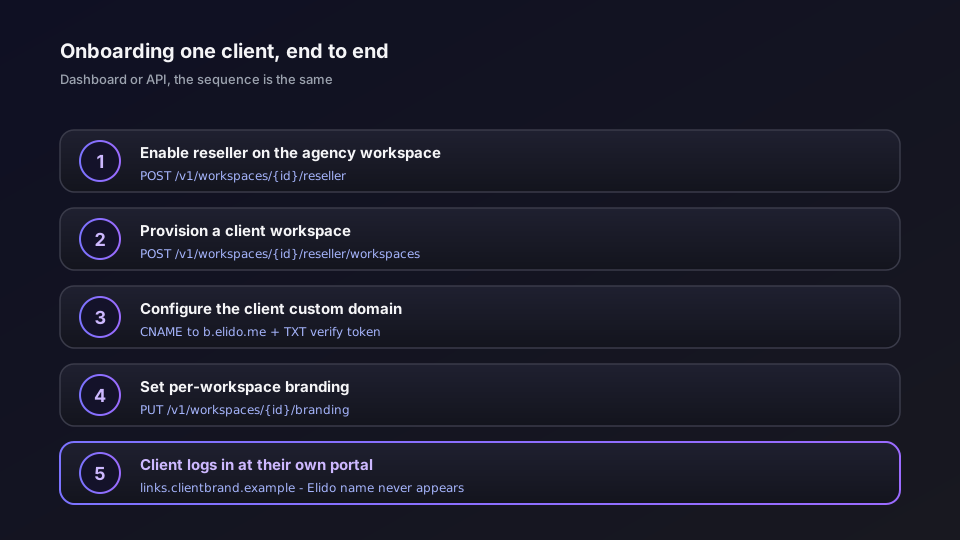
1. Enable reseller on your agency workspace
Your agency has a single parent workspace on the Business plan. You register a reseller account once:
curl -X POST https://api.elido.app/v1/workspaces/{your_workspace_id}/reseller \
  -H "Authorization: Bearer $ELIDO_API_TOKEN" \
  -H "Content-Type: application/json" \
  -d '{
    "company_name": "Acme Digital Agency",
    "contact_email": "[email protected]",
    "custom_domain": "links.acmedigital.example",
    "branding_config": {}
  }'
The response includes a reseller_account_id. Store it.
2. Provision a client workspace
When you onboard a new client, provision a sub-workspace linked to your reseller account:
curl -X POST https://api.elido.app/v1/workspaces/{your_workspace_id}/reseller/workspaces \
  -H "Authorization: Bearer $ELIDO_API_TOKEN" \
  -H "Content-Type: application/json" \
  -d '{
    "workspace_id": 99201,
    "label": "Client: TechCorp EMEA"
  }'
The workspace_id here is the client workspace, created through the normal workspace provisioning flow. The label is your internal reference - clients don't see it.
3. Configure DNS for the client's custom domain
The client wants their redirects to go through go.techcorp-emea.example. You add two DNS records in their DNS provider's panel:
go.techcorp-emea.example   CNAME   b.elido.me.
_elido-verify.go.techcorp-emea.example   TXT   "ws_<their_workspace_token>"
The verification token appears in their workspace's Settings > Custom Domains. Once our domain-validation service sees the TXT record, it marks the domain as verified and a TLS certificate is issued automatically on the next request.
4. Configure per-workspace branding
Set the client workspace's branding from your reseller account:
curl -X PUT https://api.elido.app/v1/workspaces/{client_workspace_id}/branding \
  -H "Authorization: Bearer $ELIDO_API_TOKEN" \
  -H "Content-Type: application/json" \
  -d '{
    "brand_name": "TechCorp Links",
    "logo_url": "https://assets.techcorp-emea.example/logo-dark.png",
    "primary_color": "#0a2463",
    "email_from_name": "TechCorp Links",
    "portal_hostname": "links.techcorp-emea.example",
    "enabled": true
  }'
The portal_hostname here is the custom dashboard subdomain. It must be unique across all workspaces in the platform - a 409 Conflict is returned if another workspace already claims it. Once set, links.techcorp-emea.example routes directly to TechCorp's link management dashboard, branded under their identity.
5. Client receives links on their domain, logs in at their portal
From this point, TechCorp's team logs in at links.techcorp-emea.example, creates links that resolve under go.techcorp-emea.example, and receives email notifications from TechCorp Links. Elido's name does not appear in any of these touchpoints.
For a detailed explanation of the DNS mechanics and TLS certificate lifecycle, the custom domains guide covers the full operational picture including CAA records, propagation lag, and what happens when a client's DNS admin removes the CNAME mid-campaign.
Pricing model considerations for agency resale
The economics of reselling link management look different depending on how the platform's billing model works.
Per-link-cap models (Rebrandly's structure) charge based on the number of active shortened URLs across your account. For an agency managing many clients with moderate link libraries, the cap can become the binding constraint before click volume does. Each client's accumulated active links contributes to the total, and a campaign-heavy client who mints 500 new links per month reaches tier thresholds faster than a client who drives 500,000 clicks through ten evergreen links.
Per-click-volume models (Elido's structure for the Business plan) charge based on redirect volume across the organization, with a metered overage per click past the plan threshold. The binding constraint is traffic, not inventory. Agencies running many clients with moderate traffic profiles can manage a large combined link library without tier pressure from link count alone.
Neither model is universally cheaper. The crossover depends on your client mix. The correct analysis: take your total active link count across all clients and your total monthly click volume across all clients, run both against each vendor's pricing model for the tier that covers that volume, and compare the annualized cost. Then account for the reseller margin you intend to charge.
A practical starting point for reseller markup: most agencies operating software services on behalf of clients mark up 20–40% above their own cost. With a platform that bills you monthly and lets you invoice clients independently, your margin on the link management component is straightforward to calculate. Platforms that require individual client-facing accounts, or that bill per-workspace with no consolidated reseller view, make this harder to manage cleanly.
Usage-based billing visibility is worth asking for explicitly. You want to be able to run a per-client usage report at month-end without exporting data manually. Elido's workspace-scoped analytics let you pull click volume per sub-workspace via the API; Short.io and Rebrandly have workspace-level analytics, though reseller-mode consolidated billing is a feature to verify on current plans.
Compliance angle: reselling to EU SMBs
When you resell link management services to EU-based clients, you become a data processor in the chain. Your clients are controllers of their end-users' click data. The platform is a sub-processor. This arrangement is governed by GDPR Article 28 - the processor-to-sub-processor relationship requires that your contract with the platform includes binding sub-processor obligations, and that you have corresponding obligations to your clients.
The practical obligations for an agency reselling to EU SMBs:
Your client contract needs a DPA. The agreement with each client must include a data processing agreement that covers the link click data as personal data. Standard template DPAs are acceptable; the key clauses are the categories of data processed, the sub-processor disclosure, and the security measures. Do not use a DPA template that only covers your internal processing - it needs to flow sub-processor obligations downstream to the platform you're using.
Sub-processor disclosure. Your DPA should list the platform you're built on as a sub-processor. Your clients have the right to know who processes their end-users' data. If you're using a US-based platform, this triggers a Transfer Impact Assessment requirement for many EU regulated-sector clients. If you're using an EU-resident platform, the TIA requirement is typically not triggered.
Data residency confirmation. If your client's procurement requires contractual data residency - "all personal data remains in the EEA" - your platform choice determines whether you can agree to that. Bitly, Rebrandly, and Short.io are US-primary and would require SCC-based cross-border transfer documentation. Elido's EU-region-default infrastructure means you can commit to EEA residency contractually without custom arrangements.
Breach notification SLA. GDPR Article 33 requires controllers to notify their supervisory authority within 72 hours of becoming aware of a personal data breach. As a processor in the chain, you must notify your clients (the controllers) "without undue delay" after becoming aware of a breach. Your platform's security incident notification SLA should be shorter than 72 hours - verify this in the DPA or security addendum.
Record of Processing Activities. Under Article 30, you need to maintain a Record of Processing Activities (RoPA) as a processor. This should include your sub-processors. Keeping the platform's DPA documentation current is how you maintain this without manual effort.
The GDPR for URL shorteners post has the full legal framework if you want the article citations for your own DPO review. For EU-residency procurement specifically, Elido's trust page at /trust lists the sub-processors (EU infrastructure, EU email delivery, payments, and CDN providers) and the DPA terms.
Migration checklist: moving an agency book of business
If you're moving clients from Bitly or Rebrandly to a white-label platform, the migration involves three parallel tracks: link inventory, DNS, and client communication.
Inventory phase (before you change anything):
- Export all short links for each client from the current platform. From Bitly: Settings > Export. From Rebrandly: workspace CSV export. Each row should have the short URL, destination URL, custom domain (if any), slug, tags, and creation date.
- Document which clients are on custom domains versus platform domains. Platform-domain clients have more work ahead: they need a new domain or subdomain set up before migration.
- Check for links with no custom domain that are embedded in printed materials, email footers, or external pages that you can't update. These are your highest-risk links - they'll break if the old platform account closes. Flag them separately.
DNS and redirect preservation:
- For clients on custom domains: you're repointing their CNAME from the old platform to the new one. The slug and destination can be imported before DNS propagates, so there's no 404 window if you time the DNS cutover after the bulk import.
- Reduce the CNAME TTL to 300 seconds at least 48 hours before cutover to minimize propagation lag on switch day.
- Import link records to the new platform using the bulk import API (
POST /v1/links/bulkon Elido) before cutting DNS. Test that a new redirect resolves correctly on the new platform using the API before touching DNS. - Cut DNS at a low-traffic time. Most agency links see least traffic on weekday mornings in the target timezone.
- Keep the old platform account active for at least 14 days post-cutover to catch any DNS resolver stragglers. If links on the old platform are now pointing to your new setup, this window can be shorter.
Client communication:
- Notify clients at least one week before the DNS cutover, framing it as an infrastructure improvement. Include the date and time of the planned change.
- After cutover, send a confirmation with the new dashboard URL if you're switching portal hostnames.
- Some clients will want to verify their links still work after cutover. Give them a simple way to do this - a list of five to ten representative links they can test themselves.
Historic analytics:
- Click history does not migrate between platforms. Analytics from cutover day forward are in the new system. If clients need historical data for reporting purposes, export it from the old platform before the account closes and store it in your own records or provide it directly to the client.
- Both Bitly and Rebrandly export aggregated click counts in their CSV exports. Raw click events (individual timestamp, country, device, referrer per click) are typically not exportable from either platform.
The Bitly migration playbook covers the Bitly-specific mechanics in more detail, including the API pagination for large link inventories and the DNS overlap timing.
What to ask any vendor before signing
This list is short on purpose. You can read feature pages; these are the questions you cannot answer from the marketing site.
Does the API support reseller sub-workspace provisioning? Ask for the endpoint, not just "yes". Test it in a trial account before signing. A white-label motion that requires manual platform support tickets per client onboarding does not scale past about ten clients.
Where does my clients' click data live, and can you commit to that contractually? Verbal assurances do not survive procurement review. The answer should be a jurisdiction (the EU region, US East, etc.) and it should appear in the DPA you sign.
What is your security incident notification SLA to customers? The answer matters for your own GDPR Article 33 obligation. Under 24 hours is the standard for platforms that take this seriously.
What happens to my clients' branding and links if I downgrade or leave? Ask explicitly whether per-workspace branding data is preserved on downgrade (so you don't lose configuration if you miss a payment) and what the data export options are. Some platforms delete workspace data on account cancellation with short notice.
Can I set the billing address and invoice details to my agency, not to individual client accounts? If clients can see the platform's billing interface, the resale arrangement is exposed. Consolidated billing to a single agency account with workspace-level usage breakdown is what you need.
The solutions/agencies page is where Elido's agency-specific features are documented for buying teams. The pricing page has current tier details and the plan comparison table.
For questions about reseller account setup, DPA terms, or migrating a client book of business, the sales team is reachable from the contact page.
Related on the blog
Try Elido
Paste a URL, get a working short link
No signup. Link lives for 30 days. Sign up to keep it forever.
Free, no signup required · 2 per day