A wedding QR code turns a printed invitation, sign, or table card into a one-scan shortcut to whatever you need guests to reach: the RSVP form, a shared photo album, the gift registry, the playlist. The one rule that saves you: make it a dynamic QR code, meaning it points at a short link you can change, so a typo or a switched destination never means reprinting 150 invitations. Everything else is just picking where it goes.
This is a use-case walkthrough built on how to create a QR code; the wedding part is really about choosing the right destinations and keeping the code editable after it is printed.
What a Wedding QR Code Can Link To
A QR code is just a link in a scannable shape, so it can point at anything with a URL. The common wedding jobs:
- RSVP form. The most popular use, on save-the-dates and invitations, so guests reply from their phone.
- Shared photo album. A sign or table card that sends guests to an upload link, so you get their photos without chasing anyone.
- Gift registry. One scan to the list, instead of a URL people mistype.
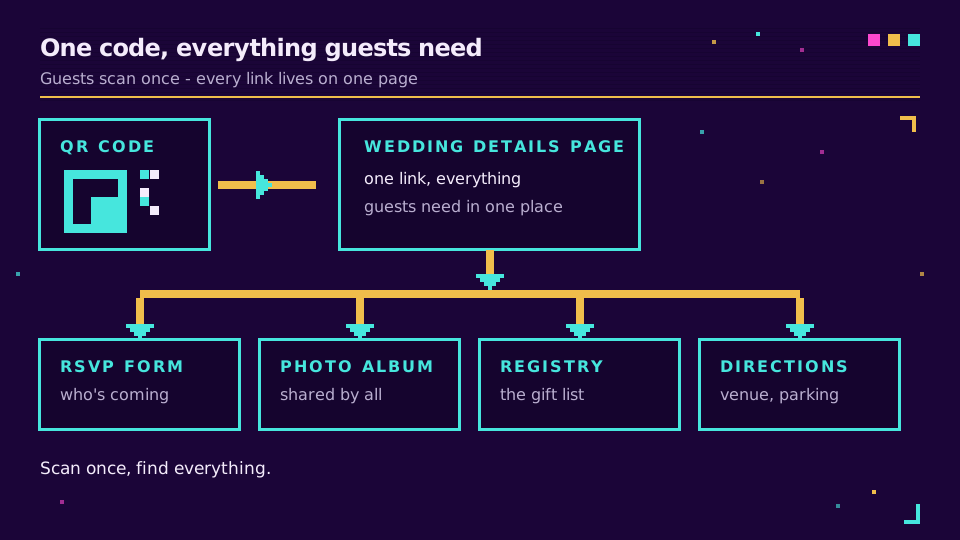
- Details, directions, and the day-of schedule. A single wedding page that holds the timing, the venue map, the dress code, and the playlist request.
You can make one code per job, or point a single code at a wedding-details page that links to all of them. The single-page approach is usually cleaner, because guests scan once and find everything.
Make It Dynamic So You Can Change It After Printing
This is the part people get wrong. A static QR code encodes the destination directly into the pattern, so the day you change the link, every printed code is dead. A dynamic QR code encodes a short link you control and can repoint at any time.
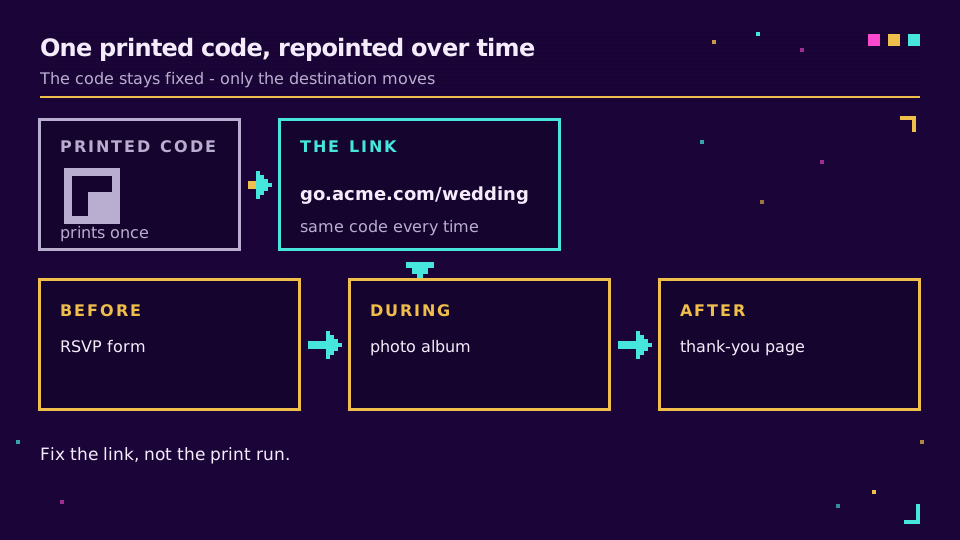
For a wedding, that flexibility is the whole point. You print one code on the invitation pointing at the RSVP form. After the RSVP deadline, you repoint the exact same code to the photo-upload album, and the codes already sitting on your guests' fridges keep working. Typo in the destination? Fix the link, not the print run. Venue changed? Same. The physical code never has to change because the link behind it does the moving.
How to Make One
Five steps, and the order matters:
- Choose the destination, or build one wedding-details page that links to everything.
- Turn that URL into a branded short link, so the code is dynamic and the fallback (a guest typing the link) is short and on-brand.
- Generate the QR code from that short link, and give it enough quiet space and contrast to scan reliably.
- Test it on at least two phones (guests just point the camera, no app needed), in the lighting you will actually print for, before you commit.
- Print it at a sensible size with a one-line label, and keep the short link so you can repoint later.
Because the code is dynamic, you also get scan analytics for free: how many guests scanned, and when. Make your wedding QR code once and repoint it through the whole event, from RSVP to photos to a thank-you page.
Where to Put It
Match the placement to the job, and always add a one-line label so guests know what they will get:
- Save-the-dates and invitations: "scan to RSVP".
- Welcome sign and table cards: "scan to share your photos" or "scan for the playlist".
- Order of service or favours: "scan for photos and thank-yous" after the day.
An unlabelled code gets ignored, and a code that scans to a broken link gets ignored twice. Label it, keep it dynamic, and test it. The size and distance rules matter for a big welcome sign, where guests scan from a few steps back.
Read the Cornerstone Series
This sits in the tutorials cluster. The foundation is how to create a QR code; the key companion is dynamic vs static QR codes.
Related on the Blog
Frequently asked questions
How do I make a QR code for my wedding?
Pick the destination (an RSVP form, a photo album, a registry, or a wedding-details page), turn that link into a short link, then generate a QR code that points at it. Make it a dynamic QR code, meaning it points at a short link you can repoint later, so you can fix a typo or change the destination without reprinting anything. Test the scan on two phones before you print.
What can a wedding QR code link to?
Anything with a URL: the RSVP form, a shared photo-upload album, the gift registry, the ceremony live stream, the playlist request form, directions, or a single wedding-details page that holds all of them. A page that links to everything is often the cleanest choice, because guests scan one code and find whatever they need.
Should a wedding QR code be dynamic or static?
Dynamic. A static QR code bakes the destination into the pattern, so if the link changes, the printed code is dead. A dynamic QR code points at a short link you control, so you can repoint it, from the RSVP form before the day to the photo album after it, without reprinting a single invitation. For anything printed in bulk, dynamic is the safe choice.
Where do I put a wedding QR code?
On save-the-dates and invitations for the RSVP, on a welcome sign and table cards at the venue for photos and the playlist, and on favours or the order of service. Put a one-line label next to it so guests know what they will get, such as scan to RSVP or scan to share photos, because an unlabelled code gets ignored.
How do I collect wedding photos with a QR code?
Point the QR code at a shared album or upload link (a cloud folder or a photo-sharing app that accepts guest uploads). Display it on signage and table cards with a label like scan to add your photos. Because the code is dynamic, you can switch the same code from the RSVP form to the photo album as the day approaches, so one printed code does both jobs.
Try Elido
Paste a URL, get a working short link
No signup. Link lives for 30 days. Sign up to keep it forever.
Free, no signup required · 2 per day