"Shorten a Facebook link" turns out to be three different jobs wearing the same sentence. Your Page's address, which needs a username rather than a shortener. A post or profile URL you copied out of the app, which is long because of tracking parameters you can simply delete. Or your own link that you're about to post to Facebook, which needs shortening and tagging so you can tell what the traffic did afterwards.
Each one has a different fix, and using the wrong one is how people end up shortening a URL that was already fine. The short version: claim a username for the Page, cut everything after the ? on a copied link, and use your own short domain for anything you post. This guide does all three, plus the one parameter you should never strip. The wider measurement picture is in tracking UTM end to end.
Which Facebook Link Are You Shortening?
Sort your link into one of these before touching it:
- A Facebook-owned page you want to publish - your Page, your profile, an event. The fix is a username, not a shortener.
- A link somebody copied and sent you, typically 200+ characters of post ID plus tracking. The fix is deletion.
- Your own site's URL, being posted to Facebook. The fix is a short link on your domain with campaign parameters attached.
The first two are hygiene. The third is the one that makes money, because it's the only case where the click belongs to you and can be counted.
Claim a Page Username First
A Page with no username has an address like facebook.com/profile.php?id=61556..., which is unshareable in print and unmemorable everywhere. Claiming a username in the Page settings turns it into facebook.com/yourbrand. It has to be unique across Facebook, and the character rules live in Meta's help centre article on Page usernames.
Meta also keeps two short hosts alive for the written form. I checked both in August 2026: fb.com answers with a 301 to www.facebook.com, and fb.me answers with a 302. So fb.com/yourbrand is a legitimate seven-character-shorter way to print your Page address, and the 301 means it's the more durable of the two.
What you don't get from either is a click count. Both hosts are Meta's, the redirect is theirs, and nothing about it reports to you. If the Page address is going on a poster or a business card and you want to know whether the poster worked, put your own short link in front of it instead. Setting up branded short links covers that setup end to end.
The Parameters You Can Cut, and the One You Cannot
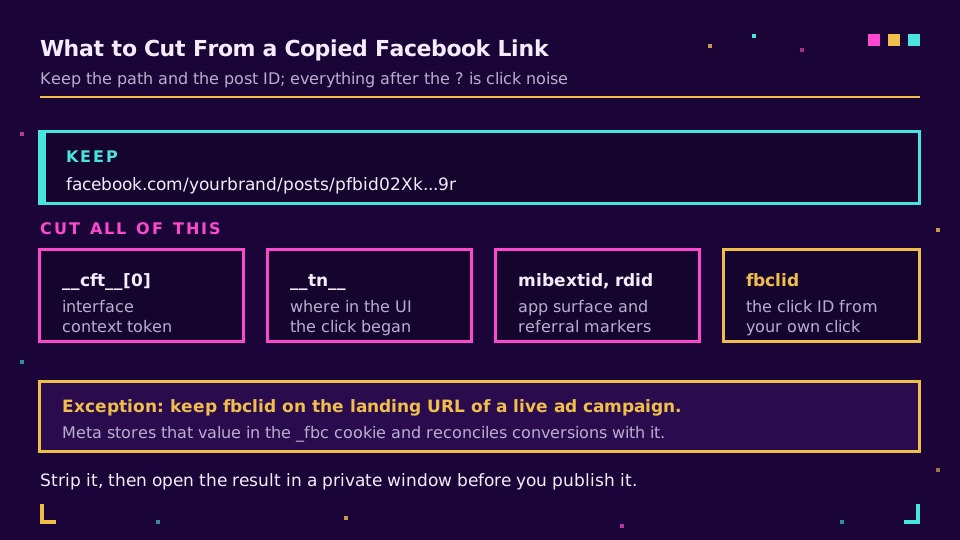
A link copied from the Facebook app looks like this, and about 80% of it is disposable:
https://www.facebook.com/yourbrand/posts/pfbid02Xk...9r
  ?__cft__[0]=AZVW1lB4...
  &__tn__=%2CO%2CP-R
  &mibextid=Nif5oz
  &fbclid=IwZXh0bgNhZW0CMTAAAR3...
What each one does:
fbclidis the Facebook click identifier. Meta documents it as "a Meta-generated parameter that is passed with the URL of an advertiser's website when a user clicks an ad on Facebook and/or Instagram", and its value gets stored in the_fbccookie for attribution.__cft__and__tn__are internal context tokens describing where in the interface the click came from. They carry no meaning outside that session.mibextidandrdidare surface and referral markers added by the app.
Delete all of it. Keep the path up to the post ID and test the result in a private window. The exception is your own advertising: never strip fbclid from the landing URL of a running campaign, because that identifier is what lets Meta reconcile a click with a conversion. Cutting it out of an ad's destination breaks attribution silently, and the first symptom is a campaign that looks like it stopped working. Forwarding conversions to Meta's CAPI explains what happens downstream of that parameter, and browsers strip UTM parameters covers who else removes things from your URLs without asking.
Unwrapping an l.facebook.com Link
Sometimes the link you were sent isn't a Facebook link at all. Outbound clicks get wrapped, so what lands in your clipboard is:
https://l.facebook.com/l.php?u=https%3A%2F%2Fexample.com%2Fpricing%3Futm_source%3Dfb&h=AT1x...
The real destination is sitting in the u parameter, percent-encoded. Decode it and you have the original URL, including whatever campaign parameters the poster attached. The wrapper exists so Meta can run safety checks between the click and the destination, which is a reasonable thing for a platform to do and an annoying thing to find in a spreadsheet.
Two practical notes. The h parameter is a signature tied to that specific wrapped URL, so a wrapper you edited by hand may simply stop working. And a wrapped link is never the one to publish: the u value is the address, so decode first, then shorten. Expand a short URL covers the general technique for seeing through any redirect before you click it.
Shorten What You Post to Facebook, Not What Facebook Gave You
This is the case that earns the effort. When the destination is yours, the link you post should be a short link on your own domain carrying campaign parameters:
https://go.yourbrand.example/spring
  -> https://yourbrand.example/spring?utm_source=facebook&utm_medium=social&utm_campaign=spring26
Now the click count sits at the link, the session lands in your analytics with the campaign attached, and you can compare Facebook against your newsletter without exporting anything. Our UTM builder assembles the destination and UTM naming conventions keeps the values consistent enough to group later. Create the links on your own domain and they'll be counted in one place alongside every other channel.
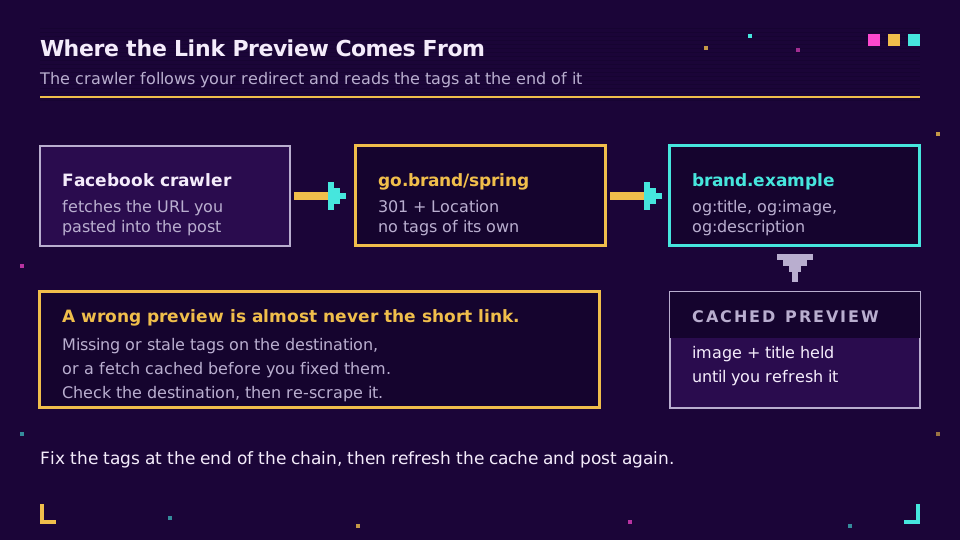
One thing to get right before you post: the link preview comes from the destination, not from the short link. Facebook's crawler follows the redirect and reads the Open Graph tags at the end of the chain, then caches what it found, which is why a broken preview usually means missing tags rather than a broken redirect. Meta's sharing documentation covers which tags it wants; our OG checker shows you what a crawler sees, and fixing a broken link preview covers the cache-refresh dance when you've already posted. If the image is the problem, Open Graph image size has the dimensions that survive every crop.
What Breaks
Four things behave differently to how people expect:
- Login-walled links. Shortening a private group post or a friends-only profile doesn't make it public. The recipient still hits the login wall, just faster.
- Marketplace and some group URLs. These occasionally keep state in the query string, so the aggressive strip that works everywhere else can break them. Test in a private window.
- App versus web. A
facebook.comlink opens the app on most phones, and your short link's redirect is what the app receives. That's fine, but it means the last hop is out of your hands. What is a deep link covers the mechanics when you need the app specifically. - Domain reputation. A generic shortening domain shared with thousands of strangers inherits their behaviour. Your own domain doesn't, which matters more on social platforms than anywhere else. Are URL shorteners safe covers how those reputations get built and lost.
Expect your click counts and Facebook's to disagree, too. In-app browsers, prefetching, and bot filtering are counted differently on each side, and neither number is lying. Pick one as your source of truth for trend lines and stop reconciling the gap.
Verify Before You Post
Three checks, thirty seconds, and they catch nearly everything:
curl -sIL https://go.yourbrand.example/spring | grep -iE '^HTTP|^location'
One hop to the destination is what you want to see. Then paste the same link into the OG checker to confirm the preview, and open it once on a phone to be sure the in-app browser lands where you expect. How to track social media links covers the same routine for the other platforms, and the sibling posts for X and LinkedIn cover their own quirks.
The mistake I still see most often is shortening the wrong thing: someone runs a Facebook post URL through a shortener, posts the result back to Facebook, and now there's an extra hop, no preview, and no useful data. Shorten your links, not theirs.
Read the Cornerstone Series
This post sits in the tutorials cluster. For the measurement side, track UTM end to end covers the whole chain from click to report.
Related on the Blog
Frequently asked questions
How do I shorten a Facebook link?
It depends which link you mean. For your Page, claim a username and the URL becomes facebook.com/yourbrand with nothing to shorten. For a post or profile link you copied out of the app, delete everything from the question mark onwards and check that it still opens. For a link of your own that you are posting to Facebook, shorten it on your own domain and add UTM parameters so the clicks are attributable.
What is fbclid and can I remove it?
The Facebook click identifier. Meta appends it to the destination URL when somebody clicks an ad or a link on Facebook or Instagram, and its value feeds the _fbc cookie used for conversion attribution. Removing it from a link you are sharing yourself is harmless, because it only got there from your own click. Removing it from the landing URL of a running ad campaign is not, because that is what the attribution depends on.
How do I get a short custom URL for my Facebook Page?
Claim a username in the Page settings and Facebook gives you facebook.com/yourname. The name has to be unique across Facebook and follows the character rules in Meta's help centre. Meta also keeps two short hosts alive: fb.com answers with a 301 to www.facebook.com and fb.me with a 302, both checked in August 2026, so fb.com/yourname works as a shorter written form.
Is it safe to remove tracking parameters from a Facebook link?
For fbclid, __cft__, __tn__, and mibextid, yes. They are session and click artifacts, not part of the address, and the link resolves without them. The one rule worth keeping is to test the stripped link in a private window before you publish it, because a few Facebook surfaces (Marketplace listings, some group content) do carry state in the query string and break when it is cut.
Why does my shortened link show the wrong preview on Facebook?
Because the preview comes from the Open Graph tags on the final destination, not from the short link. The crawler follows the redirect and reads the tags it finds at the end of the chain, then caches the result. If you shortened a URL whose tags are missing or stale, the preview will be wrong until the tags are fixed and the cache is refreshed in Meta's sharing debugger.
Can I track clicks on a link I post to Facebook?
Yes, if the link is yours. Post a short link on your own domain with UTM parameters and you get the click count at the link level plus the session in your analytics tool. What you cannot get is per-person data from Facebook itself, and expect a gap between Facebook's reported clicks and your own, since in-app browsers and prefetching count differently on each side.
Try Elido
Paste a URL, get a working short link
No signup. Link lives for 30 days. Sign up to keep it forever.
Free, no signup required · 2 per day