
To shorten a URL with an API, send one authenticated POST: put the long URL in a JSON body as destination_url, send it to https://api.elido.app/v1/links with Authorization: Bearer <your key>, and read short_url out of the 201 Created response. That's the whole integration in every language. The eight languages below only differ in how they spell the request. And in which production detail bites first.
The first call takes five minutes. The trouble starts later, when production traffic hits and a retry handler creates duplicates, so the dashboard fills with /foo-1, /foo-2 and /foo-3 variants of one destination and somebody files a ticket. This guide is the URL shortener API walkthrough I wish that team had read first: auth, the first call, the four link endpoints, idempotency keys, error codes, rate limits, and then the same short-link request in eight languages with the one habit each runtime needs.
Still picking a service? The free URL shortener API comparison lines up request shapes and free-tier limits across vendors. Everything below targets Elido's REST API.
Jump straight to your language:
- Python:
requestsfor one link,httpxwith a semaphore for thousands. - JavaScript and Node.js:
fetch, why the key stays off the browser, a worker pool instead ofPromise.all. - Go: one shared
http.Clientwith a timeout,errgroup.SetLimitfor bulk. - Java: the JDK
HttpClient, virtual threads behind aSemaphore. - C# and .NET:
PostAsJsonAsync, then a typed client fromIHttpClientFactory. - PHP, Laravel and WordPress: curl,
Http::with retries,wp_remote_poston publish. - Ruby:
Net::HTTP.post, then Faraday with retry middleware that actually retries a POST. - PowerShell:
Invoke-RestMethod, a vaulted key and a whole CSV column.
Prerequisites: An API Key and a Base URL
Sign in to the dashboard, open /dashboard/api-keys, and create an API key. Keys start with elido_ and are shown once. Each key is bound to one workspace, so a key issued in workspace A can't create links in workspace B, and the API works out which workspace you mean from the key alone. Machine-user tokens (for CI systems, internal tooling and machine-to-machine integrations) live under /dashboard/machine-users and rotate independently from personal keys.
Both kinds carry a preset workspace role (viewer, editor or admin) rather than per-endpoint scopes, so a CI job that only creates links gets editor. The guide to API key permissions lists what each role can reach. Webhook changes need admin, and it explains why.
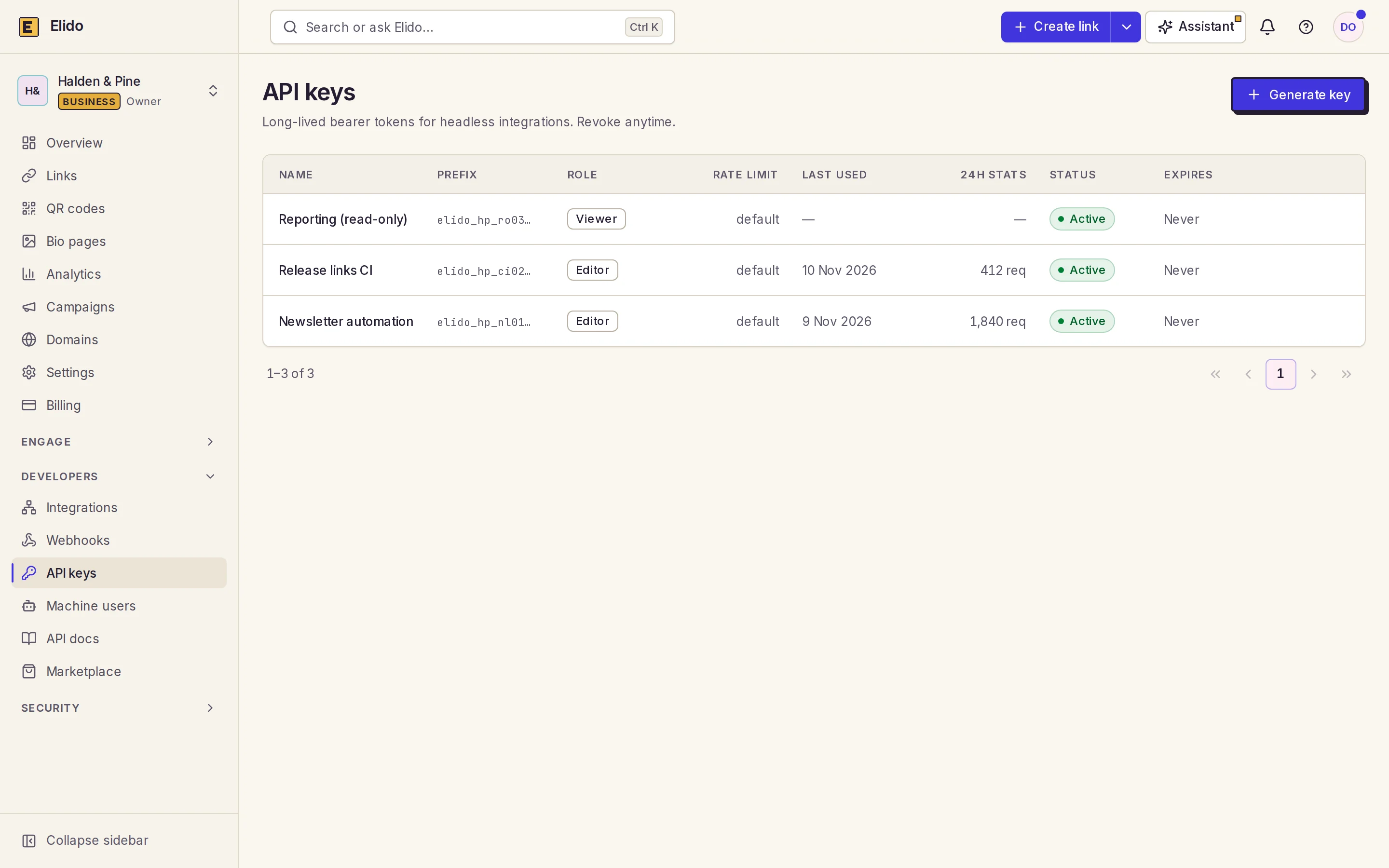
The base URL is https://api.elido.app, and link routes sit under /v1. The redirect domains (f.elido.me on Free, s.elido.me on paid plans, b.elido.me on Business) are a separate surface: your short links resolve there, while the API creates and edits them. The OpenAPI 3.1 specification behind the API reference is the contract. If a field is in the spec, it is supported.
One gotcha catches new accounts. Writes made with a key whose owner hasn't verified their email come back as 403 (email_not_verified). Reads keep working. Machine-user tokens are exempt. Verify the address once and the error goes away.
The First Call: Create a Short Link
Here is the request every language section below reproduces, in curl:
curl -sS https://api.elido.app/v1/links \
  -H "Authorization: Bearer $ELIDO_API_KEY" \
  -H "Content-Type: application/json" \
  -d '{"destination_url": "https://shop.example.com/spring-sale"}'
The response is 201 Created with the link record. Trimmed to the fields you'll use:
{
  "id": 48213,
  "workspace_id": 42,
  "domain_id": 3,
  "slug": "aB3xK9",
  "destination_url": "https://shop.example.com/spring-sale",
  "tags": [],
  "redirect_status": 302,
  "password_set": false,
  "short_url": "https://s.elido.me/aB3xK9",
  "created_at": "2026-11-11T09:14:03Z"
}
Store id if you'll ever edit, expire or delete the link: it's the canonical identifier, and slugs can change while IDs don't. You didn't pass a domain_id, so the API used your plan's default short domain. The slug is generated by the server unless you send slug; generated slugs are base62 ([0-9A-Za-z]) and at most six characters long.
Keep the key in an environment variable (ELIDO_API_KEY in every example here), never in source, because a shortener key is a spending credential and anyone holding it can create links on your quota, which matters most in JavaScript, as the Node section explains.
The Four Endpoints You Will Actually Use
The API has more than four endpoints, but most integrations stay inside this set. The flat /v1/links routes infer the workspace from your key; the canonical paths under /v1/workspaces/{workspace_id}/links behave the same and need the ID spelled out.

Create a link
POST /v1/links takes destination_url plus optional fields:
slug- a back-half you choose; it must be unique on the domain.domain_id- for a custom domain; omit it to get your plan's default short domain.titleandtags- a dashboard label and free-form strings you can filter on later.expires_at- an RFC 3339 timestamp after which the link stops redirecting and shows an expired page.redirect_status-301,302(the default) or307.
Passwords aren't set on create: send a PATCH right after, and the redirect serves a password page before forwarding. UTM parameters go straight into destination_url, and your own join keys go in tags.
The custom slug is the field that bites teams in production. Reuse a slug on the same domain and you get 409. A naive handler that appends a counter (my-slug-1, my-slug-2) is exactly how the duplicate-link mess from the opening starts. The fix is an idempotency key, covered two sections down.
Read and list links
GET /v1/links/{id} returns the full record, including short_url. Click counts aren't on the link record. They come from the analytics endpoints described in the link click analytics API guide.
GET /v1/links?limit=…&tags=…&host=… lists links with filters (q searches, status and folder narrow further). Pagination is cursor-based: send the response's next_cursor back as cursor, and stop when it's null.
Update a link
PATCH /v1/links/{id} accepts the create fields. The common updates are a new destination_url (campaign rotation without reprinting a QR code), new tags, and a later expires_at. Sending a new slug renames the link. The old slug dies at once. Don't rename anything that's already printed.
Delete and restore a link
DELETE /v1/links/{id} returns 204 No Content and moves the link to the trash: it stops redirecting and drops out of list and read calls. It's not gone yet. POST /v1/links/{id}/restore brings it back and GET /v1/links/trash shows what's there. After 30 days the trash is purged for good.
Idempotency Keys: Retries Without Duplicate Links
Every POST, PUT and PATCH accepts an Idempotency-Key header, an opaque string you choose. The first time a key arrives with a successful response, the server stores the status code and body for 24 hours, scoped to (workspace, key). A repeat of the same key with the same request gets the stored response back, so a retry returns the link that already exists instead of creating a second one.
Three details decide whether it works for you:
- Only successful responses are stored. A
429or a500isn't cached, so the next retry with the same key gets a real second attempt. - The server fingerprints the method, path and body. Reuse a key with a different body and you get
422withidempotency_key_mismatch, which is a bug in the caller, not something to retry. DELETEdoesn't take a key; deleting twice is naturally idempotent.
The key itself should come from something stable. Derive it from the business event (order-12345-link) when there is one, or from a SHA-256 hash of the destination URL in a batch job. A random UUID per attempt defeats the purpose. One per URL works until the batch is re-run.

The 24-hour window is the gotcha. A retry on day three of a stuck job creates a new link, so for multi-day batches store the id from the first successful create and look it up before re-issuing. Keys are also per workspace: the same key in two workspaces creates two links, which is correct for a multi-workspace API and still surprises teams that assumed keys were global.
A hash-of-destination key has one side effect worth knowing. Two campaigns pointing at one URL within 24 hours share a link. If you want two links, put the campaign ID in the key.
Error Handling and Status Codes
Errors come back as a small JSON object with a human-readable error and, for some cases, a machine-readable code:
{ "error": "destination_url is required" }
The status codes you'll meet:
400- validation failure: a missingdestination_url, a malformedexpires_at, an invalidredirect_status. Fix the payload; don't retry.401- the key is missing, revoked or mistyped. Check that the header readsBearerwith a trailing space before the key.402- your plan's link quota is used up. Retrying won't help; upgrading or waiting for the next period will.403- the key's role can't do this (aviewerkey can't create links), the account's email isn't verified, or the destination was blocked by the safety scan ("code": "destination_blocked").404- the link doesn't exist or this key can't see it. We return 404 rather than 403 so a caller can't probe for resources it doesn't own.409- the slug is taken on that domain.422- an idempotency key reused with a different body, or an option combination that isn't allowed.429- you hit the rate limit. Wait forRetry-Afterand try again with the same idempotency key.500,502,503,504- a server-side or transient fault. Back off and retry with the same key.

That split is the whole retry policy, and every language section below implements it the same way: retry 429 and 5xx, give up on everything else. Retrying a 400 with the same payload can't produce a different answer, and retrying a 401 three times is just a slower failure. The guide to rate limits and retries goes deeper on jitter and on why blind retry loops turn one outage into two.
Rate Limits and the Bulk Endpoint
API traffic is metered per workspace with a token bucket:
| Plan | Sustained rate | Burst |
|---|---|---|
| Free | 10 req/s | 20 |
| Pro | 30 req/s | 60 |
| Business | 100 req/s | 200 |
A full bucket lets you send the burst at once. Then you settle into the sustained rate. Each API key also has its own bucket on top of the workspace one, so a single runaway script can't spend the whole workspace's allowance by itself.
A rejected request gets 429, a Retry-After: 1 header and an X-RateLimit-Scope header saying which bucket ran dry (workspace or api_key). There are no remaining-quota headers to pace against. So the practical approach is a fixed concurrency ceiling plus a retry on 429: eight requests in flight is a comfortable start on Pro, and four suits Free. One quirk caught me out. The 429 body is JSON-shaped text sent as text/plain, so a client that only parses JSON content types will see a plain string where it expected an object.
Big job? POST /v1/links/bulk takes {"links": [...]} with up to 100 items and costs one request against the limit. It answers 200 even when some items fail, with ok and failed counts and a per-item status of ok or error, so read every item. Don't skip that. The links it returns carry a slug but no short_url, which means you build the URL yourself from your domain and the slug. The bulk import from Google Sheets walkthrough moves a whole spreadsheet this way.
Shorten a URL in Your Language: The Shared Shape
Every section from here on sends the request from the first call and applies the same four habits: the key from the environment, a timeout on every request, the status code checked before the body is parsed, and a stable Idempotency-Key on anything that might run twice. I won't re-explain them per language. What changes is the idiom. Each runtime also has one detail people get wrong.
Each section opens with the minimal working call. That's enough for a script you run by hand. Then comes the production piece that runtime's users ask about most: concurrency in Python, Go or Java; client lifetime in C#; hosting in PHP; middleware in Ruby; secrets and CSVs in PowerShell. Want to run them as written? Create a key on the free plan, export it as ELIDO_API_KEY, and every snippet works unchanged.
Shorten a URL in Python
In Python, shortening a URL is one requests.post with the key in a Bearer header, the destination in json=, and a timeout:
import os
import requests

resp = requests.post(
    "https://api.elido.app/v1/links",
    headers={"Authorization": f"Bearer {os.environ['ELIDO_API_KEY']}"},
    json={"destination_url": "https://example.com/a-very-long-path?with=params"},
    timeout=10,
)
resp.raise_for_status()
print(resp.json()["short_url"])  # https://s.elido.me/aB3xK9
The requests library has no default timeout, so without timeout=10 a hung connection blocks the script forever. raise_for_status() turns a 401 or 500 into an exception instead of letting a failed call look like a success. If you can't pip install anything, urllib.request from the standard library sends the same POST with more ceremony.
Bulk with httpx and a semaphore
A loop over requests.post is fine for a few hundred links. For tens of thousands, the time goes on waiting for the network, and httpx with asyncio overlaps those waits. The semaphore matters most. It caps requests in flight, which is the difference between a fast batch and a wall of 429s that the retry loop then has to dig itself out of.
import asyncio
import hashlib
import os

import httpx

API = "https://api.elido.app/v1/links"


async def shorten_all(urls: list[str], concurrency: int = 8) -> dict[str, str]:
    gate = asyncio.Semaphore(concurrency)
    headers = {"Authorization": f"Bearer {os.environ['ELIDO_API_KEY']}"}

    async with httpx.AsyncClient(headers=headers, timeout=10) as client:

        async def one(url: str) -> tuple[str, str]:
            key = hashlib.sha256(url.encode()).hexdigest()  # same key on every retry
            async with gate:
                for attempt in range(3):
                    r = await client.post(
                        API,
                        json={"destination_url": url},
                        headers={"Idempotency-Key": key},
                    )
                    if r.status_code == 429 or r.status_code >= 500:
                        await asyncio.sleep(int(r.headers.get("Retry-After", 2**attempt)))
                        continue
                    if r.is_success:
                        return url, r.json()["short_url"]
                    return url, f"ERROR {r.status_code}: {r.text}"
                return url, "ERROR: gave up after 3 attempts"

        pairs = await asyncio.gather(*(one(u) for u in urls))
    return dict(pairs)


# results = asyncio.run(shorten_all(my_urls))
Results are keyed by the original URL. A partial failure stays visible. Because the key is a hash of the destination, re-running the whole list after fixing three bad rows creates nothing twice. Sleeping inside the semaphore is deliberate: a worker that's been told to back off shouldn't hand its slot to a fresh request.
Shorten a URL in JavaScript and Node.js
In JavaScript, shortening a URL is one fetch POST. Node has shipped fetch as a global since version 18, so there's nothing to install:
const res = await fetch("https://api.elido.app/v1/links", {
  method: "POST",
  headers: {
    Authorization: `Bearer ${process.env.ELIDO_API_KEY}`,
    "Content-Type": "application/json",
  },
  body: JSON.stringify({ destination_url: "https://example.com/spring-sale" }),
  signal: AbortSignal.timeout(10_000),
});

if (!res.ok)
  throw new Error(`shorten failed: ${res.status} ${await res.text()}`);

const { short_url } = await res.json();
console.log(short_url);
Run it with node --env-file=.env shorten.mjs. That if (!res.ok) line isn't decoration: fetch rejects only on a network failure or an abort, so a 401 arrives as a resolved promise with ok: false. Axios users get bitten by this once. Usually it shows up as an undefined where a link should be.
Keep the key on the server
Paste that snippet into a React component and two things break. CORS blocks the response, because a key-authenticated API doesn't send Access-Control-Allow-Origin for arbitrary sites. The bigger problem sits behind the error: a key in front-end code is readable by anyone who opens DevTools, and a NEXT_PUBLIC_ prefix advertises it. So the browser posts a plain URL to your route. The route adds the key.
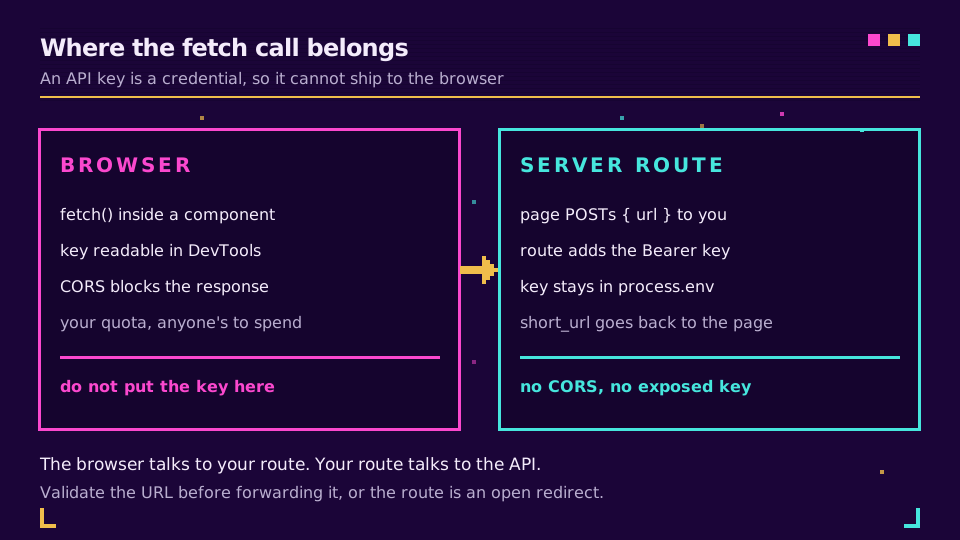
Validate the URL your route accepts, or you've built an open redirect with extra steps; the write-up on open redirect vulnerabilities shows what attackers do with one.
For a batch, resist Promise.all(urls.map(shorten)). It fires every request in the same tick, so 500 URLs become 500 simultaneous connections and most come back 429. A small pool of workers pulling from a shared queue keeps concurrency flat however long the list gets:
import { createHash } from "node:crypto";

async function shorten(url) {
  const key = createHash("sha256").update(url).digest("hex"); // stable across retries
  for (let attempt = 0; attempt < 3; attempt++) {
    const res = await fetch("https://api.elido.app/v1/links", {
      method: "POST",
      headers: {
        Authorization: `Bearer ${process.env.ELIDO_API_KEY}`,
        "Content-Type": "application/json",
        "Idempotency-Key": key,
      },
      body: JSON.stringify({ destination_url: url }),
      signal: AbortSignal.timeout(10_000),
    });
    if (res.status === 429 || res.status >= 500) {
      const wait = Number(res.headers.get("Retry-After") ?? 2 ** attempt);
      await new Promise((r) => setTimeout(r, wait * 1000));
      continue;
    }
    if (!res.ok) throw new Error(`${res.status} ${await res.text()}`);
    return (await res.json()).short_url;
  }
  throw new Error("gave up after 3 attempts");
}

export async function shortenAll(urls, concurrency = 8) {
  const queue = [...urls];
  const results = new Map();
  const worker = async () => {
    while (queue.length) {
      const url = queue.shift();
      try {
        results.set(url, await shorten(url));
      } catch (err) {
        results.set(url, `ERROR: ${err.message}`); // one bad URL must not sink the batch
      }
    }
  };
  await Promise.all(Array.from({ length: concurrency }, worker));
  return results;
}
On edge runtimes (Vercel Edge, Cloudflare Workers, Deno) node:crypto may be missing; hash with crypto.subtle.digest("SHA-256", …) instead and the rest is unchanged.
Shorten a URL in Go
In Go, shortening a URL takes net/http and encoding/json from the standard library: marshal the body, set two headers, decode short_url. Write it as a function on a shared client from the start, because that's the version you'll keep:
var client = &http.Client{Timeout: 10 * time.Second}

func shorten(ctx context.Context, destination string) (string, error) {
	body, err := json.Marshal(map[string]string{"destination_url": destination})
	if err != nil {
		return "", err
	}
	req, err := http.NewRequestWithContext(ctx, http.MethodPost,
		"https://api.elido.app/v1/links", bytes.NewReader(body))
	if err != nil {
		return "", err
	}
	sum := sha256.Sum256([]byte(destination))
	req.Header.Set("Authorization", "Bearer "+os.Getenv("ELIDO_API_KEY"))
	req.Header.Set("Content-Type", "application/json")
	req.Header.Set("Idempotency-Key", hex.EncodeToString(sum[:]))

	resp, err := client.Do(req)
	if err != nil {
		return "", fmt.Errorf("post: %w", err)
	}
	defer resp.Body.Close()

	if resp.StatusCode >= 300 {
		msg, _ := io.ReadAll(io.LimitReader(resp.Body, 512))
		return "", fmt.Errorf("shorten %s: %s %s", destination, resp.Status, msg)
	}
	var link struct {
		ShortURL string `json:"short_url"`
	}
	if err := json.NewDecoder(resp.Body).Decode(&link); err != nil {
		return "", fmt.Errorf("decode: %w", err)
	}
	return link.ShortURL, nil
}
http.DefaultClient and http.Post have no timeout at all. None. An unresponsive host can hold a goroutine for minutes. One package-level client keeps the connection pool alive across calls, and NewRequestWithContext means a cancelled CLI or a disconnected caller stops the request instead of leaving it running. If a batch dials far more sockets than you expected, raise MaxIdleConnsPerHost on the transport: its default of 2 is invisible in a script and expensive once eight goroutines share a host.
Bounded fan-out with errgroup.SetLimit
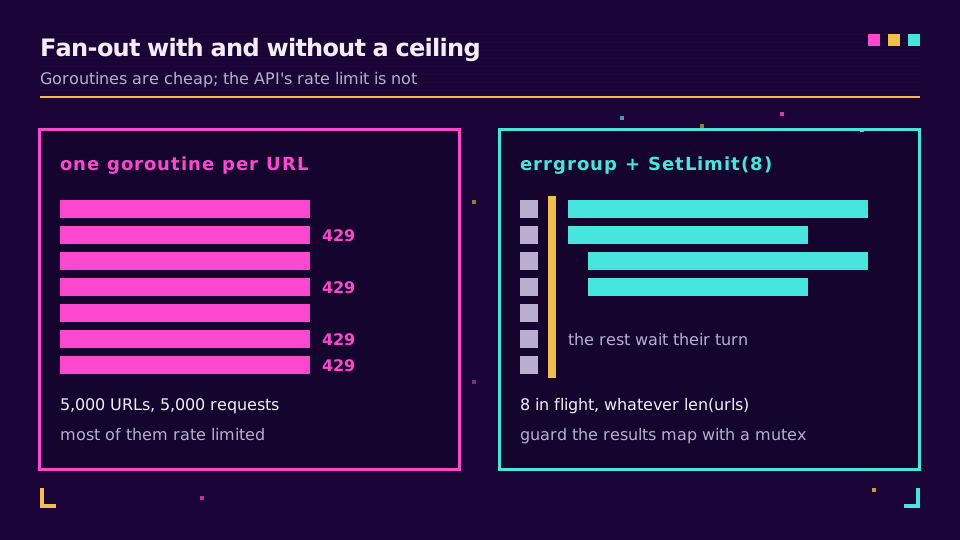
One goroutine per URL is cheap for Go and ruinous for the rate limit: 5,000 URLs become 5,000 requests at once. errgroup with SetLimit gives you a fan-out with a ceiling.
func shortenAll(ctx context.Context, urls []string) map[string]string {
	var (
		g   errgroup.Group
		mu  sync.Mutex
		out = make(map[string]string, len(urls))
	)
	g.SetLimit(8) // at most 8 requests in flight, whatever len(urls) is

	for _, u := range urls {
		g.Go(func() error {
			short, err := shorten(ctx, u)
			if err != nil {
				short = "ERROR: " + err.Error()
			}
			mu.Lock()
			out[u] = short
			mu.Unlock()
			return nil
		})
	}
	_ = g.Wait()
	return out
}
This uses a plain errgroup.Group on purpose. errgroup.WithContext cancels everything on the first error, which suits an all-or-nothing build step and is exactly wrong for an importer that should shorten whatever it can, keep going past the bad rows and report the failures at the end. Since Go 1.22 the loop variable is per-iteration, so the old u := u line is gone, but the mutex isn't optional: go test -race will flag an unguarded map. Add a retry on 429 and 5xx inside shorten using select on ctx.Done() and time.After, so the backoff stays interruptible.
Shorten a URL in Java
In Java, shortening a URL is one POST through java.net.http.HttpClient, which has been in the JDK since Java 11, so the first version needs no Maven dependency:
private static final HttpClient CLIENT = HttpClient.newBuilder()
        .connectTimeout(Duration.ofSeconds(5))
        .build();

public static void main(String[] args) throws Exception {
    HttpRequest request = HttpRequest
            .newBuilder(URI.create("https://api.elido.app/v1/links"))
            .header("Authorization", "Bearer " + System.getenv("ELIDO_API_KEY"))
            .header("Content-Type", "application/json")
            .timeout(Duration.ofSeconds(10))
            .POST(HttpRequest.BodyPublishers.ofString(
                    "{\"destination_url\":\"https://example.com/spring-sale\"}"))
            .build();

    HttpResponse<String> response = CLIENT.send(request, HttpResponse.BodyHandlers.ofString());
    if (response.statusCode() >= 300) {
        throw new IllegalStateException(response.statusCode() + " " + response.body());
    }
    System.out.println(response.body()); // JSON with "short_url"
}
Two timeouts do two jobs. connectTimeout bounds the TCP and TLS handshake; the request's timeout bounds the whole exchange, and without it a server that accepts the connection and then goes quiet holds the thread. send throws only on transport failures and timeouts, never on an HTTP error, which is why the status check is the contract rather than defensive programming. Build one HttpClient per application: it's thread-safe and owns a connection pool, and creating one per call redoes the TLS handshake every time.
Virtual threads behind a semaphore
Virtual threads went final in Java 21. They make one thread per URL cheap enough to be sane. The rate limit hasn't moved, though, so the Semaphore does the real work. Parse with Jackson here. A hand-built JSON string breaks on the first destination containing a quote.
static final ObjectMapper MAPPER = new ObjectMapper();

static String shorten(String destination) throws Exception {
    String key = HexFormat.of().formatHex(MessageDigest.getInstance("SHA-256")
            .digest(destination.getBytes(StandardCharsets.UTF_8)));
    HttpRequest request = HttpRequest
            .newBuilder(URI.create("https://api.elido.app/v1/links"))
            .header("Authorization", "Bearer " + System.getenv("ELIDO_API_KEY"))
            .header("Content-Type", "application/json")
            .header("Idempotency-Key", key)
            .timeout(Duration.ofSeconds(10))
            .POST(HttpRequest.BodyPublishers.ofString(
                    MAPPER.writeValueAsString(Map.of("destination_url", destination))))
            .build();
    HttpResponse<String> response = CLIENT.send(request, HttpResponse.BodyHandlers.ofString());
    if (response.statusCode() >= 300) {
        throw new IllegalStateException(response.statusCode() + " " + response.body());
    }
    return MAPPER.readTree(response.body()).get("short_url").asText();
}

static Map<String, String> shortenAll(List<String> urls) {
    Map<String, String> out = new ConcurrentHashMap<>();
    Semaphore gate = new Semaphore(8); // 8 in flight, whatever urls.size() is
    try (var executor = Executors.newVirtualThreadPerTaskExecutor()) {
        for (String url : urls) {
            executor.submit(() -> {
                gate.acquire();
                try {
                    out.put(url, shorten(url));
                } catch (Exception e) {
                    out.put(url, "ERROR: " + e.getMessage());
                } finally {
                    gate.release();
                }
                return null;
            });
        }
    } // close() waits for every task
    return out;
}
The try-with-resources block does real work: closing a virtual-thread executor waits for every submitted task, so there's no awaitTermination dance. On Java 11 to 17, the same shape works with sendAsync and a fixed pool. What fails on any version is CompletableFuture.allOf over an unbounded list, which starts everything at once and collects a pile of 429s.
Shorten a URL in C# and .NET
In C#, shortening a URL is one PostAsJsonAsync call on an HttpClient that already carries the Bearer header:
using System.Net.Http.Json;
using System.Text.Json.Serialization;

var http = new HttpClient
{
    BaseAddress = new Uri("https://api.elido.app"),
    Timeout = TimeSpan.FromSeconds(10),
};
http.DefaultRequestHeaders.Authorization =
    new("Bearer", Environment.GetEnvironmentVariable("ELIDO_API_KEY"));

var response = await http.PostAsJsonAsync("/v1/links",
    new { destination_url = "https://example.com/spring-sale" });
response.EnsureSuccessStatusCode();

var link = await response.Content.ReadFromJsonAsync<LinkResponse>();
Console.WriteLine(link!.ShortUrl);

record LinkResponse([property: JsonPropertyName("short_url")] string ShortUrl);
EnsureSuccessStatusCode is the line that matters. Without it a 401 completes happily, ReadFromJsonAsync hands back a record full of nulls, and the failure surfaces three layers away as a NullReferenceException. The anonymous object keeps the snake_case field name without a naming policy; in a real project, set JsonNamingPolicy.SnakeCaseLower once on the serializer options.
A typed client from IHttpClientFactory
That snippet is fine in a console spike and wrong in a service. An HttpClient created per call opens a fresh connection pool each time, and disposing it leaves sockets in TIME_WAIT; do that in a loop and you run out of ports. IHttpClientFactory pools the handlers and rotates them so DNS changes are picked up.
builder.Services.AddHttpClient<ElidoClient>(client =>
    {
        client.BaseAddress = new Uri("https://api.elido.app");
        client.DefaultRequestHeaders.Authorization =
            new("Bearer", builder.Configuration["Elido:ApiKey"]);
    })
    .AddStandardResilienceHandler(); // retries, timeouts, circuit breaker

public sealed class ElidoClient(HttpClient http, ILogger<ElidoClient> logger)
{
    public async Task<string> ShortenAsync(string destination, CancellationToken ct = default)
    {
        using var request = new HttpRequestMessage(HttpMethod.Post, "/v1/links")
        {
            Content = JsonContent.Create(new { destination_url = destination }),
        };
        // stable across retries, so the resilience handler can't create duplicates
        request.Headers.Add("Idempotency-Key",
            Convert.ToHexString(SHA256.HashData(Encoding.UTF8.GetBytes(destination))));

        using var response = await http.SendAsync(request, ct);
        if (!response.IsSuccessStatusCode)
        {
            var body = await response.Content.ReadAsStringAsync(ct);
            logger.LogWarning("shorten failed {Status}: {Body}", (int)response.StatusCode, body);
            throw new HttpRequestException($"shorten failed: {(int)response.StatusCode} {body}");
        }
        var link = await response.Content.ReadFromJsonAsync<LinkResponse>(ct);
        return link!.ShortUrl;
    }
}
AddStandardResilienceHandler comes from Microsoft.Extensions.Http.Resilience and brings jittered retries on 429 and 5xx, timeouts and a circuit breaker. It will retry a POST unless you tell it not to, and the Idempotency-Key header is what makes that safe. Reading the error body before throwing is the other half: EnsureSuccessStatusCode keeps only the status code, which leaves you guessing at 3 a.m. which field the 400 objected to. For bulk, Parallel.ForEachAsync with MaxDegreeOfParallelism = 8 caps requests in flight and reads better than a hand-rolled semaphore. Keep the key in user secrets locally and in environment variables or a vault in production, never in a committed appsettings.json.
Shorten a URL in PHP, Laravel and WordPress
In PHP, shortening a URL works with the curl extension that ships with PHP, so it runs even on shared hosting where Composer isn't an option:
<?php

$ch = curl_init('https://api.elido.app/v1/links');
curl_setopt_array($ch, [
    CURLOPT_POST           => true,
    CURLOPT_RETURNTRANSFER => true,
    CURLOPT_TIMEOUT        => 10,
    CURLOPT_HTTPHEADER     => [
        'Authorization: Bearer ' . getenv('ELIDO_API_KEY'),
        'Content-Type: application/json',
    ],
    CURLOPT_POSTFIELDS     => json_encode(['destination_url' => 'https://example.com/spring-sale']),
]);

$body   = curl_exec($ch);
$status = curl_getinfo($ch, CURLINFO_RESPONSE_CODE);
curl_close($ch);

if ($body === false || $status >= 300) {
    throw new RuntimeException("shorten failed: HTTP {$status} {$body}");
}
echo json_decode($body, true, 512, JSON_THROW_ON_ERROR)['short_url'];
Two lines exist because of bugs everyone hits once. Without CURLOPT_RETURNTRANSFER, curl prints the JSON to output and returns true, which is the real story behind most "my response is empty" questions. And CURLOPT_POSTFIELDS switches to multipart form encoding the moment you pass it an array, so the json_encode is what makes it a JSON request. Many PHP tutorials still call Google's urlshortener/v1 or the bit.ly v3 endpoint; both are long gone, and the Google URL Shortener alternative post covers where goo.gl links went.
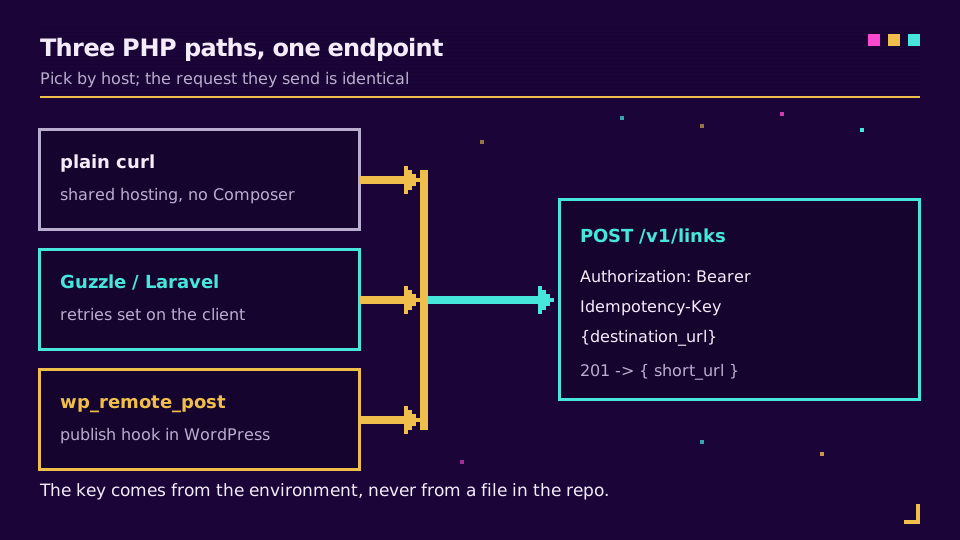
Laravel's Http client with retries
In a Laravel or Symfony app, the Laravel HTTP client (a wrapper over Guzzle) declares the retry policy once:
use Illuminate\Http\Client\ConnectionException;
use Illuminate\Http\Client\RequestException;
use Illuminate\Support\Facades\Http;

$response = Http::withToken(config('services.elido.key'))
    ->withHeaders(['Idempotency-Key' => hash('sha256', $destination)])
    ->timeout(10)
    ->retry(3, 1000, function (Throwable $e) {
        return $e instanceof ConnectionException
            || ($e instanceof RequestException
                && in_array($e->response->status(), [429, 500, 502, 503, 504], true));
    }, throw: false)
    ->post('https://api.elido.app/v1/links', ['destination_url' => $destination]);

$short = $response->successful() ? $response->json('short_url') : null;
The when callback is what keeps a 401 from being retried three times. Plain Guzzle behaves differently from curl: it throws ClientException on 4xx and ServerException on 5xx by default, so catch them or set http_errors to false. For a nightly import, Guzzle's Pool with 'concurrency' => 8 is the PHP answer to bounded parallelism. One PHP-specific trap: sleep() inside a web request holds a php-fpm worker the whole time, so retries belong in CLI scripts, queue jobs and WP-Cron.
WordPress: wp_remote_post on publish
WordPress has its own HTTP layer, wp_remote_post, which picks a transport and works on hosts where curl is disabled. Hook it to publishing and store the result as post meta:
add_action('publish_post', function (int $post_id): void {
    if (get_post_meta($post_id, '_elido_short_url', true)) {
        return; // already shortened
    }
    $response = wp_remote_post('https://api.elido.app/v1/links', [
        'timeout' => 10,
        'headers' => [
            'Authorization'   => 'Bearer ' . ELIDO_API_KEY,
            'Content-Type'    => 'application/json',
            'Idempotency-Key' => 'post-' . $post_id,
        ],
        'body' => wp_json_encode(['destination_url' => get_permalink($post_id)]),
    ]);
    if (is_wp_error($response) || wp_remote_retrieve_response_code($response) >= 300) {
        error_log('shorten failed for post ' . $post_id);
        return;
    }
    $link = json_decode(wp_remote_retrieve_body($response), true);
    update_post_meta($post_id, '_elido_short_url', $link['short_url']);
});
Define ELIDO_API_KEY in wp-config.php, not in a plugin file that ends up in a public repository and not in an options row every admin can read. The post-123 key is stable. Fire the hook twice and the second call gets the existing link back. If you'd rather not maintain a hook at all, the WordPress URL shortener guide compares this with the plugin and no-code routes.
Shorten a URL in Ruby
In Ruby, shortening a URL is one Net::HTTP.post from the standard library, so a script needs no gem:
require "json"
require "net/http"

response = Net::HTTP.post(
  URI("https://api.elido.app/v1/links"),
  { destination_url: "https://example.com/spring-sale" }.to_json,
  "Authorization" => "Bearer #{ENV.fetch('ELIDO_API_KEY')}",
  "Content-Type" => "application/json",
)
raise "shorten failed: #{response.code} #{response.body}" unless response.is_a?(Net::HTTPSuccess)

puts JSON.parse(response.body)["short_url"]
ENV.fetch rather than ENV[] fails on the spot when the key is missing, instead of sending Bearer and coming back with a confusing 401. The is_a?(Net::HTTPSuccess) check is the line people skip: Net::HTTP raises on dead sockets and timeouts and on nothing else. Net::HTTP.post also takes no timeout arguments, so for anything unattended drop to Net::HTTP.start with open_timeout and read_timeout.
Faraday with retry middleware
Inside a Rails app, Faraday gives you one connection object with the auth header attached, JSON both ways, and a declared retry policy. Since Faraday 2 the retry middleware lives in the separate faraday-retry gem.
# Gemfile: gem "faraday" and gem "faraday-retry"
require "digest"
require "faraday"
require "faraday/retry"

ELIDO = Faraday.new(url: "https://api.elido.app") do |f|
  f.request :json
  f.request :retry, max: 3, interval: 0.5, backoff_factor: 2,
                    methods: %i[post], # POST is not retried by default
                    retry_statuses: [429, 500, 502, 503, 504]
  f.response :json, content_type: /\bjson$/
  f.headers["Authorization"] = "Bearer #{ENV.fetch('ELIDO_API_KEY')}"
  f.options.timeout = 10
end

def shorten(destination)
  res = ELIDO.post("/v1/links", { destination_url: destination },
                   "Idempotency-Key" => Digest::SHA256.hexdigest(destination))
  raise "shorten failed: #{res.status} #{res.body}" unless res.success?

  res.body["short_url"]
end
The methods: %i[post] line is the one most Faraday snippets online leave out. Out of the box, faraday-retry retries only idempotent verbs (GET, PUT, DELETE, HEAD, OPTIONS), so a POST config without it never retries anything and nobody notices until a 503 drops a link. Opting POST in is safe here precisely because of the Idempotency-Key. The middleware also honours Retry-After on a 429. For a list, a Queue and eight threads works well even on CRuby, since the global lock is released during IO; in Rails, wrap shorten in an Active Job so a sleeping retry doesn't hold a Puma thread.
Shorten a URL in PowerShell
In PowerShell, shortening a URL is one Invoke-RestMethod call, built into Windows PowerShell 5.1 and PowerShell 7, and it hands back a parsed object rather than a JSON string:
$body = @{ destination_url = 'https://example.com/spring-sale' } | ConvertTo-Json

$link = Invoke-RestMethod -Method Post `
    -Uri 'https://api.elido.app/v1/links' `
    -Headers @{ Authorization = "Bearer $env:ELIDO_API_KEY" } `
    -ContentType 'application/json' `
    -Body $body `
    -TimeoutSec 10

$link.short_url
ConvertTo-Json isn't optional. Hand a hashtable straight to -Body and PowerShell form-encodes it, and you get a 400 that reads like a server problem. The surprise for people coming from other languages runs the opposite way: a 401 or 404 is a terminating error here, not a return value, so you catch an exception instead of checking a status code. PowerShell 7 adds -SkipHttpErrorCheck, which returns the response instead.
A vaulted key and a whole CSV column
A key typed into a .ps1 file lands in source control, in Get-History and in any transcript logging the estate has switched on. The SecretManagement module keeps it in a vault, so rotating a key means updating one entry instead of hunting through scripts on four servers. The common real task is a spreadsheet column rather than one URL:
$env:ELIDO_API_KEY = Get-Secret -Name ElidoApiKey -AsPlainText

function Get-ShortLink([string] $Destination) {
    $sha = [System.Security.Cryptography.SHA256]::Create()
    $key = [BitConverter]::ToString(
        $sha.ComputeHash([Text.Encoding]::UTF8.GetBytes($Destination))).Replace('-', '')
    $body = @{ destination_url = $Destination } | ConvertTo-Json
    for ($attempt = 0; $attempt -lt 3; $attempt++) {
        try {
            return (Invoke-RestMethod -Method Post -Uri 'https://api.elido.app/v1/links' `
                -Headers @{ Authorization = "Bearer $env:ELIDO_API_KEY"; 'Idempotency-Key' = $key } `
                -ContentType 'application/json' -Body $body -TimeoutSec 10).short_url
        }
        catch {
            $status = [int]$_.Exception.Response.StatusCode
            if ($status -ne 429 -and $status -lt 500) { throw }  # 400, 401, 403: give up
            Start-Sleep -Seconds ([math]::Pow(2, $attempt))
        }
    }
    throw "gave up after 3 attempts: $Destination"
}

$funcDef = ${function:Get-ShortLink}.ToString()
Import-Csv .\campaign-urls.csv | ForEach-Object -ThrottleLimit 8 -Parallel {
    ${function:Get-ShortLink} = $using:funcDef   # ship the function into the runspace
    $row = $_
    $short = try { Get-ShortLink $row.destination } catch { "ERROR: $($_.Exception.Message)" }
    [pscustomobject]@{ id = $row.id; destination = $row.destination; short_url = $short }
} | Export-Csv .\campaign-urls-short.csv -NoTypeInformation
-ThrottleLimit 8 keeps eight requests in flight whether the file has fifty rows or fifty thousand. Each -Parallel iteration runs in its own runspace, which is why the function travels in through $using:, and the whole construct needs PowerShell 7; on 5.1 a plain foreach is the honest answer for a few hundred rows. Errors land in the output column, and because the idempotency key comes from the destination, re-running the file after fixing three rows creates no duplicates. Spot-check a few rows with curl.exe -sI before anything gets printed. CSV already in a Google Sheet? The no-code bulk import does the same job.
What the SDKs Do Today
Official client libraries exist for four languages (TypeScript as @elido/sdk, Python, Go, Ruby) and follow the OpenAPI spec. Only the Go SDK is published so far, as the module github.com/elidoapp/elido-go (v0.1.0). The TypeScript, Python and Ruby SDKs haven't been published to npm, PyPI or RubyGems yet. That's why every example above uses each language's own HTTP client, which is also what we support for production integrations today. When the other libraries ship, the API and SDKs page will carry install instructions.
Once they're out, expect them to wrap the workspace-scoped routes, so you pass the workspace ID and a domain_id explicitly, and to differ in retry behaviour. The TypeScript client adds an Idempotency-Key to every POST, PUT or PATCH and retries 502, 503 and 504 with backoff, leaving 429 to you. The Ruby client also generates keys. It raises a typed rate-limit error carrying retry_after but never retries on its own. The Python and Go clients don't retry at all. Whichever you use, the retry policy from the error section still applies.
For a terminal rather than a codebase, the URL shortener CLI guide wraps the same create call in curl and a shell function, and the MCP server guide connects the API to Claude, Cursor or any other MCP-aware client.
Analytics Access
The analytics endpoints are read-only and live under /v1/workspaces/{id}/analytics/; the link analytics API guide lists every report, its parameters and its response shape. The most common queries:
GET .../clicks/recent?from=…&to=…- individual clicks, newest first, paged withnext_cursor. Useful for export pipelines.GET .../timeseries?from=…&to=…&interval=day- bucketed click counts;intervalishourorday, andtzsets the bucket time zone.GET .../breakdown/country?from=…&to=…- geographic breakdown.GET .../breakdown/referrer?from=…&to=…- referrer breakdown.
The other reports are summary, links/top, the remaining breakdowns (host, device, browser, destination) and the top lists (top-countries, top-regions, top-cities, top-referrers, top-destinations). from and to are YYYY-MM-DD dates and to is exclusive; add link_id to narrow any report to one link, and limit to size breakdowns and top lists.
The raw click feed is the biggest. A workspace with 10M clicks a month produces about 600MB of JSON a month of raw events, so page through it on a schedule rather than in one sitting.
Webhooks for Link Events
Webhooks are the inverse of polling: instead of asking the API what changed, you get link and domain events delivered to your endpoint. Configure them at /dashboard/webhooks with an endpoint URL, the events you want (link.created, link.updated, link.expired and others) and a signing secret.
A per-click click.created event is on the roadmap and not available yet, so click data comes from the analytics endpoints for now. Each delivery carries an X-Elido-Signature header (also sent as X-Webhook-Signature) with the value v1=<hex>: an HMAC-SHA256, keyed with your endpoint secret, over the X-Webhook-Timestamp value, a dot and the raw request body. Verify it before processing, or any caller can post to your endpoint and impersonate Elido; the guide to verifying webhook signatures has the check in several languages.
Delivery is at-least-once. Failed deliveries get three attempts in total, minutes apart. The webhooks vs polling comparison weighs the two integration patterns.
A Worked Example: Campaign Automation
The integration that motivates most API adoption looks like this. Your marketing automation creates a campaign in Customer.io or HubSpot, and a hook fires when it's published. Your handler creates the short link. Then it stores the link on the campaign and returns it for the email template. In Node:
export async function onCampaignPublished(campaign: Campaign) {
  const res = await fetch("https://api.elido.app/v1/links", {
    method: "POST",
    headers: {
      Authorization: `Bearer ${process.env.ELIDO_API_KEY}`,
      "Content-Type": "application/json",
      "Idempotency-Key": `campaign-${campaign.id}-link`,
    },
    body: JSON.stringify({
      destination_url: campaign.destinationUrl, // UTM parameters already in here
      tags: [
        "campaign",
        `campaign:${campaign.id}`,
        `batch:${campaign.batchId}`,
        campaign.channel,
      ],
    }),
    signal: AbortSignal.timeout(10_000),
  });
  if (!res.ok)
    throw new Error(`shorten failed: ${res.status} ${await res.text()}`);

  const link = await res.json();
  await campaignStore.update(campaign.id, {
    linkId: link.id,
    shortUrl: link.short_url,
  });
  return link;
}
The idempotency key comes from the campaign ID. When the publish hook fires twice (it will, since deliveries are at-least-once), the second call gets the same link back instead of a duplicate. The campaign: and batch: tags are your own join keys. Click reports tie back to the campaign through them. For end-to-end attribution with UTM templates and conversion forwarding, the UTM tracking guide walks through the full pipeline.
What Is Not in the API Yet
Some things teams ask about aren't available today:
- One-call link analytics. A single request returning every breakdown for one link doesn't exist; today you request clicks, country, referrer, device and timeseries separately, so run them in parallel from your own code.
- Webhook replay from the API. The dashboard shows delivery history and can replay; the API can't yet.
- Slug renames with a 301. The same goes for
utmandmetadatafields on create; until they exist, put UTM parameters in the destination and join keys in tags.
My rule of thumb: if it's in the OpenAPI spec, build on it. If it's only in a blog post, this one included, treat it as planned.
Related on the Blog
This hub sits in the features cluster next to smart links explained, which covers how the redirect engine resolves a link at the edge.
- URL shortener API: rate limits, retries and idempotency - hardening the integration for production traffic.
- URL shorteners for developers - what to check in an API before you build on it.
- Server-side conversion tracking via short links - extending the API into conversion forwarding.
- How to shorten a URL without code - the dashboard, phone and spreadsheet routes.
- Product surface:
/features/api-sdksand/solutions/developers.
Frequently asked questions
How do I shorten a URL with an API?
Send an authenticated POST with the long URL in a JSON body and read the short link from the response. On Elido that is POST https://api.elido.app/v1/links with the header Authorization: Bearer followed by your API key and the body {"destination_url": "..."}; the 201 response carries short_url. Every language in this guide is a wrapper around that one request.
How do I shorten a URL in Python?
Use requests.post against the links endpoint with your key in an Authorization: Bearer header, json={"destination_url": url} and a timeout, call raise_for_status(), then read response.json()["short_url"]. For thousands of URLs, switch to httpx.AsyncClient with an asyncio.Semaphore so only a handful of requests are in flight at once.
How do I shorten a URL in JavaScript or Node.js?
Call fetch from Node 18 or newer with method POST, the Bearer header and a JSON body, check res.ok before reading the body, and take short_url from the parsed JSON. Run it on a server or in a serverless route, never in browser code, because a key shipped to the page can be read by anyone who opens DevTools.
Do I need an SDK to use a URL shortener API?
No. Creating a link is one POST with two headers, and every language's standard HTTP client can send it: requests or httpx, fetch, net/http, java.net.http, HttpClient, curl, Net::HTTP and Invoke-RestMethod. An SDK pays off when you use many endpoints and want typed models, but the plain HTTP versions in this guide are what we support for production today.
How do I stop retries from creating duplicate short links?
Send an Idempotency-Key header and keep it the same across every retry of one logical request, for example a hash of the destination or your order ID. Elido stores the first successful response for 24 hours per workspace and replays it for a repeated key, so a retry after a lost response returns the original link instead of creating a second one.
How many short links can I create per second through the API?
Elido limits API traffic per workspace with a token bucket: 10 requests per second with a burst of 20 on Free, 30 with a burst of 60 on Pro, and 100 with a burst of 200 on Business. A 429 response carries Retry-After: 1. For big batches, POST /v1/links/bulk takes up to 100 links in one request.
Try Elido
Paste a URL, get a working short link
No signup. Link lives for 30 days. Sign up to keep it forever.
No signup needed. Sign up free for 50 links a month.