Shortening a URL in C# is one POST. Send the destination to the shortener's API with HttpClient, pass your API key as a Bearer token, and deserialise short_url from the response. PostAsJsonAsync handles the serialisation, so the call is a line long once the client is registered.
The endpoint shape, auth model, and free-tier limits assumed here are documented in the free URL shortener API overview. This is the C# entry in a series that also covers Python, JavaScript, Go, and Java.
The Fastest Way: PostAsJsonAsync
using System.Net.Http.Json;

record LinkRequest(string destination_url);
record LinkResponse(string id, string short_url);

var http = new HttpClient { BaseAddress = new Uri("https://api.elido.app") };
http.DefaultRequestHeaders.Authorization =
    new("Bearer", Environment.GetEnvironmentVariable("ELIDO_API_KEY"));
http.Timeout = TimeSpan.FromSeconds(10);

var response = await http.PostAsJsonAsync("/v1/links",
    new LinkRequest("https://example.com/spring-sale?utm_source=newsletter"));

response.EnsureSuccessStatusCode();

var link = await response.Content.ReadFromJsonAsync<LinkResponse>();
Console.WriteLine(link!.short_url); // https://s.elido.me/ab12cd
The record property names match the API's snake_case on purpose, which keeps the sample dependency-free. In a real project add [JsonPropertyName("short_url")] and give the property a C# name, or set PropertyNamingPolicy = JsonNamingPolicy.SnakeCaseLower on the options once.
EnsureSuccessStatusCode is the line that matters. Without it a 401 completes happily, ReadFromJsonAsync returns a record with nulls in it, and the failure surfaces three layers away as a NullReferenceException on something unrelated.
Register the Client Instead of Newing It Up
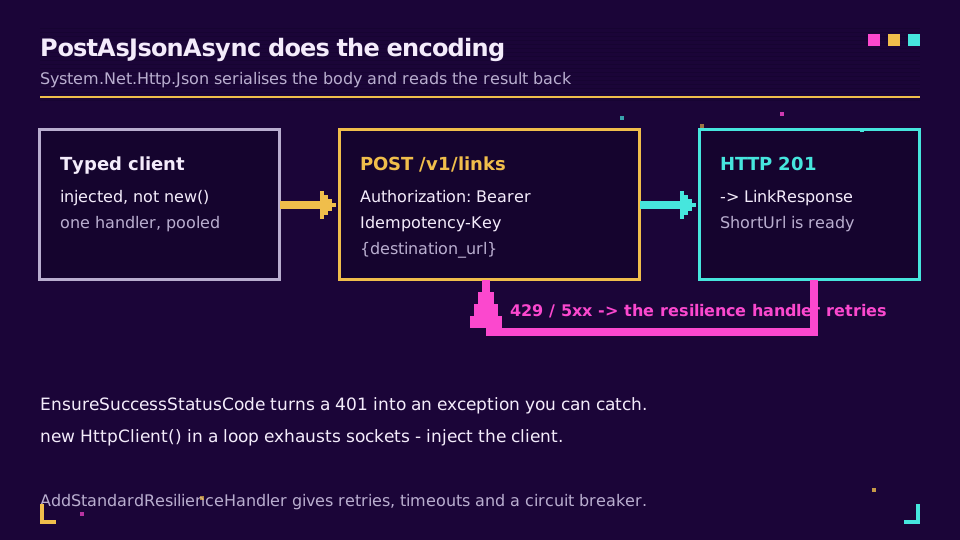
The snippet above is fine in a console spike and wrong in a service. A HttpClient created per call opens a fresh connection pool each time, and disposing it leaves the socket in TIME_WAIT; do that in a loop and you run out of ports. IHttpClientFactory pools the handlers and rotates DNS properly.
builder.Services.AddHttpClient<ElidoClient>(client =>
    {
        client.BaseAddress = new Uri("https://api.elido.app");
        client.DefaultRequestHeaders.Authorization =
            new("Bearer", builder.Configuration["Elido:ApiKey"]);
        client.Timeout = TimeSpan.FromSeconds(10);
    })
    .AddStandardResilienceHandler();   // retries, timeout, circuit breaker
AddStandardResilienceHandler comes from Microsoft.Extensions.Http.Resilience and gives you jittered retry on transient failures, a total-request timeout, and a circuit breaker without writing a policy. On an older project, Polly's AddTransientHttpErrorPolicy covers the same ground.
The typed client itself stays small:
public sealed class ElidoClient(HttpClient http)
{
    public async Task<string> ShortenAsync(string destination, CancellationToken ct = default)
    {
        var request = new HttpRequestMessage(HttpMethod.Post, "/v1/links")
        {
            Content = JsonContent.Create(new LinkRequest(destination)),
        };

        // stable across retries and across re-runs of the same batch
        request.Headers.Add("Idempotency-Key",
            Convert.ToHexString(SHA256.HashData(Encoding.UTF8.GetBytes(destination))));

        using var response = await http.SendAsync(request, ct);
        response.EnsureSuccessStatusCode();

        var link = await response.Content.ReadFromJsonAsync<LinkResponse>(ct);
        return link!.short_url;
    }
}
That header is the reason the resilience handler is safe to switch on. Without it, a retry after a lost response creates a second link for the same destination; with it, the API returns the original. The rate limits and idempotency deep-dive explains why deriving the key from the destination beats a fresh GUID for batch work.
Want to try it against a live endpoint? Create a key on the free plan, put it in user secrets as Elido:ApiKey, and the registration above works unchanged.
Read the Error Body Instead of Guessing
EnsureSuccessStatusCode is the right default and it throws away the most useful part of a failed call. The exception message carries the status code and nothing else, so a 422 tells you the request was rejected without telling you which field the API objected to.
For anything you will have to debug at three in the morning, read the body first:
using var response = await http.SendAsync(request, ct);

if (!response.IsSuccessStatusCode)
{
    var problem = await response.Content.ReadAsStringAsync(ct);
    logger.LogWarning("shorten failed {Status}: {Body}", (int)response.StatusCode, problem);

    throw response.StatusCode switch
    {
        HttpStatusCode.Unauthorized      => new InvalidOperationException("API key rejected"),
        HttpStatusCode.TooManyRequests   => new HttpRequestException("rate limited"),
        _                                => new HttpRequestException($"shorten failed: {problem}"),
    };
}
Two things fall out of that. The log line names the field on a validation error rather than leaving you to reconstruct the request, and the switch separates the failures worth retrying from the ones that will never succeed. A 401 retried three times is three wasted calls and a slower failure.
The standard resilience handler already treats 5xx and 429 as transient and leaves 4xx alone, so the two layers agree: it retries what is worth retrying, and your code explains what is left.
Bulk Without Blowing the Rate Limit
Task.WhenAll over a list of 3,000 URLs starts 3,000 requests. Parallel.ForEachAsync caps the number in flight and reads better than a hand-rolled semaphore:
var results = new ConcurrentDictionary<string, string>();

await Parallel.ForEachAsync(
    urls,
    new ParallelOptions { MaxDegreeOfParallelism = 8 },
    async (url, ct) =>
    {
        try
        {
            results[url] = await client.ShortenAsync(url, ct);
        }
        catch (Exception ex)
        {
            results[url] = $"ERROR: {ex.Message}"; // one bad URL must not sink the batch
        }
    });
Eight is a starting point, not a constant. Watch for 429s and the Retry-After header the API sends, and tune down rather than up. Keying by the original URL means a half-finished run tells you exactly which rows to redo.
Where the Code Should Live
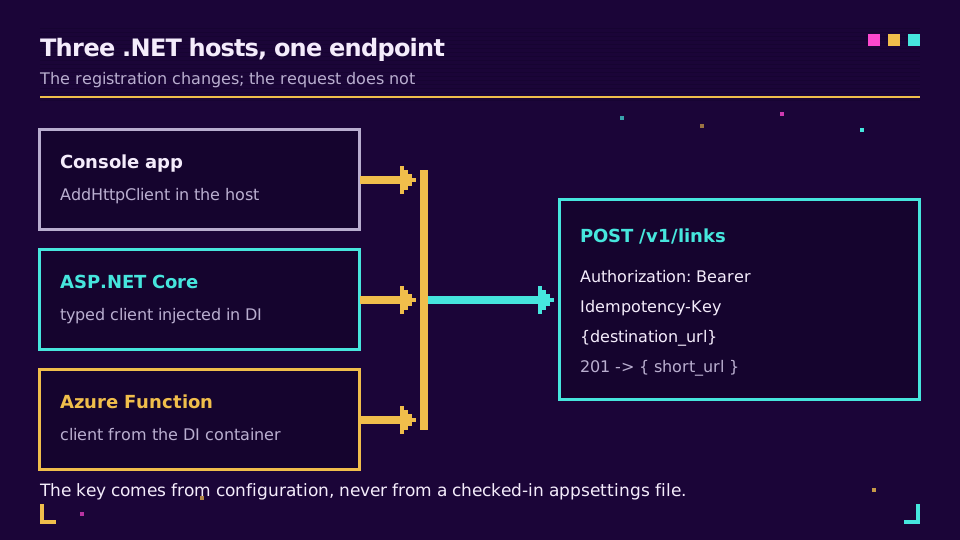
A console tool that shortens a CSV, a hosted service that creates a link when an order ships, an Azure Function on a queue trigger: same typed client, three different registrations. The one thing that must not vary is where the key comes from. User secrets in development, environment variables or a vault in production, IOptions in between, and nothing at all in appsettings.json that lands in the repository.
Once links are being created from a service, what else the API exposes to developers becomes the interesting part, and webhooks for link events beat polling for click and scan data. If you would rather not maintain the client at all, the API and SDKs page lists the generated ones.
Read the Cornerstone Series
This sits in the engineering cluster. Start with the free URL shortener API guide for the endpoint shape and auth, then rate limits and idempotency for load behaviour. The live reference is the API docs.
Related on the Blog
Frequently asked questions
How do I shorten a URL in C#?
POST the long URL to a shortener's API with HttpClient, using PostAsJsonAsync so the body is serialised for you, then deserialise the response into a small record and read ShortUrl. With the Authorization header set on the client, the call itself is a single line.
Why should I not use new HttpClient() in a loop?
Each instance opens its own connection pool, and disposing one leaves the socket in TIME_WAIT, so a loop can exhaust available ports under load. Register the client with IHttpClientFactory and inject it, which pools the handlers and rotates DNS correctly.
Does HttpClient throw on a 401 or 500 response?
Not by default. The task completes successfully and IsSuccessStatusCode is false, so a failed call looks like a working one unless you check. Call EnsureSuccessStatusCode to turn it into an HttpRequestException, or test the status yourself before reading the body.
How do I add retries to HttpClient in .NET?
Add the standard resilience handler from Microsoft.Extensions.Http.Resilience to the client registration. It brings retries with jittered backoff, a total request timeout, and a circuit breaker without any per-call code. On older projects, Polly's AddTransientHttpErrorPolicy does the same job.
How do I shorten many URLs at once in C#?
Use Parallel.ForEachAsync with MaxDegreeOfParallelism set to about eight, which caps how many requests are in flight regardless of list length. Collect into a ConcurrentDictionary keyed by the original URL so a partial failure stays visible and the batch is re-runnable.
Where should the API key live in a .NET app?
In configuration that is not checked in: user secrets in development, environment variables or a key vault in production. Bind it with IOptions and read it during client registration, so a rotated key means a config change rather than a rebuild.
Try Elido
Paste a URL, get a working short link
No signup. Link lives for 30 days. Sign up to keep it forever.
Free, no signup required · 2 per day