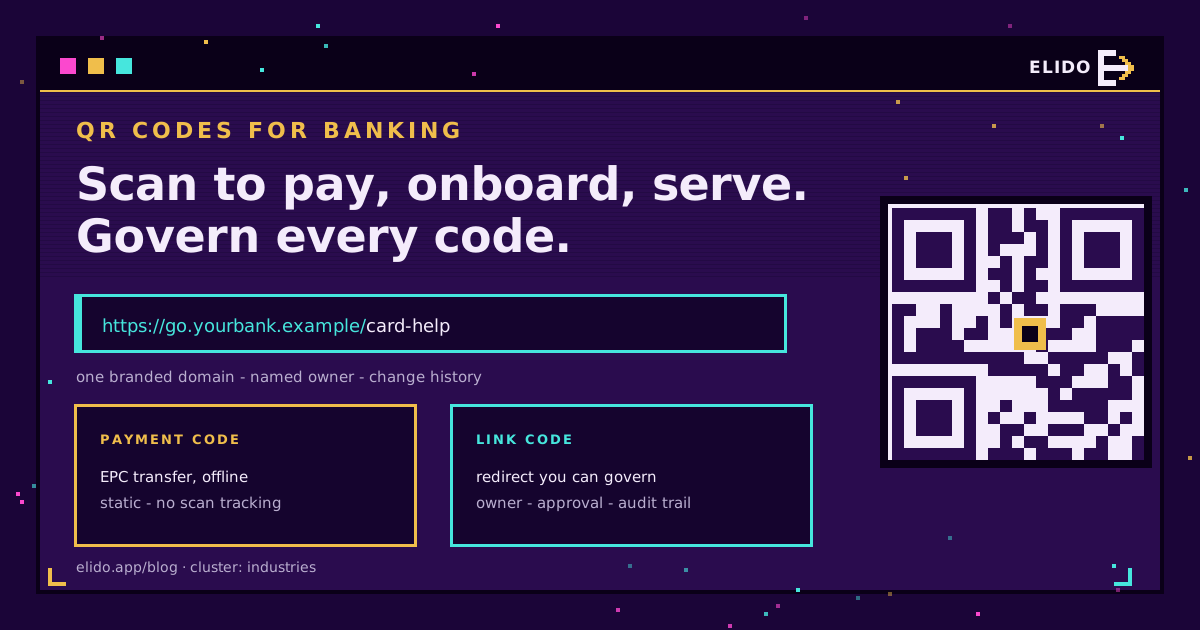
QR codes for banking fall into two very different kinds. A payment code carries a SEPA transfer inside the pattern, and the banking app reads it offline. Every other code a bank prints, on a branch door, an ATM, a statement or an app-install flyer, is just a link in a regulated customer communication. The first kind needs correct formatting. The second kind needs governance. Who owns it? Who can change it? And what proves where it pointed last March?
Here is where most "QR codes in finance" advice goes soft. The popular guides cover the use cases well, and the US Bitly post is a fair example, but they say little about audit trails, change control or EU rules. I work on the compliance side, so that is the part I'll spend the time on, alongside the practical use cases for banks, fintechs and insurers.
If your team is new to the mechanics, what a QR code is and dynamic versus static QR codes cover the basics. For the wider link-layer view in a regulated product, URL shorteners for fintech is the companion piece.
Where QR Codes Earn Their Place in Banking
A QR code is worth printing when it removes typing from a moment where the customer is standing in front of something physical. Banking has plenty of those moments, but only some deserve a code.
Payments and invoices
The strongest case is the payment code. Think of an invoice or a donation poster. The EPC QR code lets a customer scan, see the transfer prefilled in their banking app, and confirm. Nothing is shortened or tracked here, by design. Keep it as its own code and measure the surrounding page with a separate link.
App onboarding and downloads
A code on a branch leaflet or a card carrier that opens the right app store listing is the second-best use. One code can route iPhone and Android visitors to the correct store, which QR codes for app downloads walks through. Keep the code pointed at the store or at your own domain, not at a third-party onboarding vendor's raw URL, so you can swap vendors without reprinting.
Branch and ATM service links
Appointment booking, "find a branch", and "report a problem with this machine" are natural fits. They are also the most tampered placements. An ATM-side sticker sits in public and nobody watches it. More on that below.
Statements and card activation
A code on a paper statement can open a secure-message inbox or a help page. Keep account numbers, names and tokens out of the URL: they end up in server logs and referrer headers, and that is a data-minimisation problem under the GDPR before it is anything else. For card activation, my rule is simple. The code may open the bank's app or an activation help page. It should never open a page that asks for the full card number and PIN, because that is exactly what a fake one will ask for too, and customers can no longer tell the two apart.
Insurance claims and servicing
Insurers use codes on policy documents and claim letters to open a claim form or a document upload page. The same governance applies: the policy letter will sit in a drawer for years, so the destination must stay reachable and under your control for as long as the letter is.
Payment Codes Versus Link Codes
Treat these as two products with two risk profiles. The diagram shows the difference at a glance.
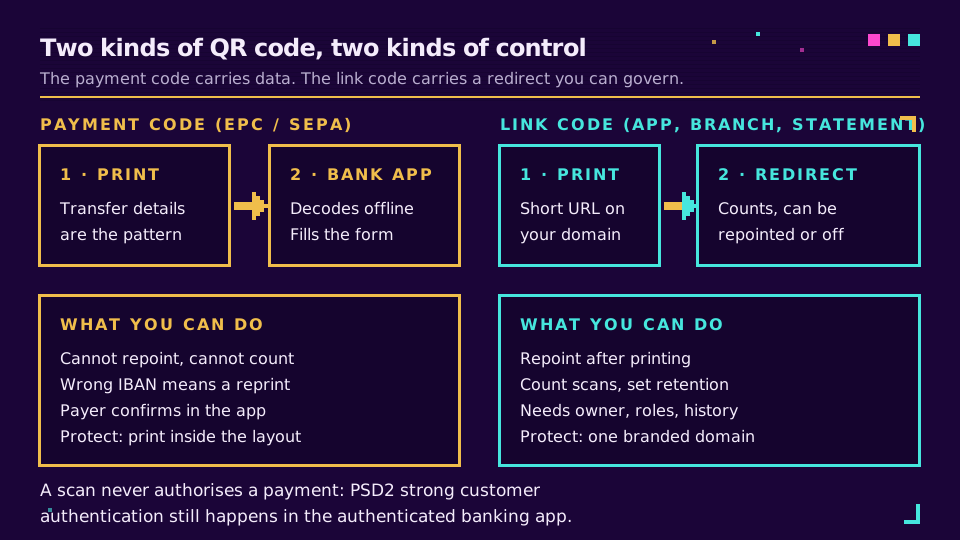
A payment code is static and offline. You cannot repoint it, you cannot count scans, and a wrong IBAN means a reprint. What protects the payer is the confirmation screen. Euro-area banks must now offer a Verification of Payee check under the EU Instant Payments Regulation (Regulation (EU) 2024/886, Article 5c), which compares the payee name with the IBAN before the payer authorises the transfer. The European Commission's implementation Q&A sets the euro-area deadline for the sending side at 9 October 2025. That helps against the sticker swap described below, but only if the payer reads the result.
A link code is the opposite. It is an ordinary URL, so a redirect sits between the scan and the destination. That redirect is the control point. It can be repointed when a page moves, disabled when something goes wrong, and counted across every branch and mailing that carries the code. It is also a liability if nobody owns it.
The Risks Specific to Banks
Quishing is phishing through a QR code. The FTC has documented how scammers hide harmful links in QR codes, and our quishing guide covers the mechanics. For a bank, three variants matter.
- Overlay stickers. A fake code pasted over a real one on an ATM, a branch window or a printed invoice. The legitimate code is untouched underneath.
- Lookalike domains. A code in an email or text that opens
yourbank-secure.exampleinstead of your domain. - Payment redirection. A static payment code on paper, covered by one with another IBAN.
The uncomfortable part is that a dynamic code does not stop an overlay. The attacker's code is theirs, not yours, and you cannot repoint it. What you can do is make overlays easier to notice and cheaper to recover from:
- Print the destination domain in plain text beside every code, so a mismatch is visible.
- Use tamper-evident labels for ATM and branch placements, and log inspections the way you log cash-machine checks.
- Use one branded domain for all customer-facing codes, so customers learn it. Custom domains for short links explains why this matters more than any other single setting.
- Tell customers in plain words what a legitimate scan never asks for: a PIN, a full card number, a one-time passcode.
The pattern to avoid is the one where every leaflet, poster and statement insert uses a different generic short domain. Nobody, including branch staff, can then say which one is real, and customers cannot learn what a genuine code looks like. Consolidating onto one domain is an afternoon of work and does more for customer safety than an awareness poster.
Governing Dynamic Codes
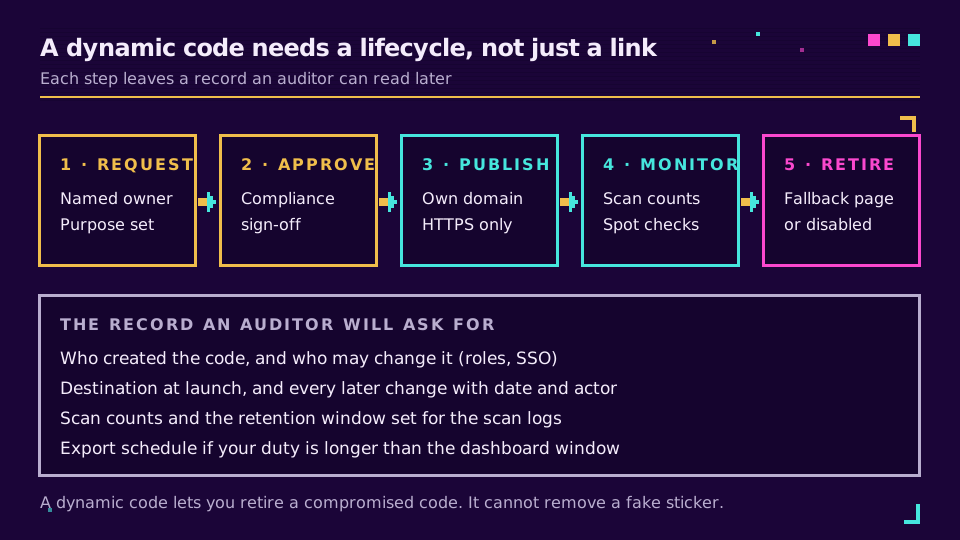
This is the section most finance QR guides skip. A dynamic code is a redirect you can edit after printing, which is exactly why it needs change control. The question an auditor or an incident reviewer will ask is not "did you use QR codes" but "who could change where this one pointed, and can you show what it pointed to on a given date?"
Four controls answer that.
Ownership. Every code has a named team and a named person, recorded when it is created. Shared logins defeat this. Single sign-on with directory provisioning ends a leaver's ability to repoint a branch code the day they go. SCIM and SSO for marketing tools covers the provisioning model.
Role separation. Not everyone who can create a code should be able to change the destination of a regulated one. Elido has Owner, Admin, Editor and Viewer roles, and custom roles on the Business plan, so you can give a campaign team edit rights on promotional links and keep the service-point codes with a smaller group.
A change record. You need the destination at launch, every later change, who made it and when. Elido keeps per-link history in the dashboard, and a workspace audit log records member, API key and settings changes, with CSV export and an API endpoint. Note the limit: paid plans keep 90 days of audit history and Free keeps 30, so a bank with a longer retention duty should export on a schedule rather than rely on the dashboard. The audit log help page lists what is and isn't recorded.
Retirement. When a campaign ends, the code does not vanish from the paper. Decide at creation time whether it redirects to a safe fallback page or is disabled. Write it down.
If you want these controls on codes you already print, you can create a test link on the free plan and check its change history before you commit a print run. The QR code features and custom domains pages show what's available.
What the Rules Actually Say
I'll keep this to what I can source. Plenty of vendor content blurs "recommended" and "required".
PSD2. Article 97 requires strong customer authentication when a payer accesses a payment account online, initiates an electronic payment, or does something remotely that carries a fraud risk. The EBA's interactive rulebook has the text. For QR codes the consequence is modest. The scan fills in a form; authentication still happens in the app. A design where scanning alone triggers a payment would be the thing to question.
GDPR. Two principles bite on scan data. Storage limitation (Article 5(1)(e)) means personal data is kept no longer than necessary, and security of processing (Article 32) covers the redirect and its logs. The regulation gives no number of days for scan logs; click data retention explains how to set and document one, and QR codes and GDPR covers what a scan actually collects. The EDPB's SME guide is a readable starting point for the accountability side.
DORA. The Digital Operational Resilience Act (Regulation (EU) 2022/2554) has applied to EU financial entities since January 2025 and makes them manage ICT third-party risk, including a register of their ICT service contracts. Whether a QR and redirect vendor falls in scope is a question for your compliance and procurement teams. Ask it before the contract is signed rather than after, and start with the EBA's DORA page.
What I could not find a primary source for is any rule that mandates QR codes, forbids them, or sets a retention period specifically for QR scan logs. Retention for marketing and servicing communications comes from your own record-keeping obligations, not from a QR-specific rule. If a vendor tells you otherwise, ask for the article number.
A Rollout Checklist
Before a bank, fintech or insurer prints its next batch:
- One branded domain, with HTTPS only, for every customer-facing code.
- Payment codes kept separate from link codes, and tested in several banking apps.
- No personal data, account numbers or tokens in any URL.
- Named owner and role-based edit rights for each regulated code.
- A written retirement rule, and a retention window for scan logs.
- A scheduled export of the change record if your retention duty exceeds the dashboard window.
- Tamper-evident placement and an inspection log for ATM and branch codes.
- A customer message stating what a legitimate scan will never ask for.
Read the Cornerstone Series
This post sits in the industries cluster. The cornerstone for printed workflows is a QR code campaign from scratch, and the compliance solutions page covers the regulated-industry setup. Pricing for the plans mentioned above is on the pricing page.
Related on the Blog
- EPC QR code: the SEPA payment QR standard explained
- Are QR codes safe? Quishing and how to stay protected
- URL shorteners for fintech: KYC, compliance, geo-blocking
- QR codes and GDPR: what a scan collects and what you owe
- Click data retention: how long to keep analytics logs
- Event ticket QR code fraud: how to prevent screenshots
Frequently asked questions
How are QR codes used in banking?
Banks and insurers use them in four places: payments (a code that prefills a transfer in the banking app), onboarding (a code that opens the app store listing or an account-opening flow), service points (branch doors, ATMs and statements linking to help, booking or secure messages), and servicing (claims and policy self-service). Only the payment code carries data inside the pattern; the rest are ordinary links, which is why they need link governance.
Are QR codes safe for banking?
Scanning is safe, and the code itself cannot move money. The risk is the destination and the physical placement. A sticker pasted over a legitimate code, or a code that leads to a lookalike domain, can harvest credentials. Banks reduce that with a recognisable domain they own, tamper-evident placement, regular inspection of printed codes, and a clear customer message that the bank never asks for a PIN or full card number after a scan.
Can banks use QR codes for payments?
Yes. In the euro area, the EPC QR code (often called GiroCode) encodes a SEPA credit transfer so a banking app can prefill the form. The payer still confirms the payment in an authenticated app. Card-scheme and instant-payment QR formats exist in other markets, and a payment link from a processor is a separate case: that is a normal URL with a hosted checkout behind it.
Can a bank track QR code scans?
A link QR code can be tracked, because the scan opens a URL that a redirect counts. An EPC payment QR code cannot, because the phone decodes it offline. Tracking scans of customer-facing codes still falls under the GDPR, so use aggregate counts where you can, keep identifiers out of the URL, and set a written retention window for the scan logs.
How do banks protect customers from fake QR codes?
They combine physical and digital controls: print codes inside the document or on tamper-evident labels, show the destination domain in plain text beside the code, inspect branch and ATM codes on a schedule, and keep every code on one branded domain customers learn to recognise. They also tell customers what a legitimate scan will never ask for, which is the instruction that stops most credential theft.
Do QR code payments need strong customer authentication under PSD2?
Yes, where the payer initiates an electronic payment. PSD2 Article 97 requires strong customer authentication when a payer accesses an account online, initiates an electronic payment, or takes a remote action that carries a risk of fraud. A QR code only fills in the form; the authentication still happens in the banking app, which is why the scan alone never authorises a payment.
Try Elido
Paste a URL, get a working short link
No signup. Link lives for 30 days. Sign up to keep it forever.
Free, no signup required · 2 per day