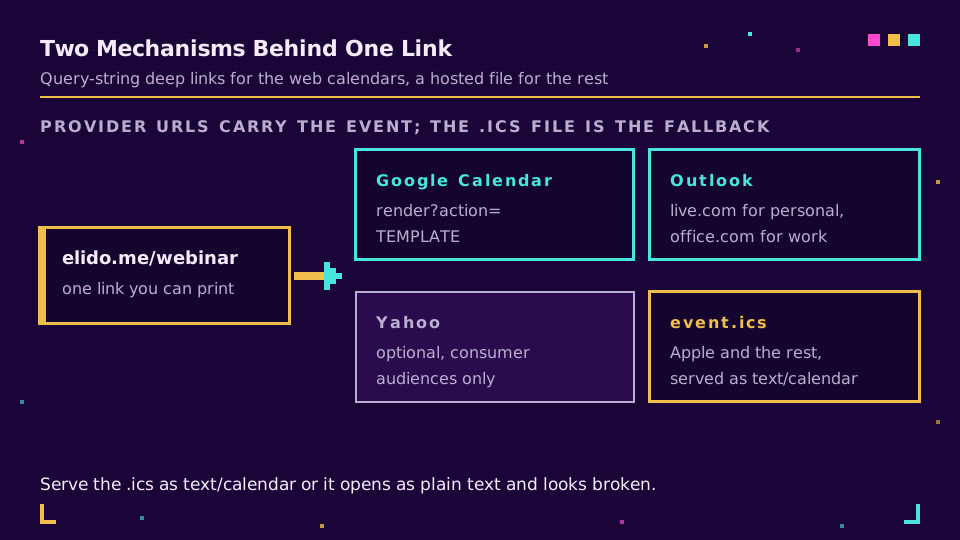
An add to calendar link is one of two things. Either a provider URL that carries the whole event in its query string, so clicking it opens a pre-filled event in Google Calendar, Outlook, or Yahoo; or a hosted .ics file, the standard calendar format that Apple Calendar and practically every desktop client can import. There is no third mechanism, and no single URL that covers everyone.
That is the part most guides skip past, and it decides how you build the thing. A webinar confirmation email aimed at a mixed B2B audience needs at least a Google link, an Outlook link, and an .ics; a consumer event might get away with one. This guide covers both mechanisms, the timezone format that causes most of the reported bugs, and how to keep the whole thing behind one link you can print, shorten, and measure. For the wider event-links picture, URL shorteners for events covers badges, signage, and follow-up.
Two Mechanisms, Not One
A provider URL is just a deep link into a web calendar's "new event" screen with the fields filled from the query string. Nothing is stored anywhere until the recipient saves it, which means the link works forever, costs nothing to host, and can be edited by the person before they commit.
A .ics file is the interchange format, standardised as iCalendar in RFC 5545. It is a plain-text file describing the event, which a calendar client parses and offers to import. It works where provider links do not, notably Apple Calendar and most corporate desktop clients, and it is the only one of the two that can carry things like a recurrence rule or an organiser address cleanly.
The Google Calendar Link
The template URL takes the event as parameters. Google documents the underlying feature as creating an event, and the link form is stable enough that the whole industry builds on it:
https://calendar.google.com/calendar/render?action=TEMPLATE
  &text=Product+webinar
  &dates=20260910T140000Z/20260910T150000Z
  &details=Join+us+for+the+spring+release+walkthrough
  &location=https://example.com/webinar
  &ctz=Europe/Berlin
Four things matter here. dates is basic ISO 8601 with the punctuation stripped, start and end joined by a slash, and the trailing Z means UTC. ctz names a timezone if you would rather the event open in local time. details accepts a limited amount of text and some clients truncate it, so put the essentials first. And every value must be URL-encoded, which is where hand-built links usually break: an ampersand in your event title will silently truncate everything after it.
outlook, office 365, and yahoo
Outlook has two different hosts, and this catches people constantly. Personal accounts live on outlook.live.com, work and school accounts on outlook.office.com, and a link built for one shows a sign-in wall to users of the other. If your audience is mixed, offer both or fall back to the .ics file, which does not care.
Yahoo takes a similar deep-link format with its own parameter names. It is worth including for consumer audiences and safe to skip for B2B.
The .ics File, and the One Header That Breaks It
The file itself is short - shorter than people expect. A minimum viable event is roughly ten lines: the calendar wrapper, one VEVENT, a UID, a timestamp, start and end, and a summary.
Serve it as text/calendar. A .ics served as text/plain opens in a browser tab as raw text, which looks completely broken to a non-technical recipient, and it is the single most common hosting mistake with this format. The filename should end in .ics too, because some clients sniff the extension rather than the header.
Two more details worth getting right the first time. Timestamps in UTC with a trailing Z avoid every daylight-saving argument, and if you must use local time, include the VTIMEZONE block rather than hoping. And a stable UID per event means a later version of the same file updates the existing entry instead of creating a duplicate, which matters the day you have to move the webinar by an hour.
One Link You Can Print, Shorten, and Measure
This is where the two mechanisms stop being a technical detail and start being a campaign problem. Three provider links plus a file download is four URLs, and four URLs cannot go on a poster, into a printed invite, or behind a QR code.
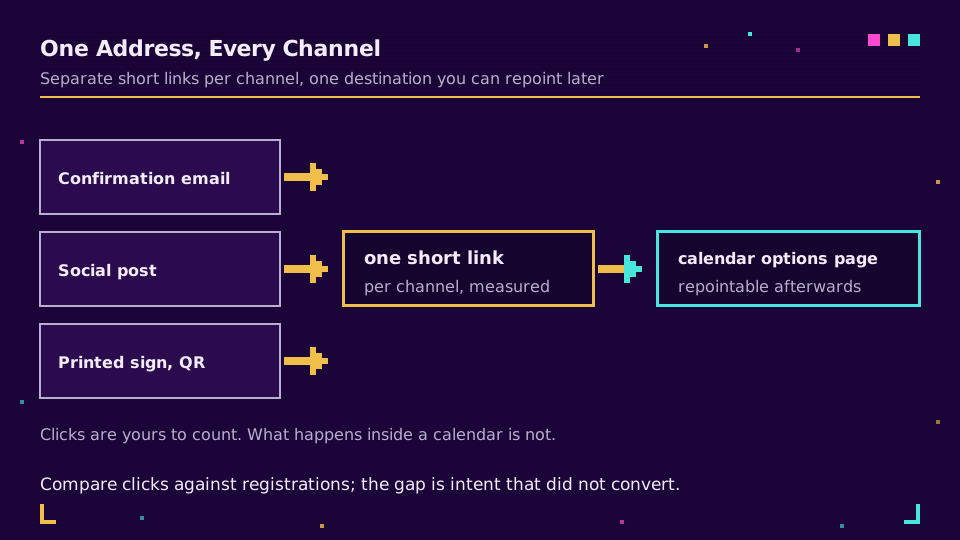
The fix is a single short link pointing at one small page that offers the options. That page can be a section of your event page rather than anything new. What you gain is one address that survives every channel: shortened for the email, printed on the badge, turned into a QR code for the venue signage, and repointable afterwards to the recording when the event is over. That last property is the one people appreciate later, because printed material outlives the event it advertised.
Measurement follows the same shape. Give the email, the social post, and the printed sign their own short links to the same page and the click counts tell you which channel actually drove intent, in the same table as the rest of your campaigns. You cannot see what happens inside someone's calendar, so clicks and registrations are the two honest numbers here. Start a workspace and put the links on your own domain if you want them counted alongside everything else, and read them in link analytics.
Test It Like a Recipient, Not Like a Builder
Four checks catch nearly everything, and all of them take a minute:
- Open the link on a phone and on a desktop, in both a personal and a work account if you have one, because the Outlook host split shows up nowhere else.
- Check the resulting event in a timezone that is not yours. A colleague two zones away is the fastest test; a manually changed system clock also works.
- Confirm the
.icsprompts the calendar app rather than opening as text, which tells you theContent-Typeis right. - Read the event as it appears after saving. Truncated descriptions and a location field holding an unclickable URL are both common and both fixable before the send.
The one I have been burned by is the timezone. A webinar that displays correctly for the person who built the link and an hour off for half the audience is not obvious from the sending side, because your own calendar shows exactly what you intended. Ask someone in another country to look before you send it to two thousand people.
Read the Cornerstone Series
This post sits in the tutorials cluster. For the full event build, URL shorteners for events covers registration through follow-up, and a QR code campaign from scratch covers the printed half.
Related on the Blog
- URL shorteners for events: links, badges, follow-up
- Track email link clicks: a marketer's how-to guide
- How to create a QR code: static, dynamic, trackable
- How to make a clickable link in email, social, HTML
- Link expiration and self-destructing links
- Short link analytics: what to measure and what to ignore
Frequently asked questions
How do I create an add to calendar link?
Two ways, and most events need both. For Google, Outlook, and Yahoo you build a provider URL with the event encoded in its query string, so one click opens a pre-filled event in that person's calendar. For Apple Calendar and everything else, you host an .ics file, which is the standard calendar format any client can import. Neither one covers every recipient on its own.
Is there a single link that works for every calendar?
Not a provider link, no, because each provider has its own URL format and Apple has none at all. The closest thing is one short link pointing at a small page that offers the three or four options, which also gives you a single URL to print, shorten, and measure. A hosted .ics file is the next best single answer, since most desktop clients import it.
What format do the dates use in a Google Calendar link?
Basic ISO 8601 in UTC, with no punctuation, joined by a slash: 20260910T140000Z/20260910T150000Z. Use the ctz parameter if you want the event to open in a named timezone instead. Getting this wrong is the single most common reason an add to calendar link creates an event an hour off, or on the wrong day for recipients across the date line.
How do I serve an .ics file so it opens rather than downloads as text?
Serve it with the Content-Type text/calendar and a filename ending in .ics. Files served as text/plain open in a browser tab as gibberish instead of prompting the calendar app, which is the most common hosting mistake. The format itself is defined by RFC 5545, and the minimum viable file is about ten lines.
Can I track how many people added the event?
You can track how many people clicked, which is the closest available proxy. The click on your short link is measurable; what happens inside someone's calendar afterwards is not visible to you at all. Give each channel its own link, compare click counts to registrations, and treat the gap as intent that did not convert rather than as a broken link.
Should the calendar link go in the confirmation email or the reminder?
Both, and they can be the same link. The confirmation is when intent is highest and the reminder is when people who ignored the first one act, so repeating it costs nothing. If you shorten it once and reuse that link in every message, you also get a single number for the whole campaign instead of one per send.
Try Elido
Paste a URL, get a working short link
No signup. Link lives for 30 days. Sign up to keep it forever.
Free, no signup required · 2 per day