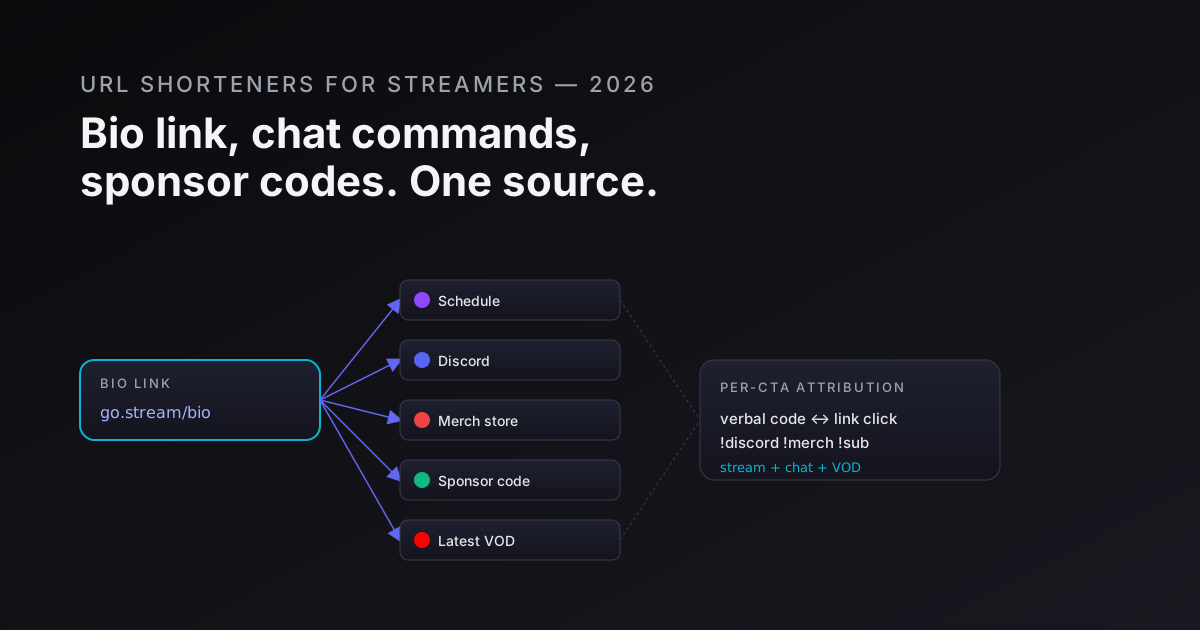
Streaming is a multi-channel business that happens to look like a single screen. Your audience lives on Twitch, YouTube, Kick, Twitter/X, TikTok, and Discord simultaneously. Your revenue comes from sponsors, merch, donations, subs, and ad revenue - each with a different attribution model. Your link layer connects all of it, and in almost every stream setup I've looked at, the link layer is the weakest part of the stack.
This post is the link architecture that actually works for a full-time streamer, a gaming content creator, or an esports org managing 10 creators. The principles apply whether you're doing 100 concurrent viewers or 100,000.
For the bio-link page mechanics in detail, build a link-in-bio page in 5 minutes covers the technical setup. This post is the broader streaming-lifecycle picture.
The five link surfaces in a streaming operation
Every streamer has the same five surfaces. Each has different requirements for the underlying link.
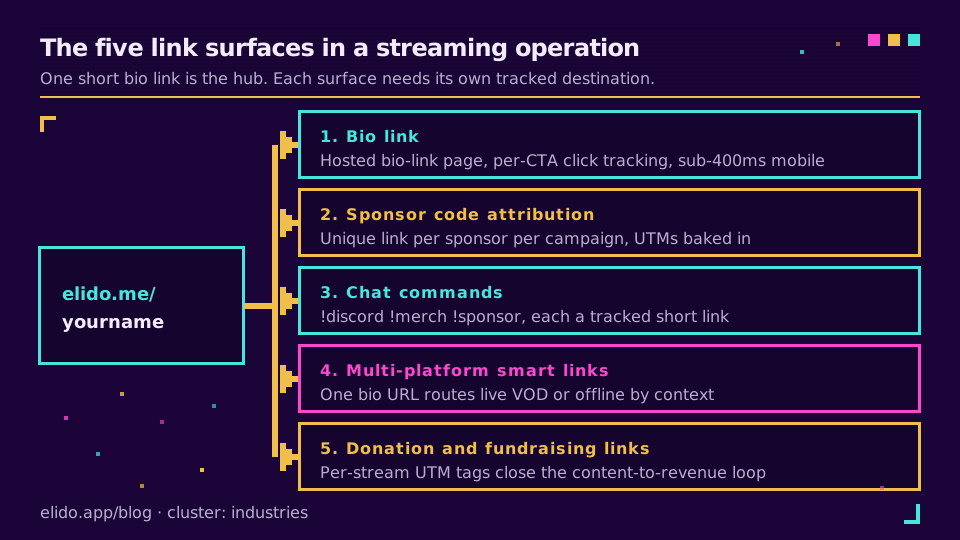
1. The bio link
Twitch gives you one URL field in your panel. YouTube gives you one website field. Kick gives you one. That single URL has to resolve to everything - your Discord invite, your current sponsor's offer, your merch store, your streaming schedule, your Patreon, your latest VOD, and your donation page.
What matters: a bio-link page that's actually yours (not a Linktree subdomain), loads in under 400ms on mobile, and tracks per-CTA clicks so you know which destinations your audience actually cares about.
Anti-pattern: pointing the bio link directly at one destination - say, your Twitch channel - and leaving everything else undiscoverable. You're leaving money on the table every stream.
The clean play: one short link (elido.me/yourname) that resolves to a bio-link page you control, with per-button click analytics. When a sponsor wants proof that their placement drove traffic, you export the panel-click numbers for their button. The smart links explained post covers how smart routing underpins this.
2. Sponsor code attribution
The standard sponsor read goes something like: "This stream is sponsored by NordVPN. Use code STREAM at checkout for 68% off." The viewer hears the code. Some of them remember it. Most of them don't.
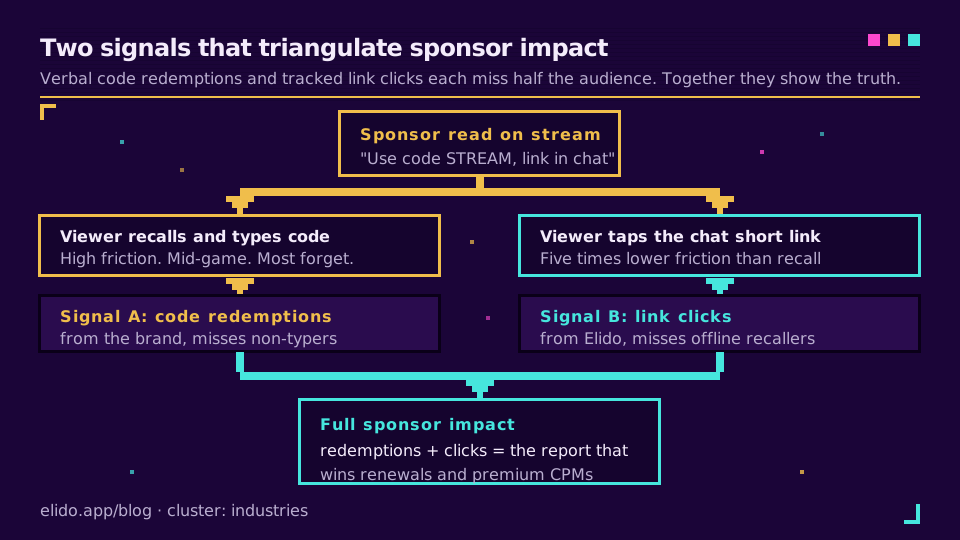
What matters: pairing every verbal sponsor code with a short link that goes into chat and the video description simultaneously. The link does two things: it catches the viewers who won't type a coupon code manually, and it lets you cross-reference link conversions against verbal-code redemptions to get the real sponsor impact number.
If your sponsor is tracking code redemptions and you're tracking link clicks, you have two signals that triangulate around the truth. Neither is complete alone. Both together give you a conversion funnel that sponsors pay a premium for, because almost no streamers provide it.
Anti-pattern: one generic short link (go.elido.me/sponsor) reused for every sponsor across every stream. Sponsors can't attribute their spend, you can't compare sponsor performance, and the sponsor who spent three times more than another has no way to prove it drove three times more traffic.
The right structure: a unique short link per sponsor per campaign, with UTM parameters baked in. s/nordvpn-may and s/nordvpn-june are separate links with separate click histories. For the UTM tagging mechanics, track UTM campaigns end-to-end is the full reference.
3. Chat commands
If you run Nightbot, Streamlabs, or Fossabot, you have chat commands. !discord drops the Discord invite. !merch drops the store link. !sponsor drops the current sponsor offer. Every one of those commands drops a URL into chat, and right now you probably have no idea which command fires how often or whether anyone clicks the link.
What matters: every chat-command URL should be a tracked short link. Not just so you can report click counts to sponsors (though that's useful), but so you can answer the real question: which segment of your live audience is most action-oriented?
If !merch fires 200 times per stream and gets 40 clicks, and !discord fires 200 times and gets 120 clicks, you've learned that your audience is community-first, not purchase-first. That information changes how you structure sponsorship pitches, what merch you prioritise, and how you talk to your audience on stream.
Anti-pattern: using the raw destination URL in the chat command. Raw destination URLs are long, break across chat wrapping, can't be tracked, and break permanently when you rebrand or switch platforms.
The clean play: each command points at a short link. !discord → go.elido.me/yourname-discord. When you switch Discord servers, update the destination in your Elido dashboard without touching the Nightbot command at all. Per-command click analytics are automatic.
4. Multi-platform smart links
You maintain a Twitter/X bio, a TikTok bio, an Instagram bio. Each audience is slightly different. Your YouTube audience is older, subscribes to longer-form VODs, and converts better on tech sponsors. Your TikTok audience is younger, skews mobile, and converts better on gaming peripherals.
What matters: a single link in your cross-platform bio that routes differently based on context. When you're live, it should resolve to the live stream. When you're not, it should resolve to your most recent VOD or a landing page. This is smart-link routing - the destination changes based on time-of-day, platform, device, or a live/offline status flag you toggle.
Anti-pattern: a static link to your Twitch channel that shows an offline page 90% of the time. Viewers who click while you're offline bounce immediately and rarely return.
The smart links explained post covers the routing logic in full. For streamers, the key rule is: the destination of every link should be the best possible page for the viewer in that moment, not the URL you happened to have when you set up the account.
5. Donation and fundraising links
Streamlabs, StreamElements, Throne, and Buy Me a Coffee each have their own long URLs. Each platform's link needs to surface in your bio page, in chat commands, and in video descriptions. And each one should be individually tracked so you can answer the question: which stream, and which audience channel, actually drives donation clicks?
What matters: per-stream UTM tagging on your donation links, so you can close the loop between content performance and revenue. If your October horror marathon drove 3x more Throne clicks than your usual gaming content, that's programming intel worth having.
Anti-pattern: one untagged donation link that lives in your bio forever with no per-stream tracking. You know your total donation volume; you don't know which content drives it. The attribution gap compounds over time and makes it impossible to justify more ambitious content decisions.
VOD descriptions: the long-tail link problem
YouTube VODs are not ephemeral. A VOD you published 18 months ago is still getting views today, driving clicks on whatever links are in the description. If those links point at a sponsor offer that expired in October, you're sending viewers to a 404 or a stale page - and those clicks are attribution-invisible to you.
The right pattern: every VOD description gets a short link to "current sponsor offer." Not a link to a specific offer page, but a short link whose destination you control. When the offer rotates, you update the destination in your dashboard. The VOD description never changes. All the historic traffic keeps converting against a live offer.
This is the same dynamic-link pattern that keeps QR codes on printed materials from going stale - the dynamic vs static QR codes post covers the underlying mechanic. The VOD case is identical: the "printed" artifact is the description text, and you can't go back and re-edit 80 videos every time a sponsorship changes.
Per-VOD short links also let you track which VODs are still driving sponsor traffic six months after upload. A VOD that keeps driving conversions long after the initial drop is algorithmically healthy content worth creating more of.
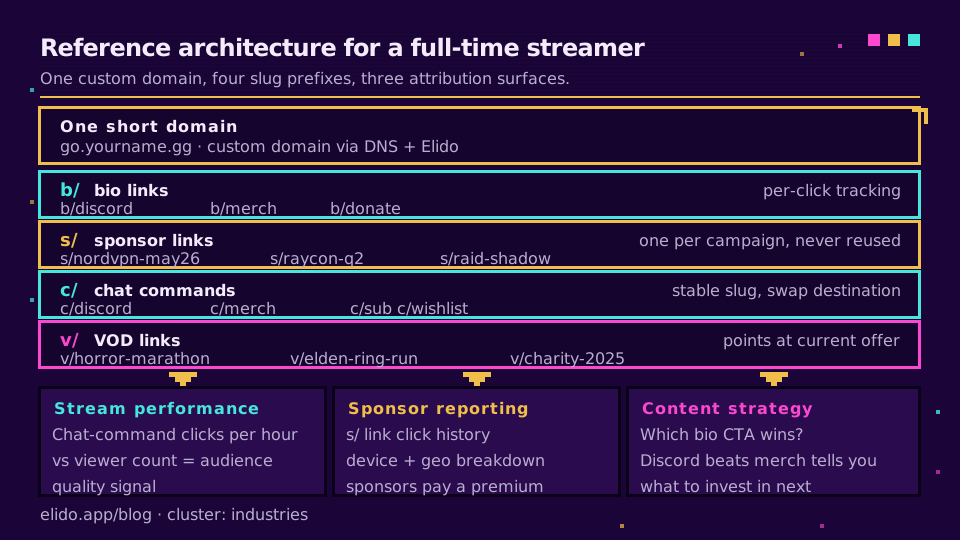
A reference architecture for a full-time streamer
This is the link architecture I recommend for anyone streaming four or more times a week with at least one active sponsorship.
One short domain. go.yourname.gg or links.yourname.com. Issue via DNS + Elido's custom-domain feature. The reason: every link you share is a brand touchpoint. go.yourname.gg/discord looks like a channel asset; bit.ly/3xK7mP looks like you grabbed the first tool you found.
Four slug prefixes:
b/- bio-page links.go.yourname.gg/b/is the root bio-link page.b/discord,b/merch,b/donateare individual CTAs with per-click tracking.s/- sponsor links.s/nordvpn-may26,s/raycon-q2,s/raid-shadow. One per sponsor per campaign period. Never reused.c/- chat commands.c/discord,c/merch,c/sub,c/wishlist. Stable slugs that you update the destination of rather than the slug itself.v/- VOD links.v/horror-marathon,v/elden-ring-run,v/charity-2025. One per notable VOD; destination points at current relevant offer.
Three attribution surfaces:
- Chat command clicks → stream performance dashboard. Which streams drive the most chat engagement, measured by command-link clicks per hour. Correlates against viewer count to give you a quality-of-audience signal, not just a size signal.
- Sponsor link clicks → sponsor reporting. Export the click history for any
s/prefixed link. Include device breakdown (mobile vs desktop) and geo (which country the viewer clicked from). Sponsors with global distribution rights pay more for this cut of the data. - Bio page clicks → content strategy. Which CTA on your bio page gets clicked most? Discord beats merch? That's your audience telling you what they want more of. Merch beats Discord? Your community infrastructure might need investment.
The four anti-patterns that kill streaming attribution
1. One generic link for all sponsors. The damage here is asymmetric - you lose not just the data, but the sponsor's trust. When a sponsor asks "how much traffic did our placement generate?", you can either show them a link-specific click report or tell them you can't separate their traffic from the previous sponsor's. The second answer costs you the renewal.
2. A static QR code on your overlay. Your overlay has a QR code? Great. Is it dynamic or static? If it's static - if the QR encodes your URL directly - every rebrand, every platform migration, and every URL change means redesigning the overlay. Dynamic QR routes through a short link. You update the destination in the dashboard; the QR on screen never changes. For the full decision framework, dynamic vs static QR codes.
3. Treating Twitch analytics as your click source of truth. Twitch reports channel impressions and view counts. It does not report link clicks from your bio panel, which CTAs drove clicks, or whether viewers who clicked your sponsor link converted. Twitch's analytics are audience metrics; link attribution is conversion metrics. They answer different questions. Relying only on Twitch's dashboard is like measuring a marketing campaign with reach numbers and no conversion tracking.
4. Verbal sponsor reads with no link backup. A viewer hears "use code STREAM for 10% off." They're mid-game. They might remember it in 20 minutes. They probably won't. A link in chat - go.yourname.gg/s/sponsor-may - catches the viewers who click instead of remembering. Clicking is five times lower friction than recalling and typing a coupon code. The link backup doesn't cannibalize verbal redemptions; it captures an audience segment that was already lost.
The sponsor reporting pack
The thing that separates a streamer who commands $500 CPMs from one who commands $50 CPMs is usually not audience size. It's the quality of the post-campaign report.
Here's what a complete sponsor report looks like with proper link architecture in place:
- Total link clicks for the campaign period, per link (not per stream - per dedicated sponsor link)
- Click-through rate against estimated reach (chat viewer count × estimated % who saw the message)
- Device breakdown - mobile vs desktop vs console browser. Relevant if the sponsor's offer has platform restrictions
- Geo breakdown - country-level data for sponsors with territory-specific deals
- Click timeline - which streams drove spikes; does VOD traffic continue after the live event?
- Verbal vs link conversion comparison - if you have sponsor code redemption data from the brand, you can show that link clicks + code redemptions together represent the full sponsor impact, not just what each source captures alone
If you generate this report after every campaign, you're in the top 1% of streamers by professionalism. Most don't because they don't have the link data to support it. Setting up the link architecture above takes about two hours; the reporting benefit lasts for every sponsorship you run after.
Where Elido sits
We didn't build Elido specifically for streamers, but the streaming use case validates the platform's core architecture hard: you need custom domains (your brand, not ours), per-link analytics (not just aggregate counts), dynamic destinations (rotate offers without editing descriptions), and EU data residency (GDPR applies to your audience's click data even when you're streaming on a US platform).
A few capabilities that streamers use specifically:
- Bio-link pages built in - one short link to a fully hosted, analytics-tracked link-in-bio page. No separate Linktree subscription. Full walkthrough in the build-a-bio-link post.
- Bulk sponsor link creation - import a CSV of sponsor slugs and destination URLs, get a batch of tracked short links back. Useful when you're managing 8 active placements for an esports roster.
- Per-link UTM injection - set your UTMs once on the short link; they're appended automatically to every click. Your sponsor's Google Analytics sees the tagged traffic without you needing to tag every destination URL manually.
- Dynamic destinations - change where any link resolves without changing the link itself. Every VOD description, overlay QR code, and chat command stays stable forever.
For a setup walkthrough specific to streamers and gaming creators, URL shorteners for influencers covers the overlapping use case with some influencer-specific nuances.
Related on the blog
- Build a link-in-bio page in 5 minutes - the technical setup for a streaming bio-link hub
- Smart links explained - how destination routing and live/offline switching works
- Track UTM campaigns end-to-end - the sponsor reporting cornerstone
- Dynamic vs static QR codes - the overlay QR decision
- URL shorteners for influencers - sibling post covering the broader creator economy
- URL shorteners for musicians - sibling post with show-link and merch parallels
- Bio pages for creators - the creator-specific landing page deep dive
Try Elido
Paste a URL, get a working short link
No signup. Link lives for 30 days. Sign up to keep it forever.
Free, no signup required · 2 per day