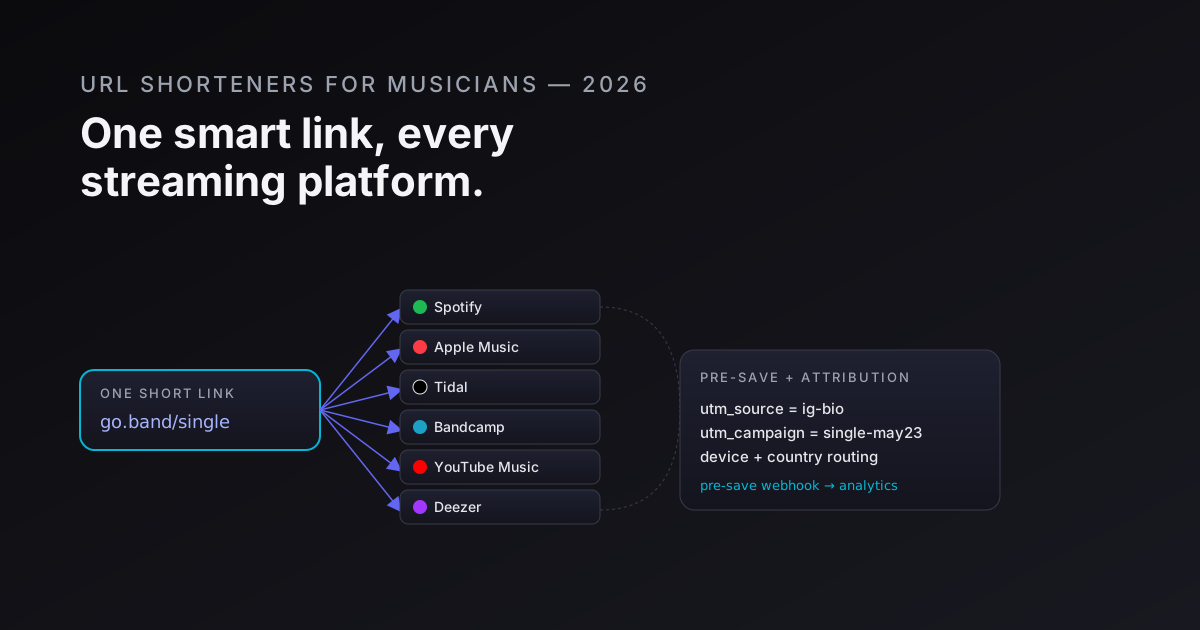
Every release cycle a musician goes through the same ritual: copy the Spotify link, the Apple Music link, the Tidal link, the Bandcamp link, the YouTube Music link, paste them into five separate social posts, watch the caption balloon to three times the intended length, and still miss the listeners who use Amazon Music or Deezer. The smart-link layer was invented specifically to solve this - and a URL shortener is the infrastructure underneath it.
This post covers the full picture: smart links for releases, pre-save campaign mechanics, tour ticket attribution, merch QR codes, YouTube card tracking, and the four anti-patterns that corrupt the data. If you want the general case for smart links, smart links explained is the long read. This post is the music-specific playbook.
Multi-platform smart links for releases
A release smart link is a single short URL - go.yourband.com/new-single - that resolves each listener to their preferred platform based on their device and country. The link serves Spotify to most users, Apple Music to iOS users who've signalled Apple preference, Tidal to those with a Tidal cookie, Bandcamp to listeners arriving from Bandcamp campaigns, YouTube Music to Android users without a streaming subscription.
The mechanics live in deep links without an SDK: the short link evaluates the User-Agent, the Accept-Language header, and optionally the referrer, then performs a 302 to the right platform URL. In practice you configure a preference table - "iOS + no explicit streaming platform → Apple Music", "Android + no preference → Spotify" - and the link layer enforces it.
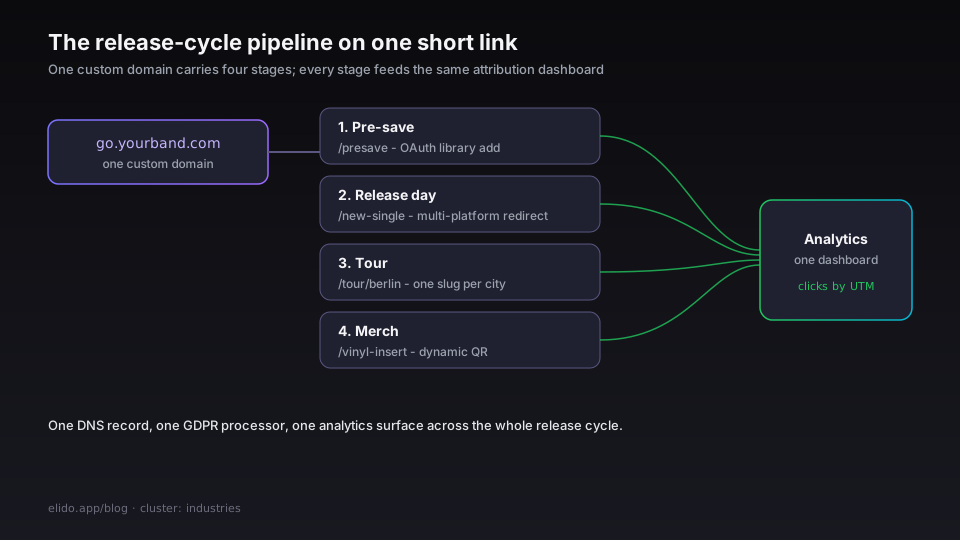
The build-vs-buy question. Several vendors (Linkfire, Feature.fm, ToneDen, Songwhip) exist purely for this layer. They're worth using if you want the default DSP detection logic without configuration. The trade-off is that you're on their subdomain, their analytics surface, and their uptime SLA. For artists who already own a custom domain and want a single analytics platform across releases, merch, tour, and social bio, running the smart-link logic on a general URL shortener with custom-domain support is a tighter fit - one dashboard for everything, one DNS record, one GDPR data processor agreement.
What to set up. One custom domain (go.yourband.com or links.yourlabelname.com). A slug per release - new-single, debut-ep, album-2026. Each slug resolves via a landing page or direct platform redirect. Use UTM parameters on the destination URLs so Spotify for Artists and your analytics platform both see the traffic source. For the UTM conventions, track UTM campaigns end-to-end covers the naming taxonomy that keeps the data readable at scale.
Pre-save campaigns
Spotify and Apple Music both offer pre-save mechanics: the listener grants an OAuth scope (user-library-modify on Spotify; the equivalent on Apple Music), and the platform auto-adds the album to their library on release day. When the release drops, the listener gets a notification and the stream counts.
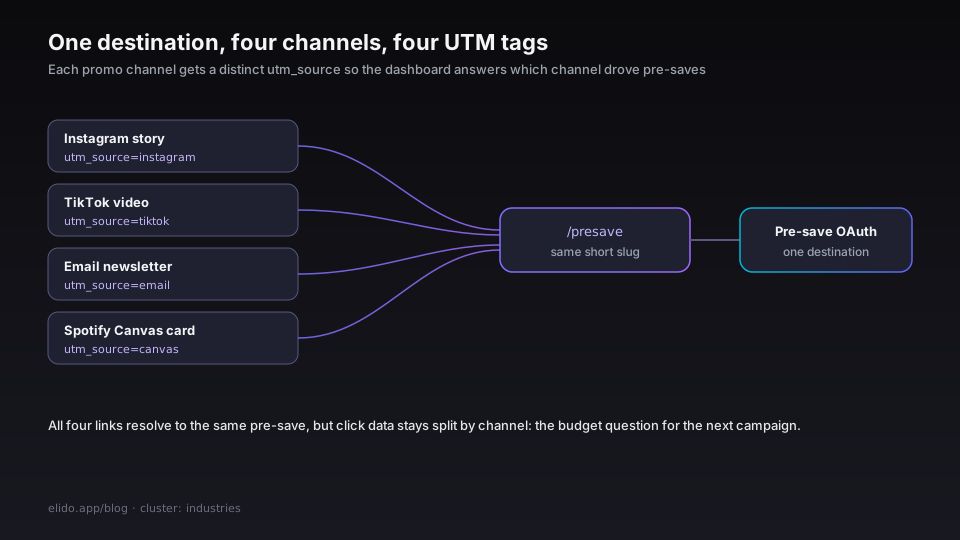
The short link wraps the pre-save URL. Here's why that matters: your pre-save campaign runs across Instagram, TikTok, an email newsletter, and a Spotify Canvas card. Each channel gets its own short link with a distinct UTM:
go.yourband.com/presave?utm_source=instagram&utm_medium=story&utm_campaign=ep-2026
go.yourband.com/presave?utm_source=tiktok&utm_medium=video&utm_campaign=ep-2026
go.yourband.com/presave?utm_source=email&utm_medium=newsletter&utm_campaign=ep-2026
All three resolve to the same pre-save destination, but the click data in the analytics dashboard answers "which channel drove the most pre-saves?" - which is the budget question for the next campaign.
The pre-save count itself doesn't flow automatically into your link analytics. Spotify for Artists (artists.spotify.com) shows your total pre-saves; Apple Music for Artists (artists.apple.com) shows the equivalent. Pulling that count into your link analytics requires a webhook or manual export. Most artists skip this wiring, which means they can measure click-to-pre-save-page but not click-to-confirmed-pre-save. Worth doing once if you're running serious ad spend; the setup is a one-time 30-minute job per platform.
Pre-stage the link days before the campaign. The pre-save link needs to exist before your first social post about it - both for technical reasons (DNS propagation, link indexing in sharing previews) and for pre-release campaign logistics. Issue the slug at least 48 hours before the first promotional post goes out.
Tour and show ticket attribution
Every show promotion is a conversion-attribution problem. The band plays eight cities. Each city has its own Eventbrite / Dice / Ticketmaster link. Each city is promoted on Instagram, TikTok, Facebook events, local radio partners, and the email list.
The short-link pattern: one slug per city, UTMs for each channel.
go.yourband.com/tour/berlin?utm_source=instagram&utm_medium=paid&utm_campaign=tour-eu-2026
go.yourband.com/tour/berlin?utm_source=email&utm_medium=newsletter&utm_campaign=tour-eu-2026
go.yourband.com/tour/warsaw?utm_source=instagram&utm_medium=paid&utm_campaign=tour-eu-2026
Now the analytics dashboard answers two questions:
- Which city's links drove the most ticket clicks? (Useful for adding a second show.)
- For each city, which channel drove the most clicks? (Useful for budget allocation on the next tour leg.)
This is also the data point that justifies the radio partnership: if the Kraków radio partner's UTM-tagged link drove 400 clicks and the paid Instagram in the same market drove 90, the radio deal earned its fee.
For the influencer and creator version of the same pattern, URL shorteners for influencers covers the affiliate-link mechanics that apply to the artist-partnership layer.
Merch QR codes
Physical merch - CD inserts, vinyl inner sleeves, t-shirt hangtags, poster flyers - has a QR code opportunity that most artists either skip or implement badly.
The QR on the vinyl sleeve is the highest-value real estate in the artist's physical catalogue: someone who bought the vinyl is already a committed fan, and they're holding a QR code scanner in their pocket. The QR should resolve to a smart link - not just the Spotify artist page. A good destination: a bio/landing page that shows tour dates, social follow links, the Spotify artist profile, and a newsletter sign-up. Build a link-in-bio page in 5 minutes covers this pattern for the "one page, all the links" format.
Practical notes for merch QR:
Print the short URL underneath the QR. When the QR doesn't scan - and it won't for every device or every lighting condition - the fallback is the human-readable URL. A 6–8 character slug (go.yourband.com/vinyl-insert) is typeable in under 5 seconds. This is especially relevant for vinyl art-direction decisions where the QR floats inside a die-cut sleeve with low contrast.
Use a dynamic QR, not a static one. The merch was printed in April. The release drops in May. The label distributor changes the Bandcamp URL in September. A dynamic QR resolves through the short link service and can be retargeted after printing. A static QR is permanent. The dynamic vs static QR codes post has the full durability trade-off.
Track per-product. Issue a different slug for CD insert vs vinyl sleeve vs t-shirt hangtag. Even if all three point to the same landing page, the click counts tell you which physical product format has the most engaged buyers - which informs the next production run.
YouTube cards and end screens
Every YouTube music video has a description, cards, and an end screen. These are direct conversion surfaces: merch, tour tickets, social follows, newsletter sign-ups.
The problem with raw YouTube card links: you can't tell which music video drove the merch sale. If you put the same yourbandmerch.com link in every video, you know the channel drove the sale but not which video. The fix is per-video short links:
go.yourband.com/merch?utm_source=youtube&utm_medium=endscreen&utm_content=official-video-title
The utm_content parameter carries the video identifier. Now your link analytics shows "the official video for Track A drove 210 merch clicks; the live session for Track B drove 8". That's the data that tells you where to invest the video budget.
For the broader link analytics methodology, short-link analytics: what to measure covers the metric hierarchy from clicks through to downstream conversions.
Festival, radio, and playlist placement attribution
When a track gets added to a Spotify editorial playlist - New Music Friday, a genre chart, a mood playlist - the band doesn't get a direct notification of what drove the spike in streams. The streams go up in Spotify for Artists; the source of the spike is opaque.
The attribution trick: when the band promotes the playlist placement, they use a short link with UTMs. The post announcing "we're on New Music Friday - give it a listen" uses go.yourband.com/nmf?utm_source=instagram&utm_medium=story&utm_campaign=nmf-may-2026. The link analytics doesn't tell you what the playlist placement drove in streams - Spotify doesn't expose that - but it tells you what the band's own promotional activity drove in playlist-follow and click-through. If the Instagram story drove 900 clicks and the TikTok post drove 80, the promotion channel mix for the next playlist placement is obvious.
The same pattern applies to festival and radio placements: issue a short link for the placement announcement, tag by channel, measure which channel of your own promotion amplified the placement most.
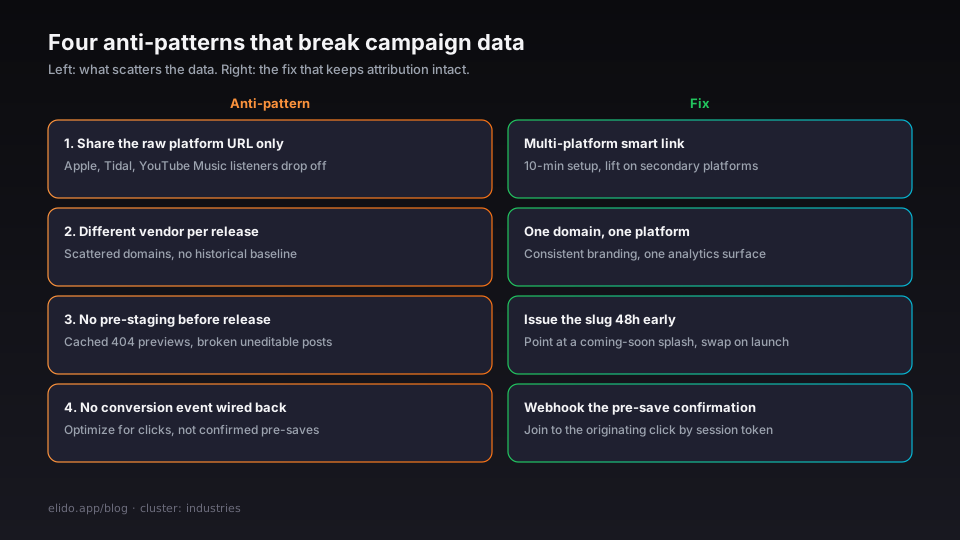
The four anti-patterns that break music campaign data
1. Sharing the raw platform URL only.
"Listen on Spotify: spotify.com/track/..." - this is a listener filter, not a link strategy. Listeners on Apple Music, Tidal, YouTube Music, or Amazon Music see the Spotify URL, shrug, and don't follow. The multi-platform smart link is a one-time 10-minute setup per release. The listener retention lift is measurable in streams on the secondary platforms within the first 48 hours of a release.
2. Using a different smart-link vendor per release.
One release on Linkfire, the next on Feature.fm, the next on ToneDen. Different domains, different analytics surfaces, no historical baseline. Artist branding depends on consistency - a fan who saw links.yourband.com/first-ep two years ago can still navigate to it. Fragmented domains break the navigation pattern and scatter the analytics. Pick a domain and a platform once; migrate if you must, but plan the migration.
3. Not pre-staging the link before release.
The short URL needs to exist before the first promotional post, not the day of the release. Two reasons. First, social platforms cache link previews - if the preview is fetched before the destination is live, it may cache a 404 for hours. Second, pre-release posts that go out before the link is live result in broken links in content that can't be edited (some TikTok caption formats, SMS messages, physical flyers). Stage the link, configure the destination to a pre-save or a "coming soon" splash, and update the destination on release day.
4. Not wiring the conversion event back into the link analytics.
The most common failure: the Spotify pre-save count is visible in Spotify for Artists, the Apple pre-save count is visible in Apple Music for Artists, and neither connects to the link analytics that shows which channel drove the click. Without the connection, you can optimize for clicks (the metric the link analytics shows) rather than confirmed pre-saves (the metric you actually care about). The wiring is a webhook: Spotify's or Apple's pre-save confirmation fires into your analytics endpoint, which joins to the originating click via a session token in the pre-save redirect. Most artists skip it; artists running real ad spend shouldn't.
How Elido fits the music workflow
Elido wasn't built specifically for music, but several of the platform's decisions align well with the release-cycle pattern:
- Custom domains with on-demand TLS -
go.yourband.comorlinks.yourlabelname.comis a single DNS CNAME and a 30-second cert. The label can manage all artists under one account, each with their own subdomain, without separate accounts. - Dynamic QR included - every short link has a dynamic QR endpoint. No separate QR generation step, no separate QR service. The QR retargets when the destination URL changes after print.
- UTM analytics built in - every click is decomposed by
utm_source,utm_medium,utm_campaign, andutm_contentwithout a third-party analytics integration. The pre-save attribution table is readable directly in the dashboard. - EU data residency - click-event data lives in our EU-region analytics store. For EU artists running campaigns to EU audiences, that's one fewer GDPR data-transfer justification.
- Bulk link creation via API -
POST /v1/links/bulkaccepts an array of destinations and returns slugs in a single call. Useful at label scale: 20 artists, 3 platform destinations each, 1 API call.
For the broader link-in-bio and bio-page pattern that complements the smart-link setup, bio pages for creators covers the landing-page layer.
Related on the blog
- Smart links explained - the cornerstone for the smart-link mechanics
- Track UTM campaigns end-to-end without a CDP - the UTM naming taxonomy and attribution chain
- Dynamic vs static QR codes - the durability trade-off for merch QR
- Short-link analytics: what to measure - the metric hierarchy from clicks to conversions
- URL shorteners for influencers - the affiliate-link and creator partnership mechanics
- Build a link-in-bio page in 5 minutes - the landing-page layer for merch and tour CTAs
Try Elido
Paste a URL, get a working short link
No signup. Link lives for 30 days. Sign up to keep it forever.
Free, no signup required · 2 per day