Does a link in a LinkedIn post cost you reach? The honest answer is that nobody outside LinkedIn knows, the folklore is louder than the evidence, and you can test it on your own account in two weeks with one short link per post. This post separates what is documented from what is repeated, then shows how to place and track links so the result is a number, not a feeling.
If you share links on LinkedIn for work, you have heard three rules: never put the link in the post, put it in the first comment, or edit it in after the post has run for an hour. All three are habits that spread because someone's post did well once. Before you adopt them, it helps to know how LinkedIn handles your URL, and our guide to tracking social media links covers the basics that apply here too.
What Is Actually Known About LinkedIn and External Links
Very little is documented. LinkedIn's help pages describe a feed ranked by relevance and expected engagement. I could not find a LinkedIn help page that says posts with external links are down-ranked, and I could not confirm any statement that says they are not.
What exists instead is third-party analysis. Creators and social tools publish studies, some showing lower impressions for posts with links, some showing no difference. They differ on account size, topic and what counts as a link post, and none of them can see LinkedIn's ranking. So here is the useful framing. A link gives the reader a reason to leave the feed. A feed that rewards time on platform may rate that differently. Plausible, yes. Measured, no.
One caveat on my own claim: LinkedIn changes its feed often, and a statement that was true last year may not hold now. Check LinkedIn's current help centre if the question matters for your decision.
Link in the Post, in the First Comment, or Edited In
Each placement trades reader effort against a possible reach effect, and only the effort side is certain. A link in the body is one tap. A link in the first comment needs the reader to find the comment, which many will not do on mobile.
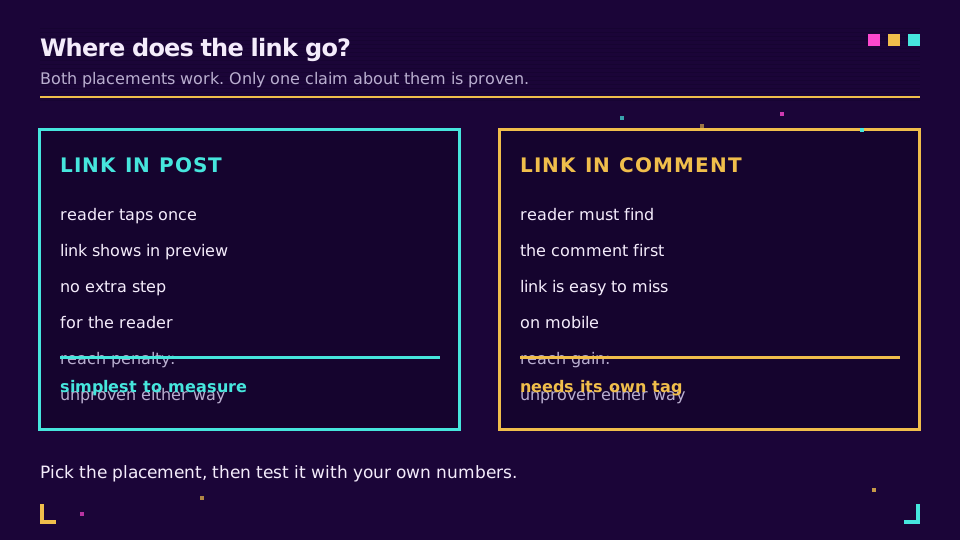
Editing the link in later has the same problem plus a second one. Whether an edit changes distribution is, as far as I can tell, undocumented. And your first hour of readers gets no link at all.
A cleaner option exists. Post a short link from the start, and if the destination needs to change, repoint the link instead of editing the post. Elido lets you change a link's destination in the dashboard, so the post keeps working. That removes the need for the edit trick without claiming anything about the algorithm.
My own rule: link in the body when the click is the goal, link in a comment when the post stands alone and the link is a bonus. Neither is a reach strategy. If you want the comment habit, test it.
How LinkedIn Wraps Your Link (lnkd.in)
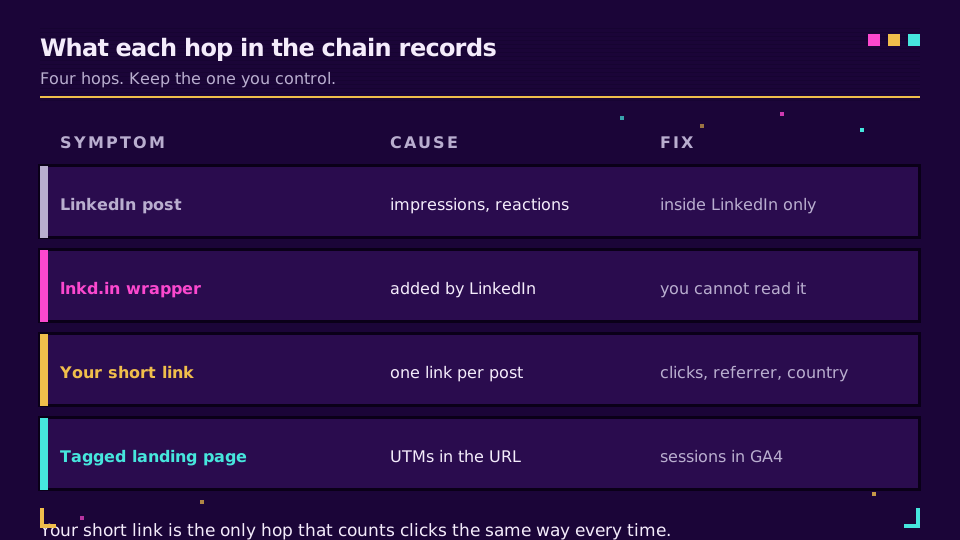
When you publish, LinkedIn may swap the URL you typed for a lnkd.in address that redirects to the original. Longer URLs tend to be wrapped, so the visible text in the post is not always what you pasted. It also means a click goes through LinkedIn's redirect first, and you only see the data your destination receives.
For attribution, the important question is what arrives at the destination. In normal cases the redirect keeps your full query string, so UTM parameters should survive. Referrers are less tidy: depending on the app, browser and in-app viewer, the visit may show as linkedin.com, as lnkd.in, or as direct traffic. That is the same dark-social gap described in our post on dark social attribution, and it is the reason UTMs are not optional here.
Always test once. Click your own link from a phone and a desktop. Read the final address. Missing UTMs are better found early.
Document and Carousel Posts
Document posts (PDF carousels) are a separate case, because the link no longer lives in the post text. A link inside a PDF slide may or may not be tappable in the in-feed viewer, so I would not rely on it. Put the destination on the final slide as text and add a short link to the post caption or the first comment.
Because slide text is read, not clicked, a short, readable branded link works better on the last slide than a long URL with parameters. A line like go.yourbrand.com/guide can be typed by a person who reads it on a laptop. A UTM-laden address cannot. There is evidence that branded links get clicked more, though the size of the effect depends on the audience, as we discuss in do branded links get more clicks.
Tracking LinkedIn Clicks With UTMs and a Branded Short Link
The reliable setup has two layers. The UTMs label the visit for your web analytics. The short link counts the click itself, before LinkedIn's reporting or your analytics tag get involved.
Here is a workable routine for each post:
- Build the destination with
utm_source=linkedin,utm_medium=social, and autm_campaignandutm_contentthat name the post. Keep the strings identical every time; the UTM naming conventions post has a taxonomy. - Create one short link for that tagged URL. One link per post is what lets you compare posts.
- Paste the short link into the post (or the comment, if you are testing that).
- After three to five days, read the clicks on the short link next to the post's impressions.
For setup details on UTMs specific to this network, see UTM parameters for LinkedIn and TikTok ads; the same ideas apply to organic posts. Google documents the parameters in its URL builder help page, and explains how GA4 sorts the resulting traffic in Campaigns and traffic sources.
A branded domain makes the link look like yours, which matters on a platform where readers decide in a second. Setting up a branded short link takes about one DNS record. Be aware of the limit: on Elido, the Free plan has 25 links in total and no branded domain, and a branded domain is part of the paid plans. See pricing and the custom domains page before you plan a posting calendar around it. Also note that Elido's analytics don't break clicks down by utm_source, so the one-link-per-post approach is what carries the comparison.
Measuring Honestly
One post proves nothing. Reach swings with the topic, the hour and who reacts early. Two posts tell you about those two posts only.
A fairer test is small. Pick two post types you publish regularly. Alternate placements for six to eight posts each, keep the topic family and posting time similar, and record impressions, link clicks and reactions. Then compare clicks per thousand impressions, not impressions alone. A placement that raises impressions but halves clicks is not a win if clicks are what you want.
Keep the caveats in view. Your sample will be small. Impression counts include people who never saw the link. App clicks can be harder to attribute. You get a decision for your account, not a law.
Related on the blog
Frequently asked questions
Does LinkedIn reduce the reach of posts with external links?
Nobody outside LinkedIn can say for certain. Many creators report lower impressions on posts with a link in the body, but those reports are not controlled tests, and I could not find a LinkedIn help page that states a link penalty. Treat it as a hypothesis and test it on your own account.
Is putting the link in the first comment better?
It is a common habit, not a proven fix. It adds a step for the reader and can lose clicks, so you only win if the reach gain outweighs that loss. Run both placements on comparable posts and compare clicks, not impressions.
What is lnkd.in?
It is LinkedIn's own link wrapper. When you publish a post, LinkedIn can replace the URL you typed with a lnkd.in address that redirects to your page. Your destination still receives the visit, but you do not control or see data for the wrapper itself.
Do UTM parameters survive on LinkedIn?
Normally yes. The wrapper redirects to the full URL you posted, query string included. Open the published post, click the link and check the address bar before you rely on it. Strip-prone browsers and apps can still drop parameters in some cases.
Can I change the link after I publish the post?
Only if the link is a short link you control. You can edit the text of a LinkedIn post, but swapping the destination of a plain URL means editing the post. With a short link, you repoint the destination in your dashboard and the post keeps working.
How do I measure whether a LinkedIn link worked?
Give every post its own short link and UTM-tagged destination, then compare clicks per link against the post's impressions after a few days. Click-through rate on your own link data is a better yardstick than reach alone.
Try Elido
Paste a URL, get a working short link
No signup. Link lives for 30 days. Sign up to keep it forever.
Free account required. The free plan includes 25 links in total. Already have an account? Log in