AI QR code art is a working QR code hidden inside an AI-generated image. Instead of a grid of black squares, you get a landscape, a logo motif, or an illustration, and it still scans. The trick is Stable Diffusion paired with ControlNet, which uses the QR code as a structural guide so the artwork lines up with the code's pattern rather than painting over it.
It is one of the more genuinely fun things to come out of image models, and it went viral for good reason. It is also easy to get wrong in a way that produces a beautiful image that does not scan. This post covers how it works, how to keep it scannable, and the one production habit that saves you from reprinting.
If you want the plain version first, how to create a QR code covers standard codes, and branded QR code design covers logos and colour without the AI step.
How It Works
A normal image model cannot draw a functioning QR code, because it has no reason to preserve the exact grid a scanner needs. ControlNet is what changes that.
ControlNet is an add-on to Stable Diffusion that steers the output using an input image as a structural constraint. Feed it a plain QR code and a text prompt, and it generates an image whose light and dark regions follow the code's modules. The dark squares of the QR become the shadowed parts of the artwork, the light squares become the highlights, and a scanner still sees the underlying pattern. A QR-specific model, most commonly QR Code Monster, is trained to hold that pattern tightly while the rest of the image follows your prompt.
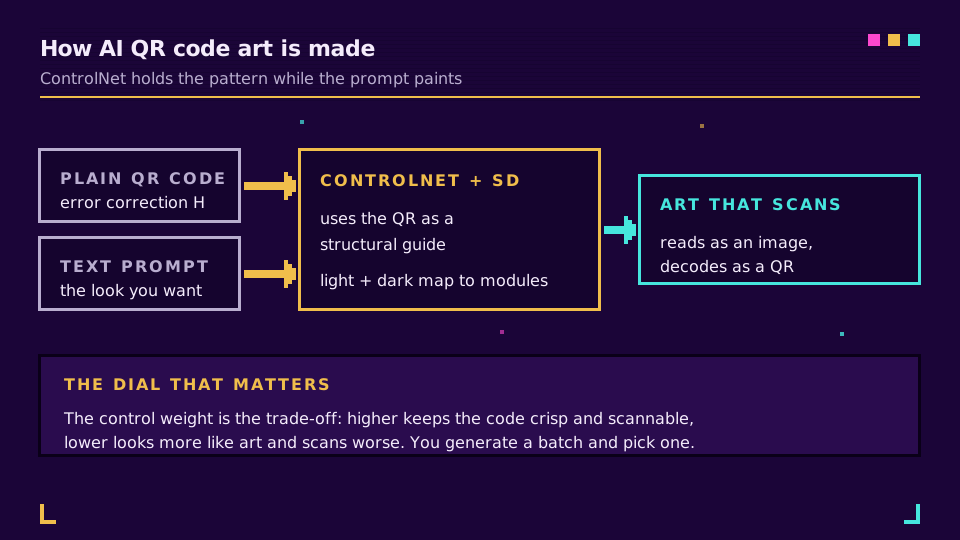
The result reads as art at a glance and as a QR code to a camera. That balance, art versus readability, is the whole game, and it is set by one dial called the control weight.
How to Make One
There are two routes, depending on how much you want to run yourself.
The hands-on route is AUTOMATIC1111's Stable Diffusion interface with the ControlNet extension and a QR model installed. You supply a plain QR code as the control image, write a prompt for the look you want, set the ControlNet weight, and generate a batch. The hosted route is a web generator such as QR Diffusion, which wraps the same Stable Diffusion and ControlNet pipeline so you skip the local setup and just type a prompt.
Either way the inputs are the same: a source QR code, a prompt, and a control weight you tune. Higher weight keeps the code crisp and scannable but looks less like art; lower weight looks better and scans worse. You generate several and pick the one that is both.
Keeping It Scannable
This is the part the viral screenshots skip, and it is where most attempts fail. A gorgeous code that does not scan is a failed code.
Four things decide whether it reads:
- Error correction: generate the source QR at level H, the highest, which lets roughly 30 percent of the code be obscured and still decode. This is what gives the AI room to paint. Lower levels leave no margin for art. QR error correction is part of the QR code standard, and level H is the one you want here.
- The quiet zone: keep the clear margin around the code. If the artwork floods it, scanners lose the frame.
- Contrast: the dark modules still have to be meaningfully darker than the light ones. When the blend flattens that difference, the code dies.
- Testing, and this one is non-negotiable: scan the finished image on several phones, iPhone and Android, in different light and at different distances, before it goes anywhere near print. What scans on your desk can fail on a poster.
Get those right and the code is reliable. Skip the testing step and you find out after the flyers are printed. For the reader's side of this, how to scan a QR code shows what their camera is doing when they point it at your art.
Put a Dynamic Link Behind It
Here is the habit that turns a fragile trick into a safe one. Do not encode the final destination URL directly into the art. Encode a short link you control, and point that link at the destination.
Two problems disappear when you do. First, if the destination changes, a campaign moves, a page is renamed, you update the link instead of regenerating and reprinting the artwork. Second, if the arty code scans poorly for some users, you still have a plain fallback and full scan analytics on the link, so you can see how many people actually got through. The difference between a fixed code and an editable one is the whole point of dynamic vs static QR codes, and it matters double when the code is art.
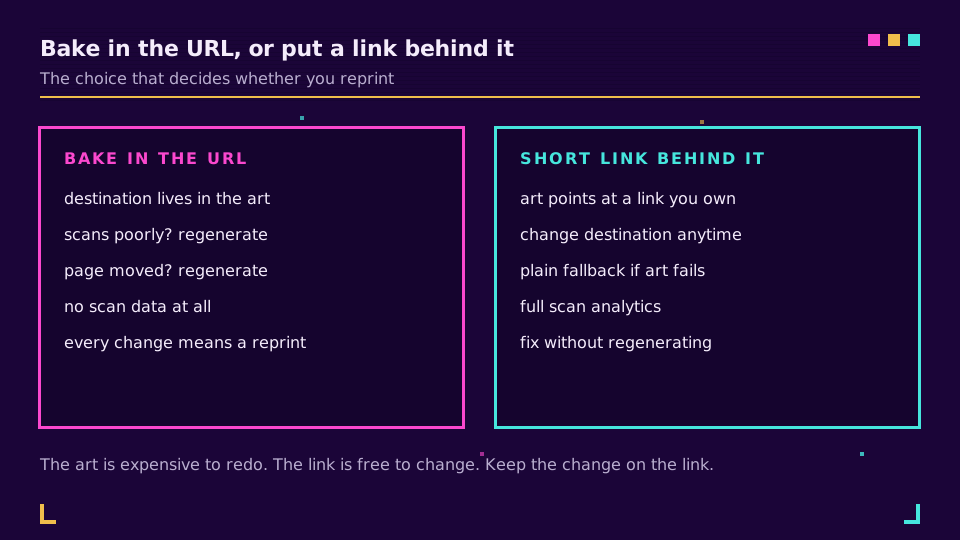
You can generate a dynamic short link on the free plan, make your art code point at it, and keep the ability to retarget and measure it after the art is locked.
When to Use It, and When Not
AI QR art earns its place on things people look at and choose to scan: campaign posters, album covers, event flyers, packaging, a booth backdrop. The novelty gets the scan, and a dynamic link keeps it useful.
Where it does not belong is anywhere the scan has to work the first time, every time, on every device: payment codes, boarding passes, medical or safety information, anything transactional. There, a plain high-contrast code is not boring, it is correct. Save the art for the marketing, and keep the utility codes plain.
Related on the Blog
Frequently asked questions
What is an AI QR code?
An AI QR code is a working QR code blended into an AI-generated image so it looks like art rather than a grid of squares. It is made with Stable Diffusion and a ControlNet model that treats the QR pattern as a structural guide, letting the artwork's light and dark areas line up with the code's modules. Built correctly, it still scans.
How do you make an AI QR code that actually scans?
Start from a QR code set to the highest error correction level (H, roughly 30 percent), keep the quiet-zone margin, and generate with a QR-focused ControlNet model, then tune the control weight until the code reads without looking like a plain grid. The non-negotiable step is testing: scan the result on several phones, in different light, at different distances, before you publish it.
Why do AI QR codes sometimes fail to scan?
Because the artwork fights the pattern. If the AI blends too aggressively, it breaks the contrast between dark and light modules, fills the quiet zone, or adds thin lines that confuse the scanner. Low error correction makes it worse. The fix is more error correction, stronger contrast, a lighter artistic blend, and testing before it goes to print.
Are AI QR codes safe to use for a business?
For marketing and campaigns, yes, with one safeguard: point the code at a short link you control rather than encoding the final URL directly. Then if the destination changes or the artful code turns out to scan poorly on some devices, you fix the link, not the artwork. For payments or anything mission-critical, use a plain, high-contrast code.
What tools make AI QR code art?
The common setup is AUTOMATIC1111's Stable Diffusion interface with the ControlNet extension and a QR-specific model such as QR Code Monster. Hosted generators like QR Diffusion wrap the same technique in a web app if you do not want to run Stable Diffusion locally. Either way, the scannability rules and the testing step are the same.
Try Elido
Paste a URL, get a working short link
No signup. Link lives for 30 days. Sign up to keep it forever.
Free, no signup required · 2 per day