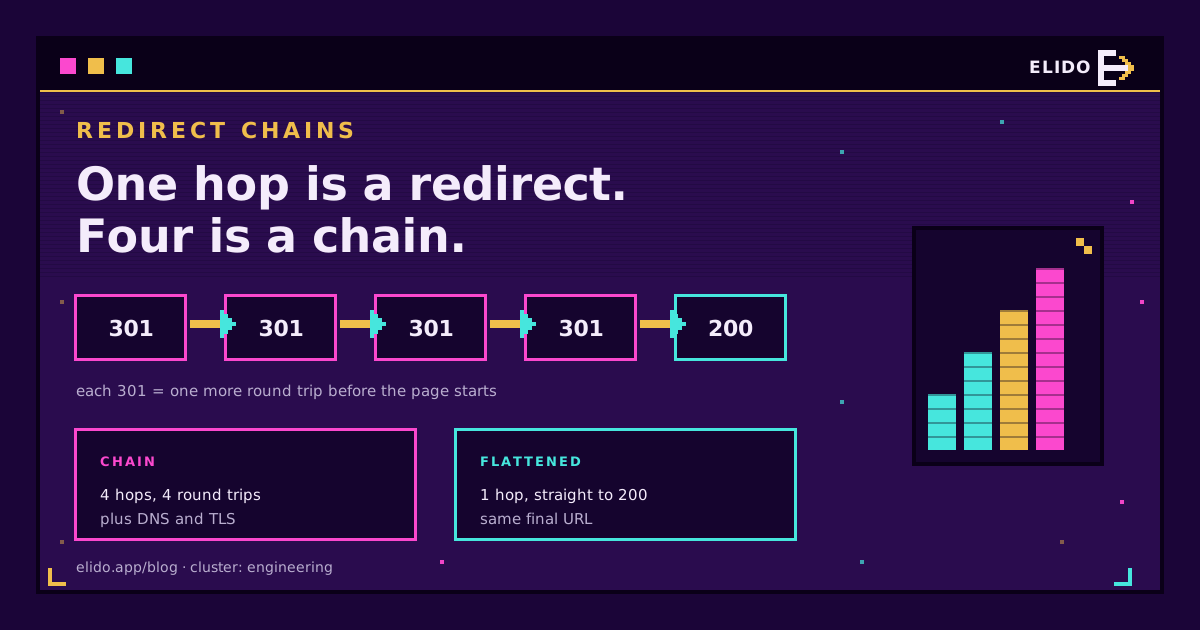
A redirect chain is two or more redirects in a row between the URL someone requested and the page that finally answers with a 200. Google documents that Googlebot follows up to 10 hops, advises redirecting straight to the final destination, and lists long chains as a drag on crawling. It does not say they destroy ranking, and it says permanent redirects don't cause a loss in PageRank. So the honest summary is that chains are a latency and crawl-efficiency problem you should fix cheaply, not an SEO catastrophe.
Most chains aren't built on purpose. Someone adds an HTTPS rule, someone else adds a www rule, a marketing tool wraps the link in a tracker, and each hop is reasonable on its own. Below: how the layers stack up, what each hop costs, which SEO claims hold against Google's documentation, and how to trace and flatten a chain. For status-code vocabulary first, types of URL redirects is the map. If the chain loops back on itself, you want how to fix a redirect loop instead.
What a Redirect Chain Is
A redirect chain happens when URL A redirects to B, and B redirects to C, instead of A pointing at C directly. Each arrow is its own HTTP response, and the client makes a fresh request for every one. One redirect is normal; "chain" starts at two.
Multiple redirects and redirect hops describe the same thing from different angles: the count of redirects between request and final page. A redirect loop is a chain that never ends because it revisits a URL. A chain, by contrast, ends; it just takes too long to get there.

How Redirect Chains Form
Chains stack because every layer enforces its own preference. The usual layers, in the order a request meets them:
- Scheme.
http://goes tohttps://, usually in a server or proxy rule. - Host. The apex goes to
www, or the reverse, in a different rule that fires after the scheme rule. - Path. A trailing-slash or lowercase normaliser rewrites
/Promo/to/promo. - Campaign or tracking wrapper. An ad click tracker, an email platform's link rewriter or a short link sits in front of everything else.
- Legacy map. A redirect from a past redesign that nobody repointed.
Put them together and a plain http://example.com/Promo/ can take four hops: to HTTPS, then to www, then to the normalised path, then through an old redesign rule to the live page. Short links join at the front. One is a legitimate hop. The harm starts when its destination is not the final URL. Paste http://example.com/promo as the target and your link heads a chain the destination site built, unseen. Do URL shorteners hurt SEO covers the ranking side of that question; the short answer is that one clean hop is fine and a stacked one is yours to fix.
Chains are easy to miss because browsers hide them: the address bar shows the final URL and the page loads, so nothing looks wrong. They also surface only for the request variant that trips every rule, usually the oldest http:// link on the oldest printed material.
How Many Hops Does Googlebot Follow?
Googlebot follows up to 10 redirect hops by default. That comes straight from Google's crawler documentation. It adds that specific Google products may use different limits, and that the URL Inspection tool does not follow redirects at all. Google doesn't spell out what happens to a longer chain, so assume the target simply isn't reached.
Ten is a ceiling, not a recommendation. Google's site-move guidance says to redirect to the final destination directly and, when that isn't possible, to keep the chain low, "ideally no more than 3 and fewer than 5", because chaining adds latency for users and not all user agents support long chains. Quote that: a goal of one hop, a tolerance of a few, and a hard stop at ten.
Browsers have their own limits. Chrome gives up at 20 and returns ERR_TOO_MANY_REDIRECTS, which is the symptom covered in the redirect loop guide. The HTTP standard doesn't fix a number either: RFC 9110 only says clients should detect and intervene in cyclical redirections.
What Each Hop Costs in Latency
Every hop costs at least one network round trip. A hop to a different hostname costs more. The client resolves the new name, opens a TCP connection and completes a TLS handshake before it can send anything. Lighthouse's own audit fails a page with two or more redirects and says the extra trip can delay a resource "by hundreds of milliseconds."
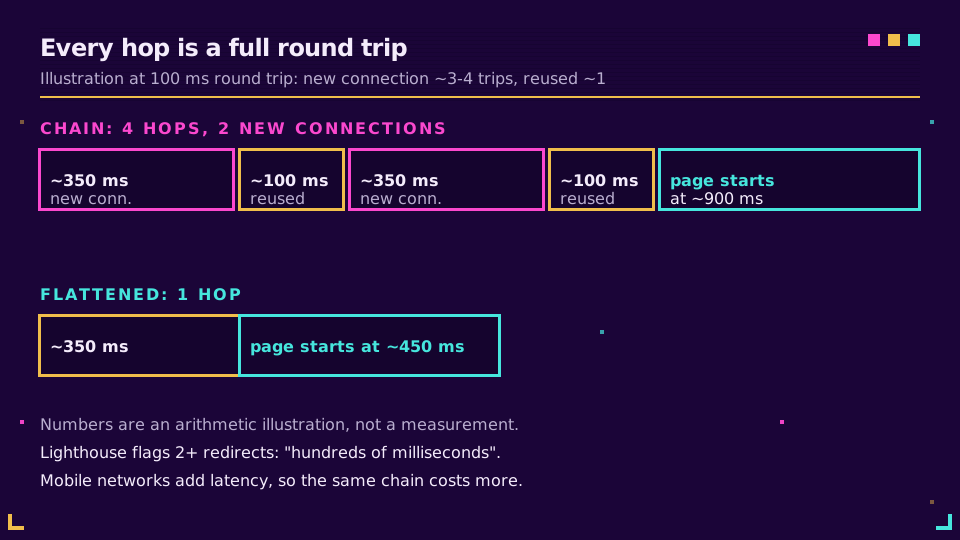
Here is the arithmetic, as an illustration and not a benchmark. Assume a 100 ms round trip, which is ordinary for a mobile connection on a middling signal. A hop to a new host with DNS, TCP and a TLS 1.3 handshake before the request can easily cost three to four round trips, so 300 to 400 ms. A hop that reuses an open connection to the same host costs one, so 100 ms. A four-hop chain with two new connections then spends roughly 900 ms before the real page starts, against about 450 ms for one flat redirect.
Mobile makes it worse for a plain reason: latency, not bandwidth, is the constraint. Redirect responses are tiny, so the wait is all round trips, and a faster plan does nothing for them. Deleting a hop is often cheaper than shrinking an image. For what a single hop should cost on the server side, see how redirects get under 15 ms.
Chains also lose data. Each hop is a place where a rewrite rule can drop a query string, and a stripped utm_source is the usual way UTM parameters go missing from analytics.
Link Equity and Crawl Budget: What Google Documents
Link equity first. Google's site-move documentation states that "301 and other permanent redirects don't cause a loss in PageRank". Google's Gary Illyes said the same about 30x redirects in 2016, but that was a social post, not documentation. So the old rule of thumb that each redirect hop bleeds a fixed percentage of equity is folklore. No Google source gives a percentage, and you will see numbers like 15 percent repeated in SEO posts without a citation. If someone gives you one, ask for the source.
Chains still aren't free. Two effects are documented. First, crawl efficiency: Google's crawl budget guidance for large sites says plainly to avoid long redirect chains, which have a negative effect on crawling. Second, user latency, covered above, which feeds the page experience signals. Crawl budget matters mainly on very large or fast-changing sites; a 200-page site is unlikely to feel a crawl-budget problem from a few chains, though visitors still feel the speed cost.
There is also an indexing nuance. Google uses permanent redirects as a canonical signal for the target. Which URL gets shown depends partly on whether each redirect was temporary or permanent. A chain that mixes 301 and 302 hops makes that signal less clear, which is a good reason to settle the codes once. Canonical vs 301 redirect goes into how those signals interact.
My stance: don't panic about equity, fix chains for speed and crawl hygiene, and don't promise a ranking lift from flattening one. Nobody has documented that lift. Faster loads and fewer wasted fetches are what you can measure.
How to Detect Redirect Chains
Start with curl, because it prints every hop where a browser hides them. The first command shows the status line and Location of each response:
curl -sIL http://example.com/Promo/ | grep -E '^HTTP|^[Ll]ocation'
A clean result is one 3xx then a 200. A chain shows two or more 3xx lines first. For a count and the time spent inside redirects, ask curl for its own numbers:
curl -sL -o /dev/null \
  -w 'hops: %{num_redirects}\nfinal: %{url_effective}\nredirect time: %{time_redirect}s\ntotal: %{time_total}s\n' \
  http://example.com/Promo/
Two caveats. -I sends a HEAD request, and a few servers answer HEAD differently from GET, so if the result looks too clean, repeat without -I and discard the body with -o /dev/null -D -. And test the worst-case variant, the one that would trigger every rule: http://, no www, uppercase path, trailing slash. Testing only the canonical URL is how chains survive. I'd rather over-test the ugly variants than trust the clean one.
In a browser, open devtools, go to the Network panel, tick "Preserve log" so earlier hops survive navigation, and reload. Each redirect shows as its own 301 or 302 row. Our link checker shows the same chain without a terminal.
To audit a whole site, a desktop crawler such as Screaming Frog or Sitebulb has a redirect-chain report that lists each chain with every hop and the status codes. For long-lived links, put the same trace in a scheduled job, as in monitoring link redirects.
How to Flatten a Redirect Chain
Flattening means every legacy URL points straight at the final URL. Steps, in order:
- Pick the canonical form: scheme, host, trailing-slash policy and case. Write it down.
- Trace each old URL and record its final destination.
- Rewrite every rule to target that final destination, not the next rule.
- Update internal links, sitemaps and
rel="canonical"tags to the final URL, so crawlers and users stop entering the chain at all. - Re-run the trace and confirm one hop at most.
The server-side trick is to combine scheme and host in one rule. In nginx, that looks like this, using $request_uri so path and query string survive:
server {
    listen 80;
    server_name example.com www.example.com;
    return 301 https://www.example.com$request_uri;
}

server {
    listen 443 ssl;
    server_name example.com;
    # ssl_certificate and key directives go here
    return 301 https://www.example.com$request_uri;
}
An http://example.com/page request now goes to https://www.example.com/page in one hop, where two rules would have produced two. Setting up a redirect in .htaccess and how to redirect a URL cover the Apache and application-level equivalents.
Test with 302 first. Browsers cache 301 aggressively, so a mistake lingers. Once the chain is one hop, switch to the permanent code. HSTS also helps: after a browser has seen a Strict-Transport-Security header, it upgrades http:// to https:// internally, so returning visitors skip that hop altogether. It does nothing for crawlers or first-time visitors, so it complements the one-hop rule and does not replace it.
If chains keep reappearing, the cause is process, not syntax; link rot prevention describes the audit habit that stops old maps piling up.
What a Well-Behaved Short Link Redirect Looks Like
A short link should be exactly one hop from the slug to the final canonical page, and nothing else. The request reaches the short domain. The response is a 3xx with the destination in Location. The destination answers 200 directly. No intermediate shortener, no tracker that redirects again, no destination that hops to www or to HTTPS because you pasted the old form.
The code depends on the use case.
302(or307) for tracked, editable links in campaigns, social posts, email and QR codes. It lets you repoint the destination later and keeps every click reaching the redirect layer so analytics stay complete.301(or308) when the move is permanent and you want the destination treated as canonical, such as a vanity URL that replaces an old address for good.
301 vs 302 redirects walks through the caching trap that makes the 302 default sensible. Two habits keep the chain at one hop. Always paste the final URL as the destination, after loading it once and copying the address from the bar, and run the curl count above on new links before launch. If you want that destination stored once and editable without reprinting, start with a free Elido workspace and trace your first link with the commands in this post.
Third parties can add hops you don't control. An ad platform's click tracker or an email provider's link wrapper sits in front of your short link whether you like it or not, which is the best argument for keeping your own part of the path to one hop. A branded domain doesn't add one, as custom domains for short links explains.
This post sits in the engineering cluster. For the full map of status codes, read types of URL redirects, and for the redirect layer behind a short link, how URL shorteners work.
Related on the Blog
- Redirect loop: how to find and fix ERR_TOO_MANY_REDIRECTS
- Types of URL redirects: 301, 302, 307, 308, and more
- 301 vs 302 redirects: which one should short links use
- Do URL shorteners hurt SEO? The honest answer
- Canonical vs 301 redirect: how to pick the right signal
- How to redirect a URL: six ways, and when each is right
Frequently asked questions
How many redirects is too many for SEO?
Google's site-move guidance says to redirect straight to the final destination and, if you can't, keep the chain ideally to no more than 3 and fewer than 5 hops. Googlebot itself follows up to 10 hops, so that is a hard ceiling rather than a target. In practice, aim for one hop and treat anything past two as a bug to fix.
Do redirect chains lose link equity?
Google says 301 and other permanent redirects don't cause a loss in PageRank, so a chain does not leak equity in the way older SEO advice claimed. What chains do cost is crawling efficiency and user latency, both of which Google documents. Treat the 'each hop loses 15 percent' figure as folklore: no Google source gives that number.
How many redirects will Googlebot follow?
Up to 10 hops by default, according to Google's crawler documentation. Specific Google products may use different limits, and the URL Inspection tool does not follow redirects at all. Browsers stop much sooner on loops: Chrome gives up at 20 hops with ERR_TOO_MANY_REDIRECTS.
Does a redirect chain hurt page speed?
Yes, each hop adds a full network round trip before the real page starts loading, and a hop to a new hostname can add DNS, TCP and TLS setup on top. Lighthouse flags a page with two or more redirects and describes the delay as potentially hundreds of milliseconds. On a slow mobile connection the penalty is larger, not smaller.
How do I check a redirect chain?
Run curl -sIL https://example.com/page | grep -E '^HTTP|^[Ll]ocation' to print the status line and Location header of every hop in order. Add -w '%{num_redirects}' to count hops, or use browser devtools with the Network panel's Preserve log option on. A crawler such as Screaming Frog or Sitebulb can then report every chain across a whole site.
Is a 301 followed by a 302 a problem?
It is one extra hop with mixed signals. Google treats permanent redirects as a canonical signal for the target, while temporary ones tend to keep the source URL in results, so a mixed chain leaves the outcome less predictable. Collapse it into a single redirect whose code matches the real intent of the move.
Try Elido
Paste a URL, get a working short link
No signup. Link lives for 30 days. Sign up to keep it forever.
Free, no signup required · 2 per day