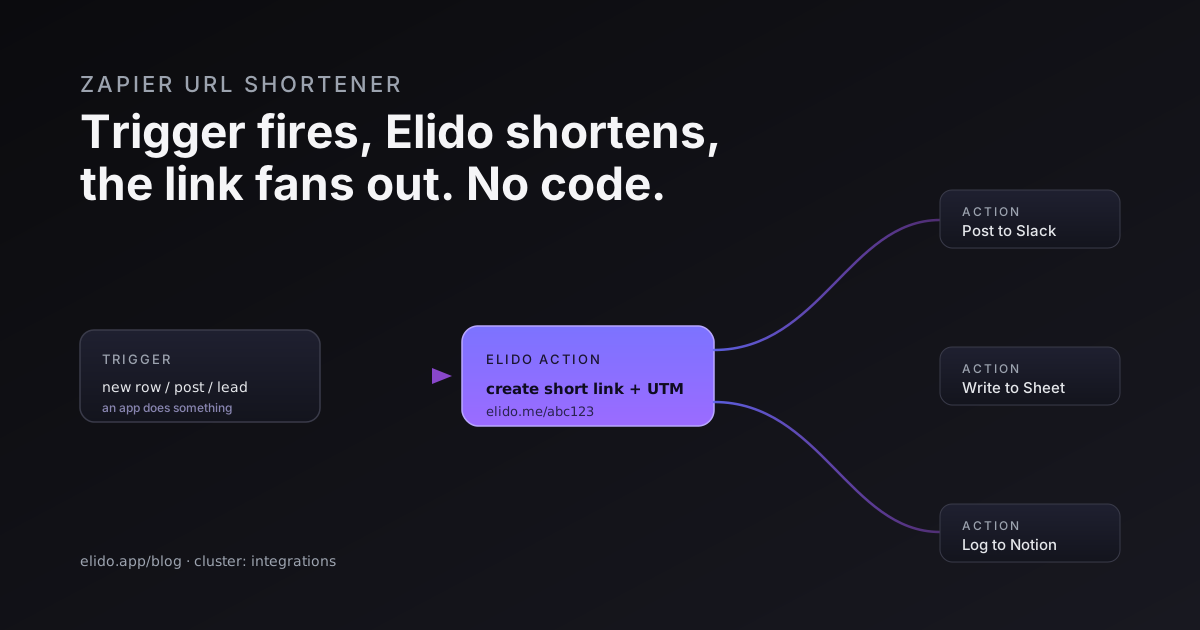
A Zapier URL shortener setup turns a long, ugly link into a tracked Elido short link automatically, the moment some other app does something. A new row lands in Google Sheets, a lead fills out a form, your blog publishes a post over RSS. Zapier catches that event, hands the destination URL to Elido, gets a short link back, and pushes it wherever you need it next.
The things people automate first are usually these: auto-shorten URLs from new spreadsheet rows so a campaign list ships with branded links already attached; post a freshly shortened social link to Slack the instant a blog post goes live; turn every form submission into a tracked link tied to that lead; and log click activity to a sheet for a lightweight report. None of it needs code. You wire it once in the Zap editor and it runs on its own.
This post covers the trigger-versus-action model that makes Zapier work, the four Zaps marketers reach for most, how to add UTM tags inside a Zap, and the honest call on when Zapier is the right tool versus when you should drop to the API or webhooks instead. If you have never touched the Elido API, the API and SDKs quickstart is the companion piece for the code path.
What Zapier Actually Connects#
Zapier sits between apps. It watches one app for an event and tells another app to do something in response. Two words carry the whole model.
A trigger is the thing that starts a Zap. New row in a sheet, new email, new form entry, new item in an RSS feed. A action is what Zapier does after the trigger fires. Create a record, send a message, and in our case, create a short link. Zapier's own primer covers the model in detail if you are brand new to it.
For Elido, the create-short-link action is the workhorse. You give it a destination URL, it returns a short link plus its slug and ID, and every step after that in the Zap can use those values. The link-event side, where a click on an Elido link becomes a trigger that starts a Zap, is the inverse direction. Most automations use Elido as an action, sitting in the middle of a chain that begins somewhere else.
In the Zap editor you pick Elido as the app, choose the action, and connect your account once with an API token from the dashboard at /settings/api. After that, the connection is reusable across every Zap you build. The general anatomy of triggers and actions is documented in Zapier's platform docs for anyone who wants the mechanics under the hood.
The Zaps Marketers Build First#
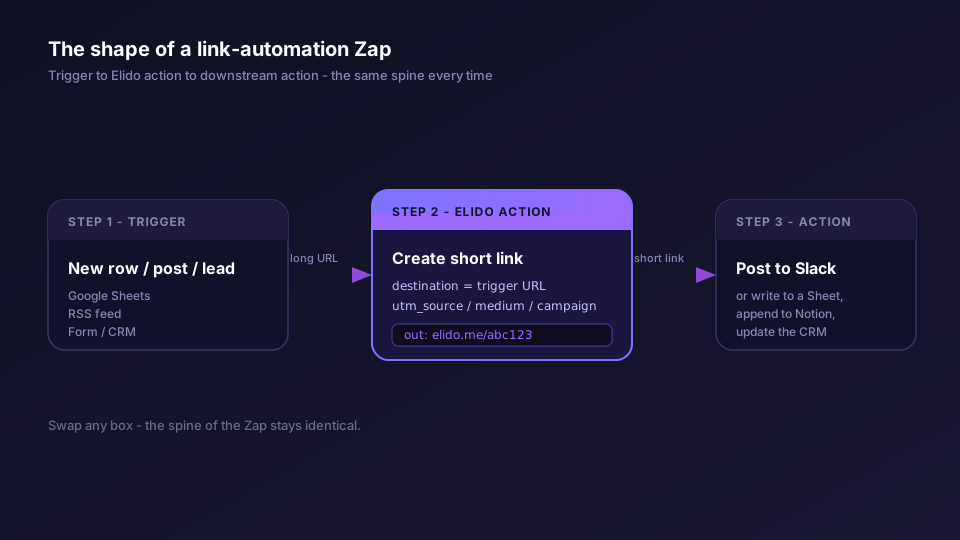
Four patterns cover most of what teams set up in the first week. Each one is the same shape: a trigger, the Elido create-short-link action, and one or more downstream actions.
Google Sheets to short link. You keep a list of destination URLs in a sheet, one per row, maybe with a campaign name and a channel column next to each. The Zap triggers on a new row, sends the URL column to Elido, and writes the returned short link back into a fourth column. Now the sheet doubles as a link inventory: paste long URLs, get branded short links without opening the dashboard. This is the no-code cousin of the bulk endpoint covered in bulk import from Google Sheets; Zapier is right for a trickle of rows, the bulk API for thousands at once.
RSS to a shortened social link. Point a Zap at your blog's RSS feed. When a new post appears, the Zap shortens the post URL through Elido, stamps it with social UTM tags, and posts the short link to your social scheduler or straight to a channel. The post goes out with a tracked link and you never touched a shortener.
Form submission to a tracked link. A new submission in Typeform, Google Forms, or your CRM's form tool triggers the Zap. You shorten a personalized destination, maybe a URL that already contains the lead's ID as a query parameter, and store the short link on the lead record. Every link you hand a prospect is now individually trackable.
New short link to Slack or Notion. This one chains onto any of the above. After Elido returns a short link, a follow-up action posts it to a Slack channel so the team sees what shipped, or appends a row to a Notion database as a running campaign log. The Notion side gets its own deeper treatment in Notion short links.
The pattern repeats because it is the whole point of no-code link automation: the short link becomes a value that flows from the app that produced the URL to the apps that need to see it.
Adding UTM Tags Inside a Zap#
A short link without tracking parameters is a redirect. A short link with UTM tags is attribution. The create-short-link action exposes UTM fields, so you set them per Zap rather than editing every URL by hand.
For the RSS-to-social Zap, that usually means a fixed utm_source and utm_medium (say, the network name and social) plus a utm_campaign you pull from the post title or a static value. For the Sheets Zap, you can map a campaign column straight into the utm_campaign field so each row carries its own. Elido appends the parameters to the destination at redirect time, which keeps your stored destination clean and lets you change tags later without reissuing the link.
If you want the tagging logic to live in one place instead of being re-entered in every Zap, define it once with the UTM builder or a saved UTM template, then keep the Zap fields thin. The end-to-end view, from the tagged click to the conversion in your analytics, is in track UTM end to end. Consistent tags are the difference between a dashboard that adds up and one that scatters the same campaign across six spellings.
When Zapier Is the Wrong Tool#
Zapier is excellent glue and a poor engine. Knowing where the line sits saves you a rebuild later.
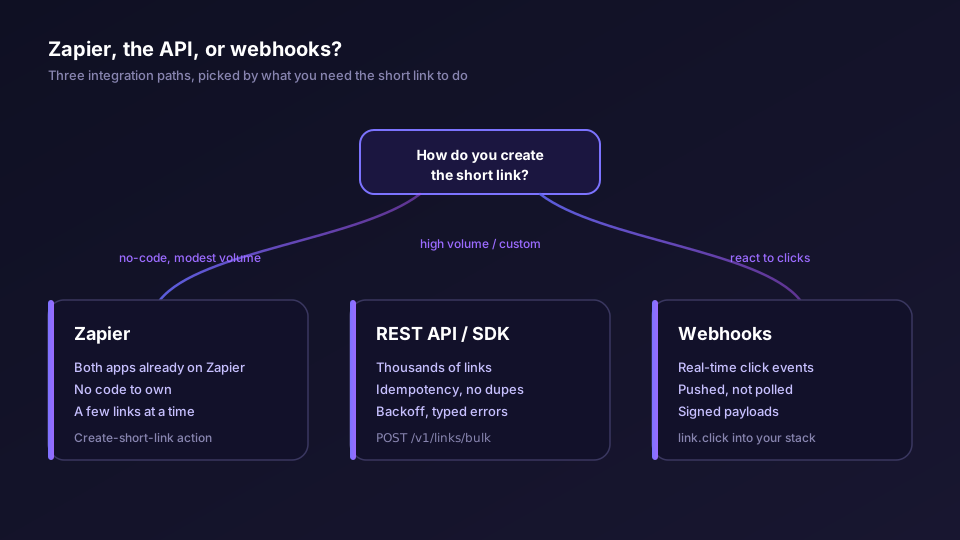
Reach for Zapier when both apps already have Zapier support, the volume is modest, and you would rather not own any code. A marketer setting up the four Zaps above gets a working pipeline in an afternoon and never opens an editor.
Drop to the REST API or an SDK when volume climbs, when you need real idempotency so a retried job does not mint duplicate links, or when the logic is more than a straight line. Zapier charges by task and polls on an interval, so a job creating thousands of links is slower and pricier through Zapier than a single call to the bulk endpoint. The API also gives you typed errors and backoff that a Zap cannot express. The API and SDKs quickstart walks the first call in five languages.
Use webhooks when you want to react to clicks. A Zap that polls for link events trades latency for convenience, and at any real click volume the polling model strains. Elido webhooks push the event to your endpoint the moment it happens, signed so you can verify it came from us. The trade-offs are laid out in webhooks for link events. The rule of thumb: Zapier when you act on something, webhooks when you react to a click.
A reasonable architecture often uses all three. Zapier for the human-facing connections, the API for the bulk and batch jobs, webhooks for the real-time click stream into your warehouse.
A Step-by-Step Example: New Blog Post to a Slack-Ready Short Link#
Here is one Zap end to end, described as the steps you take in the editor rather than exact field labels, which shift as Zapier updates its UI.
Start a new Zap and choose the trigger app. Pick your RSS reader by feed URL, and set the trigger to a new item in the feed. Test it so Zapier pulls a sample post; you will use the sample's fields in the next steps.
Add an action step and choose Elido as the app. Select the create-short-link action. Connect your Elido account if you have not already, pasting the API token from /settings/api. In the action fields, map the post URL from the trigger sample into the destination, and fill the UTM fields: source set to the network you publish to, medium set to social, campaign mapped from the post title or a fixed launch tag. Run the test. Zapier should return a short link on your redirect domain along with its slug.
Add a second action step for delivery. Choose Slack, pick the channel, and compose the message using the short link field Elido returned in the previous step, something like a one-line "New post live" plus the link. Test it, confirm the message lands, and turn the Zap on.
From then on, every post your feed publishes becomes a tagged Elido short link in your team channel without anyone touching a shortener. Swap the Slack step for a Notion append, a tweet, or a CRM update and the spine of the Zap stays identical. That reusability is the reason the trigger-to-Elido-to-action shape shows up in nearly every link automation people build.
If you are wiring this for a marketing team and want the broader playbook on tracked links across channels, the marketers solution page collects the patterns, and what is a URL shortener is the primer for anyone on the team who is new to the concept. For pricing on the volume your automation will generate, the plans page lists the per-tier rate limits.
Zapier does not make Elido faster or your links smarter. It removes the human step between "an event happened" and "a tracked short link exists." For a marketer who lives in spreadsheets, forms, and Slack, that is most of the work, gone.