A URL shortener API is one of the smaller integrations in a typical engineering team's backlog. Three endpoints, an auth header, a JSON payload. The docs page promises the first call in five minutes. Then production traffic hits, the retry logic creates duplicate links, the dashboard fills with /foo-1, /foo-2, /foo-3 variants of the same destination, and someone files a ticket.
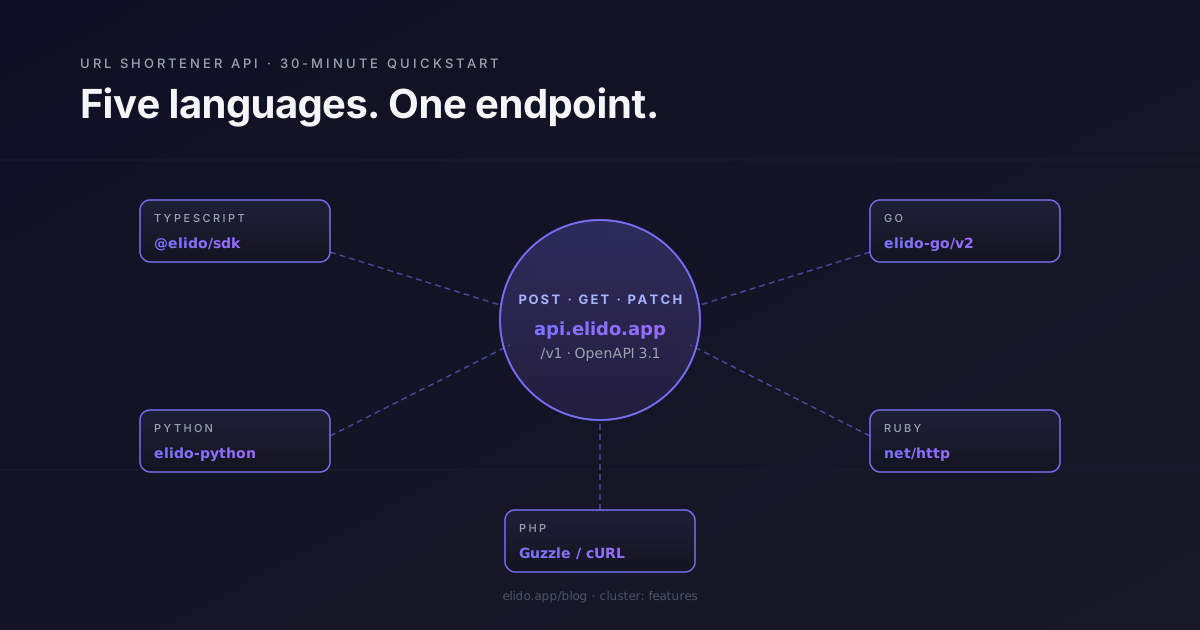
This post walks through the actual integration. Auth, the first call, the four endpoints that cover most use cases, idempotency, error handling, rate limits, and the production gotchas that the five-minute quickstart skips. Code samples in TypeScript, Python, Go, Ruby, and PHP — the first three through the official SDKs (@elido/sdk, elido-python, github.com/elido/elido-go), the latter two through plain HTTP clients.
Pre-requisites#
Sign in to the dashboard, navigate to /settings/api, and create a personal access token. Tokens are workspace-scoped — a token issued in workspace A cannot create links in workspace B. Service-account tokens (for CI systems, internal tooling, machine-to-machine integration) are created at the same screen on Pro and above; they have explicit scopes (links:write, analytics:read, domains:write) and rotate independently from personal tokens.
The base URL is https://api.elido.app/v1. The redirect domains (f.elido.me, s.elido.me, b.elido.me) are separate from the API surface. Your short links resolve at the redirect domain; the API is for creating, modifying, and reading them.
The OpenAPI specification is published at https://api.elido.app/v1/openapi.json and conforms to OpenAPI 3.1. The official SDKs are generated from that specification and re-published with every API release; you can also generate your own client in any OpenAPI-supported language.
The first call#
Create a short link from the destination URL. Five lines in TypeScript:
import { Elido } from "@elido/sdk";

const elido = new Elido({ token: process.env.ELIDO_TOKEN! });

const link = await elido.links.create({
  destinationUrl: "https://shop.example.com/spring-sale",
});

console.log(link.shortUrl); // https://s.elido.me/abc123
Python:
from elido import Elido

client = Elido(token=os.environ["ELIDO_TOKEN"])

link = client.links.create(
    destination_url="https://shop.example.com/spring-sale",
)

print(link.short_url)  # https://s.elido.me/abc123
Go:
import "github.com/elido/elido-go/v2/elido"

client := elido.NewClient(elido.WithToken(os.Getenv("ELIDO_TOKEN")))

link, err := client.Links.Create(ctx, &elido.LinkCreateInput{
    DestinationURL: "https://shop.example.com/spring-sale",
})
if err != nil {
    return fmt.Errorf("create link: %w", err)
}

fmt.Println(link.ShortURL)
Ruby (no official SDK — using net/http):
require "net/http"
require "json"

uri = URI("https://api.elido.app/v1/links")
req = Net::HTTP::Post.new(uri)
req["Authorization"] = "Bearer #{ENV['ELIDO_TOKEN']}"
req["Content-Type"] = "application/json"
req.body = { destination_url: "https://shop.example.com/spring-sale" }.to_json

res = Net::HTTP.start(uri.hostname, uri.port, use_ssl: true) { |http| http.request(req) }
link = JSON.parse(res.body)
puts link["short_url"]
PHP (Guzzle):
$client = new GuzzleHttp\Client(['base_uri' => 'https://api.elido.app/v1/']);

$res = $client->post('links', [
    'headers' => ['Authorization' => 'Bearer ' . getenv('ELIDO_TOKEN')],
    'json'    => ['destination_url' => 'https://shop.example.com/spring-sale'],
]);

$link = json_decode((string) $res->getBody(), true);
echo $link['short_url'];
All five produce the same result. The response body contains the short URL, the canonical link ID, the workspace ID, and the creation timestamp. The slug — abc123 in the example above — is generated by the server unless you pass custom_slug in the request. The slug alphabet is base62 ([0-9A-Za-z]); the default length is six characters.
The four endpoints you will actually use#
The API has more than four endpoints, but most integrations stay inside this set.
Create a link#
POST /v1/links accepts the destination URL plus optional fields:
custom_slug— a slug you choose (must be unique within the workspace).domain_id— for custom-domain links; the workspace's primary domain is used if omitted.tags— an array of free-form strings for organisation.utm— campaign parameters to append to the destination at redirect time.expires_at— ISO 8601 timestamp after which the link returns 410 Gone.password— if set, the redirect serves a password page before forwarding.metadata— opaque JSON object the redirect does not interpret; useful for your own join keys.
The custom slug is the field that bites teams in production. If you pass a slug already in use by another link in the same workspace, the API returns 409 Conflict. The naive retry handler that appends a counter (my-slug-1, my-slug-2) produces the duplicate-link problem described in the opening. The correct retry behaviour is described in the idempotency section below.
Read a link#
GET /v1/links/{id} returns the full link record, including the current click count, the most recent click timestamp, and all configuration. The link ID is the canonical identifier — slugs can change (Pro+ supports slug renames), IDs do not.
GET /v1/links?domain_id=…&tag=…&limit=… lists links in the workspace with filters. Pagination is cursor-based; next_cursor in the response is opaque and goes back as the cursor query parameter on the next request.
Update a link#
PATCH /v1/links/{id} accepts the same fields as create. The most common updates: changing the destination URL (useful for campaign rotation without re-printing QR codes), changing tags, extending expires_at. Updating the slug is a separate POST /v1/links/{id}/rename endpoint that handles the 301 redirect from the old slug for a configurable retention period (default 30 days).
Delete a link#
DELETE /v1/links/{id} soft-deletes. The link returns 410 Gone for the next 90 days, then is hard-deleted. The dashboard's trash view shows soft-deleted links; you can restore via the dashboard or via POST /v1/links/{id}/restore within the 90-day window.
Idempotency keys#
Every mutating request — POST, PATCH, DELETE — accepts an Idempotency-Key header. The header value is an opaque string of up to 255 characters; the server stores the response body and status code for 24 hours keyed on (workspace_id, idempotency_key) and returns the stored response if the same key is presented again.
The official SDKs generate idempotency keys automatically when not provided. You can override:
const link = await elido.links.create(
  { destinationUrl: "https://shop.example.com/spring-sale" },
  { idempotencyKey: "order-12345-link" },
);
The use case is a retry loop. If your job creates a link as part of processing an upstream order, generate the idempotency key from the order ID. A retry of the same job sees the same key, hits the idempotency cache, and returns the originally-created link rather than producing a second one.
The key gotcha: the idempotency cache lives for 24 hours, not forever. A retry on day three of a stuck job will create a new link. If the integration runs across multi-day batches, store the link ID returned by the first successful create and look it up before re-issuing.
A second gotcha: idempotency is per-workspace. The same key in two workspaces creates two links. This is the right semantics for a multi-workspace API, but it can surprise teams that assume the key is globally unique.
Error handling#
The API returns standard HTTP status codes plus a structured error body:
{
  "error": {
    "code": "rate_limit_exceeded",
    "message": "Workspace rate limit of 100 req/s exceeded. Retry after 1 second.",
    "request_id": "req_01HXYZAB123",
    "retry_after": 1
  }
}
The codes you will see most often:
400 invalid_request— payload validation failure. Themessagefield lists the specific fields. Do not retry; fix the payload.401 unauthorized— token missing or invalid. Do not retry without rotating the token.403 forbidden— token does not have the required scope. Check the token scope list at/settings/api.404 not_found— the resource does not exist or the token does not have access to it (we return 404 rather than 403 to avoid leaking resource existence to unauthorised callers).409 conflict— slug already in use, or simultaneous edit detected (PATCH on a stale version). Re-fetch and re-attempt.429 rate_limit_exceeded— back off per theretry_aftervalue.500 internal_server_error— server-side fault. Safe to retry with the same idempotency key.502 bad_gateway,503 service_unavailable,504 gateway_timeout— transient infrastructure issues. Back off and retry.
The official SDKs implement exponential backoff with jitter for 429, 500, 502, 503, and 504. They do not retry 400, 401, 403, 404, or 409 — those are programming errors or business-logic conflicts, not transient faults. Custom HTTP clients should follow the same pattern; retrying a 400 with the same payload will not produce a different result.
The request_id in the error body is the field to include in support tickets. We can trace any request from that ID through the audit log, the application log, and the platform metrics — and we cannot trace a request without it.
Rate limits#
The published rate limits are 100 requests per second per workspace on Pro, 500 on Business, and a negotiated limit on Enterprise. Free tier is 10 req/s.
Rate-limit state is exposed in three response headers on every API response:
X-RateLimit-Limit— the current per-second limit.X-RateLimit-Remaining— requests remaining in the current second.X-RateLimit-Reset— Unix timestamp when the bucket resets.
The 100/s limit is a token-bucket implementation with a burst capacity of 200 — meaning you can issue 200 requests at once if the bucket is full, then settle into the 100/s sustained rate. Most short-link creation jobs fit comfortably in the burst; analytics-heavy integrations that page through historical click events benefit from the Pro tier's headroom.
For bulk operations on Business+, the POST /v1/links/bulk endpoint accepts up to 1000 links per request and counts as one rate-limit unit. This is the right endpoint for any job that creates more than a hundred links at a time.
What the SDKs do that plain HTTP does not#
The official SDKs ship four things that pay for themselves quickly:
- Automatic retry with backoff for the retryable status codes.
- Idempotency key generation when not explicitly provided.
- Typed errors so you can
catch (err) { if (err instanceof ElidoRateLimitError) { … } }rather than parsing JSON in catch blocks. - Pagination iterators so list endpoints expose async iterators or generators rather than requiring manual cursor handling.
The Go SDK additionally exposes the underlying HTTP client for instrumentation — useful if you want to wire it into your existing tracing setup. The repo's API + SDKs feature page covers the full surface; the API reference is published at /docs/api-reference.
Analytics access#
The analytics endpoints are read-only and live under /v1/workspaces/{id}/analytics/. The most common queries:
GET .../links/{id}/clicks?from=…&to=…— raw click events with pagination. Useful for export pipelines.GET .../timeseries?from=…&to=…&bucket=day— bucketed click counts for a time range.GET .../breakdown/country?from=…&to=…— geographic breakdown.GET .../breakdown/referrer?from=…&to=…— referrer breakdown.
The raw click events feed is the largest. A workspace with 10M clicks per month produces about 600MB of JSON per month of raw event data. For exports at this scale, the ClickHouse export guide covers the bulk-export mechanism that bypasses the JSON envelope and streams directly from the analytics warehouse.
Webhooks for click events#
Webhooks are the inverse of polling — instead of you asking the API for new clicks, the API delivers them to your endpoint. Configure at /settings/webhooks:
await elido.webhooks.create({
  url: "https://your-app.example/webhooks/elido",
  events: ["link.click", "link.created", "link.expired"],
  secret: process.env.WEBHOOK_SIGNING_SECRET,
});
Each delivery includes an Elido-Signature header containing an HMAC-SHA256 of the request body with your shared secret. Verify the signature before processing — without it, any caller can post to your webhook endpoint and impersonate Elido.
The delivery semantics are at-least-once with exponential backoff to a maximum retention of 72 hours. For the detailed shape and retry behaviour, the webhooks vs polling post compares the two integration patterns.
A worked example: campaign automation#
The integration that motivates most API adoption looks like this. Your marketing automation creates a campaign in Customer.io or HubSpot. A hook fires when the campaign is published. Your handler creates the short link, attaches it to the campaign record, and sends it back to the campaign-management tool to substitute into the email template.
In TypeScript:
import { Elido } from "@elido/sdk";

const elido = new Elido({ token: process.env.ELIDO_TOKEN! });

export async function onCampaignPublished(campaign: Campaign) {
  const link = await elido.links.create(
    {
      destinationUrl: campaign.destinationUrl,
      tags: ["campaign", `campaign:${campaign.id}`, campaign.channel],
      utm: {
        source: campaign.channel,
        medium: "email",
        campaign: campaign.slug,
      },
      metadata: { campaign_id: campaign.id, batch: campaign.batchId },
    },
    {
      idempotencyKey: `campaign-${campaign.id}-link`,
    },
  );

  await campaignStore.update(campaign.id, { shortUrl: link.shortUrl });
  return link;
}
The idempotency key is derived from the campaign ID. If the campaign-published hook fires twice (it does — webhook deliveries are at-least-once), the second call returns the same link without creating a duplicate. The metadata field holds your own join keys so you can correlate Elido's click events back to the campaign without parsing tags.
For end-to-end campaign attribution with UTM templates and conversion forwarding, the UTM tracking cornerstone walks through the full pipeline.
What is not in the API yet#
Two things commonly asked about, currently not available:
- A single-link analytics GET that returns all breakdowns in one call. The current model requires separate calls for clicks, country, referrer, device, and timeseries. The aggregation is on the roadmap; for now, the SDKs parallelise the requests with a single helper method.
- Webhook replay from the API. The dashboard exposes webhook delivery history and supports replay; the API does not yet. This is also on the roadmap.
If a feature is in the OpenAPI spec, it is supported. If it is in this post but not the spec, treat it as planned rather than guaranteed.
Related reading#
- Smart links explained — the cornerstone for the features cluster; covers how the redirect engine resolves a link at the edge.
- Webhooks vs polling for click tracking — when to use which integration pattern.
- Server-side conversion tracking via short links — extending the API into the conversion-forwarding flow.
- Bulk import campaigns from Google Sheets — a worked example of the bulk endpoint.
- Operational walkthrough: the MCP server guide for connecting Elido's API surface to Claude, Cursor, and other MCP-aware clients.
- Product surface:
/features/api-sdksand/solutions/developers.