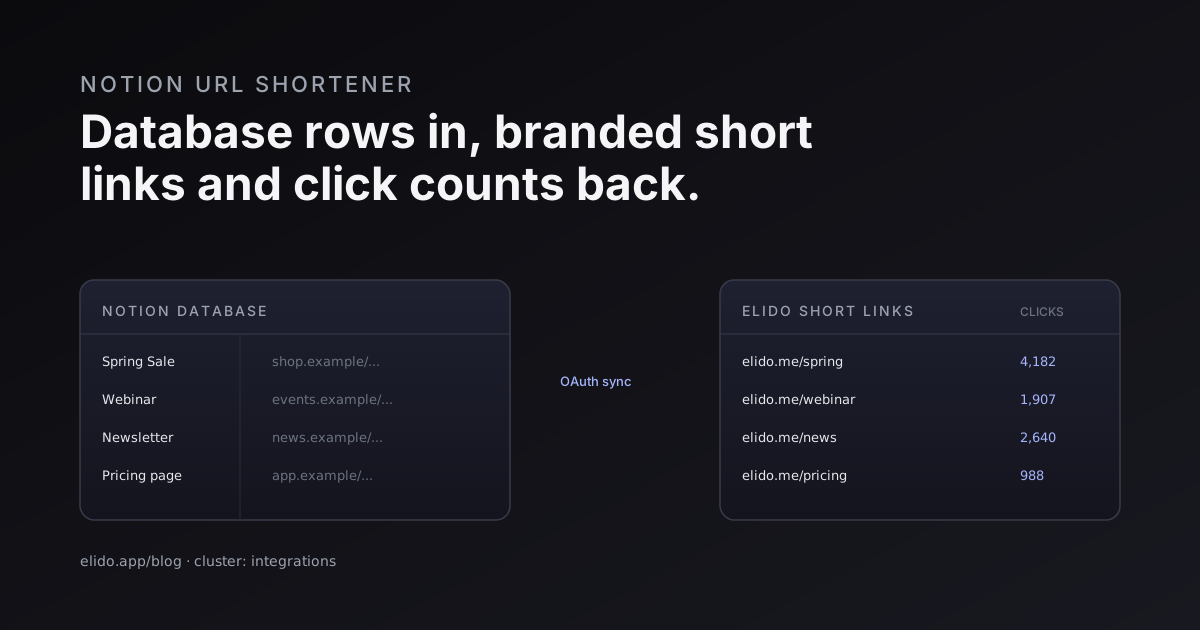
A Notion URL shortener turns the plain links sitting in a Notion database into tracked, branded short links without leaving the database. You keep your campaign table, content calendar, or link directory exactly where it already lives. Elido reads the destination URL in each row, mints a short link on your domain, and writes that link back into a column next to it. Connect once with OAuth, no token to copy, no spreadsheet export.
That is the short version. The longer version is that Notion has quietly become the place a lot of teams plan campaigns, draft content, and store the canonical list of every link they care about. The problem is that Notion stores URLs as dead text. It does not shorten them, brand them, or count a single click. So people end up running two tools in parallel: the plan in Notion, and the tracked links somewhere else, kept in sync by hand. That gap is exactly what the integration closes.
This post covers what the Notion integration actually does, how the one-click OAuth connect differs from the old paste-a-token approach, four use cases where it earns its place, how click stats flow back into the table, and the Zapier and API paths for teams that want them instead. It ends with a practical setup walkthrough.
What the Notion URL Shortener Integration Does
Strip it to the mechanics. You have a Notion database with a property that holds a destination URL: a landing page, a campaign target, a doc link. Elido connects to that database, and for each row it creates a branded short link pointing at that destination. The short link goes back into the same row, in a property you designate. From then on, that row is both a plan and a live tracked link.
Because every link Elido generates is a normal link in your workspace, it carries the full feature set. It resolves at the edge with the same sub-15ms p95 latency as any other Elido link, it can use a custom branded domain, and it records every click into our analytics store with no sampling. Nothing about the link is second-class just because it was born in Notion.
The reverse flow is the part teams underrate. Elido can write the running click count back into a number property on the same row. Your Notion table stops being a static list and starts being a small dashboard: campaign name, destination, short link, clicks, all in one view you already check every morning. No tab-switching to read numbers.
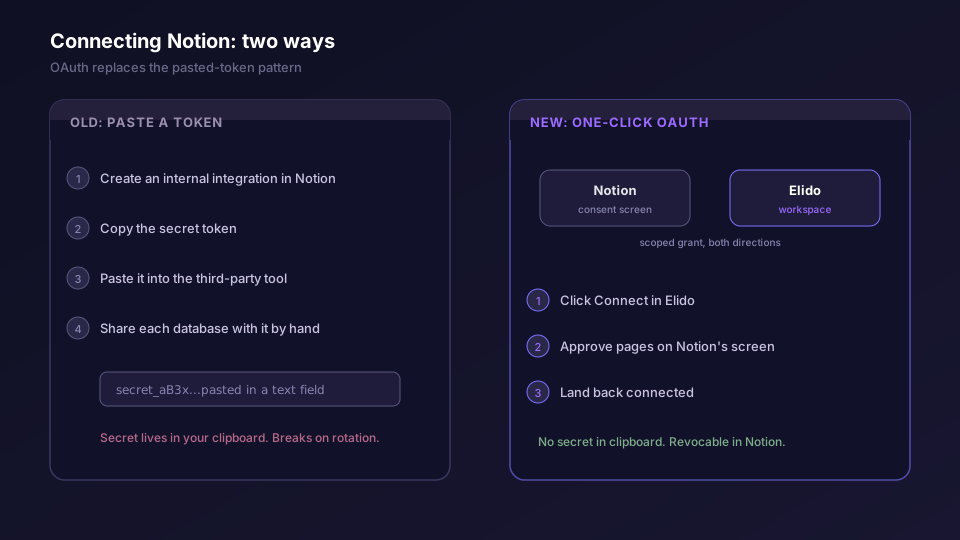
One thing worth being precise about: the exact property names and the consent screen layout are Notion's, and Notion iterates on its UI. The pattern is stable, the pixels are not. Treat any specific label below as illustrative, and trust what the connect screen tells you in the moment.
One-Click OAuth, Not a Pasted Token
Older Notion integrations across the ecosystem worked one way. You opened Notion's settings, created an internal integration, copied a long secret token, pasted it into a third-party tool, then went back into Notion to manually share each database with that integration. Four steps, two apps, one secret living in a text field. It worked, but it leaked secrets into clipboards and broke the moment someone rotated a token.
Elido uses Notion's OAuth flow instead. From your workspace integrations screen you click Connect on the Notion card. Elido sends you to Notion's own authorization screen, hosted by Notion, where you choose which pages or databases Elido may touch. You approve, Notion hands Elido a scoped grant, and you land back in Elido already connected. No secret ever passes through your clipboard.
The distinction matters for more than convenience. With OAuth, the access grant is owned by Notion and visible in your Notion settings, so you can see exactly what Elido can reach and revoke it in one click whenever you want. The scope is what you approved and nothing wider. This is the same model behind social login for URL shorteners: you authenticate against the provider, and the provider vouches for a narrow, revocable grant rather than handing over a static credential. Notion's own authorization documentation describes the public OAuth flow Elido sits on top of.
Worth saying plainly: the OAuth handshake talks to Notion, and Notion's servers may sit outside the EU. That is an authentication and authorization step, not where your link data lives. Your Elido links and click events stay pinned to the EU region you chose for your workspace. Notion holds the destinations; Elido holds the analytics, in the region you picked.
Four Ways Teams Use It
The integration is generic on purpose, but four shapes show up again and again.
Content calendar links. A marketing team plans posts in a Notion calendar database, one row per post, each with a destination URL. Connect Elido and every scheduled post gets a branded short link automatically, ready to drop into the post when it goes live. After publishing, the click count flows back so the calendar shows which posts actually drove traffic, not just which shipped.
Campaign tracker database. This is the one that sells the integration. A campaigns database with columns for name, channel, destination, and budget gains two more: the short link and its click total. The team gets per-campaign click tracking without ever opening a separate analytics tool, and because the links carry UTM parameters, the data reconciles cleanly with whatever sits downstream. If you build UTM strings by hand today, the UTM builder and the UTM template guide cover how to attach them consistently so the Notion table stays tidy.
Internal link directory. Bigger orgs keep a Notion page of canonical internal links: the VPN setup doc, the expense form, the onboarding handbook. Turn those into branded short links and you get two things. People remember go.yourbrand.com/vpn better than a 90-character SharePoint URL, and you find out which internal resources people actually use. Low click counts on the security-policy link are a finding, not a footnote.
Client deliverables. Agencies hand clients a Notion page of links: the live site, the staging preview, the analytics dashboard, the invoice. Branded short links make that page look like the agency owns the whole stack, and the click data tells the account manager whether the client ever opened the report before the review call. That answer is useful before the call, not after.
The common thread is that none of these teams wanted to leave Notion. The plan already lived there. The integration meets them where they work instead of asking them to maintain a parallel list in a link tool.
Click Stats Flowing Back
A short link that you cannot measure is just a redirect. The point of generating links from a database is to close the loop and put the numbers back where you planned the work.
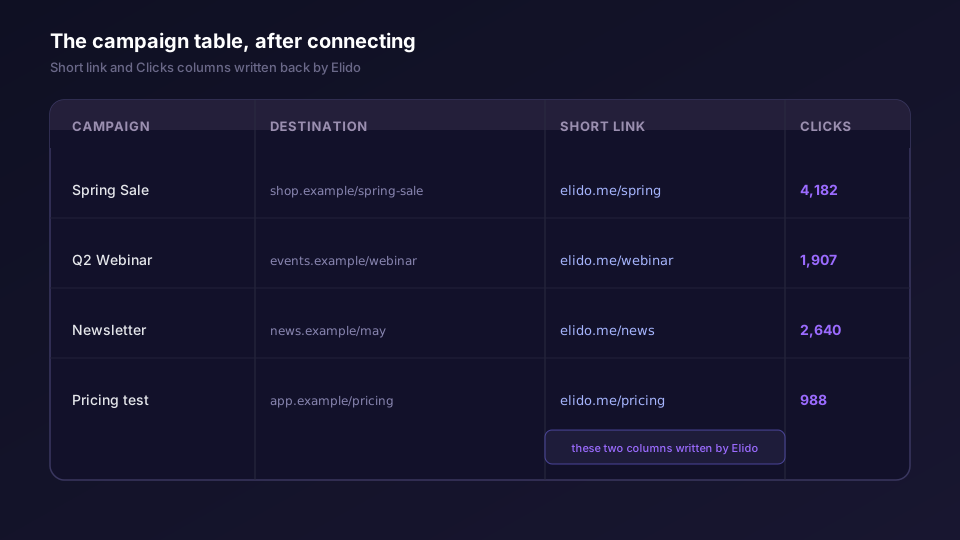
Elido writes the total click count into a number property on each row, refreshed on a schedule. That gives you a sortable, filterable view: sort the campaigns database by clicks and the winners float to the top inside Notion, no export required. It is not a replacement for the full analytics surface, which breaks clicks down by country, device, referrer, and time. It is a glance-level number that lives next to the plan.
For teams that want more than a single count in the cell, two routes open up. The link record carries its full history through the API, so a script can pull a richer breakdown and write a summary block onto the Notion page. And webhooks can push a notification the moment a tracked link crosses a threshold, which is handy when a client deliverable suddenly spikes and someone should know before the next standup. The integration handles the common case; the API and webhooks handle the long tail.
The Zapier and API Alternatives
The native OAuth integration is the path of least resistance, but it is not the only one, and two alternatives fit specific situations better.
Zapier suits teams already standardised on it. A Zap watches your Notion database for new rows, and when one appears, it calls Elido to create a short link and writes the result back into the row. You trade a little latency and a Zapier seat for the ability to chain Notion to Elido inside a workflow that might also touch a CRM, a Slack channel, and a spreadsheet in the same run. We cover the broader pattern in the Zapier automation guide. The tradeoff is honest: Zapier adds a hop and a dependency, and the native integration does not, so reach for Zapier when the link creation is one step in a longer automation rather than the whole job.
The API is the path for engineers who want full control. Elido's REST API and the TypeScript, Python, and Go SDKs let you script the Notion-to-Elido sync yourself: read the database through Notion's API, create links through Elido's, write back whatever you like. You own the schedule, the error handling, and the exact shape of what lands in Notion. If you already run jobs against the Notion API, adding an Elido call is a few lines. The API and SDK quickstart walks through auth, idempotency, and the gotchas, and the API feature page lists the full surface. Notion's API reference documents the database query and update endpoints you would pair it with.
Use idempotency keys if you script this yourself. A Notion database query that re-runs on a schedule will hand you the same rows again, and without an idempotency key keyed to the row ID, you create duplicate links every cycle. The quickstart covers exactly that failure mode.
Setting It Up
Here is the practical sequence. The labels may shift as Notion updates its UI, so follow the on-screen prompts where they differ.
First, get your Notion database into the right shape. You need at least a property holding the destination URL. Add an empty property for the short link Elido will write back, and if you want stats, a number property for the click count. A URL-type property for the short link and a number-type for clicks keeps Notion's formatting sensible.
Second, connect Notion in Elido. Open your workspace integrations screen, find the Notion card, and click Connect. You land on Notion's authorization screen. This is the step that matters: choose which pages or databases Elido may access, and grant only the ones holding links you want to track. Approve, and you return to Elido connected.
Third, map the database. In Elido, pick the connected database and tell it which property holds the destination and which property should receive the short link. If you are syncing click counts, point it at the number property too. Save the mapping.
Fourth, let it run and verify one row. Elido processes the rows and writes short links back. Open the database, check that a row got a real short link, click it, and confirm the click registers in Elido's analytics and that the count comes back to the table on the next refresh. Verify with one row before you trust the whole table.
That is the whole loop. The destinations stay in Notion where you plan, the links live on your branded domain, and the numbers come home to the same table. If you are weighing this against keeping links in a spreadsheet, the Google Sheets bulk import covers the equivalent flow for teams whose source of truth is a sheet rather than a database, and what a URL shortener actually is sets the groundwork if you are new to branded links. Marketers evaluating the whole stack can start from the marketers solution page, and pricing for branded domains and higher limits is on the plans page.
Related on the Blog
Frequently asked questions
How do I shorten links in Notion?
Connect your Notion workspace to Elido with one-click OAuth, then point Elido at a database that holds destination URLs. Elido creates a branded short link for each row and writes it back into a property on that row. There is no token to paste and no manual copy-paste between tabs.
Does the Notion integration track clicks?
Yes. Each generated short link is a normal Elido link, so it carries full click tracking: totals, time series, country, device, and referrer. Elido can write the running click count back into a number property in the same Notion database so your campaign table doubles as a lightweight dashboard.
Do I have to paste an API token to connect Notion?
No. Elido uses Notion's OAuth flow. You click Connect, approve which pages or databases Elido may access inside Notion's own consent screen, and the handshake completes. Token-paste is the older pattern Elido moved away from for this integration.
Can I use branded domains for links created from Notion?
Yes. Links generated from a Notion database use the same domain settings as the rest of your workspace, including custom branded domains on paid plans. The destination lives in Notion; the short link lives on your domain.
What if I would rather use Zapier or the API instead of the native integration?
Both work. A Zapier Zap can watch a Notion database for new rows and call Elido to create a link, which suits teams already standardised on Zapier. The REST API and SDKs give you full control if you want to script the sync yourself or run it inside an existing job.
Which Notion data does Elido read?
Only the pages and databases you grant during the OAuth consent step. Elido reads the destination URL property to create links and writes back the short link and, optionally, the click count. It does not crawl your whole workspace, and the grant is revocable from Notion at any time.
Try Elido
Paste a URL, get a working short link
No signup. Link lives for 30 days. Sign up to keep it forever.
Free, no signup required · 2 per day