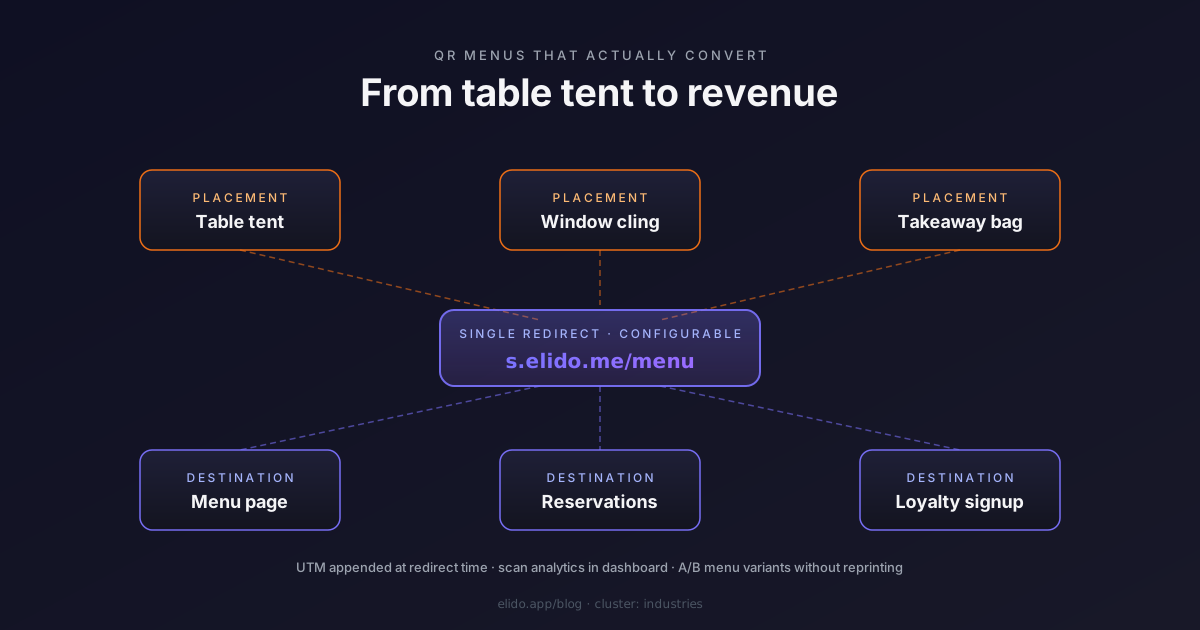
Restaurants were the first industry to adopt QR menus at scale, in 2020, out of necessity. Five years later most operators kept the QR code on the table but discarded the marketing infrastructure that came with it. The QR points to a PDF menu hosted on the website. There is no analytics, no campaign tracking, no way to know which placements work, and no ability to change the destination without reprinting.
This post is about the difference between a QR code that points to a PDF and a QR code that points to a redirect. The first is a static convenience. The second is the entry point to a marketing surface - for menu updates, reservation flow, loyalty signup, post-meal feedback - that scales to a chain of 200 locations or a single corner café.
What a redirect layer changes for a restaurant
A QR code prints once. A PDF on a website is static. Combine them and you have a QR-menu system that requires reprinting every time the menu changes - which means the prices on the QR-linked PDF are wrong any time a supplier changes, the seasonal cocktails appear weeks after they go live, and the gluten-free indicators get added to a corner of the document that nobody reads.
A redirect layer breaks that coupling. The QR code on the table tent points to a short URL - s.elido.me/menu - and that URL resolves to whatever destination you point it at today. Change the destination from the dashboard, and every printed table tent now points to the new menu instantly. No reprinting.
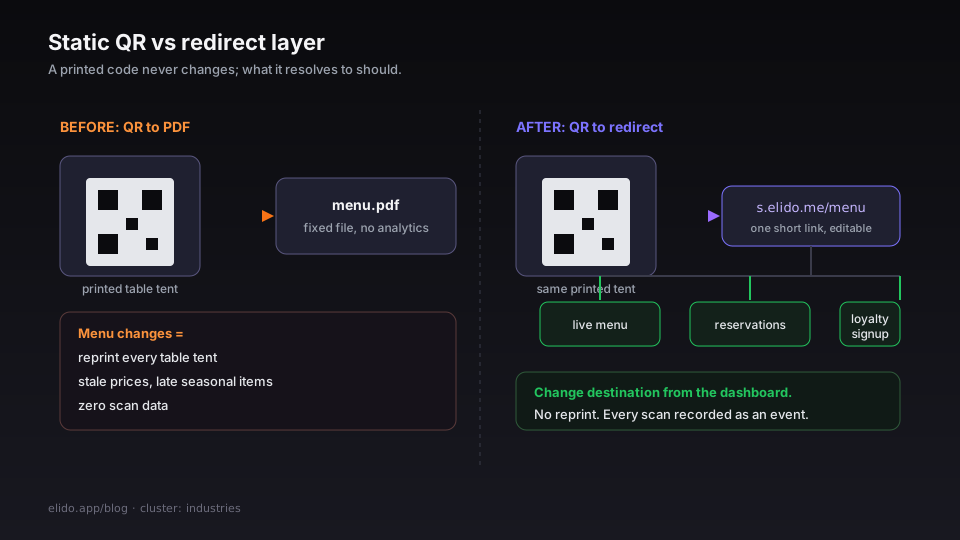
The same redirect carries analytics. Every scan is a recorded event with timestamp, location of the redirect POP, device type, and the referrer (in practice, mobile camera-app scans land with no referrer). At the volume of a single restaurant - a few hundred to a few thousand scans per week - that data is enough to answer the operational questions that matter:
- Which days of the week generate the most menu scans?
- What is the lunch-versus-dinner ratio in your QR traffic?
- Are visitors scrolling the menu after the scan, or bouncing back to the camera?
- Is the table-tent QR generating more scans than the window cling outside?
The third question requires a destination page that emits analytics back to your shortener; the others are answerable purely from redirect events. Even the simplest deployment - a single QR pointing to a PDF, with no destination-page analytics - produces useful operational data the day it goes live.
A practical setup
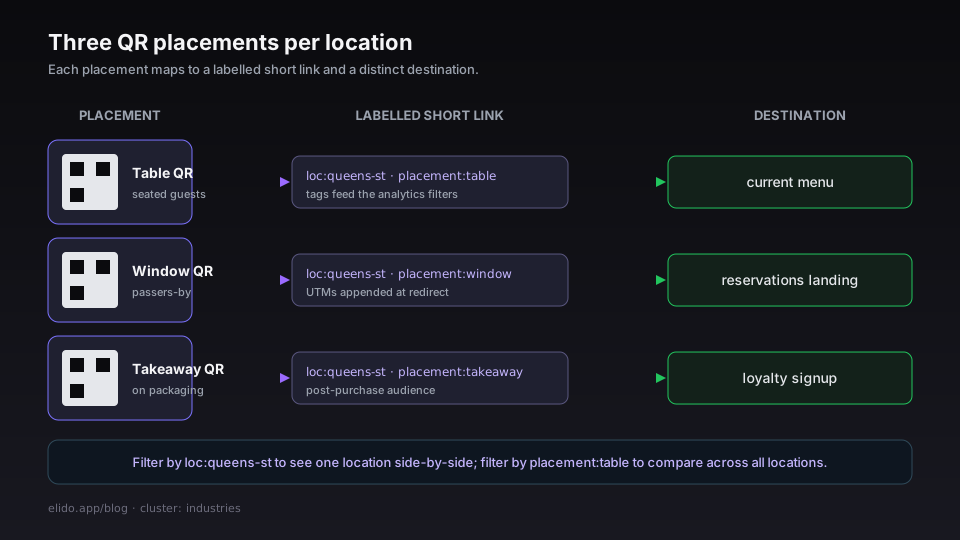
Start with three QR codes per location, each pointing to a distinct short URL:
- Table QR: the in-restaurant QR for guests already seated. Destination: the current menu.
- Window QR: a QR cling on the front window for passers-by. Destination: a landing page with reservations, hours, and the menu.
- Takeaway QR: a QR sticker on takeaway packaging. Destination: a feedback form, a loyalty-program signup, or a "next-order discount" page.
Three QR codes is enough surface for most independent restaurants. Larger groups should add separate codes for each high-traffic placement - different table positions, different bathroom signage, different staff-recommendation cards - because the analytics let you measure the placement-by-placement scan rate, and that data is what justifies the design and printing cost of the secondary placements.
Each QR maps to a short link. The links are configured at /links in the dashboard. Set descriptive labels:
loc:queens-st · placement:table→ menuloc:queens-st · placement:window→ reservations landingloc:queens-st · placement:takeaway→ loyalty signup
The labels populate the tag filters in the analytics dashboard. Filter by loc:queens-st to see all three QR codes for one location side-by-side; filter by placement:table to compare table-QR performance across all locations.
The QR images themselves are generated by Elido - at the link detail page, the QR code tab shows the QR with sizing, format, and error-correction-level options. Print files are exported as SVG or PNG; the SVG is the better choice for any placement where the design might change (table tents are usually reprinted seasonally).
The QR code itself: design and printing
Three rules that matter more than the URL behind them:
Contrast matters more than colour. A black QR on white is the highest-readable form. A coloured QR on a coloured background reduces scan reliability - sometimes a lot. If the brand requires colour, dark navy or dark brown on a cream background are the safe choices. Pastel-on-pastel is not.
Quiet zone is the most-broken rule. QR specifications require a "quiet zone" - clear space - of at least 4 modules around the code (where a module is the size of a single QR cell). Most table-tent designs put text or graphics right up against the QR edge; that pushes the scan-success rate down materially. The QR exporter at Elido sets the default quiet zone correctly; if a print designer scales the QR or applies a frame, the quiet zone needs to be preserved.
Error-correction level affects the size of the QR but also its tolerance for damage. Level L (low) gives you the smallest possible code. Level H (high) recovers from up to 30% damage and is the right choice for any placement that might get scuffed, smudged, or partially blocked - bag stickers, outdoor window clings, table tents in a busy service. The Elido exporter defaults to Level M; bump it to H for placements that need durability.
Tested in operational conditions, a 3cm-square QR at Level M on a black-on-white print scans reliably from 30cm away on most modern phones. Smaller than that, the scan rate drops noticeably. Larger codes are friendlier on poorly-lit tables - fine-dining restaurants with low lighting in particular benefit from 5-6cm QR sizing.
What to put behind the redirect
For a single-location independent restaurant, the menu destination is the obvious one. Three variants of the menu page are worth considering:
Plain PDF: cheapest to maintain, no analytics on the destination, no mobile-first design. PDF rendering on phones is improved compared to 2020 but still inferior to native HTML. Acceptable as a starting point; not a long-term destination.
HTML menu page on your website: better mobile rendering, can be updated without re-deploying assets, opens to analytics if you have any. The friction is having or paying for a CMS to keep the page up to date.
A bio-page-style destination: a single mobile-optimised page with the menu sections, photos for hero dishes, and additional links - reservations, contact, gluten-free section, kids menu. Elido's bio pages feature covers this use case directly; the build-a-bio-page tutorial is the operational walkthrough.
The bio-page approach is the one most independent restaurants land on after a season of iteration. The page is editable from a dashboard rather than requiring a CMS, it renders consistently across phones, and the analytics flow back into the same place as the QR scan data.
For chains with 50+ locations, the menu destination is more involved - usually a per-location landing page generated from a central menu database, with location-specific specials. The redirect layer makes the QR-to-destination mapping configurable per location without changing the QR. A central marketing team can A/B test a redesigned menu page in three locations without touching the QR codes printed at all 200.
A/B testing the menu landing
The smart-routing engine at Elido supports weighted destination variants on a single short link. For a QR-menu use case, this is the mechanism that lets you test menu designs without reprinting.
A single short link can route 50% to menu-v1.example.com and 50% to menu-v2.example.com based on a stable hash of the visitor's IP. A guest scanning the QR at lunch sees one variant; another guest at the next table sees the other; the analytics records which destination resolved for each scan.
Pair the routing with destination-page event tracking (a scrolled_to_dessert event, a viewed_drinks_section event), and you have an A/B test of the menu layout running on your actual lunch service. After a week of traffic, you have a few thousand sessions per variant, which is enough to detect a 5-percentage-point difference in scroll-to-dessert rate with reasonable confidence.
The smart links explained post covers the routing engine in detail; the A/B testing landing pages tutorial covers the experiment design for restaurant-scale traffic.
Reservation funnel attribution
The window-QR placement is the one that most directly connects to revenue. A passer-by scans the QR on the front window, lands on a reservations page, and books a table.
The attribution question: how do you know the booking came from the QR rather than from a Google search, an Instagram referral, or an OpenTable listing?
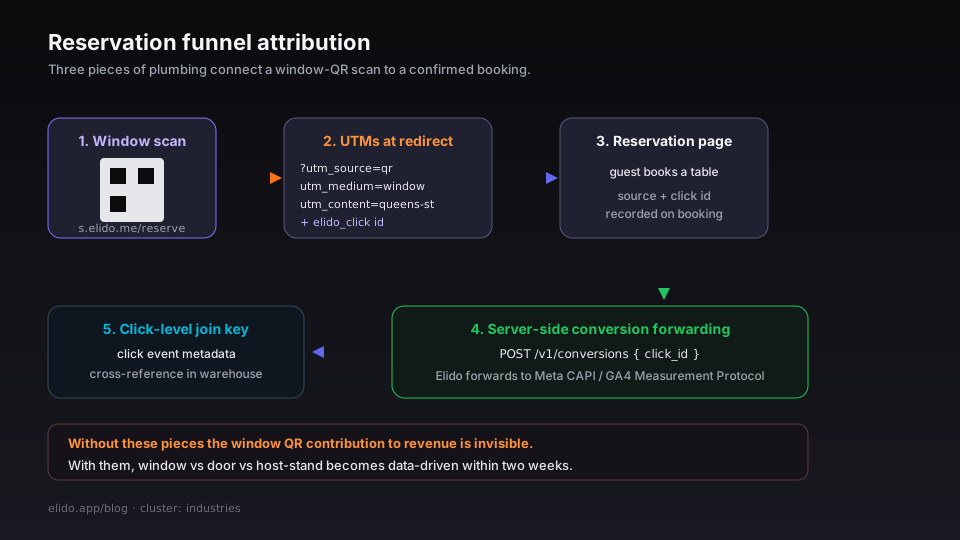
Three pieces of plumbing answer this:
- UTM parameters appended at redirect time. The QR points to
s.elido.me/reserve. The redirect appends?utm_source=qr&utm_medium=window&utm_campaign=walk-in&utm_content=queens-stand resolves to the reservation page. Your reservations platform records the source. - Server-side conversion forwarding. When the booking confirms, the reservations system fires a server-to-server call back to Elido's
/v1/conversionsendpoint with the click ID. Elido forwards the conversion to Meta CAPI or GA4 Measurement Protocol if configured. The server-side conversion tracking post covers the full mechanism. - Click-level join keys. If the reservation platform supports custom URL parameters, the
elido_clickparameter from the redirect is captured on the booking record. The shortener'smetadatafield on the click event lets you cross-reference click and reservation in your own data warehouse.
Without these three pieces, the window QR's contribution to revenue is invisible. With them, the placement decision (window vs. door vs. inside-host-stand) becomes data-driven within two weeks.
Loyalty signups through the takeaway QR
The third QR - on takeaway packaging - generates a different conversion pattern. Takeaway guests are post-purchase by definition; the redirect goes to a loyalty signup or "discount on your next order" landing page.
The interesting analytics on the takeaway QR is not the scan rate (typically 5-15% of takeaway orders, varying significantly by packaging design) but the conversion rate from scan to signup. A scan-to-signup rate above 20% means the landing page works. Below 10% means the offer is not compelling, the page asks for too much information, or the post-scan friction is too high.
The link analytics dashboard exposes this as the time-to-first-click curve and the destination-page bounce rate (when destination-page tracking is wired up). For most loyalty signups, the design choice that moves the needle is reducing the form fields - name and email beats name, email, phone, birthday, and dietary preferences.
A worked operational rhythm
For a single-location restaurant with three QR placements, the weekly analytics review takes about 10 minutes:
Monday morning, 5 minutes: open the bio analytics dashboard. Filter to the previous 7 days. Check three numbers - total scans, day-of-week shape, busiest hour. Compare against the previous week.
Mid-week, 3 minutes: check the placement breakdown. Are table scans, window scans, and takeaway scans tracking with order volume? A sudden drop in table-scan rate often correlates with a service-process change - staff stopped pointing to the QR, the table-tent layout got reshuffled, a new server is not familiar with the placement.
Friday, 2 minutes: check the destination-page analytics if wired. Are reservations clicking through? Are loyalty signups converting? Note anything anomalous for the Monday team meeting.
This rhythm is the difference between QR menus as static infrastructure and QR menus as a marketing channel. Without the rhythm, the data accumulates and never produces a decision. With it, the channel is actively managed.
Pricing realities for restaurant operators
Most independent restaurants run the QR-menu setup on Elido's Pro tier - €3.50/month for the level of usage a single restaurant generates. The cost calculus for chains is different and scales with location count rather than scan volume.
The free tier is enough to test the concept (50 links, 500 clicks per month). For a working setup with three QR codes, custom domain, analytics breakdowns, and A/B testing, Pro is the minimum.
The pricing page has the full breakdown. Restaurants that need EU data residency for guest reservation data (a real requirement for any establishment subject to GDPR enforcement audits) are on the EU-default tier - see the GDPR for URL shorteners cornerstone for the residency commitments.
What does not work
Three setups that look reasonable on paper and fall over in practice:
A QR on a coaster. Coasters are wet, scuffed, and small. The Level-H QR with a generous quiet zone helps, but the scan rate on a wet coaster is unreliable even at the best of times. Use a table tent or a menu insert instead.
A QR linking to a third-party reservations widget hosted by OpenTable or Resy. The redirect itself works, but the third-party widget often loses the UTM parameters in its own internal redirects. The conversion attribution to "QR scan" disappears in the middle of the funnel. If you must route to a third-party reservation page, use the platform's API integration to pass the click ID rather than relying on UTMs surviving the redirect chain.
A QR pointing at a Google Business Profile listing. The redirect works, but Google's hosted page does not honour UTMs and the click does not return to your conversion-tracking layer. Use a destination you control.
Related reading
- URL shorteners for ecommerce: the data plane behind the funnel - the cornerstone for the industries cluster.
- Dynamic vs static QR codes: which one breaks first - the foundational decision behind any QR-menu setup.
- QR code campaign from scratch - adjacent walkthrough for non-restaurant QR campaigns.
- URL shorteners for SaaS: lifecycle, onboarding, comms - adjacent industry walkthrough.
- A/B testing landing pages with short links - for the A/B-the-menu-design step.
- Product surface:
/features/qr-codes,/features/bio-pages, and/solutions/marketers. - External: GS1 standards for QR placement and quiet-zone guidance.
Try Elido
Paste a URL, get a working short link
No signup. Link lives for 30 days. Sign up to keep it forever.
Free, no signup required · 2 per day