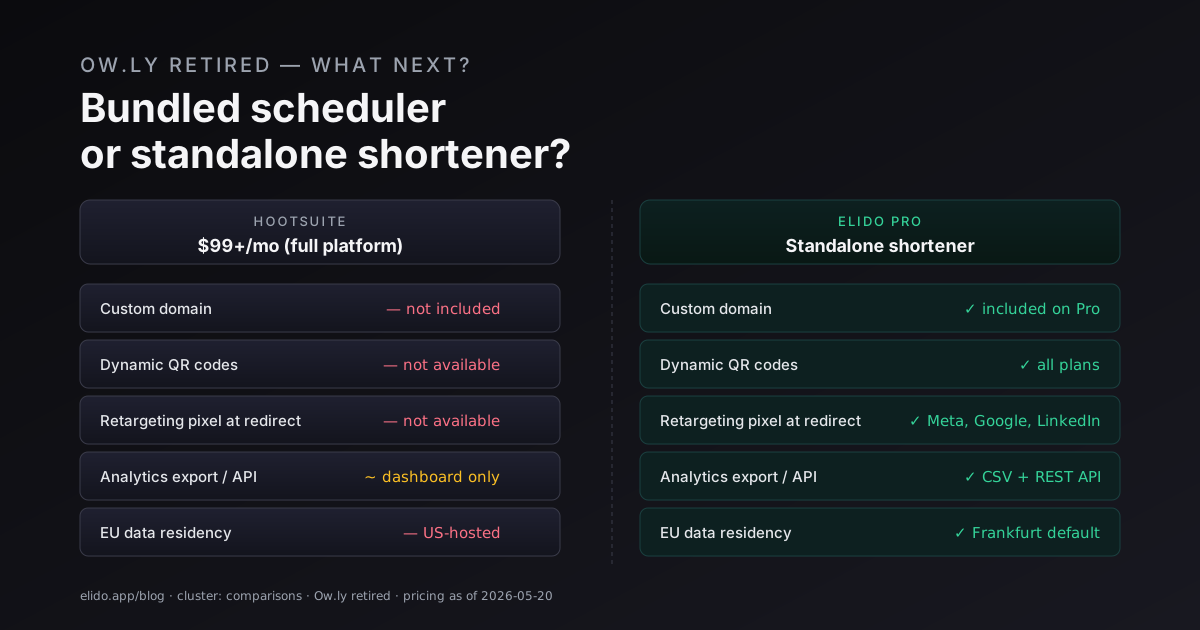
Ow.ly no longer works as a standalone URL shortener. Hootsuite folded it fully into their platform years ago, and the product you used to access for free - paste a URL, get ow.ly/XXXX - is now a byproduct of a $99+/month social media management subscription. If you want ow.ly links, you buy Hootsuite. There is no middle path.
That leaves social media managers in one of two positions. Either you're already paying for Hootsuite and link shortening is a fringe benefit that works fine for your needs. Or you're not paying $99+/month for a full social scheduler, and you need a shortener that works as a standalone product - ideally with the features Ow.ly never had.
This article is for the second group. It covers what Ow.ly was and wasn't, what a standalone shortener should actually do for a social media workflow in 2026, and how to migrate your campaigns away from Ow.ly without breaking anything that's still running.
TL;DR
- Ow.ly is retired as standalone. You can only get it bundled with Hootsuite at $99+/month.
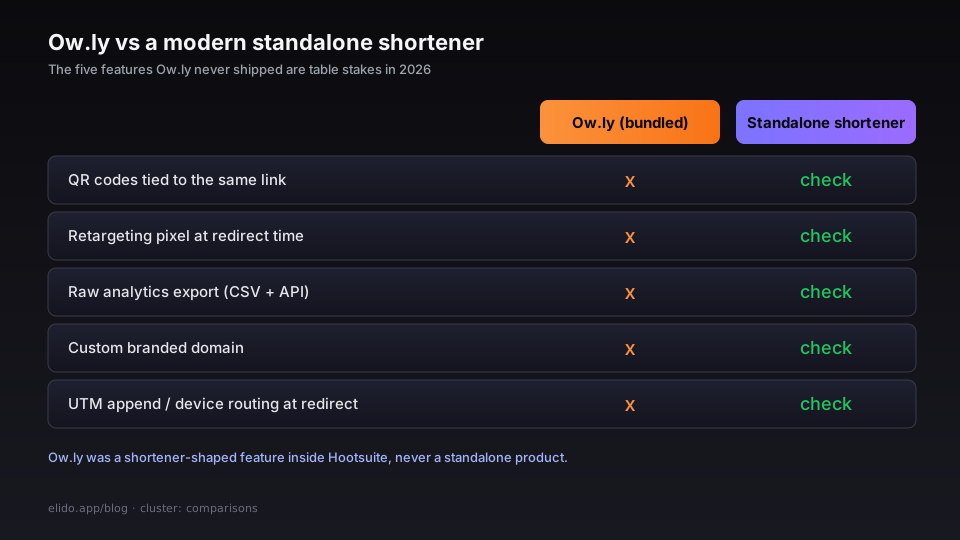
- Ow.ly never had QR codes, retargeting pixels, analytics export, or custom domains. All of those are table stakes in a modern standalone shortener.
- You keep your scheduler of choice and swap the shortener: mint links in Elido and paste them into Buffer or Hootsuite. Built-in Buffer and Hootsuite connectors that shorten automatically are planned, not available yet.
- You cannot reclaim existing
ow.ly/XXXXslugs - they resolve on Hootsuite's infrastructure. What you can do is stop minting new Ow.ly links and move all forward-looking campaigns to your own branded domain. - Cost comparison: Elido Pro + your existing scheduler (Buffer, Later, Publer, Planoly - your choice) typically runs well under $99/month total, depending on your scheduler tier.
What Ow.ly was, and what it wasn't
Ow.ly launched alongside Hootsuite in the early 2010s as a link shortener tied to Hootsuite's social scheduling product. At its peak, it did one thing: took a long URL and gave you something short that could be tracked inside Hootsuite's analytics dashboard.
That was genuinely useful for the time. Click counts inside Hootsuite, tied to the post that contained the link. Nothing more.
Here is what Ow.ly never had:
Start with QR codes. There was no QR generation attached to Ow.ly links. If you were running a campaign that spanned both digital and physical - a social post and a printed poster, a tweet and a trade show handout - you had to generate QR codes from a separate tool and hope the destination URLs stayed in sync with your Hootsuite tracking.
Retargeting pixels were missing too. Ow.ly had no mechanism for loading a Meta Pixel, Google Tag, LinkedIn Insight Tag, or any other retargeting script at redirect time. If you wanted to retarget everyone who clicked a link you shared on Twitter, you were managing that separately, with all the match-rate degradation that entails.
Analytics export never existed either: click data collected by Ow.ly lived inside Hootsuite. You couldn't export raw click events to a warehouse, a BI tool, or a CSV for your own analysis. You could look at the chart; you couldn't own the data.
Then custom domains. Your links were on ow.ly. Not on your brand domain. Every link you sent on behalf of a client or your own brand read as ow.ly/something in the address bar and in social previews.
And UTM passthrough or append. Ow.ly passed the destination URL as-is. Any UTM tagging had to be on the destination. There was no append-at-redirect capability, no A/B URL routing, no device-based destination.
None of these are exotic. Every serious standalone shortener ships them in 2026. The gap existed because Ow.ly was never a standalone product - it was a shortener-shaped feature inside a bigger tool, and the bigger tool was the investment Hootsuite made.
What to look for in a standalone replacement
The feature checklist for replacing Ow.ly is short. Priority order matters.
Custom domain. Non-negotiable. Every link you send should be on a domain you control. This matters for brand recognition in social previews, for email deliverability (shortened links on shared domains get flagged), and for trust: go.yourbrand.com reads differently than ow.ly or bit.ly. Check whether the vendor charges per domain or allows wildcard subdomains for agency or multi-brand use. Elido includes one custom domain on Pro and wildcard subdomains on Business. The custom domains feature page has the DNS setup walkthrough.
QR code generation tied to the same link. The QR code and the short link should be the same campaign asset, not two separate things managed in two separate tools. Dynamic QR codes - where the destination can be changed after printing - are the most important variant to look for. Scan rate analytics should roll into the same click report as web clicks. See Elido's QR codes feature page and the explainer on dynamic vs static QR codes for the operational details.
Retargeting pixel injection. You should be able to fire a pixel at redirect time - before the user reaches the destination - so that everyone who clicks your social link enters your retargeting audience regardless of whether the landing page fires its own pixel correctly. This recovers the audience you'd otherwise lose to Safari ITP, browser extensions, and destination pages with inconsistent tagging. Elido's retargeting feature page has the per-platform setup. The click attribution after Safari ITP explainer is relevant context.
Analytics export. Raw click events should be yours. Look for CSV export and an API endpoint that returns click event logs - device, country, referrer, timestamp, destination, UTM parsed. If a vendor stores your data and doesn't give you a way out, the data is effectively held hostage. Elido's analytics feature page covers the export formats; the short link analytics explainer covers what to actually measure.
Scheduler integration or webhook API. If you're managing 50+ links a month across active social campaigns, manual creation doesn't scale. The shortener needs to connect to your scheduler (Buffer, Hootsuite, Later, Publer) or expose a webhook and API that your automation layer can call. Elido exposes a REST API and bulk import today; native Buffer and Hootsuite connectors are planned (see the integrations page for status).
EU data residency. If any of your campaigns run into EU markets, or if you're an EU-based agency, your visitor data (IP addresses, device fingerprints, and timestamps) is personal data under GDPR. A shortener that stores click events on US infrastructure is a DPA conversation waiting to happen. Elido stores click data on EU infrastructure in the EU region, and an Article 28 DPA is available on request on every plan; redirect nodes outside the EU still process visitor requests. The EU data residency for marketing post covers what that means in procurement terms.
Elido for social media managers
Here's the specific workflow Elido supports for teams coming off Ow.ly.
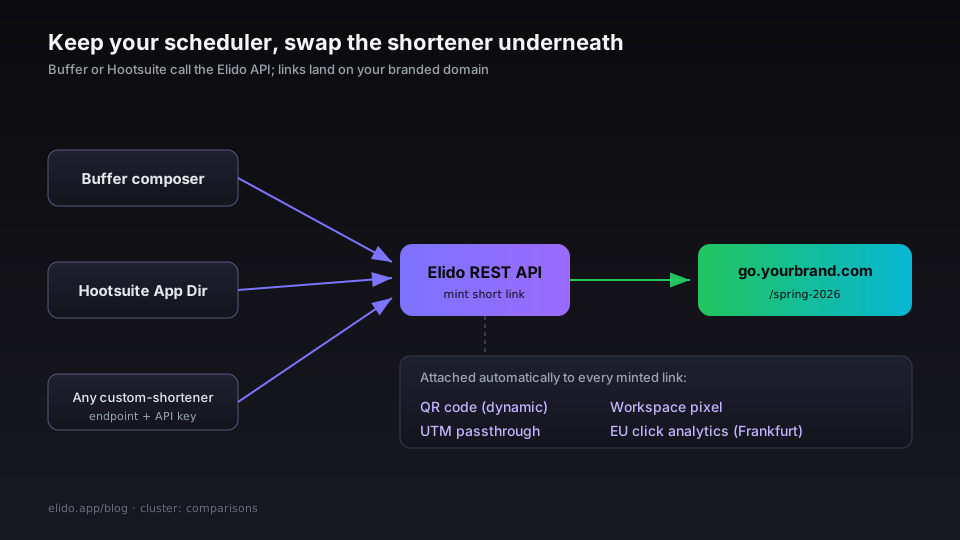
Buffer comes first, with a caveat. Elido does not have a Buffer connector yet, so Buffer cannot call Elido to shorten links as you compose. Today you mint the short link in Elido (dashboard, API or bulk import) and paste it into the Buffer post; it resolves on your branded domain with full click analytics. An automatic-shortening connector is planned, not available yet.
The same goes for Hootsuite: you can continue using Hootsuite as your scheduler and replace Ow.ly with Elido links you paste in. There is no Elido app in Hootsuite's App Directory yet, so posts created in Hootsuite do not generate Elido links on their own; that app is planned. The Hootsuite integration section tracks the status.
For bulk link import, if you're running campaigns where you pre-generate 50 or 500 links - product catalog promotions, affiliate campaigns, email sequences - Elido supports bulk CSV import via the dashboard and via the API. The bulk import from Google Sheets post has the full import-from-Sheets walkthrough, which is the most common bulk creation pattern for social teams.
QR and link come in one step. When you create a short link in Elido, the QR code is generated automatically. The same link powers both the web click and the scan event, and both show in the same analytics report. If you need to update the destination - the product moved, the event venue changed - you update it in one place and the existing QR codes and short links continue to work.
Retargeting scales without extra work, because pixels are set at the workspace level, not per link. You configure your Meta Pixel ID and Google Tag Manager container once. Every link minted in that workspace fires the pixel at redirect time. Social campaigns automatically contribute to your retargeting audiences without any per-campaign pixel setup.
Analytics export also covers client reporting. If you manage social campaigns for clients, Elido's analytics export API gives you raw click events by date range, by link, by campaign tag. Build your own client report template in Sheets or Looker Studio and pull the data via API on a schedule. You own the data; you're not screenshotting a Hootsuite dashboard.
Migration walkthrough
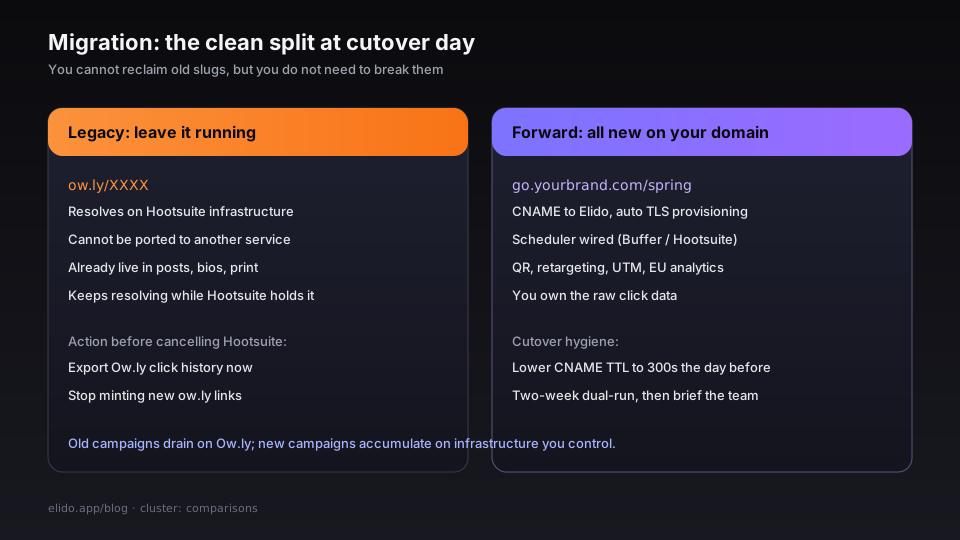
Moving off Ow.ly has one hard constraint: existing ow.ly links are not reclaimed.
Links minted on ow.ly/XXXX resolve on Hootsuite's infrastructure. You cannot port them to another service. If those links are in published content - live social posts, bios, printed materials, email archives - they will continue to resolve as long as Hootsuite keeps the redirects alive. You cannot move them, but you don't need to break them. They will just work until they don't, and when they stop working, they were already live for years.
What you can do is stop minting new Ow.ly links immediately. Any campaign that launches today or forward goes on your Elido branded domain. Old campaigns continue to resolve on Ow.ly; new campaigns accumulate on your own infrastructure.
Step 1: Set up your branded domain
Buy or nominate a short domain - something like go.yourbrand.com or lnk.agency.example - point its CNAME to Elido, and let the platform handle TLS provisioning. The custom domain setup guide walks through the DNS record, TLS certificate, and validation in about five minutes. Lower your CNAME TTL to 300 seconds the day before you make the switch so the propagation is fast.
Step 2: Wire your scheduler
Native Buffer and Hootsuite connectors are not available yet, so wiring the scheduler means changing the workflow rather than a setting. Create the campaign links in Elido first (one at a time in the dashboard, or in bulk from a CSV or the API), then paste the short links into Buffer or Hootsuite posts. Turn off the scheduler's own shortening so it does not wrap your branded link in another short URL.
If your scheduler or automation tool can call a REST API (a generic HTTP step in an automation tool, or your own script), have it create the link through the Elido API with a workspace API key and insert the returned short URL. Confirm with one test link before the first campaign.
Step 3: Migrate your active UTM templates
If you maintain a UTM naming convention - utm_source=instagram&utm_medium=social&utm_campaign=spring-2026 - and you previously applied that at the destination URL level, nothing changes. If you were relying on any Hootsuite UTM append behavior, rebuild those templates in Elido's UTM builder. The end-to-end UTM tracking guide has the canonical pattern.
Step 4: Export your Ow.ly click history while you still can
Hootsuite's data export is available as long as your account is active. If you're cancelling Hootsuite as part of this migration, run the export before the account closes. Ow.ly click history is not something you can pull later. Elido's click history starts from the day your first link is minted.
Step 5: Brief your team
The breaking change most social teams notice is not the link format - it's the analytics location. Whoever was reading click data in Hootsuite's built-in analytics needs to be directed to the Elido dashboard, or to the exported report format you choose. Plan for a two-week overlap period where both tools are live and the Hootsuite dashboard is still the source of truth for legacy links.
Pricing comparison
Hootsuite is not trying to sell you a URL shortener. It's selling a social media management platform. Ow.ly is a feature of that platform - the same way Canva integration, approval workflows, and team inboxes are features of that platform. If you need those, Hootsuite's pricing is reasonable for what it includes.
If you only need the shortener - or the shortener plus a lighter scheduler - the bundled price is expensive for the subset you use.
Hootsuite Professional: $99/month (or higher depending on current pricing and seat count). Includes the full social scheduler, content calendar, bulk scheduling, inbox management, analytics, and Ow.ly link shortening. If you use 80% of that feature set, the per-feature cost is reasonable. If you use 10% of it, I'd argue you're paying $99/month for a shortener.
Elido Pro + Buffer Essentials (as a representative example): Elido Pro, priced by the number of links you create, with one to three custom domains depending on size, analytics, QR codes, and retargeting. Buffer Essentials at its current tier for social scheduling across the channels you use. Combined total typically runs well under $99/month unless your Buffer seat count is large.
The switch is worth modeling when:
- You're paying for Hootsuite primarily to get link shortening, and you don't use the scheduler deeply.
- You need QR codes, retargeting, or analytics export - features you're currently supplementing with other tools.
- Your buyer is in the EU and Hootsuite's US data residency is creating procurement friction.
- You manage multiple brands or clients and need per-brand custom domains rather than a single
ow.lynamespace.
The switch is probably not worth modeling when:
- You use Hootsuite's full feature set - inbox management, team approvals, content calendar - and link shortening is a secondary benefit.
- Your existing
ow.lyclick history is critical business data you're actively analyzing and cannot recreate. - You have a negotiated Hootsuite enterprise contract that's already priced well below list.
FAQ
Can I redirect my existing ow.ly links to my Elido domain?
No. ow.ly links resolve on Hootsuite's infrastructure. You do not control the redirects for links you already minted. The only thing you control is whether you mint new ones.
Will my old ow.ly links stop working when I cancel Hootsuite?
Hootsuite has not published a formal deprecation timeline for historical Ow.ly redirects. They have continued to resolve links for users who cancelled, but this is not guaranteed. If you have high-traffic published content with ow.ly links, that's the argument for maintaining a basic Hootsuite seat long enough to move the destination URLs, or accepting the risk.
Does Elido work with Hootsuite?
Yes, but not as a built-in integration yet. You do not have to leave Hootsuite's scheduler: create the short link in Elido (dashboard, API or bulk import) and paste it into the Hootsuite post, so it resolves on your Elido branded domain rather than Ow.ly. A Hootsuite App Directory app that shortens links automatically is planned, not available yet.
Does Elido work with Buffer?
Yes, the same way: mint the link in Elido and paste it into the Buffer composer. Buffer cannot call Elido to shorten URLs automatically yet; that connector is planned.
What happens to QR codes if I update the destination URL?
Dynamic QR codes on Elido point at the short link slug, not the destination URL. Updating the destination in Elido updates every QR code and short link that points to that slug. Existing printed materials continue to work; they just resolve to the new destination.
Does Elido store click data in the EU?
Yes. Click events are stored in the EU: the primary database, analytics store and backups are there. Redirect nodes in the US and Singapore can still process visitor requests, and per-workspace region pinning is not available yet. A GDPR Article 28 DPA with EU SCCs is available on request on every plan; it is not pre-signed.
How many custom domains can I have?
Free has none. Pro includes one custom domain on the smallest size and up to three on larger Pro sizes; Business starts at five. Business also supports wildcard subdomains - one CNAME record, one TLS certificate cycle, unlimited subdomains under it. If you're managing 10 client brands, one wildcard on *.agency.example covers all of them without per-domain fees.
Can I export all my click data?
All of it. CSV export is available in the dashboard. Raw click events are accessible via the REST API with filters by link, date range, campaign tag, and workspace. You own the data.
Related on the blog
- Dynamic vs static QR codes: which one to use and when
- Bulk import links from Google Sheets
- Short link analytics: what to measure and what to ignore
- EU data residency for marketing tools: what your DPO actually asks
- URL shorteners for marketers: the 2026 comparison matrix
- Click attribution after Safari ITP: a practical guide
Frequently asked questions
Can I redirect my existing ow.ly links to my Elido domain?
No. Ow.ly links resolve on Hootsuite's infrastructure. You do not control the redirects for links you already minted. The only thing you control is whether you mint new ones. Existing ow.ly links will continue to resolve as long as Hootsuite maintains the redirects.
Will my old ow.ly links stop working when I cancel Hootsuite?
Hootsuite has not published a formal deprecation timeline for historical Ow.ly redirects. They have continued to resolve links for users who cancelled, but this is not guaranteed. If you have high-traffic published content with ow.ly links, that is the argument for maintaining a basic Hootsuite seat long enough to move the destination URLs, or accepting the risk.
Does Elido work with Hootsuite?
Yes, but not as a built-in integration yet. You do not have to leave Hootsuite's scheduler: create the short link in Elido (dashboard, API or bulk import) and paste it into the Hootsuite post, so it resolves on your Elido branded domain rather than Ow.ly. A Hootsuite App Directory app that shortens links automatically is planned, not available yet.
What happens to QR codes if I update the destination URL?
Dynamic QR codes on Elido point at the short link slug, not the destination URL. Updating the destination in Elido updates every QR code and short link that points to that slug. Existing printed materials continue to work; they just resolve to the new destination.
Does Elido store click data in the EU?
Yes. Click events are stored in the EU: the primary database, analytics store and backups are there. Redirect nodes in the US and Singapore can still process visitor requests, and per-workspace region pinning is not available yet. A GDPR Article 28 DPA with EU SCCs is available on request on every plan; it is not pre-signed.
How many custom domains can I have?
Free has none. Pro includes one custom domain on the smallest size and up to three on larger Pro sizes; Business starts at five. Business also supports wildcard subdomains - one CNAME record, one TLS certificate cycle, unlimited subdomains under it. If you are managing 10 client brands, one wildcard on a domain like agency.example covers all of them without per-domain fees.
Try Elido
Paste a URL, get a working short link
No signup. Link lives for 30 days. Sign up to keep it forever.
Free account required. The free plan includes 25 links in total. Already have an account? Log in