Use a short link when your audience is already on a screen, and a QR code when they're not. A short link is a clickable text URL built for digital channels: email, SMS, social bios, chat, and paid ads. A QR code is a scannable image built to carry someone from something physical - a poster, a package, a business card - onto their phone.
The short link vs qr code question usually gets framed as either/or, and that's the wrong lens. Both formats live at different points in the same journey, and the difference between short link and qr code comes down to the medium your audience is standing in when they meet your link. If you want the platform context first, here's a feature-by-feature look at Bitly alternatives that both formats are typically built on.
Short Link vs QR Code: The One-Line Answer
A short link is digital-first; a QR code is physical-to-phone. Flip it around and qr code vs short link becomes a single question - is the person holding a screen already, or standing in front of a printed thing? You'll also see this written as qr code vs url, which muddles the label with the contents: a QR code is a container, and what it usually holds is a URL, very often a short one.
Here's the whole comparison in one view.
| What you're comparing | Short link | QR code |
|---|---|---|
| Medium it lives in | Digital, on a screen | Physical (print, packaging, signage) or a screen someone else scans |
| How people open it | Tap or click the text | Point a phone camera and scan |
| Needs a camera | No | Yes |
| Trackable | Yes, on a link platform | Yes, when it wraps a short link (a dynamic QR) |
| Editable after it ships | Yes, swap the destination anytime | Only if it's a dynamic QR wrapping a short link |
| Best channels | Email, SMS, social bios, chat, ads | Print, packaging, business cards, signage, screens |
What a Short Link Is Best For
Short links shine anywhere the recipient can already tap or click. That covers most of the digital surface area a campaign touches, and it's why a shortener is table stakes for marketing teams. If you're new to the format, our plain-English explainer on what a shortener does is a good warm-up.
Reach for a short link when the destination shows up in:
- Email and SMS, where a clean
elido.me/springreads better than a 120-character tracking URL and survives copy-paste. - Social bios and captions, ad copy, podcast show notes, and chat - anywhere the audience is one tap from the destination.
There's a branding payoff too. Put your own domain on the short link and every share reinforces recognition instead of leaking clicks to a generic shortener, which tends to lift click-through in channels where the URL is visible. A short link is still a URL underneath. Every URL follows the generic syntax defined in RFC 3986, so the short version resolves exactly like the long one - it just hides the ugly query string behind a redirect. If you're curious how that hop works end to end, we walk through the redirect mechanics here.
What a QR Code Is Best For
QR codes earn their keep in the physical world, where typing a URL is annoying, error-prone, or plain impossible. They're the bridge from a surface someone can't click to a page on the phone in their pocket.
Print a QR code on packaging, restaurant tables, event badges, retail signage, or a business card and you remove all the friction of manual entry. QR codes are defined by an international standard and scale across 40 size versions; you can see the full version and capacity tables from Denso Wave, the format's inventor. The practical point for marketers is simpler: the shorter the URL inside the code, the smaller and more scannable the code gets.
There's one hard limit worth burning into memory. You can't scan a QR code with the same phone that's displaying it. So a QR code in an email, in a mobile app, or in a social caption that people read on their phone is mostly dead weight. I once watched a trade-show booth bleed scans because someone printed the code at ankle height on a pull-up banner - great artwork, impossible angle. The medium, not the design, is what decides whether a QR code can even work.
How to Decide by Channel
The rule for when to use a qr code vs a link is close to mechanical once you name the channel. Ask one thing: is the audience on a screen they can tap, or looking at a physical object? Screen means short link. Object means QR code.
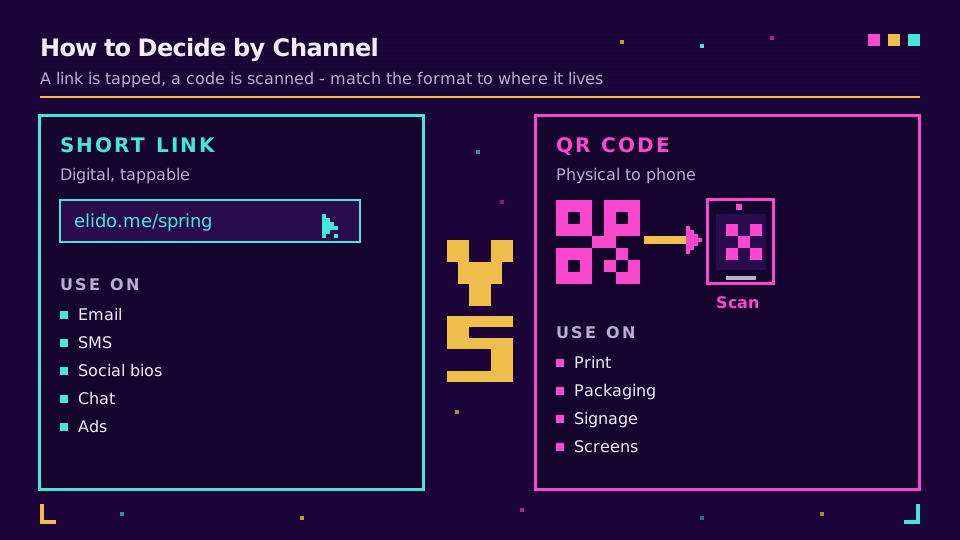
My rule of thumb is blunt: if the person can tap, give them a link; if they'd have to type, give them a code. Mapped to channels, that looks like this:
- Digital and tappable - email, SMS, chat, social bios, ad units, video descriptions: short link.
- Physical or scanned by a second device - flyers, posters, packaging, product manuals, business cards, conference slides shown on a projector: QR code.
The one genuine gray area is a slide or a shared screen. If the audience is looking at a projector or a webinar screen from their seats, a QR code works because they scan it with a separate phone. If they're reading the same screen they'd scan with, use the link.
Why the Best Campaigns Use Both
The strongest campaigns don't choose. They run a short link in the digital channels and a QR code on the physical ones, pointing at the same destination. The ones I've watched perform best tend to use both formats together rather than betting on one. For a fuller walkthrough of pairing them, see how shorteners and QR generators fit together.
The trick that makes "both" painless is that a QR code should encode a short link, not the raw destination. One short link becomes the single source of truth. Build them separately and you end up maintaining two targets and stitching two reports together at the end of the quarter. Build them off one link and the whole campaign has a single spine. The QR wraps it for print, the plain link covers digital, and every tap and every scan lands on one editable destination with one analytics stream. Add smart link rules on top and that same code can route iOS to the App Store, Android to Play, and desktop to a web page - one printed code, several destinations.
If you want one code that wraps one short link and reports taps and scans side by side, take a look at how Elido builds QR codes on trackable short links. You can generate one in a minute with the free QR code generator.
Tracking: Static QR vs Dynamic QR
Both formats are trackable when they sit on a link platform, but a QR code is only trackable if it's the right kind. This is the distinction that trips people up, so it's worth being precise.
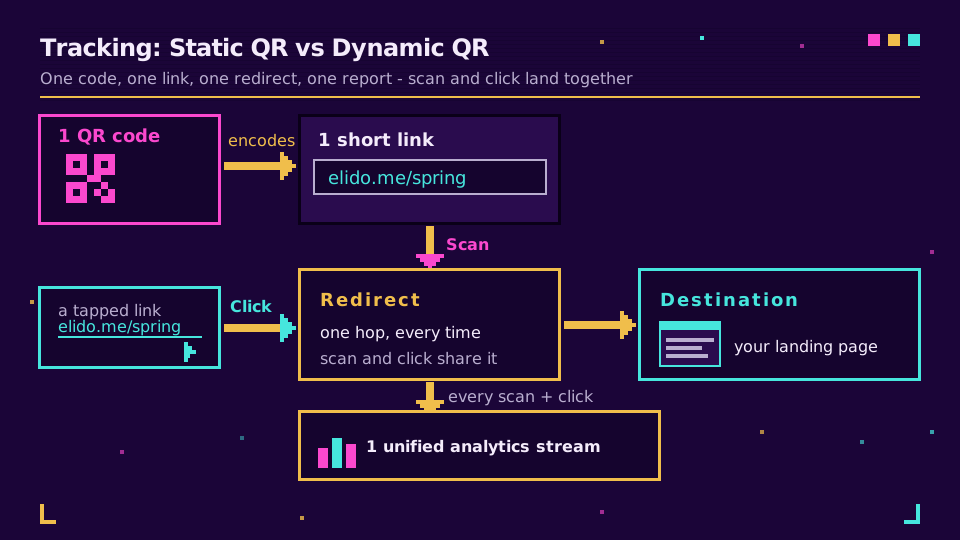
A static QR bakes the destination URL straight into the module grid. Nothing sits between the scan and the page, which means no scan counts and no way to change the target after it's printed. A dynamic QR encodes a short link instead. The destination lives at the link platform and gets resolved at scan time, so every scan is a redirect event the platform logs - count, country, device - and you can swap the destination without reprinting a thing. The full static vs dynamic breakdown is here if you want the module-level detail.
Because the QR wraps a short link, its scans and the plain link's clicks flow into the same place. You read them together rather than reconciling two dashboards, and everything stays in-region for EU data handling. For the analytics side specifically, here's how to read QR scan data once it's flowing. Editable, trackable dynamic QR codes sit on the paid tiers - the plan comparison shows exactly where.
That's the whole thing. A short link and a QR code aren't rivals; they're two doors into the same room, and the door you offer should match the wall your audience is standing at.
- Ana
Related on the blog
Frequently asked questions
Should I use a short link or a QR code?
Use a short link when your audience is already on a screen, and a QR code when they're not. Short links suit email, SMS, social bios, chat, and ads because people can tap them. QR codes suit print, packaging, and signage because they let someone jump from a physical surface to their phone without typing.
What is the difference between a short link and a QR code?
A short link is a clickable text URL; a QR code is a scannable image. The short link is opened by tapping or clicking, so it works in digital channels. The QR code is opened by pointing a phone camera at it, so it works on physical surfaces. A QR code very often encodes a short link inside it.
Can you scan a QR code from the same phone that's displaying it?
No, you can't scan a QR code with the same phone that's showing it. This is why QR codes are a poor fit for email, apps, and social captions that people read on the device they'd need to scan with. Use a tappable short link in those channels instead.
Can a QR code be tracked like a short link?
Yes, a QR code can be tracked as long as it encodes a short link (a dynamic QR). Each scan becomes a redirect the link platform logs, so you get scan counts, country, and device. A static QR that bakes in the raw destination cannot be tracked or edited after printing.
Should I put a QR code in an email?
Usually no, because most people open email on a phone and can't scan a code on the screen they're reading. Put a clickable short link in the email body instead. Save QR codes for printed or on-screen contexts a second device will scan.
Try Elido
Paste a URL, get a working short link
No signup. Link lives for 30 days. Sign up to keep it forever.
Free, no signup required · 2 per day