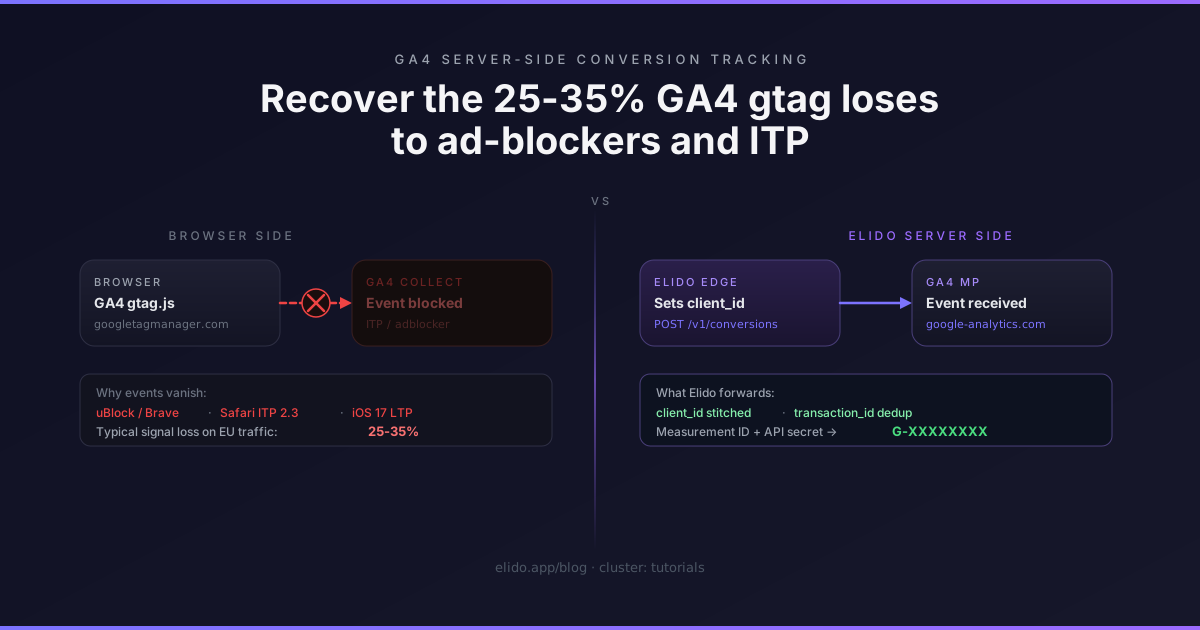
GA4 client-side tagging via gtag.js or GTM is the attribution baseline most teams default to. It works well under ideal conditions: a Chrome desktop user on a fast connection, no ad-blocker, a Safari session that hasn't triggered ITP's 24-hour script-set cookie cap. Ideal conditions cover maybe 65-75% of EU traffic in 2026.
The rest of it — uBlock Origin users, Brave's built-in blocking, Safari's Intelligent Tracking Prevention on iOS, the growing cohort of network-level blockers like NextDNS and Pi-hole — sends events that either drop before reaching www.google-analytics.com or arrive without a usable client identifier because the _ga cookie was wiped. The typical gap on EU-heavy audiences is 25-35% of conversion events. For some industries — fintech, privacy tools, dev tooling — it runs higher because the user demographic correlates with ad-blocker adoption.
GA4's Measurement Protocol is the server-side path that bypasses all of it. Your server talks to Google's collection endpoint directly. The browser's state is irrelevant. This post covers the exact setup: credentials, payload shape, client_id stitching, validation, and the deduplication pattern for teams running gtag alongside the server-side path.
The underlying conversion-forwarding architecture — why server-side wins and how fan-out to multiple platforms works — is covered in the server-side conversion tracking overview. The Meta CAPI version of this tutorial is at forwarding conversions to Meta CAPI; the setup pattern is the same shape, GA4-specific parameters here.
TL;DR#
- GA4 gtag.js loses 25-35% of conversion events on typical EU traffic to ad-blockers (uBlock, Brave) and ITP (Safari cookie lifetime caps); Measurement Protocol bypasses all of it because the request originates from your server.
- You need two credentials: the Measurement ID (
G-XXXXXXXX) from your data stream, and an API secret generated under Admin → Data Streams → Measurement Protocol API secrets. Both paste into Elido's workspace settings in under two minutes. - The
client_idis what ties a server-side event back to a GA4 session; Elido sets a first-party UUID cookie on the short-link redirect and includes it in every conversion forward, so you do not have to read the_gacookie from the browser. - Validation takes about ten minutes: GA4 DebugView shows Measurement Protocol events arriving within roughly ten seconds; standard reports backfill over 24-48 hours.
The two credentials you need#
GA4 Measurement Protocol requires two pieces of information, both from the GA4 Admin console.
Measurement ID. The data stream identifier, formatted as G-XXXXXXXX. Find it under Admin → Data Streams → your web stream → the stream details panel. This is the same ID you pass to gtag('config', 'G-XXXXXXXX') in your client-side setup — it's not a secret; it appears in your page source.
API secret. This is the credential that authorises server-side writes to the collection endpoint. Navigate to Admin → Data Streams → your web stream → Measurement Protocol API secrets → Create. The secret is a short alphanumeric string. Treat it like a service account key: store it as a workspace secret, rotate it with other service credentials, do not commit it to source code.
In Elido, these paste into Workspace Settings under Integrations → GA4. Once saved, Elido validates the pair against the GA4 debug endpoint and confirms connectivity. The validation is immediate; a 4xx at this step means the Measurement ID or API secret is wrong.
The event shape#
The GA4 Measurement Protocol reference (accessed 2026-05-12) specifies the request format. The endpoint is:
POST https://www.google-analytics.com/mp/collect?measurement_id=G-XXXXXXXX&api_secret=<secret>
The body carries a client_id, an optional user_id, and an events array. Here is the payload for a purchase event:
{
  "client_id": "a1b2c3d4-e5f6-7890-abcd-ef1234567890",
  "user_id": "user-shop-12847",
  "events": [
    {
      "name": "purchase",
      "params": {
        "transaction_id": "ord_98231",
        "value": 89.50,
        "currency": "EUR",
        "engagement_time_msec": 1,
        "items": [
          {
            "item_id": "sku-spring-jeans-32-blue",
            "item_name": "Spring Jeans 32 Blue",
            "quantity": 1,
            "price": 89.50
          }
        ]
      }
    }
  ]
}
A few things in this payload that are easy to get wrong:
event_name must be lowercase snake_case. The GA4 event reference (accessed 2026-05-12) lists the recommended event names: purchase, sign_up, generate_lead, add_to_cart. Sending Purchase (capital P) will produce a separate event in GA4's reports rather than merging with your gtag-fired purchase events. The platform does not warn you; the event just lands as an oddly-named custom event.
engagement_time_msec must be present and set to a positive integer. Without it, GA4 counts the event but does not credit session engagement, and some attribution models exclude events without engagement time. Setting 1 is sufficient to satisfy the requirement.
event_params is capped at 25 parameters per event. The Measurement Protocol will reject payloads that exceed this limit. The rejection is silent by default — the request returns 204 with no body regardless of whether the event was accepted. Use the debug endpoint (covered in the validation section) to catch overflows.
user_id is optional but valuable. If you have a persistent user identifier on the server side — a customer ID in your order table, a subscriber ID in your CRM — send it. GA4 uses it for cross-device attribution, and it improves the match between server-side and client-side events.
client_id stitching: why it matters and how Elido handles it#
The client_id is the field GA4 uses to tie a server-side event to a browser session. When gtag.js runs on a page, it reads the _ga cookie and uses its UUID as the client_id for all events it fires. If your server-side event carries the same client_id, GA4 can stitch those events together into the same user journey and session.
The challenge is getting that UUID onto the server side. The _ga cookie is a first-party cookie on your domain, so your server can read it at checkout time and include it in the conversion payload. But this only works if the user's browser has _ga set, which is exactly the population you lose to ITP and ad-blockers.
Elido solves this at the redirect tier. When a user clicks a short link, Elido's edge handler generates a UUID and sets it as a first-party _elido_cid cookie on the redirect response — before the user reaches your site. The UUID is also appended to the destination URL as ?elido_click=<uuid> (configurable per workspace). The flow:
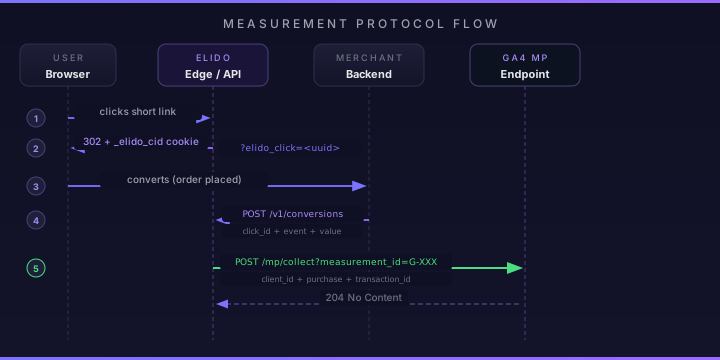
Your landing page or tag manager reads elido_click from the URL and writes it to the order's custom attributes. At conversion time, your order webhook carries the UUID. Elido looks it up, builds the Measurement Protocol payload with client_id set to that UUID, and forwards to GA4.
This is more reliable than reading _ga from the browser because the UUID is captured at click time, before the user's browser session determines whether cookies are accepted. Even if ITP wipes the _ga cookie within 24 hours, Elido's _elido_cid cookie persists as a first-party cookie under your short-link domain — and the order attribute persists in your database regardless.
The GA4 sending events guide (accessed 2026-05-12) describes how client_id works across client and server paths.
Elido forwards: the actual curl#
When POST /v1/conversions arrives with a click_id, Elido assembles the Measurement Protocol payload and forwards it. To call the endpoint directly — bypassing Elido and testing the GA4 MP side of the wiring — the curl is:
curl -X POST \
  "https://www.google-analytics.com/mp/collect?measurement_id=G-XXXXXXXX&api_secret=YOUR_SECRET" \
  -H "Content-Type: application/json" \
  -d '{
    "client_id": "a1b2c3d4-e5f6-7890-abcd-ef1234567890",
    "user_id": "user-shop-12847",
    "events": [
      {
        "name": "purchase",
        "params": {
          "transaction_id": "ord_98231",
          "value": 89.50,
          "currency": "EUR",
          "engagement_time_msec": 1
        }
      }
    ]
  }'
GA4 returns 204 for both valid and invalid events. You cannot distinguish a malformed event from a successful ingest by HTTP status code alone. To see whether the event actually landed, use the debug endpoint during development:
POST https://www.google-analytics.com/debug/mp/collect?measurement_id=G-XXXXXXXX&api_secret=YOUR_SECRET
The debug endpoint returns a JSON body that lists validation errors for each event. An event with a wrong parameter name, a payload exceeding 25 params, or a malformed client_id will surface here.
When using Elido, the same validation visibility is available via GET /v1/conversions/{id} — the conversion record shows the GA4 forward status and any error response from the debug endpoint during test mode.
Validation: DebugView#
GA4's DebugView is the fastest feedback loop during setup. To activate it for server-side events, add "debug_mode": 1 to the event's params object. Events with this flag appear in DebugView within roughly ten seconds; they do not count toward production report data.
In DebugView (GA4 Admin → DebugView), each event shows its name, the parameters it carried, and whether any parameters were rejected. The view groups events by client_id, so you can trace the full session from click to conversion.
What to verify before removing debug_mode:
- The event name appears exactly as expected in the DebugView event stream (
purchase, notPurchaseorecommerce_purchase). - The
transaction_idparameter is visible and matches your order ID format. - The
client_idis a UUID format string — not empty, not a fallback"unknown"string. - The
currencyis the correct ISO 4217 code (EUR, noteur, notEuro).
Standard GA4 reports take 24-48 hours to reflect server-side conversion data. Do not evaluate report accuracy on day one. DebugView confirms the event shape; the reports confirm attribution and totals.
Common errors#
Missing client_id. Events without a client_id are silently dropped by Measurement Protocol. This is the most common single failure mode. The drop is invisible — the request returns 204, DebugView shows nothing, the conversion never appears. Verify that the client_id field is always populated before the request fires. In Elido's setup, a missing client_id means the elido_click parameter was not written to the order at conversion time — check the landing page tag or webhook handler.
Wrong event name format. Purchase creates a custom event named Purchase alongside any existing purchase events from gtag. Your total purchase count in GA4 reports splits across two event names. The fix is enforcing lowercase snake_case on all event names sent to the Measurement Protocol endpoint. The GA4 event reference (linked above) lists the canonical names for ecommerce events.
Exceeding 25 event_params. The Measurement Protocol silently rejects payloads with more than 25 parameters per event. Teams forwarding full order metadata (all line items, all custom attributes) often hit this limit without realising it. Use the debug endpoint to catch overflows in development. In production, strip non-essential parameters and keep event payloads lean.
Currency sourced from page config, not the order. If your gtag setup defaults to USD but your orders are in EUR, the server-side event and the client-side event carry different currency values. GA4 records them under the same event name but cannot aggregate the values. Source currency from the order record in your backend, not from a page-level gtag configuration.
Deduplication with client-side gtag#
If you run gtag.js client-side and Measurement Protocol server-side simultaneously, you need deduplication. GA4 deduplicates events using client_id combined with a timestamp window. The mechanism is less explicit than Meta CAPI's event_id field but the practical approach is the same: carry a consistent transaction_id on purchase events across both paths.
For purchase events, set transaction_id to your order ID. Your browser-side gtag fires purchase with transaction_id: "ord_98231" when the confirmation page loads; your server-side Measurement Protocol event carries the same transaction_id: "ord_98231". GA4 deduplicates within the same session window. If the same client_id + transaction_id combination arrives twice within the dedup window, the second is ignored.
For upstream events — generate_lead, sign_up, add_to_cart — there is no order ID to use. The click ID works here: set event_id to the elido_click UUID. Both the browser-side pixel and the server-side forward reference the same value. This is the same discipline described in the end-to-end UTM tracking tutorial, which covers the broader campaign tagging setup that makes this ID available throughout the funnel.
The dedup window in GA4 is not publicly documented with the precision Meta publishes for CAPI. In practice, events with matching client_id + transaction_id arriving within the same session window are deduplicated. Running both paths simultaneously is the safer configuration — it provides fallback coverage for the ad-blocker-heavy audience while giving the algorithm cleaner signal from the server path.
Where this fits in the attribution pipeline#
Measurement Protocol closes the GA4 signal gap the same way CAPI closes the Meta signal gap. The mechanisms are different — GA4 uses client_id and transaction_id where Meta uses event_id and match keys — but the architecture is identical: a server-side event that does not depend on the browser's state.
For the full picture of which platforms to forward to and how fan-out works at scale, the server-side conversion tracking overview covers GA4, Meta CAPI, and TikTok Events side by side. For campaigns where UTM tagging is the upstream step, tracking UTM campaigns end-to-end is the prerequisite reading.
The product surface for this setup: conversion tracking features documents the full /v1/conversions API, including multi-platform fan-out, refund events, and retry semantics. Solutions for marketers shows how the conversion pipeline fits into a campaign workflow alongside UTM templates and smart link routing.
The setup itself — credentials into workspace settings, tag manager step for elido_click on the landing page, order webhook plumbing — takes a half-day for most teams. The DebugView validation step adds another thirty minutes. The output is GA4 conversion data that reflects what your campaigns are actually driving, not the 65-75% of it that survives the browser-side path.
Sources
- Google Analytics 4: Measurement Protocol overview. developers.google.com/analytics/devguides/collection/protocol/ga4 (accessed 2026-05-12)
- GA4 Measurement Protocol: Event reference. developers.google.com/analytics/devguides/collection/protocol/ga4/reference/events (accessed 2026-05-12)
- GA4 Measurement Protocol: Sending events. developers.google.com/analytics/devguides/collection/protocol/ga4/sending-events (accessed 2026-05-12)