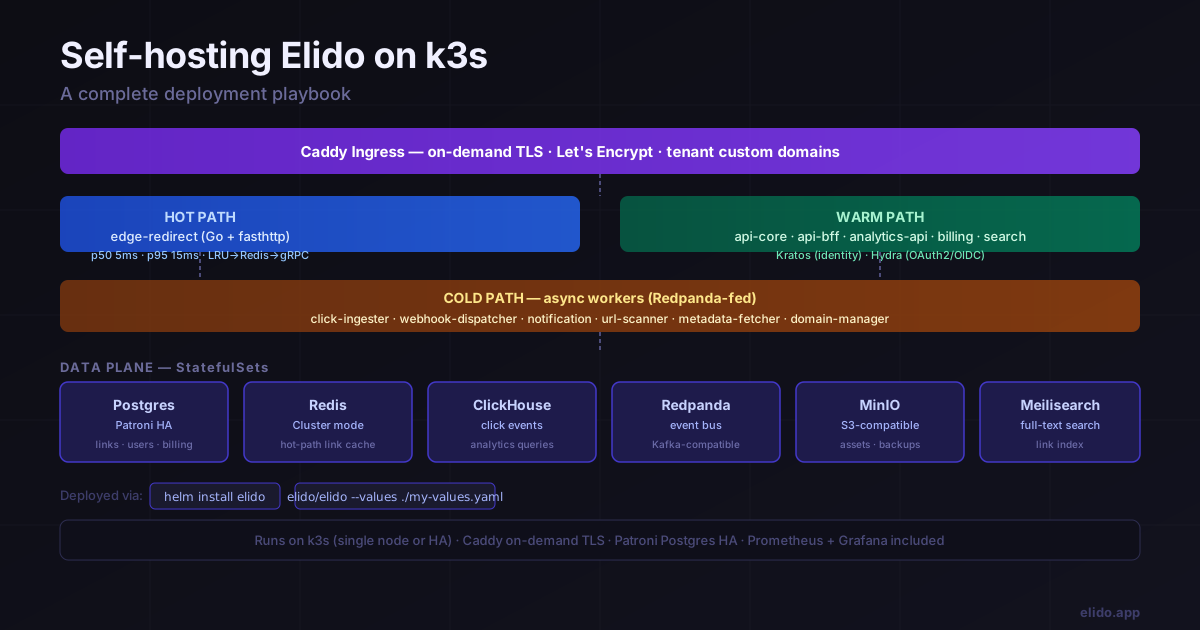
Elido ships a Helm chart that deploys the whole stack onto one Kubernetes cluster, and this post walks through it on a single k3s node. Before the commands, the part that decides whether you should read on: Elido isn't open source and self-hosting isn't a product we sell. The repository has no licence file, so no one outside the company has a licence to run or modify it. The chart is deployment tooling that we keep in the repo, and the commands below come from it and from the runbook beside it (accessed 2026-10-25). Use this guide if you work on Elido, if you have a written arrangement with us, or if you want to see exactly what running the platform involves.
If you're still choosing between projects you can actually download, start with the comparison of self-hosted shorteners. It covers YOURLS, Shlink, Kutt and Dub and doesn't repeat any of the steps here. Head-to-head pages go deeper on Kutt, Shlink and Polr, and YOURLS alternatives covers teams leaving YOURLS.
What the chart is, and what it isn't
The chart lives at deploy/helm/elido. Its metadata points at a GitHub repository under the elidoapp organisation; an unauthenticated request to that address returned 404 on 2026-10-25, so don't expect to clone it from the internet. The values file pulls images from ghcr.io/elidoapp, and a comment in it calls the registry public. I couldn't confirm anonymous pulls, so treat that as unverified.
The chart is also young. Its version is 0.1.0, and its own description calls the target "single-region k3s cluster on a beefy VM." A few things people assume come with a Kubernetes chart are missing, and an earlier version of this post wrongly described some of them:
- No high availability. Every stateful set runs one replica.
- No backup jobs. The runbook says so and tells you to use Velero, k8up or provider snapshots.
- No monitoring objects, dashboards or autoscalers.
- No multi-region edge. The preset collapses redirects into one fleet.
If a regulator or your own policy needs those, budget the work to add them yourself.
What the self-host preset deploys
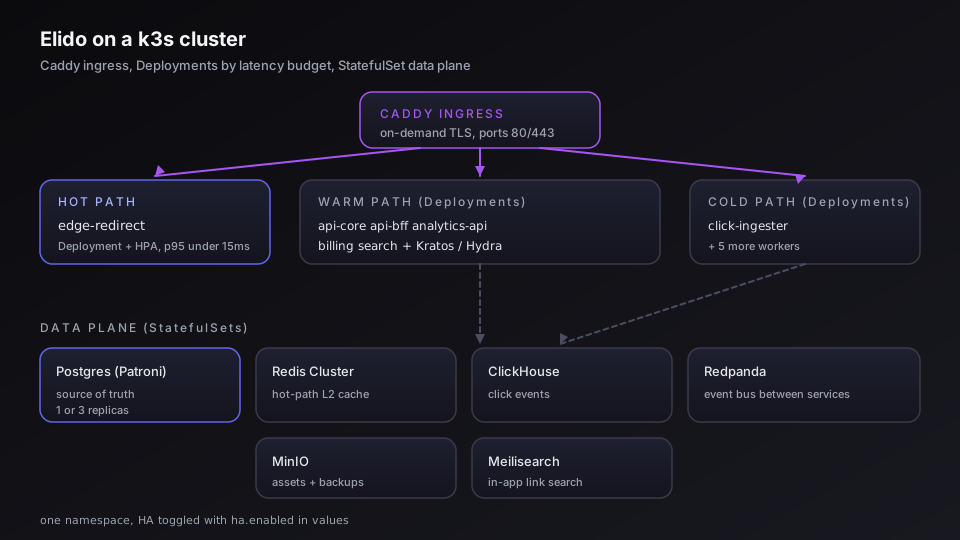
values-selfhost.yaml trims everything to fit a 4-core, 8 GB host. It runs one replica of each application workload: api-core, analytics-api, click-ingester, url-scanner, notification, bio-renderer, billing, the dashboard (web), the marketing site, and one edge fleet that answers for every host. An identity service handles sign-up and sessions.
Behind them sit six stateful sets with persistent volumes: Postgres (20Gi in the preset), Redis (2Gi), a column store for click events (30Gi), an event bus (10Gi), object storage (20Gi) and a search index (5Gi). Redis here is a single instance with append-only persistence, not a cluster. Several services that used to be separate, including domain management, webhook delivery and search indexing, now run inside api-core, which is why the workload list is shorter than older docs suggest.
Prerequisites
The runbook asks for Kubernetes 1.27 or newer, Helm 3.13 or newer and kubectl pointed at the cluster. You also need DNS records for the dashboard, API, redirect and bio hostnames, an SMTP relay the cluster can reach, and an ingress controller of class caddy.
k3s bundles Traefik, which would compete for ports 80 and 443 with the controller you're about to install. Disable it when you install k3s:
curl -sfL https://get.k3s.io | INSTALL_K3S_EXEC="--disable traefik" sh -
sudo cp /etc/rancher/k3s/k3s.yaml ~/.kube/config
sudo chown $UID ~/.kube/config
kubectl get nodes   # should show Ready
Install, step by step
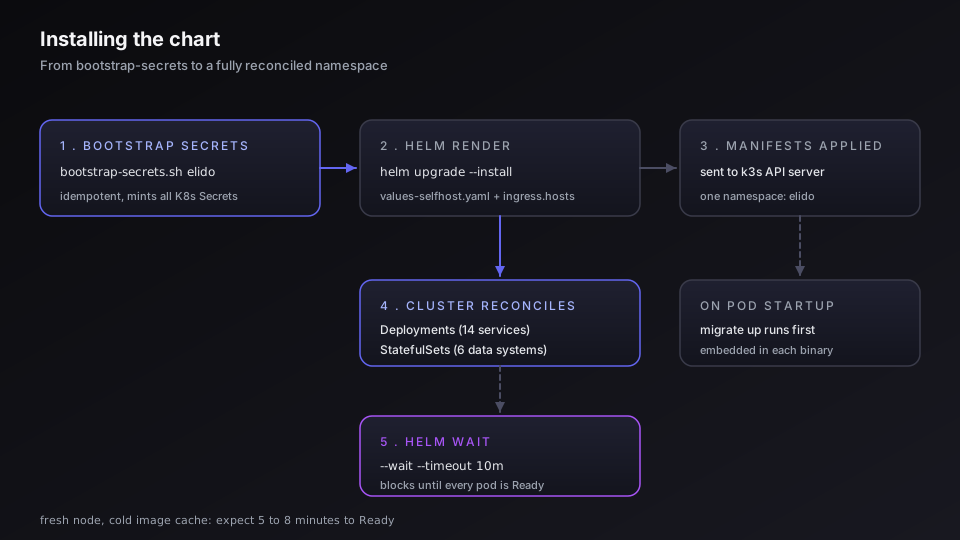
Create the namespace and mint the secrets. The script generates random values for the database password, the identity service's cookie and cipher keys, the slug-obfuscation key and the API-key pepper, and it creates placeholders for SMTP and LiqPay. It skips secrets that already exist unless you pass --rotate.
kubectl create namespace elido
./deploy/helm/elido/scripts/bootstrap-secrets.sh elido
The script prints the Postgres password at the end. Save it. Then replace the SMTP placeholder before anyone signs up; the same pattern works for elido-liqpay if you take payments:
kubectl -n elido create secret generic elido-smtp \
  --from-literal=host=smtp.example.com \
  --from-literal=port=587 \
  [email protected] \
  --from-literal=pass=YOUR_SMTP_KEY \
  --from-literal=kratos_uri='smtps://postmaster%40your-domain.com:[email protected]:465/?disable_starttls=false' \
  --dry-run=client -o yaml | kubectl apply -f -
Install the ingress controller with on-demand TLS switched on:
helm repo add caddy https://caddyserver.github.io/charts
helm -n caddy-system upgrade --install caddy caddy/caddy-ingress-controller \
  --create-namespace --set controller.config.onDemandTLS=true
Now install Elido itself. Pin image.tag to a release you've chosen. The runbook's example uses latest, which makes upgrades and rollbacks hard to reason about.
helm -n elido upgrade --install elido ./deploy/helm/elido \
  -f ./deploy/helm/elido/values-selfhost.yaml \
  --set image.tag=YOUR_TAG \
  --set ingress.hosts.dashboard=app.your-domain.com \
  --set ingress.hosts.api=api.your-domain.com \
  --set ingress.hosts.bio=bio.your-domain.com \
  --set 'ingress.hosts.redirect={r.your-domain.com}' \
  --set ingress.hosts.marketing=your-domain.com \
  --set auth.kratos.publicHost=app.your-domain.com
kubectl -n elido get pods -w
Migrations run as init containers for the services that need them and as a pre-install job for the identity service. If a migration fails, the new pods never take traffic.
First user and custom domains
Open https://app.your-domain.com/signup and register. The identity service creates the account and api-core stores a user row. Nothing makes that user an owner yet, so create a workspace and membership by hand, which is what the chart's own install notes tell you to do:
kubectl -n elido exec -it sts/postgres -- psql -U elido -d elido <<'SQL'
INSERT INTO workspaces (slug, name, plan_tier)
VALUES ('default', 'Default', 'business') RETURNING id;
INSERT INTO workspace_members (workspace_id, user_id, role)
SELECT 1, id, 'owner' FROM users WHERE email = '[email protected]';
SQL
Custom domains use on-demand TLS. A customer adds links.brand.com in the dashboard, then points a CNAME at the host you set in EDGE_CNAME_TARGET (an api-core variable that defaults to Elido's own edge hostname, so change it). On the first HTTPS request the ingress controller calls GET /v1/caddy/ask on api-core. A 200 issues the certificate; a 403 means the domain isn't verified. Debug with kubectl -n elido logs deploy/api-core | grep caddy/ask.
Backups, upgrades and rollback
You own backups. The runbook's guidance is daily snapshots of the Postgres volume (data-postgres-0) and weekly ones for the column store (data-clickhouse-0), since click data can be replayed from the event bus within its retention window. The event bus volume needs no backup. To use a managed Postgres, set postgres.enabled=false and point the elido-postgres secret's url at it. Run a restore into a scratch namespace before you rely on any of this.
Upgrades are one command with a new tag:
helm -n elido upgrade elido ./deploy/helm/elido \
  -f ./deploy/helm/elido/values-selfhost.yaml --set image.tag=NEW_TAG
Rolling updates use maxSurge: 1 and maxUnavailable: 0, and helm -n elido rollback elido <revision> swaps the Deployments back without touching volumes or secrets. With one replica per service, expect brief blips on workloads that aren't stateless.
Known snags
| Symptom | Likely cause | Fix |
|---|---|---|
Identity migration job fails with database "kratos" does not exist | Postgres created elido but not that database | CREATE DATABASE kratos; via psql, then helm upgrade again |
api-core crash-loops asking for KRATOS_PUBLIC_URL | auth.kratos.enabled=false without an override | Re-enable the identity service or set the variable to your IdP |
| Dashboard 502s on first load | Certificate not issued yet | Watch the ingress controller logs; first issuance can take about 30 seconds |
| Redirects return 503 | The edge fleet can't reach Redis | Check the elido-redis secret URL points at the in-cluster service |
| Everything crash-loops after a reboot | PVCs unbound | kubectl get pv,pvc -n elido and confirm the local-path provisioner is up |
If a DPO is the reason you're here, the hosted option may already be enough: its primary data is in the EU, and the EU residency guide lists what is processed outside it. For the latency side of running your own redirects, see the edge POP post.
Related on the Blog
Frequently asked questions
Can I self-host Elido?
Not as a product we offer today. The repository has a Helm chart and a runbook that we use ourselves, but it has no licence file, so nobody outside Elido is licensed to run or modify the code, and there is no published self-hosted plan or support. If you have a hard data-location requirement, contact us and we will discuss it as a custom arrangement.
Is Elido open source?
No. The repository contains no licence file, which means all rights are reserved. Some client packages (the SDKs, the API types and the MCP server) carry their own LICENSE files, but the platform itself, including the chart this post describes, does not. Any site copy that says Apache 2.0 for self-hosting is wrong.
What does the self-host preset need to run?
The runbook asks for Kubernetes 1.27 or newer, Helm 3.13 or newer, wildcard DNS for the dashboard, API, redirect and bio hosts, an SMTP relay and an ingress controller of class caddy. A 4-core, 8 GB VM is described as enough to smoke-test. Production, per the same runbook, wants three or more nodes with 8 cores and 16 GB each.
Does the chart include backups, monitoring or high availability?
No. The chart deploys Postgres, Redis, the column store, the event bus, object storage and search as single-replica stateful sets with persistent volumes. Backups are left to your cluster tooling such as Velero or k8up, and the chart has no monitoring objects, autoscaling or failover. Earlier versions of this post described them; they were not in the chart.
How do custom domains work on a self-hosted install?
The ingress controller asks api-core at /v1/caddy/ask before issuing a certificate for an unknown hostname, and api-core answers from its list of verified domains. You point customers' CNAMEs at the host set in EDGE_CNAME_TARGET. If that endpoint returns 403 the certificate never issues, so check the api-core logs first.
How do I upgrade or roll back?
Run helm upgrade with the same values file and a new image.tag. Deployments use maxSurge 1 and maxUnavailable 0, and database migrations run before new pods serve traffic, so a failed migration leaves the old pods running. helm rollback to a previous revision swaps the Deployments and leaves your data volumes and secrets alone.
Try Elido
Paste a URL, get a working short link
No signup. Link lives for 30 days. Sign up to keep it forever.
No signup needed. Sign up free for 50 links a month.