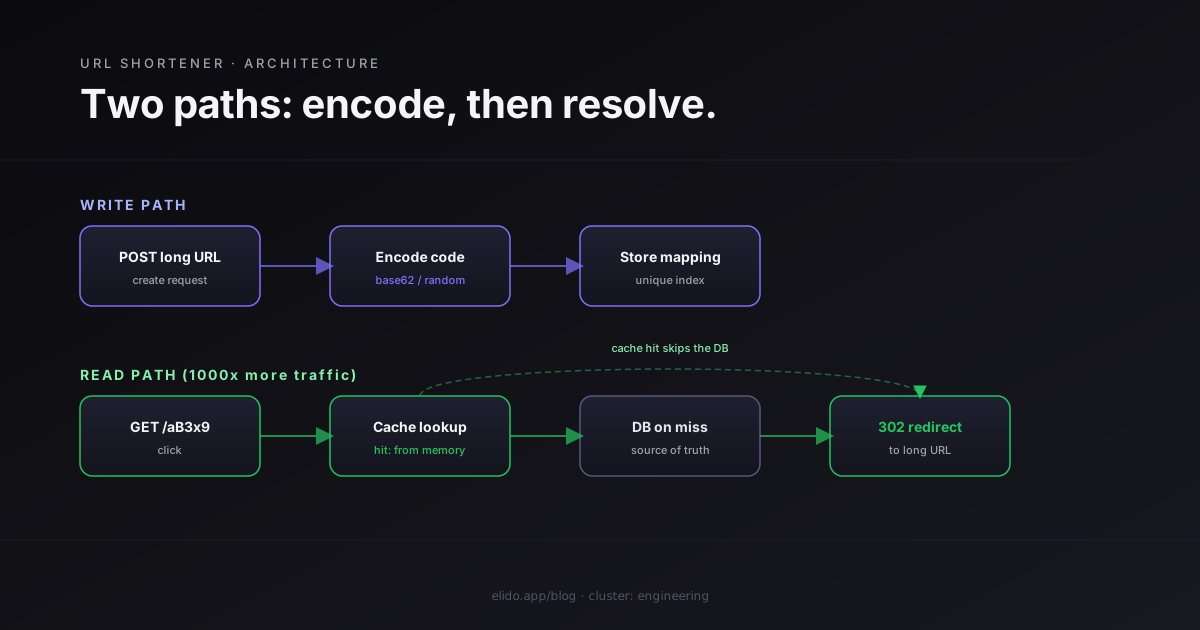
To build a URL shortener you need four things: a place to store the mapping from a short code to a destination URL, a way to generate a unique code for each new link, a redirect handler that looks up the code and returns an HTTP redirect, and a cache in front of the lookup because reads outnumber writes by a wide margin. That is the entire core, and you can stand it up in an afternoon.
The trap is thinking the afternoon version is the product. A redirect that works on your laptop and a URL shortening service that survives strangers pointing it at malware, hammering it with traffic, and expecting four nines of uptime are different engineering problems. The first is an algorithm. The second is an operations commitment.
This walkthrough builds the core honestly, then spends most of its time on the part the system-design tutorials skip: what you still have to build after the redirect works. If you want the conceptual primer first, how URL shorteners work covers the mechanics without the code.
The Short Version: What a URL Shortener Actually Does
A URL shortener is a key-value lookup wearing an HTTP redirect. The key is the short code, the value is the long URL, and the entire job is turning example.com/aB3x9 into a 302 pointing at the original address.
The data model is one table:
CREATE TABLE links (
    id          BIGSERIAL PRIMARY KEY,
    short_code  TEXT NOT NULL UNIQUE,
    long_url    TEXT NOT NULL,
    created_at  TIMESTAMPTZ NOT NULL DEFAULT now()
);

CREATE UNIQUE INDEX idx_links_short_code ON links (short_code);
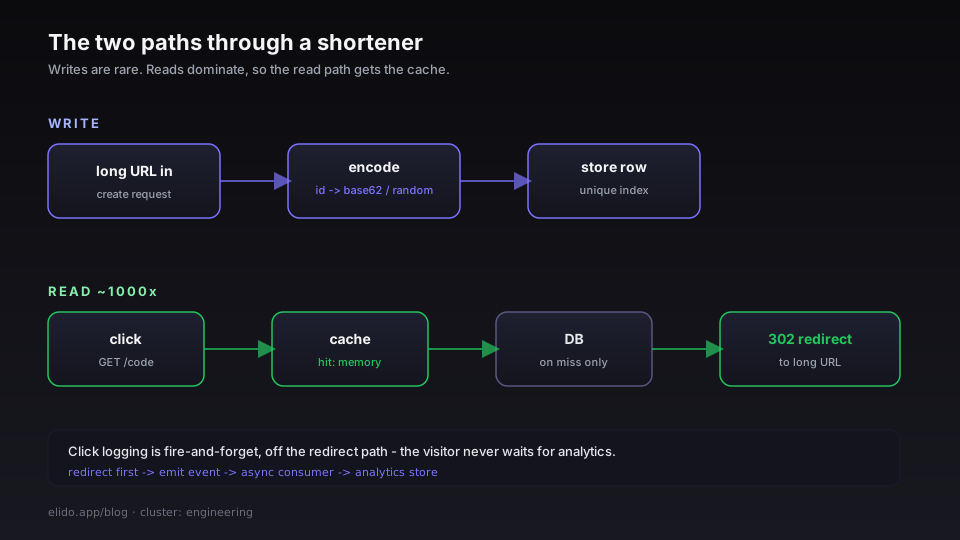
There are two paths through it. The write path takes a long URL, generates a short code, and inserts the row. The read path takes a short code, looks up the row, and returns a redirect. Reads dominate by a ratio that is commonly around 1000 to 1, so almost all of your engineering attention belongs on making the lookup fast and cheap. The unique index on short_code is what keeps that lookup an index seek instead of a scan. That's the whole core.
Generating the Short Code: Base62, Random, or Hash
The short code is where the interesting decision lives. You have three realistic strategies, and they trade off length, predictability, and how hard collisions are to handle.
Base62 of a unique ID is the classic. Take the auto-incrementing row ID and encode it in base62, the 62 characters a-z, A-Z, and 0-9. The codes are short, they never collide because each ID is unique, and they grow one character longer roughly every 62x in volume. The downside is that they are sequential and guessable, so anyone can walk your namespace.
const alphabet = "0123456789abcdefghijklmnopqrstuvwxyzABCDEFGHIJKLMNOPQRSTUVWXYZ"

// encode turns a positive integer ID into a base62 short code.
func encode(id uint64) string {
	if id == 0 {
		return string(alphabet[0])
	}
	var b []byte
	for id > 0 {
		b = append(b, alphabet[id%62])
		id /= 62
	}
	// reverse, since we built the digits least-significant first
	for i, j := 0, len(b)-1; i < j; i, j = i+1, j-1 {
		b[i], b[j] = b[j], b[i]
	}
	return string(b)
}
Random strings fix the guessability. Generate a short random code, for example with a library like nanoid, and check it against the unique index before saving. At seven characters of base62 you have trillions of possibilities, so collisions are rare, but you still have to handle the rare insert that fails the uniqueness constraint by retrying with a new code.
Hashing the URL is the third option and usually the worst. A hash of the long URL is deterministic, which sounds convenient, but you still have to truncate it, you still get collisions, and identical URLs map to identical codes, which leaks information. Most production services pick base62 for internal IDs or random codes for public ones. Custom or branded slugs, the codes a user types in by hand, are validated against the same unique index before they are accepted.
The Redirect Path: 301 vs 302 and Why It Decides Your Analytics
The redirect status code is not a cosmetic choice. It decides whether you ever see a second click.
A 301 Moved Permanently tells browsers and proxies the move is permanent, so they cache it. After the first visit, the browser can send future clicks straight to the destination without touching your server. Great for raw speed, fatal for analytics, because the clicks you most want to count are the ones that never reach you. The HTTP semantics are spelled out in RFC 9110, which defines both the permanent and temporary redirects.
A 302 Found or 307 Temporary Redirect is re-requested every time. The browser asks your server on each click, which means you can count every visit and you can change the destination later without fighting stale caches. For a link shortener whose whole value is editable links and click data, that is the right default. The cost is one network round trip per click, which a cache hit makes negligible.
The rule of thumb: reach for 302 unless you have a specific reason to want the link frozen and cached forever. The 301 vs 302 redirects post works through the tradeoff in detail, and types of redirects covers the rest of the 3xx family, including when 307 and 308 matter.
Storage and Caching: Designing for a 1000:1 Read/Write Ratio
Because reads swamp writes, the database is not your bottleneck, your cache strategy is. The pattern is a read-through cache: on a click, check an in-memory cache first, and only fall back to the database on a miss, writing the result back into the cache for next time.
func resolve(ctx context.Context, code string) (string, error) {
	if url, ok := cache.Get(code); ok {
		return url, nil // hot path: served from memory
	}
	url, err := db.LookupLongURL(ctx, code)
	if err != nil {
		return "", err
	}
	cache.Set(code, url) // populate for the next click
	return url, nil
}
In production this usually becomes two tiers: a small in-process cache for the hottest links, backed by a shared in-memory store such as Redis so every server instance benefits from a lookup any one of them has already done. The database, the source of truth, is touched only on a genuine cold miss. Get this layer right and a single modest server handles enormous click volume. The cache strategy for URL redirects post goes deep on the eviction and sizing decisions, and the cornerstone on hitting p95 under 15ms covers what a tuned redirect path looks like under load.
If you would rather not run any of this, Elido's API gives you the redirect tier, the cache, and in-region EU delivery with sub-15ms p95 on a cache hit, behind a single call. Start free and skip the operations.
Counting Clicks Without Slowing the Redirect
The mistake that kills redirect latency is writing the click to the database inside the redirect handler. Do that and every visitor waits for your analytics write before they get their redirect.
Decouple them. The handler emits the redirect immediately, then fires the click event into a durable log or message queue as fire-and-forget work. A separate consumer reads that stream and writes events into an analytics store on its own schedule. The visitor never waits, and a reporting query that scans millions of click rows never competes with the redirect path for resources. A columnar analytics database handles those aggregate queries far better than a row store, which is why click events usually land somewhere different from the links table. The fire-and-forget click ingestion post details the queue side, and why a columnar store beats Postgres for click analytics explains the storage choice. Elido's analytics follow this shape so clicks are queryable in seconds without adding milliseconds to the redirect.
What You Still Have to Build: the Hard 80 Percent
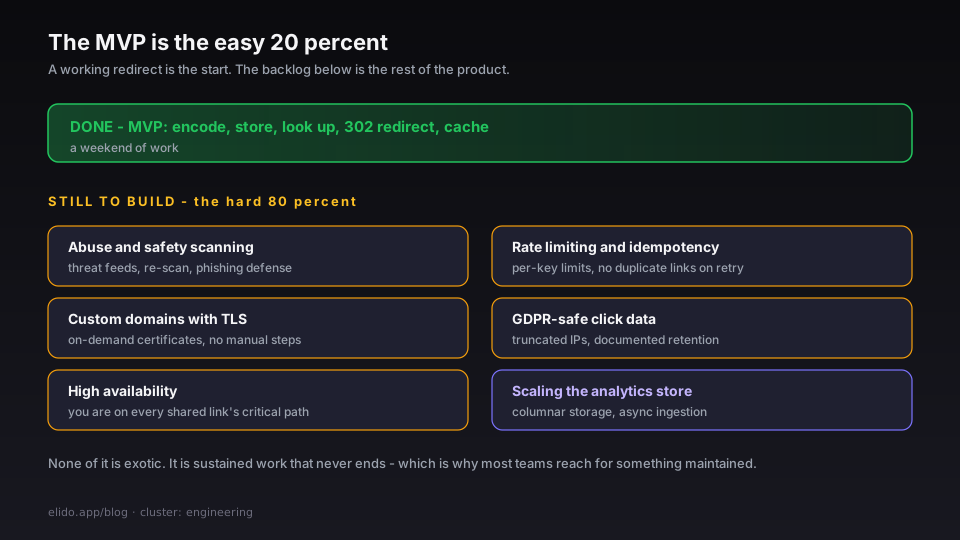
Here is the part the system-design walkthroughs leave out. A working redirect is maybe a fifth of a real URL shortening service. The rest is everything that turns a demo into something you can put on the public internet.
- Abuse and safety scanning. A public shortener is a phishing magnet within hours of launch. You need to check destinations against a threat feed such as Google Safe Browsing and re-scan, because a clean URL at creation can turn malicious later. The URL shortener security checklist is the full list.
- Rate limiting and idempotency. An open create endpoint gets scripted instantly. You need per-key limits and idempotency so a retried request doesn't mint duplicate links. The mechanics are in API rate limits and idempotency.
- Custom domains with TLS. Branded links mean issuing certificates for domains you don't own, on demand, without manual steps.
- GDPR-safe click data. The moment you log clicks you are processing personal data. Truncating IP addresses and documenting retention isn't optional in the EU, as GDPR for URL shorteners lays out.
- High availability. Your redirect is now on the critical path of every link anyone has ever shared. Downtime breaks other people's content, so the uptime bar is higher than for most apps.
None of these are exotic. They're just a lot of sustained work, and they never end, which is the honest reason most teams stop at the MVP and reach for something maintained.
Build, Buy, or Self-Host
Building one yourself is the best way to understand redirects, encoding, and caching, and for a closed internal tool the MVP may be all you ever need. Build it. You'll learn more in a weekend than any interview prep gives you.
For anything public or business-facing, weigh the maintenance honestly. The redirect is free; the abuse handling, the custom-domain TLS, the analytics pipeline, and the on-call rotation are not. If you want the control without writing it from scratch, you can self-host an existing service, and Elido ships a self-hosting path for exactly that, with the open-source options post laying them side by side. If you'd rather offload it entirely, the developer solution and the API and SDK quickstart get you a production redirect tier without the backlog above.
Related on the Blog
- How URL shorteners work - the conceptual primer, no code required.
- Hitting p95 under 15ms for redirects - the engineering cornerstone on a tuned redirect path.
- Cache strategy for URL redirects - the two-tier cache in depth.
- Fire-and-forget click ingestion - decoupling analytics from the redirect.
- Self-hosted URL shorteners - the open-source options if you would rather not build from zero.
- How to shorten a URL in Go with net/http - calling an existing shortener instead of storing links yourself.
- Short link not working? Diagnose it in one command
Frequently asked questions
How do you build a URL shortener?
Store a mapping from a short code to a destination URL, generate a unique code for each new link, and on lookup return an HTTP redirect to the destination. Put a cache in front of the database because reads vastly outnumber writes. That is the whole core. The MVP is a weekend project; the production version is not.
What algorithm do URL shorteners use to generate short codes?
The two common approaches are base62 encoding of a unique numeric ID, which gives short collision-free codes, and generating a random string such as a nanoid and checking it for collisions before saving. Hashing the URL is a third option but needs collision handling and leaks nothing useful, so most services pick base62 or random.
Should a URL shortener use a 301 or 302 redirect?
Use 302 or 307 if you want to count every click and keep the destination editable, because browsers re-request the short link each time. Use 301 only when you want the redirect cached and never changed, since a 301 can be cached so aggressively that future clicks skip your server and your analytics entirely.
What database is best for a URL shortener?
A relational database is the usual source of truth, with the short code stored as a unique indexed key for fast lookups. Put an in-memory cache in front for the read path, and use a separate analytics store for click events so heavy reporting queries never touch the redirect path.
How long does it take to build a URL shortener?
A working redirect with code generation is a weekend. The long tail is what takes months: abuse scanning, rate limiting, custom domains with TLS, click analytics that scale, GDPR-safe data handling, and high availability. Most of the engineering effort lives after the MVP works.
Is it hard to build a URL shortener?
The redirect itself is easy. Hardening it for production is the hard part, because you inherit a public endpoint that strangers will point at malware, hammer with traffic, and expect to stay up. The difficulty is operational, not algorithmic.
Try Elido
Paste a URL, get a working short link
No signup. Link lives for 30 days. Sign up to keep it forever.
Free, no signup required · 2 per day