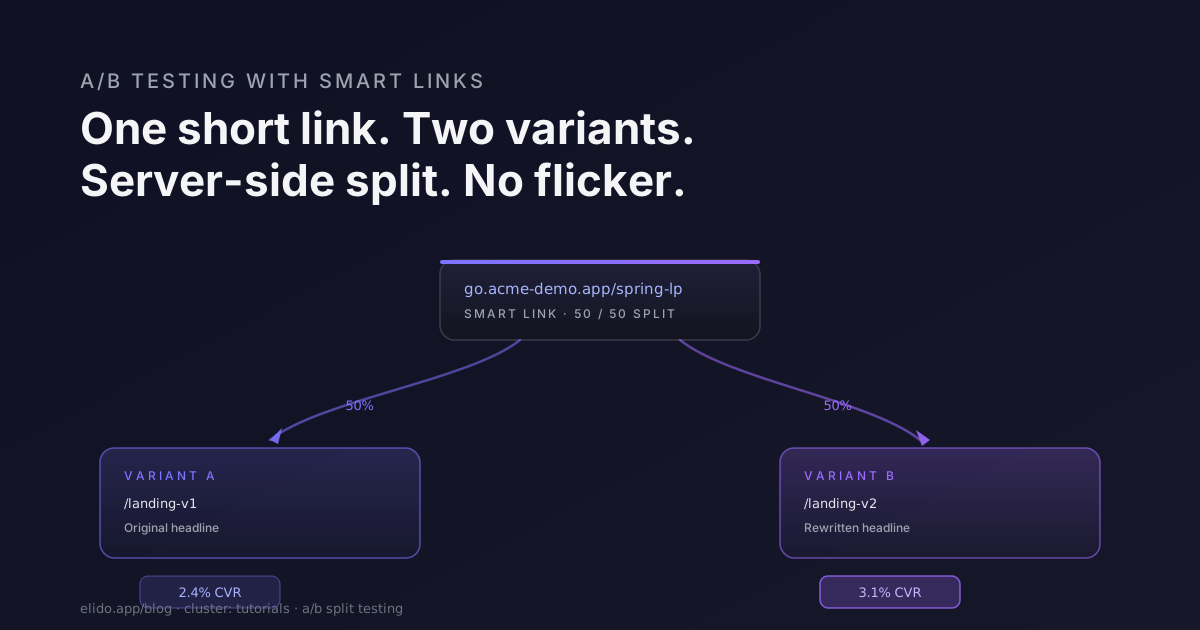
Most A/B testing platforms charge between $200 and $2,000 per month before you've run a single experiment. They earn that fee at the high end - multi-armed bandit optimization, heatmaps, in-page element testing against a live DOM. But a large slice of what people actually test in practice is simpler: two landing pages, one question - which converts better. For that use case, you can skip the tool entirely and use a smart short link as the traffic splitter. The routing happens server-side, at the edge, before the browser loads. No JavaScript injected, no flicker.
This post walks through the mechanics and the full workflow. By the end you'll have a runnable plan, a sample size estimate, and enough context to know when the approach breaks down and you actually need a dedicated tool.
TL;DR
- A smart short link routes each visitor to variant A or B based on weighted random assignment, server-side - no JS flicker, no third-party script.
- Assignment is sticky for 24 hours via hashed IP + user-agent, so the same visitor always sees the same variant on repeat visits.
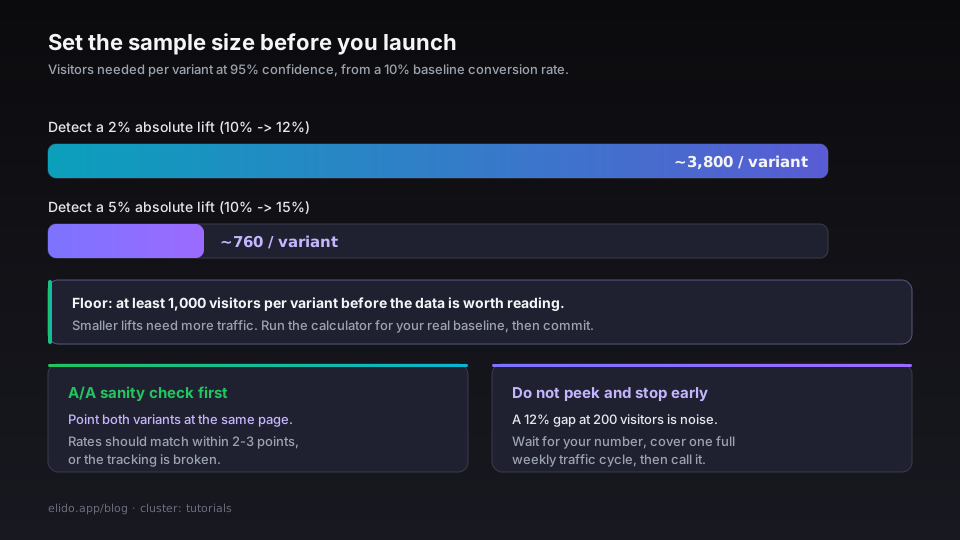
- You need at least 1,000 visitors per variant before the data is worth interpreting. Run Evan Miller's sample size calculator (accessed 2026-05-12) for your specific baseline rate and expected lift.
- This approach handles page-level experiments well. For element-level testing (button color, copy, in-page layout) or multi-armed bandit optimization, you still want a purpose-built CRO tool.
Why server-side splitting is worth the trade-off
Google Optimize shut down in September 2023 with an explanation that landed in its support docs (accessed 2026-05-12): the company would fold experimentation into Google Analytics 4 and partner with third-party CRO platforms instead. The page-flicker problem it described in its own developer documentation - the brief flash of the original page content before the variant swap - was a known limitation of client-side A/B testing that even the market leader never fully solved.
Client-side tools inject a snippet that waits for the DOM to render, then swaps it. The swap takes 50-300ms depending on complexity. On a fast connection with browser caching warmed up, visitors rarely notice. On a cold load over mobile, it is visible. Worse: ad blockers and script-heavy environments sometimes prevent the snippet from executing at all, routing those visitors to the original page and polluting your control group with the subset of traffic that blocks scripts.
A short link routes at the edge before any HTML is sent. The visitor never sees the other variant's URL in the browser. The conversion rate you measure is clean - no contamination from blocked scripts, no flicker artifact. The trade-off is that you're testing entire pages, not in-page elements. You redesign the landing page, point both URLs at the short link, and let it split.
For a full breakdown of how smart links work at the edge, including the cache propagation mechanics and the six routing dimensions, that post covers the underlying architecture in more detail. The short version: routing decisions happen at the Elido edge POP (the EU region, US East, or Asia-Pacific depending on workspace region) before any response bytes leave the datacenter.
How the split works
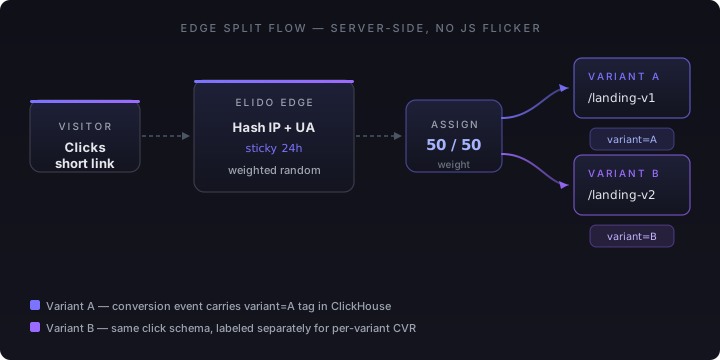
When a visitor hits your smart short link, the edge assigns them to a variant using weighted random selection. The default weight is 50/50; you can configure 70/30, 80/20, or any n-way split including three or more variants.
Assignment is deterministic within a 24-hour window. The edge hashes the visitor's IP address and user-agent string and uses the result as the assignment key. A visitor who clicks the link at 9am and returns at 7pm lands on the same variant both times. This matters because comparing variants where some visitors see both is a contamination problem that inflates noise in your conversion data.
After 24 hours the assignment resets. For most landing page tests this is acceptable - the evaluation window for a page-level experiment is rarely longer than a day per visit. If your product has a known multi-day evaluation cycle (B2B SaaS trials, for example), consider whether the 24-hour sticky window aligns with when your conversion events fire. For longer cycles, the per-variant conversion rate is still accurate in aggregate; the concern is only if a single visitor's variant assignment flips mid-evaluation and they convert on one variant having been exposed to both.
Click events are recorded in our analytics store with the variant tag attached. The per-variant click distribution and the downstream conversion rate are both visible in the analytics dashboard without any additional wiring. The conversion tracking guide covers how to attach a conversion event to a specific click ID if you're tracking form submissions or purchases as your success metric.
The two variant shapes
There are two ways to structure the variants, and the right choice depends on your analytics setup.
Page variants. Each variant is a distinct URL pointing to a different page. Variant A is https://acme.example/landing-v1, variant B is https://acme.example/landing-v2. The short link routes to the full destination URL. Your analytics tool sees two separate pages and you compare them directly. This is the simpler shape - no changes to the destination page required, works with any analytics setup that tracks page views by URL.
Query-parameter variants. Both variants resolve to the same base URL, with a ?variant=A or ?variant=B appended. The destination page reads the parameter and renders the appropriate variant. This lets you use one URL in your analytics while still differentiating in the page experience. It requires the destination page to actually handle the parameter - a JavaScript check at render time, or a server-side branch in your template. The upside is that multi-touch attribution is clean: a visitor who bookmarks the URL and returns later carries the variant tag with them without requiring the short link to reassign.
The query-parameter shape pairs well with server-side rendering. If your landing page is a Next.js route, read searchParams.variant in the page component and conditionally render the A or B version. The page is still one URL in GA4, and the variant dimension is available as a custom parameter. For the full UTM attribution layer on top of this, the UTM tracking end-to-end guide covers how to structure the template and ensure the variant survives downstream to your conversion destination.
Sample size and significance basics
This is the most commonly skipped step, and it's why most self-run A/B tests produce conclusions that don't hold up.
The number of visitors you need per variant depends on three inputs: your baseline conversion rate, the minimum lift you want to detect reliably, and the confidence level you're willing to accept. A test detecting a 5% absolute lift (say, from a 10% conversion rate to 15%) at 95% confidence needs roughly 760 visitors per variant. A test trying to detect a 2% lift from the same 10% baseline needs around 3,800 per variant. Evan Miller's sample size calculator (accessed 2026-05-12) runs these numbers for any inputs you give it - use it before you start, not after you see early results.
Two common mistakes follow from skipping this step.
Peeking and stopping early. You check results after 200 visitors, see a 12% difference, declare a winner, and stop the test. The problem: at 200 visitors, a 12% difference is well within the noise band for most baseline conversion rates. Stopping early on a positive result is statistically equivalent to fishing for a significant result - you'll find one eventually by chance alone. Set your required sample size before the test starts and do not evaluate until you hit it.
Novelty effect. Traffic that has never seen your landing page before responds differently from returning traffic encountering a new page. If your short link is going into a paid ad campaign, most traffic is cold and the novelty effect is minimal. If you're sending it to an existing email list, some fraction of your audience already knows your existing landing page, and seeing a new variant may generate a temporary conversion lift that decays after the first week. CXL's analysis of statistical significance in conversion testing (accessed 2026-05-12) covers the novelty effect and the sample stability problem in more detail - the key recommendation is to run the test long enough to cover at least one full weekly cycle of your traffic pattern.
A practical sanity check before a real test: run an A/A test with your short link first. Configure both variants to point to the exact same page. If your traffic and measurement setup are clean, the two variants should show statistically indistinguishable conversion rates. If they diverge by more than 2-3% in an A/A test, something is wrong with your assignment logic, your conversion tracking, or both.
Setup walkthrough
Creating the split short link takes about five minutes. The critical part is getting the rules array right - it controls how the edge assigns variants.
curl -X POST \
  https://api.elido.app/v1/links \
  -H "Authorization: Bearer $ELIDO_TOKEN" \
  -H "Content-Type: application/json" \
  -d '{
    "domain":       "go.acme-demo.app",
    "slug":         "spring-lp-test",
    "destination":  "https://acme.example/landing-v1",
    "rules": [
      {
        "type":        "ab_split",
        "variants": [
          {
            "label":       "A",
            "destination": "https://acme.example/landing-v1",
            "weight":      50
          },
          {
            "label":       "B",
            "destination": "https://acme.example/landing-v2",
            "weight":      50
          }
        ],
        "sticky":      true,
        "sticky_ttl":  86400
      }
    ],
    "tags": ["ab-test", "spring-2026-lp"]
  }'
A few fields worth noting. sticky: true enables the IP+UA hash assignment; sticky_ttl: 86400 sets the window to 24 hours in seconds. The destination at the top level is the fallback - if the rules array fails to match for any reason (edge cache miss during a deployment, malformed request), traffic falls through to the original landing page rather than dropping. The tags array makes the link filterable in the dashboard when you have multiple tests running simultaneously.
Once the link is created, paste it into your campaign - an email send, a paid ad, a social post - and leave it alone. The dashboard's click distribution panel shows the per-variant split in near real-time (ingestion delay is under 5 seconds at normal traffic volumes). You should see the 50/50 split hold within 2-3 percentage points after the first few hundred clicks.
For a deeper look at the smart links feature page and the full rule syntax including country, device, time-of-day, and referrer conditions, the product documentation covers all dimensions. The marketers solution page has the specific attribution and campaign integration patterns most relevant to this use case.
Reading results
Per-variant results appear in the analytics dashboard under the link detail view. The click count, click-to-conversion rate (if you've wired conversion events), and the split percentage are all visible without exporting anything.
The conversion rate shown is clicks-to-conversions for each variant independently. If variant A had 1,200 clicks and 96 conversions, its conversion rate is 8.0%. If variant B had 1,180 clicks and 115 conversions, its conversion rate is 9.7%. The difference is 1.7 percentage points - a 21% relative lift.
Whether that difference is real depends on your sample size math. At 1,000 visitors per variant, a difference of roughly 2.5 percentage points from an 8% baseline is statistically significant at 95% confidence. At 1,200 per variant, that threshold drops slightly. Run the numbers through the calculator before calling a winner.
When you've hit your required sample size, call the winner and act on it. Redirect the losing variant's destination to the winner by updating the short link's rules. If you want to preserve the test data, create a new link for the winning page rather than modifying the original. The original link's historical split data stays intact in our analytics store and is visible in the dashboard indefinitely.
Don't keep running after you've called the winner. Extended exposure to the losing variant costs real conversions. The point of hitting statistical significance is that you have enough evidence to act - act.
Common mistakes worth calling out
Peeking early. Covered above, but worth repeating because it's the most common failure mode. The temptation to check results after a few hundred visits is natural, and the fix is mechanical: write down your required sample size before launch, put a reminder in your calendar for when you'll hit it, and close the analytics tab until then.
Ignoring the novelty effect. New pages get a short-term lift simply because they're new. If your test window is three days and your traffic has a significant returning-visitor component, run the test for at least a full week before evaluating. The CXL analysis of significance (accessed 2026-05-12) suggests that tests under seven days are unreliable for most retail traffic patterns precisely because the novelty effect doesn't wash out in a shorter window.
Skipping the A/A sanity check. If you've never run an A/B test with this traffic source and this conversion tracking setup before, run a 50/50 split where both variants point to the same page first. Confirm that the reported conversion rates are within 1-2 percentage points of each other. This rules out measurement problems before you have real test data riding on the infrastructure.
Mixing traffic sources. If your short link appears in both a paid ad and an organic social post simultaneously, the two traffic sources will have different baseline conversion rates and device mixes. The per-variant assignment is random across all visitors, but the baseline skew means variant A might get slightly more mobile paid traffic than variant B by chance, and that difference is hard to disentangle from a real treatment effect. Keep your test link to one traffic source at a time or use separate links per source that each split independently.
When you'd want a real CRO tool instead
The short-link splitter handles page-level experiments well. Three cases where you'd reach for a dedicated tool.
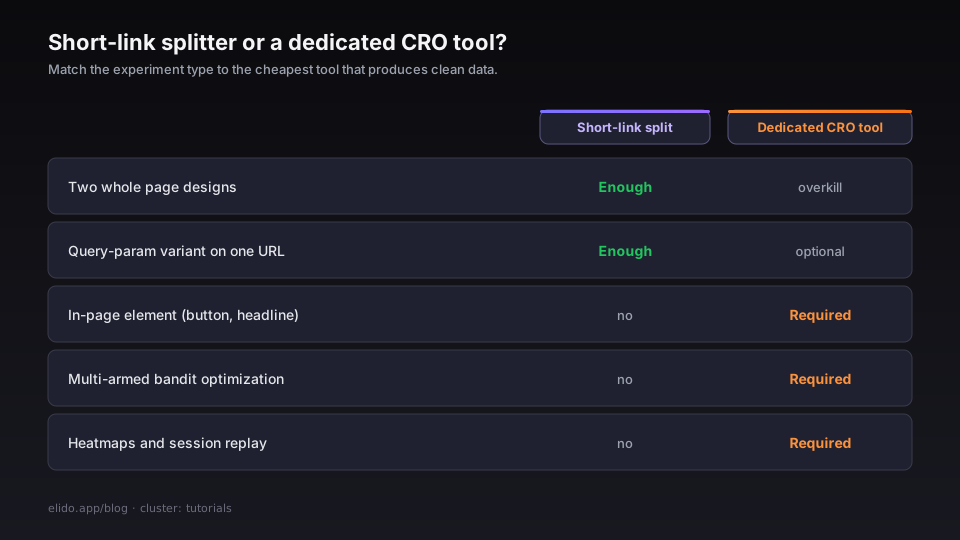
Multi-armed bandit optimization. Classic A/B testing holds traffic splits fixed and evaluates at the end. Multi-armed bandit algorithms dynamically shift more traffic toward the better-performing variant as evidence accumulates - useful when you want to minimize regret (conversions lost to the losing variant) during the test period rather than maximize statistical certainty at the end. Elido's split is static weight-based; if you want the bandit variant, tools like Optimizely or VWO are built for it.
In-page element testing. Testing a button color, a headline, a form layout, or a hero image requires modifying the DOM of a single page rather than routing to two different URLs. That's JavaScript-territory - a tool that injects a snippet and can modify the rendered page is the right approach. Short-link splitting only works when the variants live at different URLs or different query parameters that the page already reads.
Heatmaps and session replay. If you want to understand why variant B converts better - where visitors click, how far they scroll, where they drop off - you need a tool that instruments the session. That data doesn't come from click-level analytics. Hotjar, Microsoft Clarity, and the session replay features in Amplitude are the right layer for this; they sit alongside a short-link test rather than replacing it.
For everything else - comparing two page designs, testing a new pricing layout, evaluating a different above-the-fold message - the short-link workflow described here is enough, costs nothing beyond your existing Elido plan, and produces clean data without the flicker artifact or the $200/month entry fee.
Set the sample size before launch. Run the A/A sanity check. Don't peek. Call the winner when you hit the number you committed to.
Try Elido
Paste a URL, get a working short link
No signup. Link lives for 30 days. Sign up to keep it forever.
Free, no signup required · 2 per day