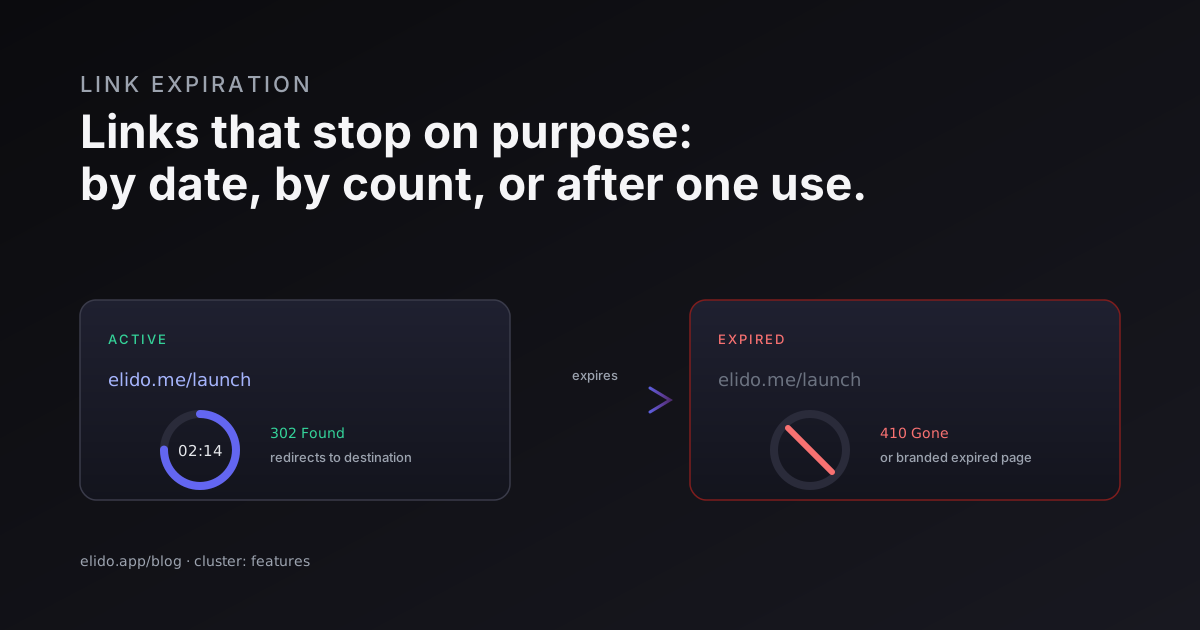
Link expiration is a rule that retires a short link automatically once a condition is met, so the URL stops working at a moment you choose rather than living forever. A self-destructing link is the same idea tuned to a single use: it dies after the first click. Both are intentional. You are not fixing a broken link, you are building one that is supposed to stop.
That intent is the whole distinction worth holding onto. A link that breaks because its destination vanished has rotted, and rot is a problem you detect and repair. We wrote the operational playbook for that in link rot prevention strategy. Expiration is the opposite move: you are the one deciding the link should go dark, on a date, after N clicks, or after exactly one. This post covers when each mode fits, what the edge actually returns when an expired link is hit, how expiry stacks with password gates and geo rules, and the timing caveats that bite if you treat a one-time link as a hard security boundary.
When do you reach for it? Limited-time offers that should not keep converting after the promo window. Time-boxed access to a shared document or data export. One-time links for a credential or a sensitive file. Compliance data-minimization, where a link that grants access should not outlive the reason it was created. Event links that ought to die the day after the event so a stale QR code on a poster does not send people to last year's schedule.
Three Modes of Link Expiration#
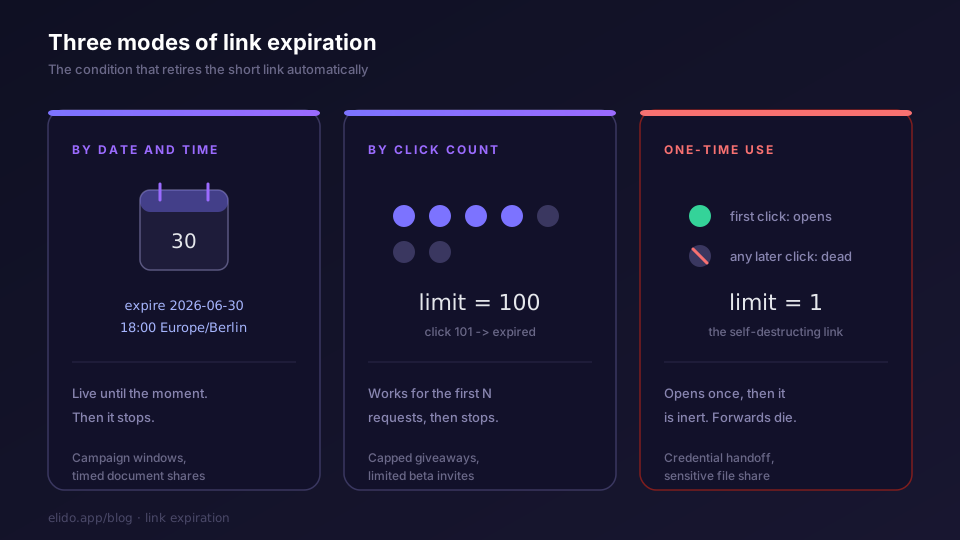
Expiration comes in three shapes, and picking the right one is most of the decision.
The first is by date and time. You set an expiry timestamp, ideally with a timezone, and the link resolves normally until that moment, then stops. This is the expiring URL most people mean: a temporary link for a campaign that ends at midnight, a document share that should close at the end of a sprint, a time limited link for a webinar replay you only want open for a week.
The second is by click count. The link works for the first N requests, then expires. Set N to 100 and the hundred-and-first visitor gets the expired response. This is useful for capped giveaways, beta invites with a fixed number of seats, or any case where the limit is "how many people used it" rather than "what day is it".
The third is one-time use, which is click count with N set to one. This is the self-destructing link. It opens once and is dead on every click after. Forwarded copies are useless, screenshots of the URL are useless, and a leaked link in a log is already spent if the intended recipient opened it first.
The modes are not mutually exclusive in principle, though in practice you usually want one clear rule per link. A link that expires on a date and after a click count is fine, but be explicit about which condition you expect to fire first, because the answer changes how you reason about the link's lifetime. If you cannot say in one sentence why a given link expires, you have probably reached for the wrong mode.
What the Edge Does When an Expired Link Is Hit#
A live short link answers with a 302 to its destination. An expired one has to answer with something terminal, and the choice of status code is not cosmetic.
The cleanest answer is 410 Gone. Per RFC 9110, the HTTP semantics specification, 410 means the resource is intentionally and permanently unavailable, and the server has no forwarding address. That is exactly what an expired link is. The MDN reference for 410 Gone notes that, unlike 404, a 410 is a deliberate signal that the resource used to exist and is now gone for good, which is a hint crawlers respect by dropping the URL from their index faster. For an expired campaign link you want indexers to forget, 410 is the honest code.
Sometimes you would rather not admit the link ever existed. A 404 Not Found is the move there. It treats the expired slug as if it was never a real link, which is the more discreet posture for one-time links to sensitive material where even confirming the URL was once valid leaks something. Both 404 and 410 are valid terminal responses; the difference is what you are willing to disclose.
On a branded domain you have a third option that is friendlier to humans: a branded expired page. Instead of a bare status code, the edge serves a small HTML page that says the link has closed and, ideally, points to a current alternative. This is the right call for marketing links a real person might click weeks late, off a printed asset or an old email. A 410-with-body is still standards-correct: you can return the 410 status and serve an explanatory page in the same response. The reason this matters more on a custom domain is that the expired page then carries your brand rather than a generic error, which softens the dead end.
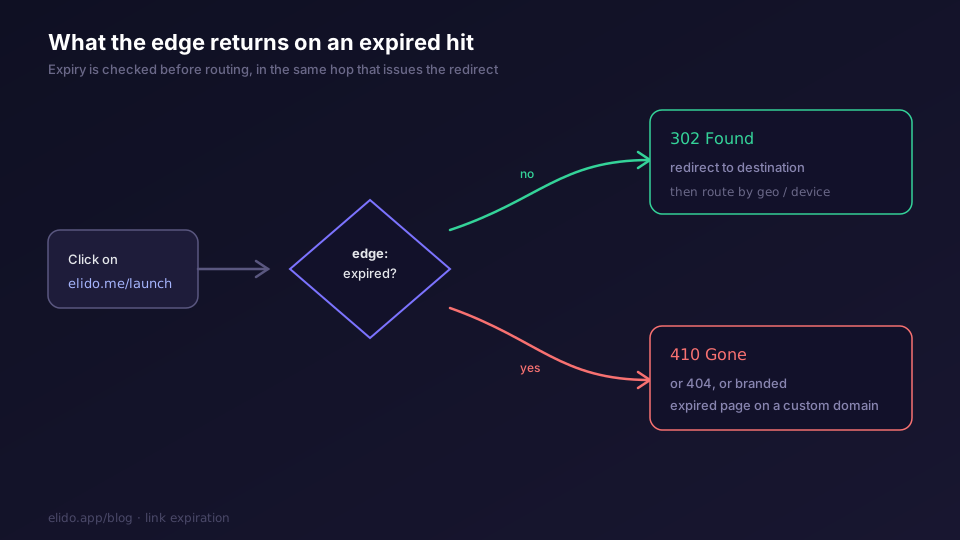
The decision happens in the same hop that would otherwise issue the redirect, which is the same architectural point we made about smart links: the cheapest place to make a routing or gating decision is the process that is already writing the response. Expiry is just one more check in that path, evaluated before the redirect is built. An expired link costs the edge an extra comparison, not an extra service call.
Use Cases by Audience#
Different teams reach for expiry for different reasons, and the mode that fits follows from the reason.
Marketing teams want date-based expiry most of the time. A flash sale link that keeps converting after the sale ended is a support ticket waiting to happen, because the price on the landing page no longer matches the offer in the link. Setting an expiry that matches the campaign window keeps the link honest. The friendlier pattern, rather than a hard 410, is to expire the live offer and repoint the slug to a "this offer has ended, here is the current one" page, which is the sunset move from the link rot playbook applied on purpose. For the broader campaign tooling, Elido for marketers covers how expiry sits alongside UTM templates and conversion tracking.
Legal and compliance teams care about data-minimization. The GDPR data-minimization principle in Article 5(1)(c) says personal data should be limited to what is necessary for the purpose. A link that grants access to personal data should not outlive that purpose. If a link exists only to let a contractor pull a report this quarter, an expiry at quarter-end is the link-level expression of the same principle your retention policy already states for the data itself. Elido for compliance and our trust page go into the residency and audit side of that.
Teams sharing sensitive files lean on click-count and one-time use. A credential handoff, a one-off data export, an NDA-gated document for a single reviewer: the link should open once, for one person, and then be inert. Pair that with a password gate and you have two independent factors, which we get to next.
How Expiry Pairs With Password Gates and Geo Rules#
Expiration is a gate, not a destination, and gates stack.
The edge evaluates expiry first. An expired link never reaches the password prompt and never runs the geo or device routing rules, because there is nothing to route to. This ordering is deliberate: it means a leaked one-time link that has already been used cannot even be probed for whether it had a password, since the expired response comes back before any of that logic runs.
For sensitive shares, expiry and a password are complementary controls. The password is "prove you are allowed"; the expiry is "and only within this window, or only once". Either one alone is weaker than both together. A one-time link that is also password-protected is dead after a single successful open and useless to anyone who intercepts it after the fact. We cover the gate itself in password-protected short links.
Geo rules combine the same way. A geo-targeted link that is also time-limited will route by country while it is live and return the expired response once the window closes, with the country check never running after expiry. The mental model is a short stack of gates the request passes through in order, and expiry sits at the top of that stack. None of this is special-cased; it falls out of evaluating the cheapest, most decisive check first.
How to Set It Up#
The practical flow is the same regardless of mode. You create or edit a short link, choose an expiry rule, and pick what an expired hit should return.
For a date, set the expiry timestamp and confirm the timezone. A link set to expire at "midnight" without a timezone is ambiguous across regions, and the ambiguity is exactly the kind of off-by-a-day that surfaces in a support thread. Use an explicit IANA zone like Europe/Berlin so "end of the campaign day" means the same thing for everyone.
For a click count, set the limit and decide whether you want the count to be strict. For a one-time link, set the limit to one. Choose your expired response per link: 410 Gone for links you want crawlers to forget, 404 for discretion, or a branded expired page on a custom domain for human-facing marketing links. The smart links guide walks through the rule fields, and the pricing page covers which expiry capabilities sit in which tier rather than my guessing here.
A note on honesty about timing, because this is where expiry gets oversold elsewhere. Date and click-count rules are evaluated at request time against the link record, so a date-based expiry takes effect at the configured moment. A manual expiry, where you disable a link by hand, has to propagate across the edge caches the same way any link edit does. That is roughly a second on the happy path, with a short cache TTL as the upper bound, which is the same propagation model we documented in cache strategy for URL redirects. For click-count limits, very high concurrent traffic spread across regions can let a small number of extra clicks through before the distributed counter settles. For a campaign cap of 1,000 that is noise. For a one-time link you are treating as a hard security boundary, do not lean on the count alone: layer a password or a server-side check at the destination, because "exactly once, guaranteed, under adversarial concurrency" is a property the destination is better placed to enforce than the redirect hop. Expiry at the edge is a strong control, not a cryptographic guarantee, and saying so is the difference between a feature and a liability.
Used for what it is good at, expiry is one of the cheapest risk reductions in the link toolkit. A campaign link that cannot embarrass you after the sale, a document share that closes itself, a credential link that is spent on first use: each one removes a class of problem before it can happen. For the wider question of whether short links are safe to hand out at all, are URL shorteners safe is the companion read.