
Elido can open a Linear issue as soon as it finds a dead short link. One trigger exists today: a broken destination. When the daily check sees a link fail, Elido creates an issue in the Linear team you picked, with the short URL, status code and error message in the body. Click spikes, tag routing and labels aren't built, and this post says where those gaps are so you don't plan around them.
If you maintain hundreds of short links, you know the failure mode. Marketing rotates a campaign destination, the new URL 404s, and nobody notices until a customer screenshots it. Linear is where your team already triages bugs, so that's where the ticket goes.
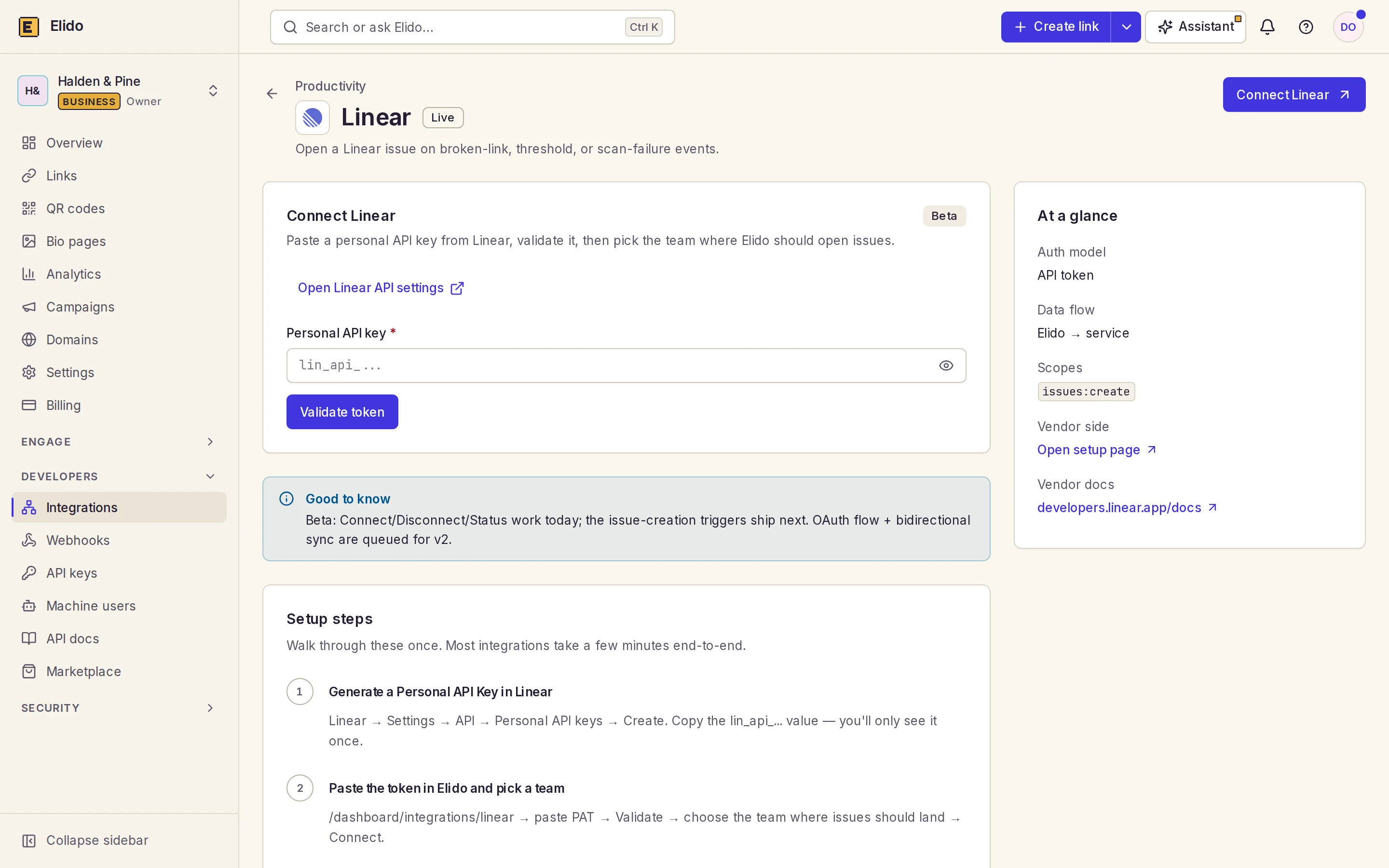
Connecting Linear with a personal API key
The integration uses a Linear personal API key, not OAuth. Linear's developer docs (accessed 2026-10-24) say its API supports personal API keys and OAuth2, and the authentication guide covers how to create a key. We went with the key because pasting one is a two-minute setup and works for server-to-server jobs. OAuth is on our backlog.
- Create a personal API key in Linear. Name it
elido-integrationso you can revoke it later without guesswork. - In the Elido dashboard open Integrations, then Linear, and paste the key. Only keys that start with
lin_api_are accepted. - The dashboard validates the key against Linear and lists the teams it can see. Pick one.
- Click Connect. The key is encrypted with envelope encryption and stored; the team ID and name are kept with it.
Connecting needs the workspace admin or owner role. The same flow is available over the API, which is useful for config as code:
curl -X POST https://api.elido.app/v1/workspaces/42/integrations/linear/connect \
  -H "Authorization: Bearer elido_xxx" \
  -H "Content-Type: application/json" \
  -d '{ "token": "lin_api_...", "team_id": "<team id from /validate>" }'
POST .../integrations/linear/validate returns the team list, GET .../integrations/linear/status shows whether the workspace is connected and which team, and DELETE .../integrations/linear/disconnect drops the stored key. A workspace has one connection. Connecting again replaces the key, which is how you rotate it. For what an Elido key can do, see API key permissions.
One gotcha is on Linear's side. A personal key belongs to the user who created it, so if that person's Linear seat is removed, the key stops working and issues silently stop. Create the key from a shared bot account instead. Linear also counts requests per user, not per key (more on limits below).
What triggers a Linear issue

The url-scanner service runs a destination check once a day over every active link. First comes a HEAD request. Some servers, such as presigned object-storage URLs, refuse HEAD, so the scanner then retries with a one-byte ranged GET, following up to three redirects by hand and giving each link five seconds before it gives up. A 4xx or 5xx, a timeout, a DNS failure or a refused connection counts as broken. When a link recovers, the scanner marks its record resolved.
Each failure is written to a broken-link record in api-core, and that record decides whether to alert:
- The first failure raises the alert immediately. There's no "two consecutive probes" confirmation.
- A link that stays broken alerts again after 24 hours.
- Anything in between is silent.
An alert does two things. It publishes the link.broken event to your webhook channels, which is what feeds Sentry and chat alerts. And, if the workspace has a Linear connection, it creates one Linear issue. Detection is daily. Expect a ticket within about a day of the break, not within minutes, which is fine for a dead campaign link and too slow for anything you'd page someone over. TLS expiry and parked-domain fingerprints aren't separate checks. A broken certificate shows up only as a failed request.
What the Linear issue contains

The title is Broken link: elido.me/<slug>. The body is short Markdown:
**Short URL:** elido.me/link/1042
**Destination:**
**Status code:** 502
**Error:** bad gateway
**Detected by Elido at:** 2026-10-24T03:11:42Z

_This issue was automatically created by the Elido broken-link monitor._
The values above are illustrative, and two of the fields are weaker than they should be. The alert path only passes the link ID, status code and error to the Linear hook, so today the short URL shows as elido.me/link/<id> rather than your real slug and domain, and the Destination line is empty. You find the actual link by its ID in the dashboard's links list, where broken links carry a flag. That's a known gap and it's in our backlog.
What the issue doesn't have: labels, a priority, an assignee, click counts, referrers or a suggested fix.
The issue lands in the one team you chose at connect.
Duplicates, failures and Linear rate limits
The system remembers which issue it filed for each broken-link record, keyed by workspace, link and record ID. If the same record alerts again after 24 hours, no second issue is created. The flip side: a link that recovers and breaks again reuses its record, so Linear gets no new issue for the second break. Treat the first ticket as the permanent home for that link, and reopen it by hand. Dedupe is per link, not per destination host, so 800 links pointing at one dead domain make 800 issues. A host-level grouping is on the backlog.
If creating the issue fails, nothing retries, and honestly that's the part I'd fix first. The Linear client reports a 429 with Linear's Retry-After value, but the broken-link hook doesn't wait and try again. It logs a warning and moves on, and there's no dead-letter queue to replay. The record stays flagged in Elido, so you can still see the link. Linear's rate limiting docs (accessed 2026-10-24) give an API key 2,500 requests per hour and 3,000,000 complexity points per hour, shared by all requests from the same user. One issue per broken link is far below that, but a bulk break could brush against it if the same user also runs other Linear automation.
Click spikes and drops are not covered
You may have read that the Linear adapter also fires on click thresholds. It doesn't.
A click-threshold trigger exists, but it feeds Pipedrive deals, not Linear. There is no spike or cliff band for Linear, no per-link threshold setting in the dashboard and no tag routing. Catching a traffic cliff means monitoring the click numbers elsewhere. The Datadog redirect metrics guide shows a click-drop monitor, and Discord and Telegram alerts cover chat delivery.
Other ways to reach Linear
If you need richer tickets than the built-in hook creates, the event itself is available to you. The link.broken event is delivered to any webhook endpoint, and its payload carries the workspace ID, link ID, status code, error message and first-seen time. Point it at a small function or an automation tool that calls Linear's GraphQL API yourself, where you can set labels, priority and team per rule. The webhooks for link events post covers signing and delivery, and the Zapier walkthrough shows the no-code route.
Which team gets the ticket is also a process question. Pick the team that owns campaign links, not the platform team, because the usual fix is updating a destination, not fixing a service. Link rot prevention covers what to do after the ticket lands.
Related on the Blog
- Webhooks for link events: a developer's guide - the event bus behind
link.broken. - Short link monitoring with Sentry and Datadog - the same event routed to Sentry.
- Wiring Sentry across 12 Go services - how we monitor our own services.
- Link rotting prevention strategy - why broken-link detection exists.
- API key permissions for link tools - what an Elido key can do.
Frequently asked questions
How does Elido authenticate with Linear?
With a Linear personal API key (it starts with lin_api_), not OAuth. An admin pastes it into the Linear card under Integrations in the dashboard, Elido checks it against Linear, and the admin picks a team. The key is stored encrypted with envelope encryption and decrypted only when an issue is created.
What counts as a broken link?
A daily check sends a HEAD request to each active link's destination, retries with GET if the server refuses HEAD, follows up to three redirects and waits five seconds. Errors such as a 4xx or 5xx status, a timeout, a DNS failure or a refused connection mark the link as broken. The first failure raises the alert.
Can I send issues to different Linear teams by link tag?
No. Each workspace has one Linear connection and one team, picked when you connect. Tag-based routing, labels and priorities are not built. If you need several teams, the practical route today is to triage in the one team or to reconnect with a different team.
Does Elido open Linear issues for click spikes or drops?
Not yet. The only Linear trigger that exists is a broken link. Click-threshold triggers exist for Pipedrive, not Linear, so a traffic cliff has to be caught elsewhere, for example with a Datadog drop monitor on the click metrics.
What happens if Linear is down or rate-limits the request?
The issue isn't created. Elido makes one attempt, logs the failure and does not retry or queue it. The broken link stays flagged in the Elido dashboard, and the next alert for it comes after 24 hours. Linear's API allows 2,500 requests per hour per user with an API key.
Does the Linear integration cost extra?
Our pricing page doesn't list Linear as a paid add-on, and I found no plan check on the connect endpoints in the code. Check the current pricing page for your tier before you rely on it. Linear itself is billed by Linear, and an API key needs a seat.
Try Elido
Paste a URL, get a working short link
No signup. Link lives for 30 days. Sign up to keep it forever.
No signup needed. Sign up free for 50 links a month.