For short link automation on Elido, pick Make for visual multi-step scenarios on a budget, IFTTT for phone or smart-home triggers, n8n when you want to self-host or verify webhook signatures in code, and Zapier when your other apps already live there. All four do the same thing underneath. They send one POST to the Elido API and pass on the short_url that comes back.
That shared request is why this page is short. The platform decides the trigger. It decides the price and the error handling too. It doesn't decide what the link looks like. So below you get the common request once, a paragraph on each tool with its real limits, a comparison table, and a link to the full recipe post for each platform. I've rewritten this page from an older version that promised things the tools can't do, so every claim here is one I checked against the API or the vendor's own page in September 2026.
New to the API itself? The URL shortener API and SDKs quickstart covers keys and domains. Everything in this no-code link automation guide assumes you've read it.
The One Request Every Tool Sends
Whichever tool you choose, short link creation is the same HTTP call: POST https://api.elido.app/v1/workspaces/{workspace_id}/links. It carries an Authorization: Bearer elido_... header and a JSON body with two required fields, domain_id and destination_url. Optional fields include slug, title and tags.
Two things trip people up, on every platform:
- The full URL is in the response. Elido answers with the link record, including
short_url(for examplehttps://b.elido.me/4Fr7Eq) next toid,slug,destination_urlanddomain_id. For a custom domain, runGET /v1/workspaces/{workspace_id}/domainsonce and note itsidto send asdomain_id. - Duplicates on retry. Send an
Idempotency-Keyheader, say a hash of the destination URL. A repeat within 24 hours then replays the first response instead of minting a twin link. The rate limits and idempotency guide explains the window.
The key comes from the API keys page in the dashboard. It starts with elido_ and shows once, so paste it straight into the tool's credential store. Give each automation tool its own key. Revoking one then breaks nothing else. Editor is enough for creating links, and the guide to least-privilege API keys covers why webhook management is the one job that needs admin.
Going the other way, Elido webhooks push events to a URL your tool gives you. The events are lifecycle ones: link.created, link.updated, link.deleted, link.expired, link.cap_reached, plus workspace and member changes. There's no click event today; a click trigger is planned for the official automation apps, and until it lands, click numbers come from the analytics API or dashboard. Each delivery is signed with X-Webhook-Signature: v1=<hex>, an HMAC-SHA256 over {timestamp}.{raw_body}, and whether a tool can check that signature turns out to be one of the bigger differences between them.
Make.com URL Shortener: Visual Scenarios on the HTTP Module
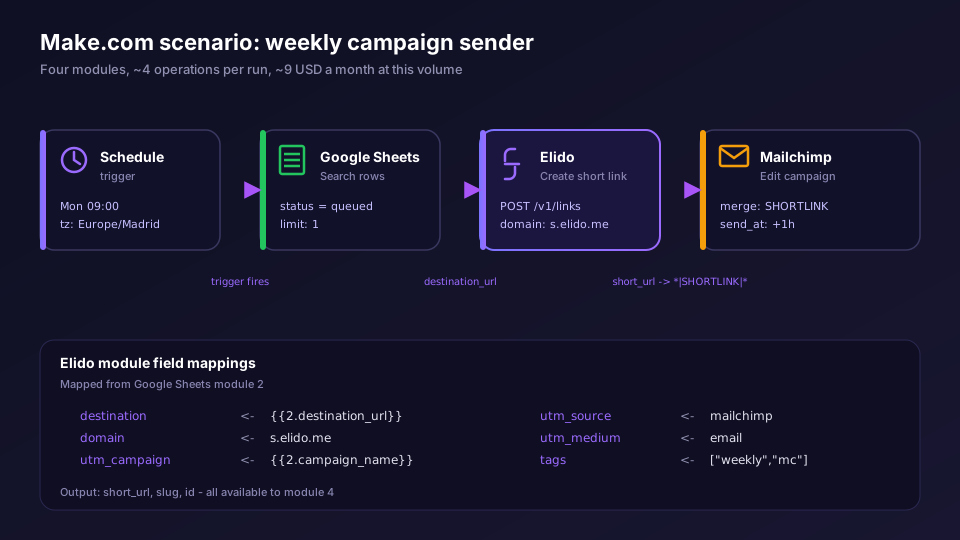
Make is where I'd send most marketing teams first. An official Elido app for Make is planned, and its source already sits in our repository, but it isn't listed in Make's directory yet, so nobody can click install on it. Today you use Make's own HTTP app and its Make a request module, with an API key credential that stores the Bearer header once.
What Make does well is the middle of a flow. Routers split one new link to Slack and a scheduler, filters stop blank sheet rows before they cause a 400, and the Retry error handler parks a failed bundle for later when Elido answers 429. For inbound events, a Custom webhook with JSON pass-through keeps the raw body, and a filter built on Make's sha256 function can recompute the signature.
The catch is credits. Every module run costs one, and a polling trigger costs one per check even when nothing's new, so a Sheets watcher on a 15-minute interval burns a free allowance just looking. The Make.com URL shortener scenarios post has the three scenarios I'd build, the exact filter for signature checks and a credit table per scenario.
IFTTT Short Links: Consumer Triggers, Paid Webhooks
IFTTT has no native Elido service either. It works through IFTTT's generic Webhooks service: Make a web request calls the Elido API, and Receive a web request gives Elido a URL to post events to.
The plan decides almost everything here. When I checked IFTTT's plans page on 21 September 2026, Free allowed two applets and no Webhooks at all. Pro, at 2.99 USD a month billed yearly or 4.99 USD month to month, adds Webhooks. Pro+, at 8.99 USD a month billed yearly or 14.99 USD monthly, adds the JSON-response query and filter code. That split matters more than it looks. On Pro the create call is fire-and-forget. The link exists in Elido. The applet never sees the slug.
Why pick IFTTT at all, then? Because of the triggers nobody else has. A phone widget, arriving at a venue, a voice command. If the job is "tap a button, get tonight's short link," it's the right tool. Just don't point Elido events at an applet that does anything important, because IFTTT can't check signatures, and anyone holding your Maker URL can fire it. The IFTTT URL shortener applets guide walks through all three applets, including the filter code that reads the slug back.
n8n Short Links: Self-Hosted Control and Signature Checks
n8n is the pick when data location matters. Or per-run pricing. Or you just want real code in the flow. The HTTP Request node reaches the Elido API on every n8n edition, cloud or self-hosted, with a Header Auth credential carrying the Bearer key.
There's also a packaged community node, n8n-nodes-elido. It's published on npm now, version 0.2.0 as of 22 September 2026, with Create, Get, List and Get Analytics operations on a Link resource. One caveat before you plan around it. n8n Cloud installs only verified community nodes, and this one isn't verified, so it runs on self-hosted n8n only. n8n's community node installation guide explains the install routes. On Cloud, HTTP Request stays the reference path, and it's what the node calls anyway.
n8n's strength on the event side is the Code node. Turn on Raw Body in the Webhook node, recompute the HMAC and reject anything that doesn't match. Of the four, it's the one I'd trust with an event that changes something real, like pausing a campaign halfway through a launch week with the whole team watching the numbers. The n8n URL shortener node post covers the node plus retries, with three workflows to copy. If you're running it yourself, self-hosted link automation with n8n covers Docker Compose and the reverse proxy, then queue mode for when one worker isn't enough.
Tired of choosing between four tools for a job you understand already? Start a free Elido workspace, mint one key per tool, and try the same request in two of them side by side before you commit.
Zapier URL Shortener: Widest Catalog, Premium Webhooks
Zapier's pull is its app catalog. If your form tool and CRM are both there, a Zap is often the shortest path from "new row" to "short link posted somewhere."
One thing to know up front: an official Elido app for Zapier is planned, but when I checked in September 2026 it wasn't listed in Zapier's public app directory. Until it is, the dependable route is Webhooks by Zapier, which Zapier marks as a premium app, so it needs a paid Zapier plan. A POST step sends the same body as every other tool, and later steps use the returned short_url.
I haven't built the signature check in Zapier for this comparison. So I won't claim it works. If an inbound Elido event is going to change records, n8n or Make are the tools I've actually seen do it. For outbound creation, the Zapier URL shortener walkthrough shows the Zap patterns marketers reach for first, from a sheet row to a Slack post.
Make vs IFTTT vs n8n vs Zapier, Side by Side
Here's the comparison in one place. Prices move. Each row points to what I checked, not to a sales page.
| Question | Make | IFTTT | n8n | Zapier |
|---|---|---|---|---|
| How it calls Elido | HTTP, Make a request | Webhooks, Make a web request | HTTP Request node | Webhooks by Zapier |
| Listed Elido app | Planned | No | On npm, self-hosted only | Planned |
| Reads the slug back | Yes, any plan | Pro+ only | Yes, any edition | Yes, paid plan |
| Verifies webhook signatures | Yes, sha256 filter | No | Yes, Code node | Not tested here |
| Retries on 429 or 5xx | Retry error handler | No, the run fails | Retry On Fail per node | Not tested here |
| Best at | Branching visual flows | Phone and smart-home events | Self-hosting, custom code | Breadth of connected apps |
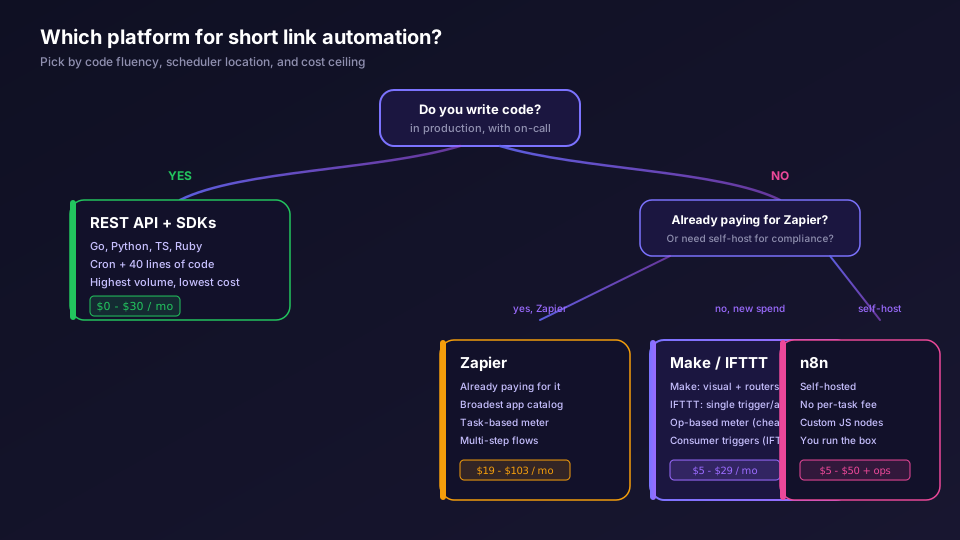
Two more rules sit above the table. First, volume: if you're creating thousands of links a day, none of these is the right home. A short script on the Elido API and SDKs is cheaper and easier to debug, and pasting a big list at once is a job for bulk import from Google Sheets. Second, clicks: no tool here gets a click event today, because Elido doesn't send one yet. For click numbers, schedule a daily pull or read the analytics dashboard. The webhooks for link events write-up lists what does get pushed.
My own default, if you forced me? Make for a marketing team of one to five, n8n the day someone asks where the workflow data lives. The marketers solution page collects the wider playbook for tracked links across channels.
Read the cornerstone → URL shortener API and SDKs quickstart
Related on the Blog
- Make.com URL shortener scenarios - three scenarios, signed webhooks and credit costs.
- IFTTT URL shortener applets - Webhooks applets, filter code and cap alerts.
- n8n URL shortener node - HTTP Request setup, retries and the community node.
- Self-hosted link automation with n8n - Docker, reverse proxy and signature checks.
- Zapier URL shortener automation - the Zaps marketers build first.
- API key permissions for link tools - role caps, rotation and keys for automation tools.
Frequently asked questions
Does Make.com have an Elido module?
Not a listed one yet. An official Make app is on Elido's integrations roadmap, and its source already sits in the repository, but it isn't in Make's public app directory. Today the working route is Make's own HTTP app: one Make a request module posts domain_id and destination_url with a Bearer API key.
Can IFTTT shorten URLs automatically?
Yes, through IFTTT's Webhooks service, which ifttt.com/plans lists on Pro and Pro+ but not on Free. The Make a web request action creates the link fire-and-forget. Getting the new slug back into the same applet needs the JSON-response query and filter code, and both are Pro+ features.
Which is cheapest for short link automation: Make, IFTTT, n8n or Zapier?
Self-hosted n8n has no per-execution fee, but you pay for the server and the hours spent patching it. Among hosted tools, IFTTT Pro is the cheapest entry for simple one-step flows. Make's free plan covers light scenarios if you avoid tight polling. Zapier's webhook step is a premium app, so it needs a paid plan.
Can Make, IFTTT, n8n or Zapier trigger when someone clicks a short link?
No. Elido webhooks cover link and workspace lifecycle events such as link.created, link.updated, link.deleted, link.expired and link.cap_reached, and there is no per-click event. A click trigger is on the roadmap for the planned official apps, but it doesn't ship today. The nearest click-driven signal now is link.cap_reached, which fires once when a capped link hits its limit.
Which automation tool can verify Elido webhook signatures?
Make and n8n can. Elido signs each delivery with X-Webhook-Signature, an HMAC-SHA256 over the timestamp and raw body. A Make filter using the sha256 function or an n8n Code node can recompute it. IFTTT has no step that checks signatures, so keep IFTTT event applets to low-stakes notifications.
When should I use IFTTT instead of Make or Zapier?
Use IFTTT when the trigger is a consumer service it covers natively, such as a phone widget, a location, a smart-home device or a voice assistant, and the flow is one or two steps. Once you need branching, retries, loops over many rows or response handling on a cheaper plan, Make, Zapier or n8n fit better.
Try Elido
Paste a URL, get a working short link
No signup. Link lives for 30 days. Sign up to keep it forever.
Free, no signup required · 2 per day