Wire Elido into any AI agent.
Elido MCP is an open-source server that exposes our link, QR, and analytics APIs as MCP tools. Drop it into Claude Desktop, Cursor, or your own agent in 30 seconds.
What's MCP?
Model Context Protocol is an open standard from Anthropic that lets AI agents talk to tools, files, and APIs in a structured way. One protocol, many clients.
Before MCP, wiring an AI agent to an external service meant writing custom prompt instructions, maintaining a hand-crafted tool schema, and hoping the model would call it correctly. MCP replaces that with a standardized protocol: the server declares its tools in JSON Schema, the client discovers them automatically, and every call is typed and auditable. One protocol works across Claude Desktop, Cursor, Claude Code, Continue.dev, and any other MCP-aware client.
The Elido MCP server runs locally in your environment. It holds your API key, translates structured tool calls from the agent into REST requests to api.elido.app, and returns structured results. The agent never sees your key; api.elido.app never speaks directly with the model.
Runtime flow
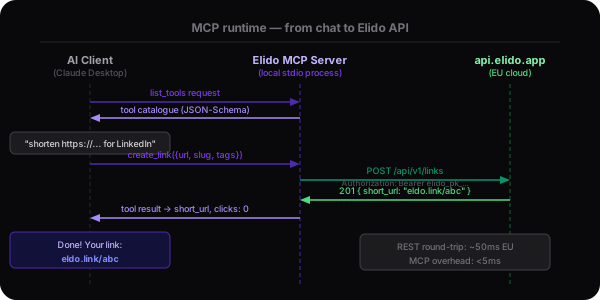
From your chat message to the Elido API and back
The sequence is four steps. Each is fast - the MCP layer adds under 5ms of overhead. The REST call to api.elido.app takes 30-80ms from EU. You see the result in chat before you can alt-tab to a browser.
How it works
MCP is a thin wire protocol. The server runs in your environment, holds your API key, and translates structured tool calls from the agent into REST requests to api.elido.app.
- 1. Agent asks for tools
On startup the MCP client (Claude Desktop, Cursor, your own agent) asks the Elido server for its tool catalogue. The server returns a JSON-Schema description of every available tool - names, parameters, return shapes.
- 2. User makes a request in chat
When you say 'shorten this URL with the tag launch-2026', the agent matches it against the catalogue and decides to call create_link with structured arguments. You see the tool call before it executes if your client renders it (Claude Desktop does).
- 3. Server hits api.elido.app
The local MCP server signs the request with your ELIDO_API_KEY and calls the corresponding REST endpoint. Latency is dominated by the round-trip to api.elido.app - typically 30-80ms from EU; the MCP layer adds <5ms.
- 4. Result flows back to the agent
The response is returned as a structured tool result the agent can quote, summarise, or chain into the next call. Errors include actionable messages (rate-limit hint, scope-missing, not-found) so the agent can recover without escalating to you.
Available tools
Every tool is JSON-Schema typed. The agent sees parameter names, types, and descriptions on startup. No manual prompt engineering required.
Example session
What it looks like after install
This is a real Claude Code session after adding the Elido MCP server. The agent discovers tools on startup. From there, plain language is enough.
$ claude
> What tools do you have available?

Claude: I have access to the Elido MCP server with these tools:
  - create_link: Shorten a URL with optional slug, domain, and tags
  - list_links: Search and filter links by tag, folder, or query
  - get_link_analytics: Click counts, geo, devices, conversions
  - create_qr: Generate a QR code for a short link
  - list_workspaces: Enumerate accessible workspaces

> Shorten https://elido.app/pricing with tag launch-2026

Claude: [calling create_link with {url, slug: "pricing-launch", tags: ["launch-2026"]}]

Result: eldo.link/pricing-launch · 0 clicks · audit logged
The tool call is visible before it executes in Claude Desktop and Claude Code. You see exactly what arguments the agent passes. You can cancel before the call fires.
What teams ship with this
Three patterns we see in production. Pick whichever maps to how your team already works.
Why MCP, not direct API calls?
All three approaches reach the same Elido endpoints. The differences show up in setup time, security posture, and how readable the agent's reasoning is.
| Every feature, side by side | Elido MCP | Direct REST | Browser only |
|---|---|---|---|
| Setup time | 30 seconds (config + key) | Custom prompt + tool definitions (hours) | Manual paste / scrape (no automation) |
| Tool catalogue | Auto-discovered, JSON-Schema typed | Hand-written, drifts as the API evolves | None - agent has to guess |
| API key handling | Stays in the local server's env | Pasted into prompts (leak-prone) | Pasted into the dashboard (cookie-bound) |
| Audit trail | Structured tool calls in chat history | Free-text - hard to grep later | Browser history; doesn't capture intent |
| Multi-client reuse | One config, N MCP-aware clients | Re-prompt per client | Per-browser state, no portability |
Tested clients
Stability ratings are based on our internal test suite that runs against each client on every release. "Stable" means the full tool catalogue passes. "Beta" means it works but edge cases (streaming results, long lists) may behave unexpectedly.
Security
Read-only by default. Key stays local.
The security model follows the principle of fewest-scopes-needed. The default install has read-only access. Every mutation is logged. The API key never leaves the local server process.
Key isolation
ELIDO_API_KEY lives in the server's env - never in a prompt, never sent to the model. The model calls the tool; the server signs the request. Compromise of the model conversation doesn't expose the key.
Scope gating
Read-only is default. Granting write or delete access requires a deliberate workspace setting. Even with writes enabled, every mutation shows up in the workspace audit log with the calling key.
Open source
The server is MIT-licensed at github.com/elidoapp/mcp-server. Read the source before you deploy. Common forks add workspace-specific enrichment or internal tool calls.
Install in 30 seconds
The server runs locally and authenticates against your workspace API key. No data leaves your machine except the calls to api.elido.app you'd make anyway.
- 1Add the server to your client config
- 2Set ELIDO_API_KEY (issue one in Settings → API Keys)
- 3Restart your client. Elido tools appear in the agent's tool list.
{
  "mcpServers": {
    "elido": {
      "command": "npx",
      "args": ["-y", "@elido/mcp-server"],
      "env": { "ELIDO_API_KEY": "elido_pk_..." }
    }
  }
}
Same snippet works for Cursor - drop it into .cursor/mcp.json. For Claude Code, add it to your project's .mcp.json. Issue the API key in Settings → API Keys. Read-only scope is sufficient for most workflows.
Common questions
Does my data leave my machine?+
Only the calls you'd make to api.elido.app anyway. The MCP server is stdio (default) or local SSE - it doesn't phone home, doesn't telemetry, and the source is on GitHub if you want to verify. Same EU residency rules as the dashboard.
Can the agent delete my links by accident?+
Not on default install. Read-only mode is the default; granting write/delete requires a deliberate workspace setting. Even with writes enabled, every mutation appears in the audit log with the API key that called it.
Which clients are supported?+
Claude Desktop, Cursor, and Claude Code are stable. Continue.dev is in beta. Any client that speaks MCP 0.1.0 over stdio or SSE works - we test against the reference client implementation.
What's the rate limit?+
Same as your workspace's API key - 100 req/sec sustained, 200 burst, gates 429 with a Retry-After. The MCP server passes 429 through as a tool error so the agent can back off; we don't add an extra layer.
How does this compare to the LLM integrations on /ai/llm?+
Different layers. /ai/llm is consumer-facing (custom GPTs, Slack bots, deep-link buttons) - pre-built, click-to-use. MCP is the developer protocol that sits underneath: any of those integrations could be built on top of MCP, and many third-party clients do exactly that.
Can I run my own fork?+
Yes. The repo is MIT-licensed. Common forks add custom tools (e.g. workspace-specific metadata enrichment, internal links to Notion/Linear). If you ship one, open an issue - we want to land widely-useful tools upstream.
Does it work in air-gapped environments?+
Yes for self-hosted Elido. The MCP server only needs network access to your api-core endpoint; that can be your private VPC. Public-cloud Elido needs egress to api.elido.app like any other API client.
What's the security model for the API key?+
Standard 'fewest-scopes-needed' applies. Issue a key scoped to a single workspace, restrict by IP if your client runs from a known IP, and rotate quarterly. Compromise of the key gets the same blast radius as compromise of any API key - workspace-bounded, audit-logged, revocable.
Keep reading
AI inside the dashboard - generate slugs, ask questions in plain English.
Custom GPTs, Slack bots, deep-link buttons. The pre-built side of /ai.
Zapier, HubSpot, Slack, and the rest. Where MCP isn't the right tool.
The REST endpoints MCP wraps. Useful when you need a tool MCP doesn't expose yet.
Ready in 30 seconds
Drop the snippet into Claude Desktop or Cursor, restart, and watch the tools appear in your agent's catalogue.