AI in the dashboard, not in the way.
Type what you want a link to do - Elido Assist drafts the slug, picks the right domain, fills the UTM, and tells you when something underperforms.
Available on every plan, including Free.
The problem
Dashboard tools assume you know exactly what you want before you open them.
You're mid-draft on a campaign brief and you need a short link - specific slug, right UTM tags, correct domain. The shortener is in another tab. You alt-tab, fill in four fields, copy the link, alt-tab back. Under a minute per link. Fifty campaigns a year, three links each: that's two and a half hours of pure context-switching.
The bigger issue is the knowledge required. What slug format does your team use? Which custom domain maps to which tier? What UTM convention does marketing actually follow? Every new team member gets this wrong for weeks. Every context switch means a small chance of a typo that sends analytics to the wrong campaign.
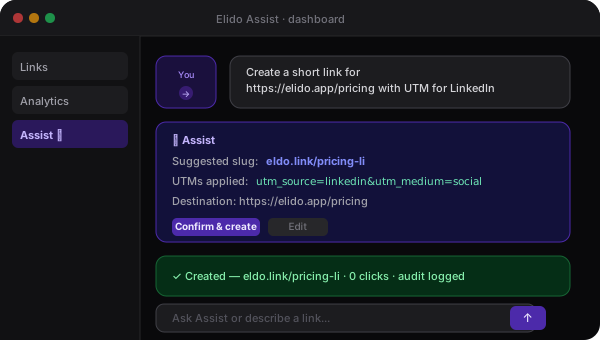
Assist runs inside the dashboard. You describe what you need. It reads your workspace history to infer the naming pattern, fills the UTMs based on the channel you describe, and shows you a preview before anything creates. Confirm once. Done.
What Assist does
Four things you can ask right now
How Assist works
Assist runs inside the dashboard. It reads your workspace data through the same scoped API your integrations use - no special access, no hidden pipelines, no action without confirmation.
- 1. You ask a question or make a request
Type in the Assist panel: 'create a short link for this URL with a campaign UTM', 'what's underperforming this week?', 'generate a slug that fits our naming convention'. Assist doesn't require a particular syntax - it parses intent from plain language.
- 2. Assist reads your workspace
Assist queries your workspace data - links, analytics, folders, campaigns - through the same scoped API your connected integrations use. It can see what your API key can see: nothing more. It doesn't have a back-channel to workspace data outside your session scope.
- 3. Assist suggests a response or action
For creation requests: Assist proposes a slug, domain, UTM fill, and tags. For analytics questions: it surfaces a time-series chart or a ranked list with a plain-English summary. For bulk operations: it shows a preview of the rows it would create or modify. Nothing has happened yet at this point.
- 4. You confirm before anything changes
Assist never mutates data without an explicit confirmation click. The confirmation panel shows exactly what will be created or changed, what API calls will fire, and what the result will look like. Destructive actions (delete, bulk overwrite) require a second confirmation. Every confirmed action lands in the workspace audit log attributed to your user, not to 'Assist'.
A real request
From plain English to a live link in under 10 seconds
This is what a typical Assist session looks like for a marketing manager creating campaign links before a product launch.
Here are the three links. Slugs match your workspace convention (kebab-case, campaign prefix). UTMs inferred from channel.
eldo.link/launch-twtwittereldo.link/launch-lilinkedineldo.link/launch-ememailThe confirmation step is not optional. Assist never creates, edits, or deletes anything without an explicit click. Destructive actions add a second confirmation.
What Assist handles in practice
Three patterns from teams already using it. Dashboard-side, not agent-CLI-side - these happen in the UI, not in a terminal.
Assist vs other ways to work with your link data
Three routes to the same endpoints. The differences are setup cost, data context, and whether there's a confirmation layer before mutations happen.
| Capability | Elido Assist | Direct LLM (no Elido context) | Manual dashboard work |
|---|---|---|---|
| Workspace-aware suggestions | Yes - full tool catalogue + your API key context | No - model has no workspace data | You look things up manually |
| Audit trail | Structured tool calls in chat history + workspace log | Depends on whether you logged the session | Workspace audit log only - no AI session trace |
| Action-confirmation gating | Client-dependent (Claude Desktop shows tool calls) | None - model executes if you've wired direct API calls | Manual - you click the button yourself |
| Multi-step workflow chaining | Yes - agent chains tool calls across steps | Manual prompt chaining | Manual navigation between dashboard pages |
| Scope-limited writes | Governed by API key scopes - explicit grant required | Governed by whatever key you put in the prompt | Full user-session permissions |
Security model
What Assist can and cannot do
Assist has read-only access by default. It calls the same API endpoints your connected integrations use - scoped to your session, bounded to your workspace.
Can read
- Your links, slugs, destinations
- Click analytics and time-series
- Campaign folders and tags
- Workspace naming history (for slug inference)
Can do with confirmation
- Create new short links
- Apply UTM tags and custom slugs
- Add links to campaign folders
- Generate and attach QR codes
Cannot do
- Delete links (requires second confirmation + explicit grant)
- Access other workspaces
- Modify billing or team settings
- Act without your confirmation click
Questions about Assist
Which model powers Assist?+
We don't pin a single model publicly - the model behind Assist may change as better options become available. What's stable is the interface and the confirmation-gating behavior, not the underlying model version. If you need a specific model for compliance or reproducibility reasons, Assist isn't the right tool - use the API directly with your own model setup.
Can it delete links by accident?+
No. Read-only is the default scope - Assist can read your workspace data and suggest actions, but it cannot create, modify, or delete anything without your explicit confirmation. When you grant write scope (you have to opt in per workspace), mutations still require a confirmation click in the Assist panel before they fire. Destructive actions (delete, bulk overwrite) show a second confirmation. Every confirmed mutation lands in the audit log as your user action.
Where does my workspace data go when I use Assist?+
Assist queries your workspace via the analytics and links API - the same endpoints your integrations use. The query results are passed to the model to generate a response. Your workspace data is not used for model training; it is not stored beyond the active session; it stays in EU infrastructure (same region as your workspace). The response is generated within your session context and discarded after.
Which plan includes Assist?+
Assist is available on Pro and above. Free plan users see the Assist panel but are limited to read-only analytics questions. Creation and bulk-import suggestions require Pro+. Advanced analytics Q&A (cohort queries, funnel breakdown) requires Business.
Can Assist run when offline or on a self-hosted instance?+
Assist requires a connection to Elido's cloud to run - it queries the analytics API and calls a hosted model. For self-hosted Elido: Assist is not included in the open-source Helm chart by default; a self-hosted AI feature would require wiring your own model endpoint into the Assist API surface, which is undocumented and unsupported today. That may change.
Which languages does Assist support?+
Assist responds in the language of your question. If you ask in French, it answers in French. Slug and UTM suggestions are generated in Latin-alphabet ASCII regardless of input language (because short URLs don't benefit from Unicode slugs in most contexts). Analytics summaries are generated in the language of your input.
How fast is Assist?+
Most requests complete in under 2 seconds: the analytics or links API call takes 50-200ms; the model generation adds the rest. Complex analytics questions that require multiple API calls (e.g. cohort comparison across two time windows) may take 3-5 seconds. We don't stream partial results yet - you see the full response when it's ready.
How is Assist different from the MCP server on /ai/mcp?+
Different interaction layer, same underlying API. Assist runs inside the Elido dashboard - you open it in the UI, ask a question, confirm an action, done. MCP is a protocol layer for external AI agents (Claude Desktop, Cursor, your own agent) - it exposes Elido tools outside the dashboard so an agent running in a terminal or IDE can call them. If your workflow is in the dashboard, use Assist. If your workflow is in an AI agent outside the dashboard, use MCP.
Keep reading
Wire Elido into Claude Desktop, Cursor, or any MCP client. For workflows outside the dashboard.
Custom GPTs, Slack bots, and deep-link buttons. The pre-built side of /ai.
Conditional routing, deep links, A/B splits - the features Assist helps you set up.
Zapier, HubSpot, Slack, and the rest. Where Assist and MCP aren't the right tool.
AI in the dashboard, not in the way.
Try Assist on your real links and campaigns. Read-only by default - you confirm before anything changes.