The managed version of Elido runs on EU-region infrastructure with a privacy-by-default configuration. For most users, that is sufficient. For some, it is not.
If your security team requires that short-link destination data and click events never leave a specific data centre, if your audit policy demands full control over the database server, or if you are building Elido into an internal platform that needs to run air-gapped, the self-hosted path exists for exactly that purpose.
This guide walks through deploying Elido on k3s, a production-grade minimal Kubernetes distribution that runs comfortably on a single VM or a small HA cluster. By the end you will have every service running, TLS provisioned, backups wired up, and a repeatable upgrade path. The guide assumes you want a working system, not a tutorial on Kubernetes concepts — explanations are kept short and operational steps are explicit.
Why self-host#
Before getting into the playbook, it is worth being precise about the trade-offs. Self-hosting is not automatically better — it moves operational risk from a vendor to your own team.
Data residency and compliance. If your compliance framework (ISO 27001 scope, internal data-classification policy, or contractual data-residency clause) requires that link metadata and analytics events stay on infrastructure you directly control, managed SaaS cannot satisfy that requirement regardless of where it physically runs. A self-hosted deployment on an EU-region VM you own does. See the compliance overview for specifics on how Elido's architecture maps to common frameworks.
Cost predictability at scale. Managed plans price on active links and click volume. Above a certain threshold — typically somewhere above a few million clicks per month — the per-event cost on managed plans exceeds the infrastructure cost of running the equivalent StatefulSet workload yourself. The crossover point depends on your traffic shape, but it exists.
Audit control. Some organizations require access to the raw Postgres tables and ClickHouse click-event data for evidence packaging, legal hold, or SIEM integration. The Elido API exposes audit log endpoints and evidence exports, but direct database access is only available in self-hosted deployments.
What you are trading away. k3s requires someone to own upgrades, node health, backup verification, and incident response. If your team does not have Kubernetes operational experience, the managed version at a compliant hosting location is almost certainly the right answer. See the last section of this post for a more direct treatment of when self-hosting is the wrong call.
Prerequisites#
- A k3s cluster. A single node with 4 vCPU and 8 GB RAM handles light workloads. For HA, three control-plane nodes plus two or more worker nodes is the minimum recommended topology. k3s's built-in etcd covers control-plane HA; data-plane HA is handled by Patroni (Postgres) inside the Helm chart.
kubectlconfigured with a context pointing at your cluster.- Helm 3.14 or later.
- A domain you control with the ability to create DNS records. The k3s ingress IP needs to be reachable on ports 80 and 443 from the internet for Let's Encrypt ACME challenges to succeed.
- If compliance-driven, an EU-region VM. Hetzner (Falkenstein, Helsinki, Nuremberg) and OVH (Gravelines, Roubaix) are the two providers Elido's own edge infrastructure uses.
On a fresh Hetzner CX32 (4 vCPU / 8 GB) running Ubuntu 24.04, k3s installs in roughly 30 seconds:
curl -sfL https://get.k3s.io | sh -
# Copy the kubeconfig to your local machine:
scp root@<your-vm>:/etc/rancher/k3s/k3s.yaml ~/.kube/elido-self-host.yaml
export KUBECONFIG=~/.kube/elido-self-host.yaml
kubectl get nodes  # should show Ready
Clone the Elido repository to get the Helm chart (the chart lives at deploy/helm/elido/ in the repo — there is no separate public Helm repository):
git clone https://github.com/elidoapp/elido.git
cd elido
Quick start#
The self-host preset (deploy/helm/elido/values-selfhost.yaml) is the recommended starting point for a single-node k3s deployment. Bootstrap secrets first, then install:
# 1. Mint all required Kubernetes Secrets in one shot (idempotent)
./scripts/bootstrap-secrets.sh elido

# 2. Install using the self-host preset
helm -n elido upgrade --install elido ./deploy/helm/elido \
  -f ./deploy/helm/elido/values-selfhost.yaml \
  --set ingress.hosts.redirect[0]=r.example.com \
  --set ingress.hosts.api=api.example.com \
  --set ingress.hosts.dashboard=app.example.com \
  --set image.tag=$(git rev-parse --short HEAD) \
  --create-namespace \
  --wait --timeout 10m
For custom overrides (production replica counts, managed external services, etc.), copy values-selfhost.yaml to a local my-values.yaml, edit it, and pass it with -f. The key top-level values sections are ingress.hosts.* (your hostnames), image.registry/image.tag, and per-service resources blocks. Do not use global.domain — the chart uses ingress.hosts.* for domain configuration.
The --wait flag blocks until all Deployments and StatefulSets reach their ready state. On a fresh node with no cached images, expect 5–8 minutes on a 1 Gbps link.
Check that everything came up:
kubectl -n elido get pods
kubectl -n elido get svc
See the chart's values reference with helm show values ./deploy/helm/elido for the full parameter surface. The deploy/helm/elido/README.md in the repository is the authoritative source for specific field names and the bootstrap script usage.
Architecture you are deploying#
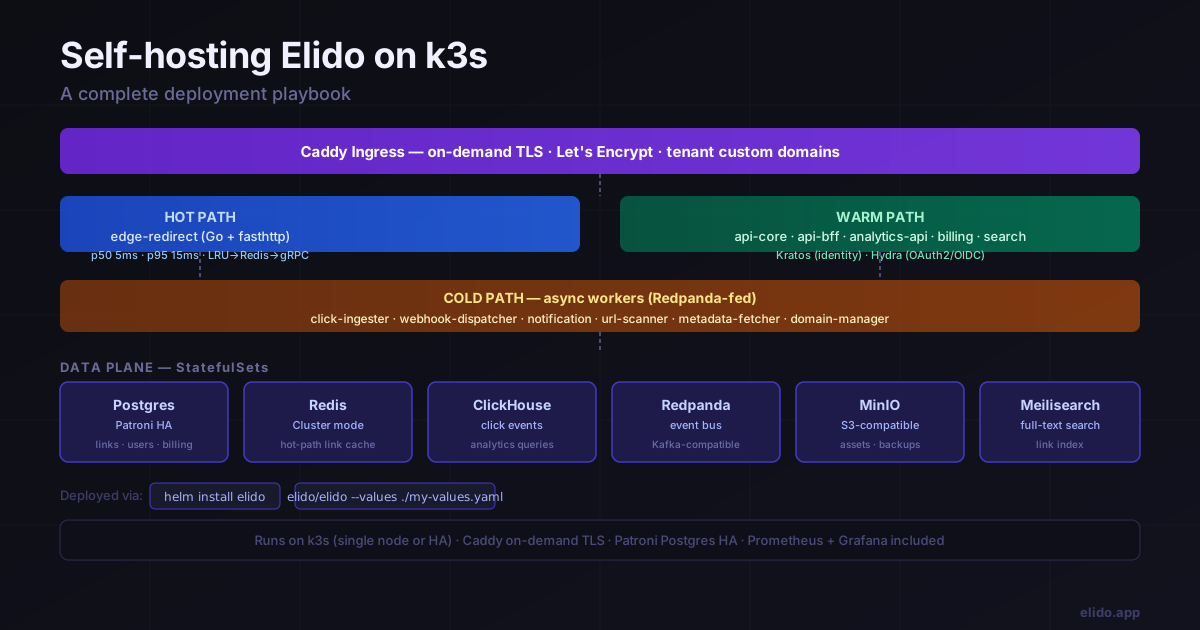
Elido's architecture is divided by latency budget. Understanding that division helps you make informed resource allocation decisions.
Hot path: edge-redirect#
edge-redirect is the only service on the synchronous path of a redirect request. It is written in Go with fasthttp and has a hard latency budget: p50 5 ms, p95 15 ms on a cache hit. The service maintains a two-tier cache: an in-process LRU (L1) backed by Redis Cluster (L2). On a cache miss, it falls through to a gRPC call to api-core. Click events are emitted fire-and-forget into Redpanda — the redirect response is never held waiting for the event write to complete.
The Helm chart deploys edge-redirect as a Deployment with a HorizontalPodAutoscaler. In a single-region self-hosted setup, two replicas is a reasonable starting point. The L2 Redis cache is shared across replicas, so cache warming is fast after a rolling update.
Warm path: API surface#
Five services handle synchronous API and business logic work:
api-core— Go + chi, REST and gRPC. Source of truth for links, workspaces, memberships, custom domains, audit events.api-bff— Node/Hono BFF layer for the web dashboard and mobile clients. Aggregates acrossapi-coreandanalytics-api.analytics-api— Go, ClickHouse queries. Serves the analytics dashboards.billing— Go + chi + sqlc. EU VAT engine, LiqPay payment integration, invoice generation.search— Go, proxies link search queries to Meilisearch.
Auth is handled by Ory Kratos (identity, sessions, email verification) and Ory Hydra (OAuth2/OIDC tokens for third-party integrations and the browser extension). Both are deployed as Deployments in the chart.
Cold path: async workers#
Six services consume events from Redpanda topics and have no response-time budget:
click-ingester— consumes click events, writes to ClickHouse.webhook-dispatcher— fans out signed webhook payloads to customer endpoints.notification— email and in-app notifications (account events, link alerts).url-scanner— runs destination URL scanning against Google Safe Browsing, PhishTank, SURBL.metadata-fetcher— fetches Open Graph metadata for link previews.domain-manager— DNS verification and Caddy on-demand TLS provisioning for custom domains.
Data plane: StatefulSets#
Six stateful systems back the services above:
| System | Role | Chart resource |
|---|---|---|
| Postgres (Patroni) | Source-of-truth for links, users, billing | StatefulSet, 3 replicas in HA mode |
| Redis Cluster | Hot-path link cache | StatefulSet |
| ClickHouse | Click event storage and analytics queries | StatefulSet |
| Redpanda | Event bus between services | StatefulSet |
| MinIO | User-uploaded assets (QR images, exports) | StatefulSet |
| Meilisearch | In-app link search | StatefulSet |
In a single-node deployment, each StatefulSet runs one replica. In HA mode (enabled by setting ha.enabled: true in values), Postgres scales to three replicas under Patroni, Redis scales to six (three primaries, three replicas), and Redpanda scales to three brokers.
Caddy ingress#
Caddy handles TLS termination and on-demand TLS for tenant custom domains. When a workspace operator adds a custom domain through the dashboard (or the API), domain-manager verifies DNS ownership, registers the hostname as allowed, and Caddy provisions the Let's Encrypt certificate on the first HTTP request to that hostname. The chart deploys Caddy as a DaemonSet on nodes labelled elido.app/ingress=true, or as a Deployment on the default single-node setup.
The flow for a tenant custom domain go.company.com:
- Operator creates a CNAME:
go.company.com → <your-k3s-ingress-ip>(or an A record pointing directly). - Operator calls
POST /v1/workspaces/{id}/domainsor clicks "Add domain" in the dashboard. domain-managerqueries DNS to confirm the CNAME resolves to the ingress IP.- Caddy receives the first HTTPS request, checks the Elido-issued allow-list, and requests a certificate from Let's Encrypt via ACME HTTP-01.
- Certificate is stored in the Caddy state volume and renewed automatically.
First-run bootstrap#
After helm install completes, the admin API is available but no user account exists.
Bootstrap the admin user#
# Port-forward to the api-core admin interface (not exposed by default)
kubectl -n elido port-forward svc/api-core 8081:8081 &

# Create the first admin account
curl -X POST http://localhost:8081/internal/admin/bootstrap \
  -H 'Content-Type: application/json' \
  -d '{
    "email": "ops@example.com",
    "password": "your-secure-password"
  }'
The bootstrap endpoint is only callable from within the cluster network and is disabled after the first successful call. Once the admin account exists, log in through the dashboard at your configured domain.
Create the first workspace#
After logging in, the dashboard prompts for workspace creation on first use. Alternatively, via API:
curl -X POST https://links.example.com/v1/workspaces \
  -H "Authorization: Bearer <your-session-token>" \
  -H 'Content-Type: application/json' \
  -d '{"name": "My Workspace", "slug": "my-workspace"}'
Add a custom domain#
From the workspace settings, go to Domains and add your short-link domain. Set the DNS record (CNAME or A) before clicking "Verify" — domain-manager checks DNS immediately and returns an error if the record is not yet propagated. On passing verification, Caddy will provision the certificate on the first redirect request to that domain. Certificate issuance typically takes 10–30 seconds on the first request.
Verify TLS is working:
curl -I https://go.company.com/healthz
# Expect: HTTP/2 200
Operational concerns#
Backups#
Postgres. The chart ships a CronJob that runs pg_dump on a configurable schedule (default: daily at 02:00 UTC) and uploads the compressed dump to the MinIO bucket configured in values. For HA deployments, pg_dump runs against a replica to avoid impacting the primary. Enable it in values:
backups:
  postgres:
    enabled: true
    schedule: "0 2 * * *"
    retentionDays: 30
    s3Bucket: "elido-backups"
For point-in-time recovery, enable WAL archiving (postgres.walArchive.enabled: true in values), which ships WAL segments to MinIO continuously. Combine daily pg_dump with WAL archiving for an RPO under 5 minutes.
ClickHouse. ClickHouse stores click events, which are append-only and can be replayed from Redpanda if retention allows it. The chart includes a CronJob that runs BACKUP TABLE SQL to MinIO using ClickHouse's native backup interface. Enable with backups.clickhouse.enabled: true.
Redpanda. Redpanda is a streaming bus, not a database. Retention is time-based (default: 7 days) and configured in values under redpanda.retention. If your click-ingester falls behind by more than the retention window, events are lost. Monitor consumer group lag — the chart ships a Prometheus alert (ElidoRedpandaConsumerLag) that fires when any consumer group is more than 100K messages behind.
Backup verification. A backup that has never been tested is a backup you cannot depend on. Run a restore drill into a separate namespace at least quarterly:
kubectl -n elido-restore create ns elido-restore || true
helm install elido-restore ./deploy/helm/elido \
  --namespace elido-restore \
  --values ./my-values.yaml \
  --set restore.fromBackup=true \
  --set restore.backupDate="2026-05-01"
Monitoring#
The chart includes a ServiceMonitor for each service if the Prometheus Operator CRD is present in the cluster. Key metrics to alert on:
monitoring:
  prometheus:
    enabled: true       # requires prometheus-operator in cluster
  grafana:
    enabled: true       # deploys bundled dashboards
    adminPassword: "change-me"
The bundled Grafana dashboards cover:
edge-redirectp50/p95 latency, cache hit ratio, click volumeapi-corerequest rate, error rate, gRPC latencyclick-ingesterconsumer lag per Redpanda partition- Postgres primary/replica replication lag (Patroni)
- Redis eviction rate and memory pressure
If you already have a Prometheus stack in the cluster, set monitoring.prometheus.install: false and point your existing stack at the ServiceMonitors.
Patroni HA for Postgres#
In HA mode, Patroni manages leader election and failover. The chart configures Patroni with the kubernetes distributed configuration store (uses Kubernetes ConfigMaps, no separate etcd needed). Failover typically completes in 15–30 seconds. During failover, api-core and billing experience brief write errors; both services retry on 5xx with exponential backoff.
To inspect the Patroni cluster state:
kubectl -n elido exec -it postgres-0 -- patronictl -c /etc/patroni/config.yml list
Upgrade flow#
Elido follows semantic versioning. Patch releases contain bug fixes and do not require manual migration steps. Minor and major releases may include database schema migrations, which are embedded in the service binaries and run automatically on pod startup via the migration runner.
The recommended upgrade path:
# 1. Pull the latest chart (git pull in your cloned repo)
git pull origin main

# 2. Review the upgrade notes
helm show chart ./deploy/helm/elido | grep -A10 'version\|appVersion'

# 3. Diff the values changes (requires helm-diff plugin)
helm diff upgrade elido ./deploy/helm/elido \
  --namespace elido \
  --values ./my-values.yaml

# 4. Upgrade
helm upgrade elido ./deploy/helm/elido \
  --namespace elido \
  --values ./my-values.yaml \
  --wait --timeout 10m
Migration handling. Each Go service binary contains its schema migrations (using golang-migrate against an embedded migrations directory). On pod startup, the binary runs migrate up before serving requests. In a rolling update, the new pod applies any pending migrations before the old pod terminates. Migrations are required to be backward-compatible with the previous minor version — a new column added in v1.5 must be nullable or carry a default so the v1.4 binary running alongside it during the rollout window does not error.
Blue/green for major upgrades. For major version upgrades where schema changes are not backward-compatible, use the blue/green strategy: install the new version under a separate Helm release name in a staging namespace, migrate a production database snapshot into it, smoke-test, then execute the DNS cutover at the ingress level. After validating the green stack, delete the blue release.
# Install green stack
helm install elido-green ./deploy/helm/elido \
  --namespace elido-green \
  --create-namespace \
  --values ./green-values.yaml

# After validation, cut over DNS at your registrar
# Then decommission blue
helm uninstall elido --namespace elido
When not to self-host#
Self-hosting is the right call in a narrow set of circumstances. In more cases than you might expect, it is the wrong one.
Your workload is small. If you create fewer than 100K links per month and do not have strict data-residency requirements, managed Elido costs less in money and operational time than running k3s. The hosted tier includes backups, upgrades, and on-call for the infrastructure you would otherwise own.
You do not have Kubernetes operational experience. k3s is minimal, but Kubernetes is not simple. If no one on your team has operated StatefulSets, handled etcd backup/restore, or debugged a CrashLoopBackOff in Patroni at 2 AM, self-hosting adds a category of operational risk that the infrastructure cost savings do not offset.
Your compliance requirement is EU data residency, not specific tenancy. EU data residency means data stored and processed in the EU. Elido's managed infrastructure runs in Hetzner FRA and OVH GRA, both of which satisfy GDPR Article 44 requirements without cross-border transfer. If your compliance team's actual requirement is "data in the EU," the managed product already satisfies it without a self-hosted deployment — see the pricing page for the compliance features available on each plan.
You want multi-region edge performance. The managed service runs edge POPs in Frankfurt, Ashburn, and Singapore, with the hot-path edge-redirect deployed at each. A single-region self-hosted k3s cluster has redirect latency bounded by the VM's geographic distance from the end user. Multi-region self-hosting is possible but multiplies the operational surface significantly — it is a different undertaking from what this guide covers.
Questions about the Helm chart values, StatefulSet resource requirements for specific traffic volumes, or upgrade paths for a specific version should go to the GitHub Discussions board for the self-hosted edition. For compliance-related questions — specifically what the self-hosted configuration provides beyond EU residency — the compliance page covers the audit log, evidence export, and RBAC controls in detail.