Wire Elido into any AI agent.
Elido runs a hosted MCP server at https://api.elido.app/mcp. It exposes five tools for links, QR codes and click analytics and signs in with a workspace API key. Point Claude Code, Cursor or another MCP client at it - nothing to install.
What's MCP?
Model Context Protocol is an open standard from Anthropic that lets AI agents talk to tools, files, and APIs in a structured way. One protocol, many clients.
Before MCP, wiring an AI agent to an external service meant writing custom prompt instructions, maintaining a hand-crafted tool schema, and hoping the model would call it correctly. MCP replaces that with a standardized protocol: the server declares its tools in JSON Schema, the client discovers them automatically, and every call is typed. One protocol works across Claude Code, Cursor, and other MCP-aware clients.
Elido's MCP server is hosted at api.elido.app/mcp. Your client sends structured tool calls there with your API key; the server runs them with the same permissions, plan limits and rate limits as the REST API and returns structured results. The model sees tool names and results, not your key.
Runtime flow
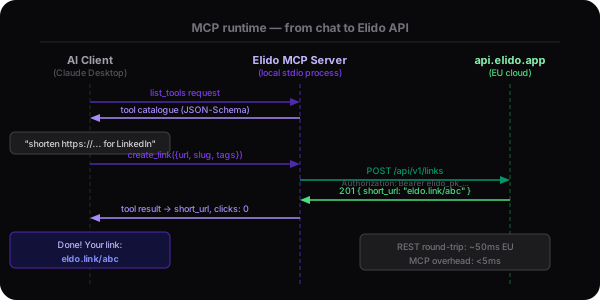
From your chat message to the Elido API and back
Four steps, all over HTTPS. Your client posts a JSON-RPC request to api.elido.app/mcp, the server runs the tool against the Elido API with your key's permissions, and the result comes back as a single JSON response.
How it works
MCP is a thin wire protocol. Elido hosts the server: your client sends structured tool calls over HTTPS with your API key, and the server runs them with the same permissions and limits as a REST call.
- 1. Agent asks for tools
When it connects, the MCP client (Claude Code, Cursor, your own agent) calls tools/list on api.elido.app/mcp. The server returns a JSON-Schema description of the five tools - names, parameters and what they return.
- 2. User makes a request in chat
When you say 'shorten this URL with the tag launch-2026', the agent matches it against the catalogue and calls create_link with structured arguments. Clients such as Claude Code show the tool call and can ask for your approval before it runs.
- 3. Elido runs the call
The hosted server checks your API key, then runs the tool in the key's workspace with the key's role, plan limits, rate limits and IP allowlist - the same checks as a REST request. Link creation is audited like a REST call.
- 4. Result flows back to the agent
The result comes back as a single JSON response the agent can quote, summarise, or chain into the next call. Errors (forbidden, not found, plan limit, rate limited) come back as readable tool results, so the agent can explain or recover instead of failing.
Available tools
Every tool is JSON-Schema typed. The agent sees parameter names, types, and descriptions when it connects - no manual prompt engineering. There are five tools; editing and deleting links are not exposed.
Example session
What it looks like after install
An illustrative Claude Code session after adding the Elido endpoint. The agent discovers the tools when it connects; from there, plain language is enough.
$ claude mcp add --transport http elido https://api.elido.app/mcp \
    --header "Authorization: Bearer elido_…"
$ claude
> What Elido tools do you have?

Claude: The elido MCP server gives me five tools:
  - create_link: shorten a URL (slug, domain, title, tags)
  - list_links: list recent links in the workspace
  - query_analytics: click timeseries, hourly or daily buckets
  - generate_qr: SVG or PNG QR code for a link
  - list_workspaces: the workspace this key belongs to

> Shorten https://elido.app/pricing as pricing-launch, tag launch-2026

Claude: [calling create_link with {destination_url, slug: "pricing-launch", tags: ["launch-2026"]}]

Result: link created · short_url returned · audited like a REST call
Claude Code shows each tool call with its arguments before it runs and can ask for your approval, so you see exactly what the agent sends.
What teams ship with this
Three ways to use the five tools. Pick whichever maps to how your team already works.
Why MCP, not direct API calls?
All three approaches reach the same Elido endpoints. The differences show up in setup time, security posture, and how readable the agent's reasoning is.
Supported clients
Claude Code and Cursor connect natively over HTTP with a custom header. Claude Desktop needs the mcp-remote bridge. Connector screens that only offer OAuth sign-in (claude.ai, ChatGPT) cannot connect until OAuth ships.
Security
Your key, your key's role.
The MCP endpoint adds no new permissions. Every call runs as the API key that made it, inside that key's workspace and role, with the same limits, IP allowlist and audit trail as the REST API.
Key handling
The API key lives in your client's config and is sent only in the Authorization header to api.elido.app. The model calls tools; the client attaches the key. Missing, wrong or revoked keys get HTTP 401.
Role gating
Each key belongs to one workspace and has a role. A viewer key can read, but create_link returns 'forbidden'. No tool edits or deletes links, and link creation is audited.
Hosted, nothing to install
The server runs on Elido's side, so there is nothing to install or update. A local stdio server with the same five tools is in our repository if you want to build and run it yourself; it is not on npm.
Connect in a minute
The server is hosted: your MCP client sends JSON-RPC over HTTPS to api.elido.app/mcp with your API key in the Authorization header. There is nothing to run locally.
- 1Issue an API key in Settings → API Keys (it starts with elido_)
- 2Add the endpoint and the Authorization: Bearer header to your client config
- 3Reload your client. The five Elido tools appear in the agent's tool list.
{
  "mcpServers": {
    "elido": {
      "url": "https://api.elido.app/mcp",
      "headers": { "Authorization": "Bearer elido_…" }
    }
  }
}
This is the Cursor config (.cursor/mcp.json or ~/.cursor/mcp.json). In Claude Code, run claude mcp add --transport http elido https://api.elido.app/mcp --header "Authorization: Bearer elido_…". Claude Desktop connects through the mcp-remote bridge (needs Node.js). Issue the API key in Settings → API Keys; a viewer-role key is enough for read-only use.
Common questions
Where does the MCP server run?+
On Elido's side. The hosted endpoint at api.elido.app/mcp is part of the Elido API, so tool calls go to the same place your REST calls would, under the same data rules. A local stdio server with the same tools is in our repository if you prefer to build and run it yourself; it is not on npm.
Can the agent delete my links by accident?+
No. None of the five tools edits or deletes links. Each tool runs with the API key's role: a viewer key can list links and read analytics, but create_link returns a 'forbidden' result. Link creation through MCP is audited like a REST call.
Which clients are supported?+
Any client that speaks MCP over Streamable HTTP and lets you set an Authorization header. Claude Code and Cursor do this natively; Claude Desktop connects through the mcp-remote bridge (needs Node.js). The server answers with single JSON responses - no SSE stream, no sessions. The claude.ai and ChatGPT connector screens need OAuth sign-in, which is planned but not live, so they cannot connect yet.
What's the rate limit?+
The same as your API key on the REST API: MCP calls share the per-key and per-workspace rate limits (by default 60 requests per second per key, with bursts up to 120). When a limit is hit, the tool returns a 'rate limited' result so the agent can back off.
How does this compare to the LLM integrations on /ai/llm?+
Different layers. /ai/llm is consumer-facing (custom GPTs, Slack bots, deep-link buttons) - pre-built, click-to-use. MCP is the developer protocol that sits underneath: any of those integrations could be built on top of MCP, and many third-party clients do exactly that.
Can I use the MCP server today?+
Yes. The hosted endpoint at https://api.elido.app/mcp works now on any plan that includes API keys. Issue a key, add the endpoint to your client, and the tools appear.
Does it work in air-gapped environments?+
No: the hosted endpoint lives on api.elido.app, so your client needs network access to it. Self-hosting is available by contract (Enterprise); contact [email protected].
What's the security model for the API key?+
Treat it like any API key. Each key belongs to one workspace and has a role, so issue a viewer key if the agent only needs to read, turn on the workspace IP allowlist if your client runs from known addresses, and revoke the key as soon as it leaks - revoked keys get HTTP 401 straight away. The key sits in your client's config file, so keep that file out of version control.
Keep reading
AI inside the dashboard - generate slugs, ask questions in plain English.
Custom GPTs, Slack bots, deep-link buttons. The pre-built side of /ai.
Zapier, HubSpot, Slack, and the rest. Where MCP isn't the right tool.
The REST endpoints behind the MCP tools. Use them for anything the five tools don't cover, such as editing links.
Connect in a minute
Add the endpoint and your API key to Claude Code or Cursor, reload, and the five Elido tools appear in your agent's tool list.