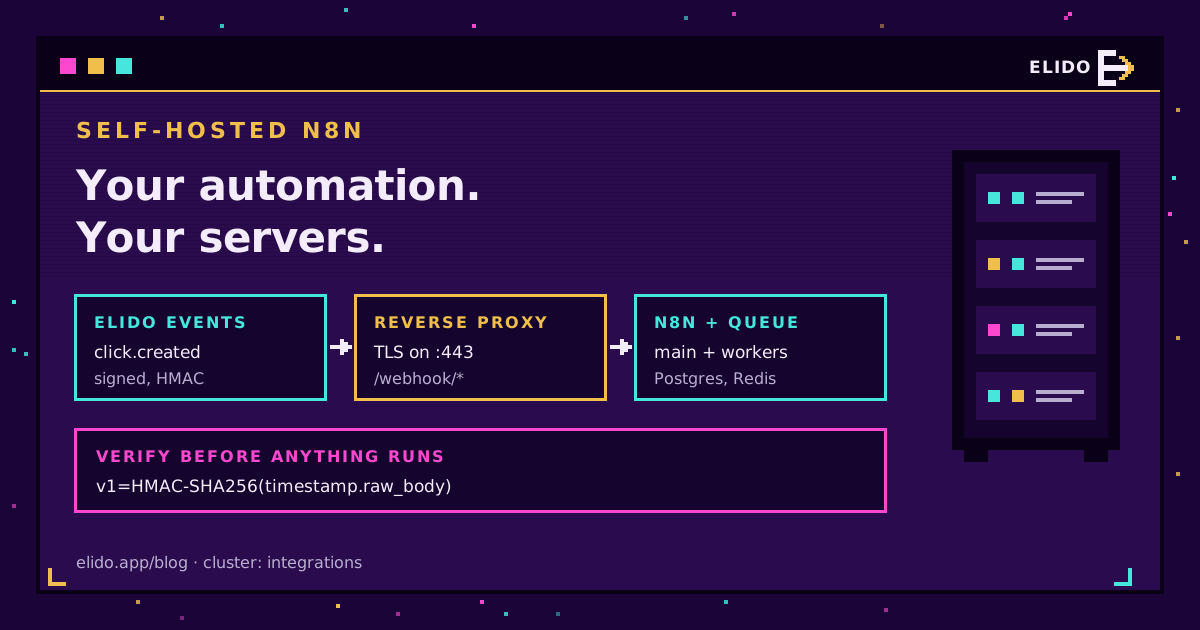
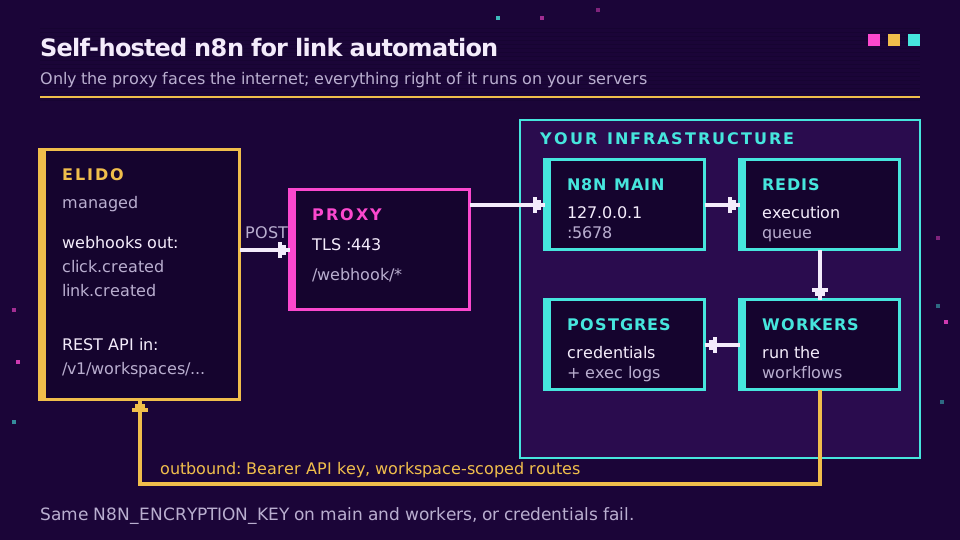
Self-hosted n8n automation for links means three things running on servers you control: an n8n instance in Docker, a public HTTPS endpoint that receives Elido webhook events, and outbound calls back to the Elido API with a scoped token. Link and domain events come in signed, and per-click events are on the roadmap. Your workflows decide what happens next, and the execution logs never leave your infrastructure.
That's the whole architecture. The rest of this post is the part the quickstarts skip: how to get webhooks through a reverse proxy, how to check the signature so a stranger can't trigger your workflows, what queue mode changes, and when n8n Cloud is honestly the better call. I run this setup on a single small VM, and the moving parts fit on one screen.
If you want the links themselves on your own hardware too, that's a separate and much bigger job. The self-hosting Elido on k3s playbook covers it. Here, Elido stays managed and only the automation layer moves in-house.
Why Self-Host n8n for Link Automation
The usual reason is data. An n8n self hosted url shortener workflow sees every payload it processes: the destination URL, tags, sometimes a campaign name that says more than you'd like, and country, device and referrer if you pull click analytics into it. On n8n Cloud those executions are stored on someone else's servers under someone else's retention defaults. Self-hosted, they sit in your Postgres, in the region you picked.
Under Article 28 of the GDPR every processor that touches personal data needs a contract and a place in your records. Fewer processors, less paperwork. If your marketing data already has to stay in the EU, the EU data residency guide explains why the automation layer counts just as much as the shortener.
The second reason is cost shape. n8n Cloud prices by executions, and a busy webhook trigger or a frequent analytics poll burns executions fast. Self-hosted, an execution is a row in a table and a few milliseconds of CPU.
The third is reach. A self-hosted instance sits on the same network as your CRM database or internal ticketing tool, so a link event can land in a system that was never meant to face the internet.
The Docker Compose Stack
A minimal n8n docker link automation stack needs four services. n8n's own Docker Compose guide is the reference; this is the version I'd start from for link work, with queue mode already switched on so you don't have to migrate later.
services:
  postgres:
    image: postgres:16
    environment:
      POSTGRES_USER: n8n
      POSTGRES_PASSWORD: ${PG_PASSWORD}
      POSTGRES_DB: n8n
    volumes: [pgdata:/var/lib/postgresql/data]

  redis:
    image: redis:7

  n8n:
    image: docker.n8n.io/n8nio/n8n
    env_file: .env.n8n
    ports: ["127.0.0.1:5678:5678"]
    depends_on: [postgres, redis]

  n8n-worker:
    image: docker.n8n.io/n8nio/n8n
    command: worker
    env_file: .env.n8n
    depends_on: [n8n]

volumes:
  pgdata:
And the shared environment file:
DB_TYPE=postgresdb
DB_POSTGRESDB_HOST=postgres
DB_POSTGRESDB_USER=n8n
DB_POSTGRESDB_PASSWORD=change-me
EXECUTIONS_MODE=queue
QUEUE_BULL_REDIS_HOST=redis
N8N_ENCRYPTION_KEY=generate-a-long-random-string
N8N_WEBHOOK_URL=https://n8n.example.com/
N8N_PROXY_HOPS=1
Two lines matter more than they look. The encryption key must be identical on the main process and every worker, or workers can't decrypt the Elido credential and every execution fails with a confusing auth error. And port 5678 is bound to localhost only, because the reverse proxy is the one thing that should face the internet.
Calling the Elido API From Self-Hosted n8n
Outbound calls need nothing beyond what ships with n8n. Create a Header Auth credential with the name Authorization and the value Bearer followed by an API key from the Elido dashboard, then use it from the built-in HTTP Request node. n8n encrypts it at rest with the key from the environment file, which is one more reason that key has to match everywhere.
Every link route is scoped to a workspace. To shorten a URL, POST to https://api.elido.app/v1/workspaces/{workspace_id}/links with a JSON body:
{
  "domain_id": 12,
  "destination_url": "{{ $json.url }}",
  "title": "Spring launch",
  "tags": ["n8n", "spring"]
}
Leave slug out and Elido generates one. The domain_id is the short domain the link lives on; a GET to /v1/workspaces/{workspace_id}/domains lists yours, and I'd hard-code the ID in the workflow rather than look it up on every run. A GET on the same links route lists links, and PATCH /v1/workspaces/{workspace_id}/links/{link_id} changes a destination or tags after the fact.
Set an Idempotency-Key header on the POST, built from something stable in the triggering item such as a row ID. If n8n retries the node after a timeout, the API replays the first response instead of creating a second link. The API and SDKs quickstart covers the rest of the surface, and the API and SDKs page is there if you'd rather move a step into code later.
There is also a packaged community node, n8n-nodes-elido, meant to wrap these calls in a friendlier form. It's published on npm (version 0.2.0) but still optional, and since it isn't a verified node it installs on self-hosted n8n only, which is the setup this post assumes anyway. Keep the HTTP Request version as your baseline. If you do install community packages in queue mode, remember the GUI only installs into the main container; workers never see it. From n8n 2.21, the environment variable installation route fixes that by reconciling every container on startup, though it uninstalls anything not on its list the first time.
Getting Elido Webhooks Through Your Reverse Proxy
Events flow the other way. Elido emits link.created, link.updated and domain.verified (among others) to an endpoint you register under Settings, Webhooks, and on self-hosted n8n that endpoint is the production URL of a Webhook node. A per-click click.created event is on the roadmap but not shipped yet, so for now click data comes from a scheduled pull of the analytics API. The full event list and payload shapes are in the webhooks for link events reference.
Behind a proxy, n8n builds its webhook URL from its own protocol, host and port, which means it'll happily advertise http://localhost:5678/webhook/... to anyone who asks. The reverse proxy configuration page is short and worth reading in full: set N8N_WEBHOOK_URL to your public address, set N8N_PROXY_HOPS=1, and have the last proxy forward X-Forwarded-For, X-Forwarded-Host and X-Forwarded-Proto. Older guides say WEBHOOK_URL; current releases still read it but log a deprecation warning.
Nginx, Traefik, whatever you already run is fine. What matters is TLS on the public side and that the path /webhook/* reaches n8n untouched.
One timing detail bit me. Elido waits ten seconds for a response before counting a delivery as failed. A workflow that writes to a slow spreadsheet API and then responds can blow through that, get retried, and write the same row twice. Set the Webhook node to respond immediately and do the work afterwards.
If you're wiring this for a client and want the webhook side handled for you, the webhooks feature page shows what you can subscribe to before you build anything.
Verifying the Signature Before Anything Runs
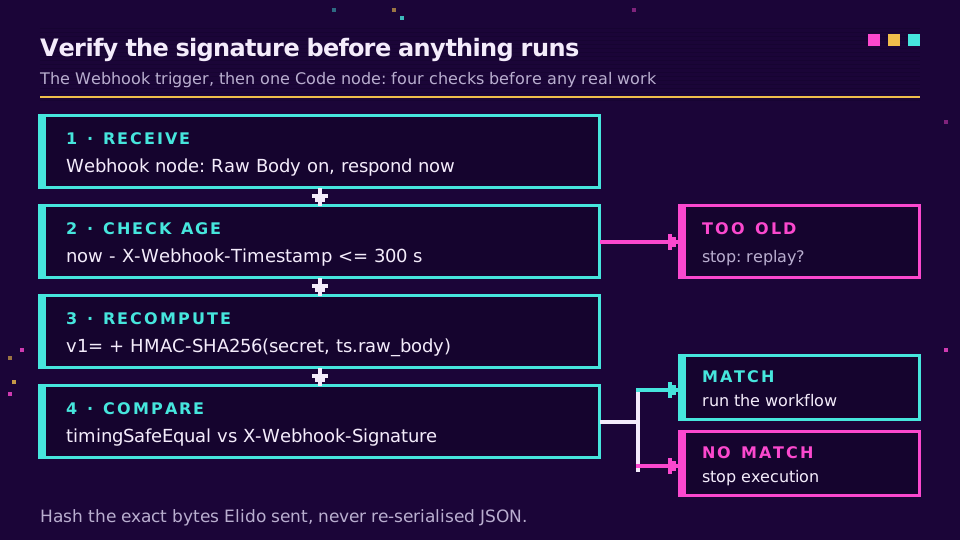
A public webhook URL is a public URL. Anyone who finds it can POST a fake event and trigger your workflow, so the first node after the trigger should be a signature check.
Each Elido delivery carries X-Webhook-Signature (value v1= plus a hex digest), X-Webhook-Timestamp in Unix seconds, X-Webhook-Event and X-Webhook-Delivery. The digest is HMAC-SHA256 over the timestamp, a dot and the raw request body, keyed with the whsec_ secret shown once when you created the endpoint.
Enable Raw Body on the Webhook node first. That's the step people skip. If you hash JSON.stringify($json.body) instead of the exact bytes Elido sent, key order or whitespace differ and every signature fails, and you'll spend an evening convinced the secret is wrong. Then a Code node:
const crypto = require("crypto");
const item = $input.first();
const h = item.json.headers;
const raw = (await this.helpers.getBinaryDataBuffer(0, "data")).toString(
  "utf8",
);

const ts = Number(h["x-webhook-timestamp"]);
if (Math.abs(Date.now() / 1000 - ts) > 300) throw new Error("stale delivery");

const expected =
  "v1=" +
  crypto
    .createHmac("sha256", $env.ELIDO_WEBHOOK_SECRET)
    .update(`${ts}.${raw}`)
    .digest("hex");
const got = h["x-webhook-signature"] || "";
if (
  got.length !== expected.length ||
  !crypto.timingSafeEqual(Buffer.from(got), Buffer.from(expected))
) {
  throw new Error("bad signature");
}
return [{ json: JSON.parse(raw) }];
The crypto module is available in the Code node by default, so no extra config is needed there. The five-minute window blocks replays of a captured request. When you rotate the secret, Elido also sends X-Elido-Signature-Previous during the grace period, so you can accept either key while you update the variable. The webhook signature verification guide has a version of this node that checks both headers, plus the same check in Node, Python and Go.
Queue Mode and Retries
With the signature check in place, the remaining question is what happens under load or when something is down. Two retry systems are in play here, and they cover different failures.
In n8n queue mode the main process receives the webhook, creates an execution and hands its ID to Redis; workers pick it up. A burst of events piles up in the queue instead of stalling the HTTP response. For more inbound volume you can add dedicated webhook processors behind a load balancer, though for most link workloads one main process and two workers is plenty.
Elido's side handles n8n being unreachable. Any non-2xx response or timeout is retried after 1, 5 and 15 minutes; after three attempts the delivery is marked failed and you can re-arm it from the dashboard. That covers a container restart or a quick deploy. It doesn't cover a weekend outage, which is why I'd pair webhooks with a nightly reconciliation that lists links through the API, as the webhooks vs polling post argues.
Use X-Webhook-Delivery as an idempotency key. Retries reuse it.
Self-Hosted n8n vs n8n Cloud: Honest Trade-Offs
I prefer self-hosting for this, but I've watched teams regret it. Here's the comparison without the sales pitch from either side.
| Concern | Self-hosted n8n | n8n Cloud |
|---|---|---|
| Where execution data lives | Your servers, your region, your retention | n8n's infrastructure and defaults |
| Reaching internal systems | Same network as your CRM and databases | Only what you expose publicly |
| Public webhook URL and TLS | You run the proxy and certificates | Provided |
| Upgrades, backups, patching | Your job, every month | Handled |
| Cost at high event volume | Flat server cost | Scales with executions |
The last row cuts both ways. A small VM is cheap, but an engineer's hour on a broken upgrade is not, and n8n ships often. If nobody on the team owns the box, Cloud with the HTTP Request node and Elido's REST API is the saner option, and the Make and IFTTT recipes or the Zapier guide show what that managed path looks like on other platforms.
What I can't tell you is whether your data protection officer will accept a self-hosted box as simpler than a vendor DPA. In my experience they usually do, but that depends on how well the box is run. For how the shortener side of the contract works, the GDPR guide for URL shorteners is the place to start. And if you're ready to wire the first workflow, grab an API token on a workspace and point a Webhook node at it.
Related on the Blog
- Self-hosting Elido on k3s: the playbook - when the links need to live in-house too.
- Webhooks for link events - every event type and payload shape.
- Webhooks vs polling for click tracking - why the nightly reconciliation matters.
- Short link automation with Make and IFTTT - the managed low-code route.
- n8n URL shortener - the HTTP Request node setup and three workflows in detail.
- Verify webhook signatures - raw body, replay window and secret rotation in four runtimes.
Întrebări frecvente
Can I use a URL shortener with self-hosted n8n?
Yes. Self-hosted n8n can call any shortener with a REST API through the built-in HTTP Request node. For Elido that means a Header Auth credential carrying your API key and a POST to the workspace-scoped links route. Inbound events such as link.created arrive through n8n's built-in Webhook node, which needs a public HTTPS URL. A per-click click.created event is planned but not available yet.
How do I install community nodes on self-hosted n8n?
On a single instance, use Settings, then Community Nodes, and paste the npm package name. In queue mode the GUI install does not reach your workers, so install the package inside each container or, from n8n 2.21, list it in N8N_COMMUNITY_PACKAGES with N8N_COMMUNITY_PACKAGES_MANAGED_BY_ENV set to true. For Elido you do not need one: the HTTP Request node covers the API.
What is WEBHOOK_URL in n8n?
It tells n8n which public address to show in the editor and register with external services, because behind a reverse proxy n8n cannot work that out from its own host and port. Current n8n versions read N8N_WEBHOOK_URL and log a deprecation warning for the older WEBHOOK_URL. Pair it with N8N_PROXY_HOPS=1 and forwarded headers on the proxy.
How do I verify a webhook signature in n8n?
Turn on the Raw Body option in the Webhook node, then add a Code node that recomputes HMAC-SHA256 over the timestamp header, a dot and the raw body, using your endpoint secret. Compare it with the signature header in constant time and reject anything older than five minutes. Verify against the raw bytes, never against re-serialised JSON.
Does n8n queue mode need Redis?
Yes. In queue mode the main instance and any webhook processors turn incoming triggers into execution IDs and push them onto a Redis-backed queue, and workers pull from it. n8n also advises against queue mode with SQLite, so plan for Postgres. Every process must share the same encryption key or workers cannot read stored credentials.
Is self-hosted n8n better for GDPR than n8n Cloud?
It can be, because you choose where workflow data, execution logs and credentials physically live and who administers them. It is not automatically compliant: you become responsible for patching, access control, backups and retention. For link automation that handles click data, self-hosting in an EU region removes one processor from your records, which simplifies the paperwork.
Încearcă Elido
Lipește un URL, obții un link scurt funcțional
Fără înregistrare. Linkul este activ timp de 30 de zile. Înregistrează-te ca să-l păstrezi pentru totdeauna.
Gratuit, fără înregistrare · 2 pe zi