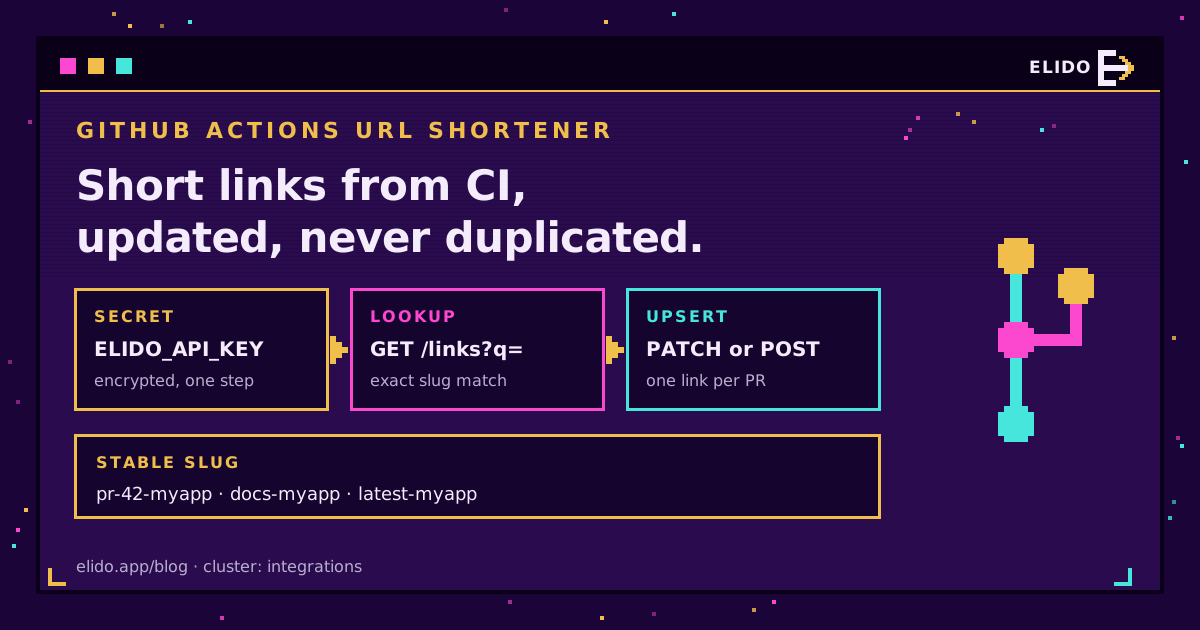
A GitHub Actions URL shortener step is a few lines of shell: read an API key from an encrypted secret, check whether the slug already exists, then either update its destination or create it. Run it on every push and the same short link always points at the newest preview, docs build or artifact. No marketplace action needed. curl and jq ship on every GitHub-hosted Ubuntu runner.
That's the whole answer, and the rest of this post is the part that makes it hold up across a few hundred workflow runs. People searching for how to create a short link in GitHub Actions usually get as far as a single POST request, and it works right up until the second push to the same pull request, when the create call returns a conflict and the job goes red. The fix is to treat the step as an upsert, not a create. The other thing that goes wrong is the key itself, which tends to be someone's personal token with far more reach than a CI job needs.
If you already manage links as code, short links as Terraform is the declarative version of the same idea and the better fit for links that change on a human schedule. A workflow step wins when the destination only exists once a build has finished.
How a GitHub Actions URL Shortener Step Works
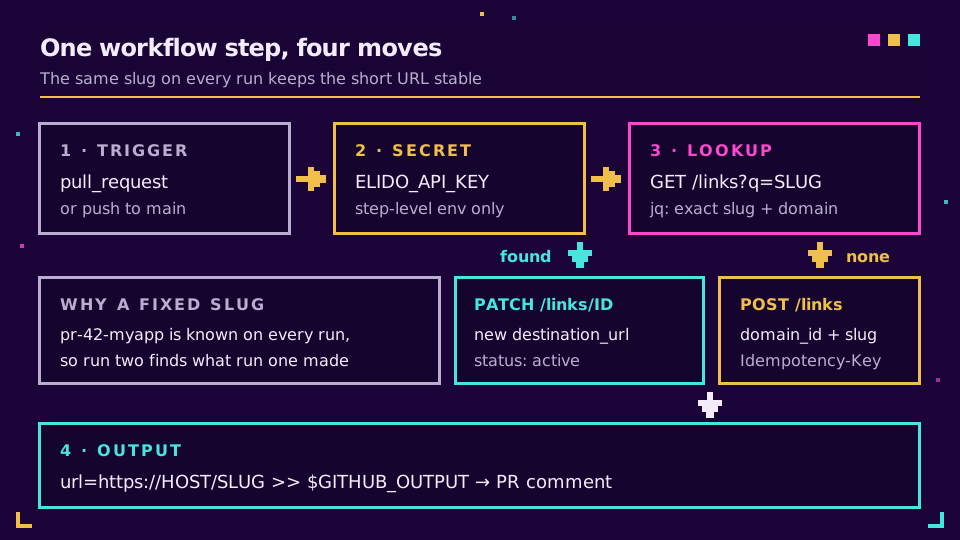
Every run does the same three things against the REST API at https://api.elido.app/v1. It lists the workspace's links filtered by the slug. It sends a PATCH to the link it found, or a POST if it found nothing. It writes the short URL to $GITHUB_OUTPUT so the next step can use it.
Why not let the shortener generate a random slug? Because then you can't find the link again. The slug has to come from something the workflow already knows on every run: the pull request number, the branch name, a fixed word like latest. A stable slug means a stable short URL, and that's the entire value for reviewers who bookmark it or product managers who paste it into a ticket.
Storing the API Key as an Encrypted Secret
Create the key in the dashboard, copy it once (it's shown exactly one time and starts with elido_), and save it under Settings, then Secrets and variables, then Actions, as ELIDO_API_KEY. GitHub's guide to using secrets in GitHub Actions covers the repository, environment and organization levels. For anything that deploys, I'd put it on an environment with required reviewers so a stray branch can't use it.
Three values aren't secret and belong in configuration variables, where you can read them back: ELIDO_WORKSPACE_ID, ELIDO_DOMAIN_ID and ELIDO_HOST. The domain ID matters because the create call requires it. You can look it up once with GET /v1/workspaces/{workspace_id}/domains, which returns each domain's id and hostname.
Map the secret into the single step that calls the API, not the whole job. A step-level env keeps it out of every other process the job starts, including the third-party actions you didn't write.
A Working Workflow to Shorten a URL on Every Pull Request
This is the complete file for the most common reason to shorten a URL in a GitHub workflow, a preview link per pull request. Drop it into .github/workflows/preview-link.yml and change the DEST line to wherever your preview deploys land.
name: Preview short link

on:
  pull_request:
    types: [opened, reopened, synchronize]

permissions:
  contents: read
  pull-requests: write

concurrency:
  group: preview-link-${{ github.event.pull_request.number }}
  cancel-in-progress: true

jobs:
  short-link:
    # Forks get no secrets; skip them instead of failing.
    if: github.event.pull_request.head.repo.full_name == github.repository
    runs-on: ubuntu-latest
    env:
      API: https://api.elido.app/v1/workspaces/${{ vars.ELIDO_WORKSPACE_ID }}
      DOMAIN_ID: ${{ vars.ELIDO_DOMAIN_ID }}
      HOST: ${{ vars.ELIDO_HOST }}
      SLUG: pr-${{ github.event.pull_request.number }}-myapp
      DEST: https://pr-${{ github.event.pull_request.number }}.preview.example.com
    steps:
      - name: Create or update the short link
        id: link
        env:
          ELIDO_API_KEY: ${{ secrets.ELIDO_API_KEY }}
        run: |
          set -euo pipefail
          auth=(-H "Authorization: Bearer $ELIDO_API_KEY" -H "Content-Type: application/json")

          # 1. Find an existing link with exactly this slug on this domain.
          link_id=$(curl -sS --fail-with-body "${auth[@]}" "$API/links?q=$SLUG&limit=100" \
            | jq -r --arg s "$SLUG" --argjson d "$DOMAIN_ID" \
                '.items[] | select(.slug == $s and .domain_id == $d) | .id' | head -n1)

          if [ -n "$link_id" ]; then
            # 2a. Found: point it at the new destination.
            curl -sS --fail-with-body -X PATCH "${auth[@]}" "$API/links/$link_id" \
              -d "$(jq -n --arg u "$DEST" '{destination_url: $u, status: "active"}')" > /dev/null
          else
            # 2b. Not found: create it. The key makes curl's retries safe.
            curl -sS --fail-with-body --retry 3 -X POST "${auth[@]}" "$API/links" \
              -H "Idempotency-Key: $GITHUB_REPOSITORY-$SLUG-$GITHUB_RUN_ID" \
              -d "$(jq -n --arg u "$DEST" --arg s "$SLUG" --argjson d "$DOMAIN_ID" \
                  '{domain_id: $d, slug: $s, destination_url: $u, tags: ["ci", "preview"]}')" > /dev/null
          fi

          echo "url=https://$HOST/$SLUG" >> "$GITHUB_OUTPUT"

      - name: Comment once, when the pull request opens
        if: github.event.action == 'opened'
        env:
          GH_TOKEN: ${{ github.token }}
        run: |
          gh pr comment "${{ github.event.pull_request.number }}" \
            --repo "${{ github.repository }}" \
            --body "Preview: ${{ steps.link.outputs.url }}"
A few lines deserve a comment. --fail-with-body turns a 4xx or 5xx into a failed step while still printing the error body, which plain curl -s won't do; it exits 0 on a 401 and the job carries on happily. The request bodies are built with jq -n rather than string interpolation, so a destination containing quotes or an ampersand can't break the JSON. And the comment step runs only on opened. Since the short URL never changes, one comment stays correct for the life of the PR, and nobody gets pinged on every push.
The concurrency block isn't decoration. Two quick pushes would otherwise start two runs that both see "no link yet" and both try to create one. GitHub's docs on controlling workflow concurrency explain the grouping; here, the older run is cancelled and the race never happens.
Idempotency: Update the Short Link, Don't Duplicate It
Two different failures hide under the word idempotent, and the workflow handles them separately. The first is the rerun: a second push, a manual "Re-run jobs", a reopened PR. That's what the lookup-then-PATCH branch is for. The second is the retried request, where curl sends the POST, the network drops before the response arrives, and curl sends it again. The Idempotency-Key header covers that one. Elido stores the first successful response against the key for 24 hours and replays it for a matching retry, so the create runs once; the full mechanics are in rate limits, retries and idempotency.
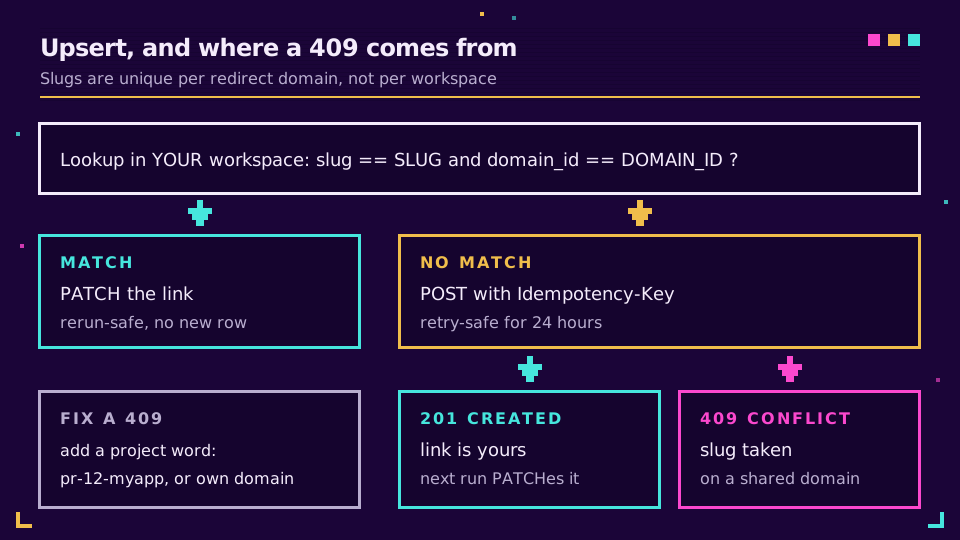
Slug collisions are the part people miss. Slugs are unique per redirect domain, not per workspace. On a shared domain, every other Elido customer is in the same namespace, and a slug as plain as pr-12 has probably been claimed by someone. The lookup won't see their link (it lists only your workspace), so the POST goes out and comes back 409 slug already exists for this domain. Two fixes: add a project word to the slug, or put CI links on your own custom domain, where the namespace is yours alone. I'd do both.
There's a second, sneakier reason the repo name sits at the end of the slug rather than the front. The q parameter is a substring match across slug, destination and title. With myapp-pr-1, the search also returns myapp-pr-10 through myapp-pr-199, which is more than the 100 results a single page returns, and the one link you wanted, being the oldest, drops off the end. pr-1-myapp matches nothing but itself. Small detail, and it took me an embarrassingly long afternoon of "why does PR #1 keep getting a 409" to spot it.
Three CI Short Link Jobs Worth Automating
The preview workflow is one pattern. Change the trigger, the slug and the destination, and the same step covers most of what teams actually automate. (Release notes are their own topic, covered in shortening links in release notes.)
| Use case | Trigger | Slug | What the step does |
|---|---|---|---|
| Preview deploy per PR | pull_request | pr-42-myapp | Upsert on each push, delete on close |
| Docs deploy | push to main | docs-myapp | PATCH to the freshly deployed docs URL |
| Latest build | push to main or a tag | latest-myapp | PATCH by a stored link ID, no lookup |
| Nightly artifact | schedule | nightly-myapp | PATCH to the newest artifact URL |
The latest-build case is the simplest of the lot. Create the link by hand once, save its numeric ID as a variable, and the job shrinks to a single call:
- name: Point the latest link at this build
  env:
    ELIDO_API_KEY: ${{ secrets.ELIDO_API_KEY }}
    API: https://api.elido.app/v1/workspaces/${{ vars.ELIDO_WORKSPACE_ID }}
    DEST: https://builds.example.com/${{ github.sha }}/
  run: |
    curl -sS --fail-with-body -X PATCH \
      -H "Authorization: Bearer $ELIDO_API_KEY" -H "Content-Type: application/json" \
      "$API/links/${{ vars.ELIDO_LATEST_LINK_ID }}" \
      -d "$(jq -n --arg u "$DEST" '{destination_url: $u}')"
Keep these moving links on a 302, which is the default when you don't set redirect_status. A 301 tells browsers they may cache the answer, and people who clicked yesterday will keep landing on yesterday's build; our write-up on 301 versus 302 redirects has the long version.
For preview links, clean up when the PR closes. Add closed to the trigger types, reuse the lookup, and send DELETE /v1/workspaces/{workspace_id}/links/{link_id}. A deleted slug is free for reuse. If you'd rather keep the click history, PATCH with {"status": "disabled"} instead; the upsert above sets status: "active" on every run, so a reopened PR brings its link back.
Ready to try it on one repo? Start a free workspace, create a key, and the workflow above runs as written once the three variables are set.
Least-Privilege API Keys for CI
The key in a CI secret should be able to do exactly what the workflow does, and no more. That's harder than it sounds, because of how personal keys work.
A personal API key authenticates as the person who created it. Whatever that person can do, the key can do, and when they leave the company the key goes with their account. For CI I'd use a machine user instead: a service account that belongs to one workspace, carries its own role and has tokens that only a signed-in human admin can mint or revoke. Create it under Machine users in the dashboard with the editor role, which is the lowest built-in role that can create, edit and delete links, then mint a token for it with an expiry date. Disabling the machine user kills every token it holds at once, which is precisely the button you want on the day a secret leaks.
Four more habits cost nothing:
- One token per repository, named after it, so the audit trail says which repo made which link.
- Environment secrets with required reviewers for any workflow that changes a link people rely on.
permissions:set explicitly at the top of the workflow, as in the example, so theGITHUB_TOKENgets only what the job needs.- Never
pull_request_targetto reach the secret from fork PRs. GitHub Security Lab's piece on preventing pwn requests shows why running untrusted code next to a write token ends badly.
Workspaces can also restrict API access by IP allowlist. It's a strong control for self-hosted runners with fixed egress, and close to useless for GitHub-hosted runners, whose addresses come from a very large, shifting pool. GitHub's own secure use reference is worth an hour if your workflows touch production.
What Breaks in Practice
Most failures come from four places, and each one shows up as a readable error if --fail-with-body is on. A 404 on every call usually means the workspace ID variable is wrong or the key belongs to a different workspace. A 400 saying domain_id is required means the variable is empty, typically because it was set on a different environment than the job uses. A 409 is the shared-namespace collision from the idempotency section. And a 429 means you're over the per-key rate limit, which a single upsert per run won't hit but a matrix of fifty jobs can.
One thing isn't an error at all. After a PATCH, a visitor may still reach the old destination for a short while, because redirects are cached close to the visitor to keep them fast. A smoke test that asserts the new destination immediately after the update will flake. Poll with a short backoff or assert against the API response instead.
If you want the step to report outward, pair it with webhooks for link events, which fire when a link changes, or with the curl and jq patterns from the CLI guide for local testing before you commit the workflow. The API and SDK reference lists every field the link endpoints accept.
Read the cornerstone → Manage your short links as Terraform
Related on the Blog
- URL shortener API: rate limits, retries and idempotency - the retry-safety rules this workflow relies on.
- URL shortener CLI - the same curl and jq calls, from your terminal.
- Free URL shortener API - the create call in curl, JavaScript, Python and Go.
- URL shorteners for developers - short links in talks, READMEs and open-source projects.
- Webhooks for link events - react when a CI job changes a link.
- GitLab CI short links - the same upsert pattern as a .gitlab-ci.yml job.
Întrebări frecvente
Can GitHub Actions create short links?
Yes. A workflow step can call any shortener's REST API with curl, which is preinstalled on GitHub-hosted runners along with jq. The step reads the API key from an encrypted secret, sends the destination URL, and writes the resulting short URL to a step output so later steps can post it in a pull request comment or a job summary.
How do I store a URL shortener API key in GitHub Actions?
Save it as an encrypted repository or environment secret, then map it into the one step that needs it with an env entry such as ELIDO_API_KEY: secrets.ELIDO_API_KEY inside the expression syntax. GitHub masks the value in logs. Keep non-secret values like the workspace ID and domain ID in configuration variables instead, so they stay readable.
How do I avoid creating duplicate short links on every workflow run?
Make the step an upsert. Derive the slug from something stable, such as the pull request number, look it up first, and send a PATCH to change the destination when it already exists. Only create when the lookup comes back empty. An Idempotency-Key header on the create call covers the separate case of a retried request after a network timeout.
Why does my workflow get a 409 when creating a short link?
The slug is already taken on that domain. On Elido, slugs are unique per redirect domain, and a shared domain is shared with every other workspace, so a generic slug like pr-12 is likely to exist already. Add a project prefix or suffix to the slug, or use your own custom domain where the whole namespace belongs to you.
Do short-link steps work on pull requests from forks?
Not with the plain pull_request trigger, because GitHub does not pass repository secrets to workflows started by a fork. Skip the job for forks with an if condition on the head repository. Switching to pull_request_target to get the secret is risky, since it runs with write access next to code you have not reviewed.
Should a link that points at the latest build use a 301 or a 302 redirect?
Use a 302 or 307. Browsers are allowed to cache a 301 indefinitely, so returning visitors would keep landing on an old build after your workflow has moved the link. Elido links default to 302 when you do not set redirect_status, which is the right choice for any link whose destination a pipeline changes.
Încearcă Elido
Lipește un URL, obții un link scurt funcțional
Fără înregistrare. Linkul este activ timp de 30 de zile. Înregistrează-te ca să-l păstrezi pentru totdeauna.
Gratuit, fără înregistrare · 2 pe zi