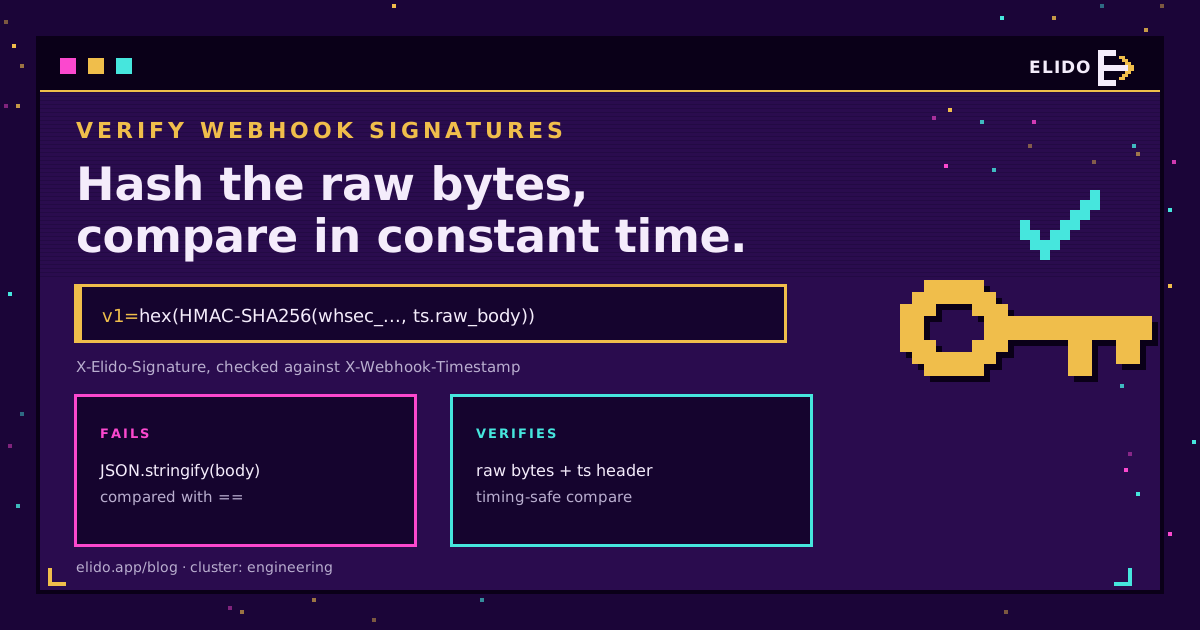
To verify a webhook signature, recompute an HMAC over exactly the bytes the sender signed, using the secret you share with it, and compare your value with the signature header in constant time. Then check that the signed timestamp is recent. For Elido webhooks that means HMAC-SHA256 keyed with your whole whsec_... secret, over {X-Webhook-Timestamp}.{raw body}, hex-encoded, prefixed with v1=, and matched against X-Elido-Signature.
That's the whole algorithm. The failures come from the details around it: a body parser that ran too early, a secret that got decoded, a hex digest compared with a base64 one. This post covers HMAC webhook signature verification in general, then working Elido code for Node, Python, Go and an n8n Code node, plus the replay window and secret rotation that most quickstarts leave out.
If you haven't set up an endpoint yet, start with webhooks for link events, which lists every event type and the payload envelope. This page picks up once a signed request lands on your server.
How HMAC Webhook Signatures Work
A webhook endpoint is a public URL. Anyone who finds it can POST a JSON body that looks like a real event, so the receiver needs proof of origin. HMAC gives it cheaply: sender and receiver share a secret, the sender computes HMAC-SHA256(secret, message) and puts the result in a header, and the receiver does the same computation and compares. Without the secret, nobody can produce a matching value, and changing a single byte of the message changes the whole digest.
Three details differ between providers, and each one breaks verification if you get it wrong:
- What goes into the message. GitHub signs the raw body alone. Stripe and Elido sign a timestamp, a dot and the body. The Standard Webhooks spec signs a message ID, the timestamp and the body.
- How the digest is encoded. Hex or base64, with a scheme prefix such as
v1=orsha256=. - What the key is. Some providers base64-decode the secret after its prefix. Elido doesn't: the key is the full
whsec_string as UTF-8 bytes.
Putting the timestamp inside the signed message matters. It stops an attacker from pairing an old, validly signed body with a fresh timestamp header, which is what makes a replay window enforceable at all.
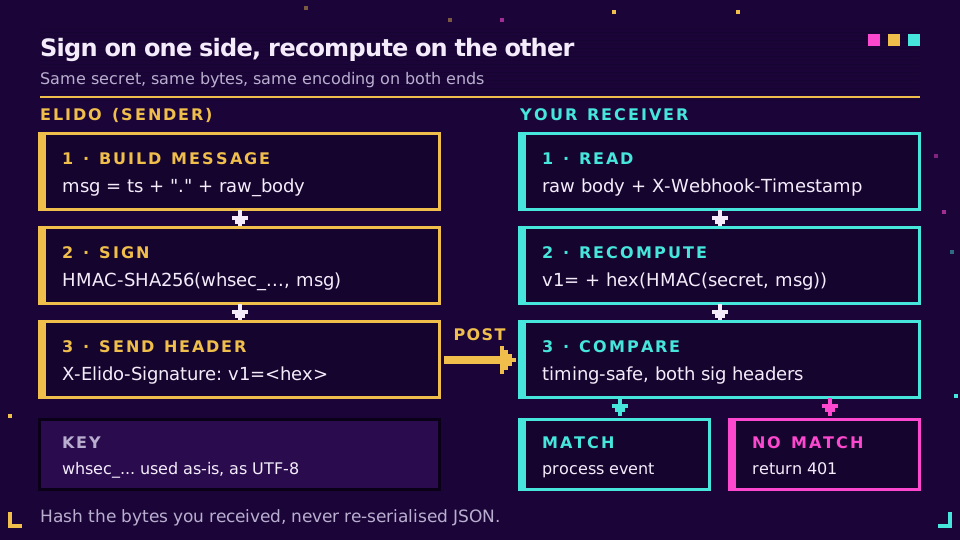
What Elido Signs and Which Headers Carry It
Every delivery to an event or siem endpoint is a POST with Content-Type: application/json and a body shaped like {"type", "workspace_id", "data", "timestamp"}. Chat-shaped endpoint kinds (Discord, Telegram, Sentry) authenticate through their URL and carry no HMAC headers, so everything below applies to the first two kinds only.
| Header | Value | What to do with it |
|---|---|---|
X-Elido-Signature | v1= + 64 lowercase hex chars | Compare against your computed value |
X-Webhook-Signature | Same value as above | Older alias; read either, not both |
X-Webhook-Timestamp | Unix seconds, e.g. 1789000000 | Part of the signed message; check its age |
X-Elido-Signature-Previous | v1= + hex, signed with the old secret | Present only during a rotation grace window |
X-Webhook-Event | Event name, e.g. link.created | Route the event (after verifying) |
X-Webhook-Delivery | Numeric delivery ID, stable across retries | Dedupe key for idempotent processing |
The secret is generated for you when the endpoint is created: whsec_ followed by 64 hex characters. It's returned once in the create response and never again, so it goes straight into your secret store.
Here's a test vector you can run your code against. With the secret whsec_test_only_do_not_use, the timestamp 1789000000 and the body {"type":"link.created","workspace_id":42}, the correct header value is:
v1=b9369aa411a8b7ce705bcd5bba112dea9d72d2e787aa88959ff62f33942d1a15
You can reproduce it from a shell, which is my first move whenever a receiver disagrees with the sender:
printf '%s.%s' 1789000000 '{"type":"link.created","workspace_id":42}' \
  | openssl dgst -sha256 -hmac 'whsec_test_only_do_not_use' -r
One trap here: the body's own timestamp field is the time the event happened. The signed timestamp is the one in the X-Webhook-Timestamp header, set when the request is sent. Don't mix them up.
Validate a Webhook Signature in Node
In Express the fix for most failures is one line: mount express.raw() on the webhook route so req.body is a Buffer of the exact bytes received. Register this route before any global app.use(express.json()), because once the JSON parser has consumed the stream, the raw parser has nothing left to read.
import express from "express";
import { createHmac, timingSafeEqual } from "node:crypto";

const SECRET = process.env.ELIDO_WEBHOOK_SECRET; // the full whsec_... string
const TOLERANCE_SEC = 300;

function matches(expected, got) {
  const a = Buffer.from(expected);
  const b = Buffer.from(got ?? "");
  return a.length === b.length && timingSafeEqual(a, b);
}

const app = express();

app.post(
  "/webhooks/elido",
  express.raw({ type: "application/json" }),
  (req, res) => {
    const ts = req.get("X-Webhook-Timestamp") ?? "";
    if (
      !/^\d+$/.test(ts) ||
      Math.abs(Date.now() / 1000 - Number(ts)) > TOLERANCE_SEC
    ) {
      return res.status(400).send("stale or missing timestamp");
    }
    const expected =
      "v1=" +
      createHmac("sha256", SECRET)
        .update(`${ts}.`)
        .update(req.body)
        .digest("hex");
    const ok = [
      req.get("X-Elido-Signature"),
      req.get("X-Elido-Signature-Previous"),
    ].some((got) => matches(expected, got));
    if (!ok) return res.status(401).send("bad signature");

    const event = JSON.parse(req.body.toString("utf8"));
    // enqueue event, then acknowledge fast
    res.sendStatus(200);
  },
);
The length check isn't decoration. timingSafeEqual throws on buffers of different lengths instead of returning false. If you use the TypeScript SDK from the API and SDKs quickstart, webhooks.verify() in @elido/sdk does the same HMAC and timing-safe compare. Pass { maxSkewSec: 300 } explicitly, though: without that option it doesn't check the timestamp's age at all.
Webhook HMAC SHA256 Verification in Python and Go
Python's standard library covers it. With FastAPI, await request.body() returns the raw bytes; in Flask, call request.get_data() before anything touches request.json.
import hashlib
import hmac
import json
import os
import time

from fastapi import FastAPI, HTTPException, Request

SECRET = os.environ["ELIDO_WEBHOOK_SECRET"].strip().encode()
TOLERANCE = 300
app = FastAPI()


def verify(raw: bytes, ts: str, candidates: list) -> bool:
    if not ts.isdigit() or abs(time.time() - int(ts)) > TOLERANCE:
        return False
    digest = hmac.new(SECRET, ts.encode() + b"." + raw, hashlib.sha256).hexdigest()
    expected = "v1=" + digest
    return any(c and hmac.compare_digest(c, expected) for c in candidates)


@app.post("/webhooks/elido")
async def elido_webhook(request: Request):
    raw = await request.body()
    h = request.headers
    sigs = [h.get("x-elido-signature"), h.get("x-elido-signature-previous")]
    if not verify(raw, h.get("x-webhook-timestamp", ""), sigs):
        raise HTTPException(status_code=401, detail="bad signature")
    event = json.loads(raw)
    # enqueue event
    return {"ok": True}
In Go, read the body once, cap its size, and use hmac.Equal from crypto/hmac, which compares in constant time. I build the message from the header string exactly as received rather than re-formatting the parsed integer.
package webhook

import (
	"crypto/hmac"
	"crypto/sha256"
	"encoding/hex"
	"io"
	"net/http"
	"strconv"
	"time"
)

const toleranceSec = 300

// Verify returns the raw body when the request carries a valid Elido signature.
func Verify(w http.ResponseWriter, r *http.Request, secret []byte) ([]byte, bool) {
	body, err := io.ReadAll(http.MaxBytesReader(w, r.Body, 1<<20))
	if err != nil {
		return nil, false
	}
	tsHeader := r.Header.Get("X-Webhook-Timestamp")
	ts, err := strconv.ParseInt(tsHeader, 10, 64)
	if err != nil {
		return nil, false
	}
	if age := time.Now().Unix() - ts; age > toleranceSec || age < -toleranceSec {
		return nil, false
	}

	mac := hmac.New(sha256.New, secret)
	mac.Write([]byte(tsHeader + "."))
	mac.Write(body)
	expected := []byte("v1=" + hex.EncodeToString(mac.Sum(nil)))

	for _, name := range []string{"X-Elido-Signature", "X-Elido-Signature-Previous"} {
		if got := r.Header.Get(name); got != "" && hmac.Equal([]byte(got), expected) {
			return body, true
		}
	}
	return nil, false
}
All three versions answer 401 on a bad signature and only parse JSON after the check passes. Elido counts any non-2xx as a failed attempt, so if your verifier is wrong, genuine deliveries pile up as 401s in the endpoint's delivery log. That's the first place to look after a deploy.
Want to see this against live traffic? Create an endpoint in a workspace from the webhooks feature page and point it at a local tunnel; the delivery log shows the status code your verifier returned for each attempt.
Verify the Webhook Signature Inside an n8n Code Node
n8n can do the same check with no extra service. Turn on the Raw Body option in the Webhook node, which stores the untouched request as binary data, then add a Code node straight after it. The built-in crypto module is allowed in the n8n Code node, so this runs as is:
const crypto = require("crypto");
const h = $input.first().json.headers;
const raw = await this.helpers.getBinaryDataBuffer(0, "data");

const ts = h["x-webhook-timestamp"] ?? "";
if (!/^\d+$/.test(ts) || Math.abs(Date.now() / 1000 - Number(ts)) > 300) {
  throw new Error("stale delivery");
}
const expected = Buffer.from(
  "v1=" +
    crypto
      .createHmac("sha256", $env.ELIDO_WEBHOOK_SECRET)
      .update(`${ts}.`)
      .update(raw)
      .digest("hex"),
);
const ok = ["x-elido-signature", "x-elido-signature-previous"].some((name) => {
  const got = Buffer.from(h[name] ?? "");
  return (
    got.length === expected.length && crypto.timingSafeEqual(got, expected)
  );
});
if (!ok) throw new Error("bad signature");
return [{ json: JSON.parse(raw.toString("utf8")) }];
A thrown error stops the execution, so nothing downstream runs on a forged event. One self-hosting catch: if your instance sets N8N_BLOCK_ENV_ACCESS_IN_NODE=true, the Code node can't read $env, the secret comes back empty and every delivery fails the check. The self-hosted n8n guide covers the reverse-proxy side, and the n8n URL shortener post shows what to build once events arrive.
Replay Windows and Secret Rotation
A valid signature proves who sent a request, not when. Somebody who captures one signed delivery, from a log line or a misconfigured proxy, could send it again a week later and the HMAC would still match. The timestamp check closes that gap, and it's your job: Elido's delivery worker signs the timestamp but doesn't enforce any window on your side. I use 300 seconds. Keep the receiver's clock synced with NTP, since a server that drifts a few minutes will start rejecting honest traffic.
Retries don't trip the window. Each attempt gets a fresh X-Webhook-Timestamp and a new signature, while X-Webhook-Delivery stays the same. That split gives you both defences: the timestamp bounds how long a captured request stays usable, and a unique index on the delivery ID stops a legitimate retry from being processed twice. The rate limits and idempotency post covers the same pattern on the inbound API side.
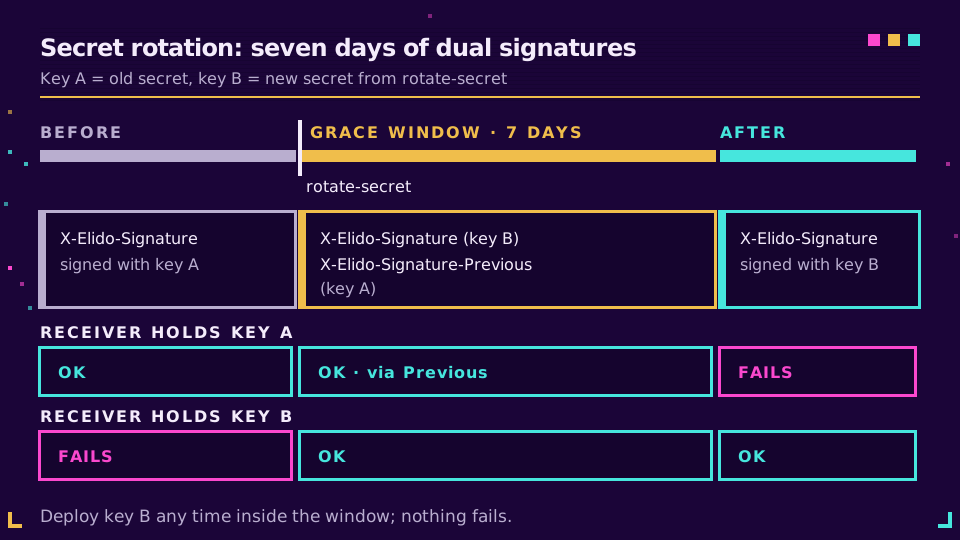
Rotation works through POST /v1/workspaces/{workspace_id}/webhooks/{id}/rotate-secret, or the Rotate button on the endpoint page. The response holds the new secret once, plus grace_window_days (7) and previous_expires_at. For those seven days each delivery carries two signatures:
X-Elido-Signature, made with the new secretX-Elido-Signature-Previous, made with the old one
That's why every snippet above checks both headers against the one secret it holds. A receiver still running the old secret matches the second header; after you deploy the new one, it matches the first. Nothing fails in between. Treat the previous-key header as a bridge rather than a guarantee, though, and ship the new secret early in the week.
Why Webhook Signature Verification Fails
When I help someone debug this, it's the same short list nearly every time. Work through it in order:
- Re-serialised JSON.
JSON.stringify(req.body)orjson.dumps(payload)produces different bytes than the sender hashed: key order, spacing, escaped slashes, unicode escapes. Hash the raw body. If your framework already parsed it, fix the middleware order rather than trying to rebuild the string. - The wrong key bytes. Elido uses the whole
whsec_...string as the HMAC key. Stripping the prefix, hex-decoding the rest, or base64-decoding it (which Standard Webhooks libraries do) gives you a different key. A trailing newline fromechointo a secrets file does the same, which is why the Python example calls.strip(). - Encoding mismatch. Compare
v1=plus lowercase hex against the header. A base64 digest, an uppercase hex string or a missing prefix never matches. - The wrong timestamp. Use the
X-Webhook-Timestampheader string, not the body'stimestampfield, and not a number you parsed and re-formatted.
Two smaller ones: comparing with == works but leaks timing, so use the constant-time function your language ships; and a proxy that decompresses or re-encodes bodies will break verification too, though that's rare for plain JSON POSTs.
When both sides still disagree, log the timestamp, the body length and the first few hex characters of your digest, then run the openssl line from earlier on the same inputs. Whichever side matches openssl is the correct one. For where signing fits among the other controls worth checking on any provider, see the URL shortener security checklist.
Read the cornerstone: webhooks for link events.
Related on the Blog
- Webhooks for link events - event types, payload envelope and the retry policy.
- Webhooks vs polling for click tracking - when push beats pull, and when it doesn't.
- Self-hosted link automation with n8n - reverse proxy, queue mode and signature checks in one stack.
- URL shortener API: rate limits, retries, idempotency - the dedupe patterns from the other direction.
- URL shortener security checklist - nine controls to verify on any provider.
Întrebări frecvente
How do I verify a webhook signature?
Recompute the HMAC over exactly what the sender signed, using the shared secret, and compare your result with the signature header in constant time. For Elido that means HMAC-SHA256 over the X-Webhook-Timestamp value, a dot and the raw body, hex-encoded with a v1= prefix. Reject the request if nothing matches or the timestamp is stale.
Why does my webhook signature verification keep failing?
Almost always because you hashed different bytes than the sender did. A JSON body parser ran first and you re-serialised the object, or you decoded the secret, or you compared hex against base64. Hash the raw request bytes, use the secret string exactly as issued, and log both values side by side.
What is HMAC in a webhook?
HMAC is a keyed hash: the sender mixes a secret it shares with you into a SHA-256 hash of the message. Only someone holding the secret can produce a matching value, so a valid signature proves the request came from the sender and that the body wasn't changed on the way.
How do I prevent webhook replay attacks?
Sign the timestamp together with the body and reject any request whose timestamp is more than a few minutes old; five minutes is a common window. Then store the delivery ID and skip IDs you've already processed. Elido signs the timestamp but leaves the freshness check to your receiver.
Should I use hex or base64 for an HMAC-SHA256 webhook signature?
Whatever the sender documents, because the two encodings of the same digest never compare equal. Elido sends lowercase hex after a v1= prefix. Shopify and the Standard Webhooks spec use base64, and GitHub uses hex after sha256=. Encode your digest the same way before comparing.
How do I rotate a webhook secret without dropping events?
Use a sender that signs with both keys for a while. After you rotate an Elido endpoint secret, each delivery carries X-Elido-Signature with the new key and X-Elido-Signature-Previous with the old one for seven days. Accept either header, deploy the new secret, and the old one expires on its own.
Încearcă Elido
Lipește un URL, obții un link scurt funcțional
Fără înregistrare. Linkul este activ timp de 30 de zile. Înregistrează-te ca să-l păstrezi pentru totdeauna.
Gratuit, fără înregistrare · 2 pe zi