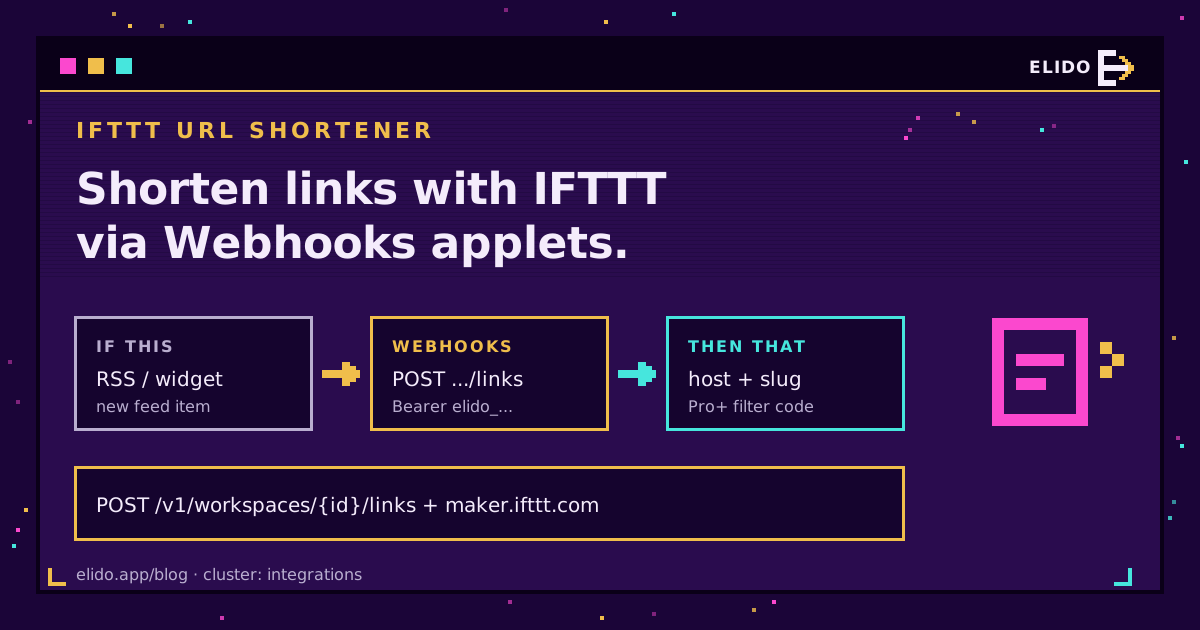
An IFTTT URL shortener on Elido is built from IFTTT's generic Webhooks service, because there is no native Elido service on IFTTT. An applet sends POST /v1/workspaces/{workspace_id}/links with an Authorization: Bearer elido_... header and a JSON body holding domain_id and destination_url, and Elido creates the link. Going the other way, an Elido webhook posts link events to your personal IFTTT Webhooks URL, where they become applet triggers. Webhooks need IFTTT Pro. Reading the created link back needs Pro+.
That's the honest shape of it. You can shorten links with IFTTT from any trigger it offers, and you can react to link lifecycle events. What you can't do on a cheap plan is take the new short link and use it in the same applet, which surprises most people on day one.
This guide goes deeper on IFTTT than our Make and IFTTT recipes, which cover both platforms side by side. New to the Elido API? The API and SDKs quickstart explains keys, workspaces and domains first.
What the IFTTT Integration Actually Is
It's two pasted URLs, one per direction, with no OAuth app between them. IFTTT's Webhooks service supplies both halves. Its "Make a web request" action calls the Elido API. Its "Receive a web request" trigger listens on a URL that carries your personal Maker key, and an Elido webhook endpoint can point at it.
Which half you can use depends on the IFTTT plan. Here's what IFTTT's plans page listed when I checked on 21 September 2026:
| IFTTT feature | Plan | What it does for Elido |
|---|---|---|
| Make a web request (action) | Pro, Pro+ | Creates or updates a short link, fire-and-forget |
| Receive a web request (trigger) | Pro, Pro+ | Starts an applet when an Elido event arrives |
| Make a web request with JSON response (query) | Pro+ | Creates a link and returns the response body |
| Filter code | Pro+ | Parses JSON, builds the short URL, skips actions |
Free accounts get two applets and no Webhooks at all, so a free IFTTT account can't talk to Elido. Pro was listed at 2.99 USD a month and Pro+ at 8.99 USD. Prices move, so trust the page over this paragraph.
Applet 1: Shorten Links With IFTTT From an RSS Feed
The simplest useful applet turns every new blog post into a tagged short link, so the link already exists by the time you share it. It runs on Pro.
Before you open IFTTT, collect three things from Elido. Create a key under API keys in the dashboard; it starts with elido_ and is shown once. Copy your workspace ID from the dashboard URL. Then run GET /v1/workspaces/{workspace_id}/domains once and note the id and hostname of the domain the links should live on.
In IFTTT, choose RSS Feed as the "If This" service with the New feed item trigger and paste your feed URL. For "Then That", pick Webhooks and Make a web request:
URL:                https://api.elido.app/v1/workspaces/1/links
Method:             POST
Content Type:       application/json
Additional Headers: Authorization: Bearer elido_xxxxxxxx
                    Idempotency-Key: {{EntryUrl}}
Body:               {"domain_id": 7,
                     "destination_url": "{{EntryUrl}}",
                     "title": "{{EntryTitle}}",
                     "tags": ["ifttt", "rss"]}
Leave out slug and Elido generates one. The Idempotency-Key header is the line I'd never skip. If IFTTT sends the same item twice, Elido replays the original response for 24 hours instead of minting a duplicate link, because the key is simply the post's URL.
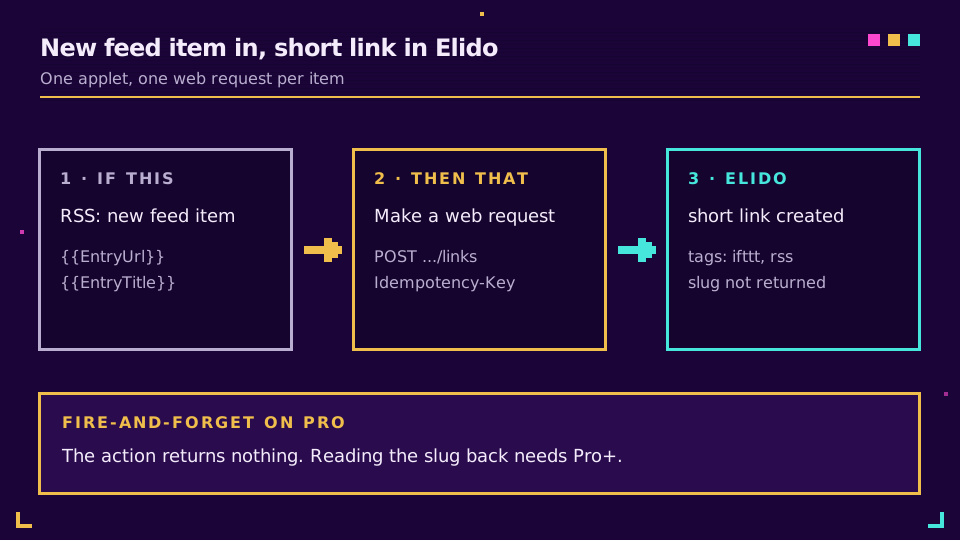
The action is fire-and-forget, though. IFTTT's Make a web request action page lists no response ingredients, so the new slug never reaches the next step. The link exists in Elido, tagged rss, and you copy it from there. For a lot of people that's fine. If you want the link posted somewhere automatically, keep reading.
Applet 2: Read the Slug Back With a Query and Filter Code
Pro+ changes the picture. IFTTT's Make a web request with JSON response is a query, not an action, and it hands back two ingredients: Status Code and Response Body. Filter code can parse that body, pull the slug out of it and write the finished short URL into whatever action comes next in the applet, before IFTTT runs that action.
Build the applet with the same RSS trigger. Add the query with the same URL, headers and body as above. Then add an action, say Notifications, and open the filter code editor:
const res = MakerWebhooks.makeWebRequestQueryJson;
if (res.StatusCode != "201") {
  IfNotifications.sendNotification.skip("Elido returned " + res.StatusCode);
} else {
  const link = JSON.parse(res.ResponseBody);
  IfNotifications.sendNotification.setMessage(
    "Short link ready: https://go.example.com/" + link.slug,
  );
}
Two details matter. Elido answers a successful create with 201, not 200, so test for that. And the create response has no full-URL field: you get id, slug, destination_url, domain_id and timestamps. You join your domain's hostname to the slug yourself, which is why you noted it earlier. The ingredient paths above are the ones IFTTT's query page documents; the editor's autocomplete shows the same names, so trust it if they ever differ.
Swap the notification for an email or a Sheets row. The pattern holds. Anything that accepts text can receive the short link.
Applet 3: IFTTT Webhooks Short Link Alerts From Elido Events
The reverse direction starts in Elido. Elido webhooks fire on workspace events, and an IFTTT applet can listen for them. The events are lifecycle ones: link.created, link.updated, link.deleted, link.expired, link.cap_reached and a few workspace and member events. There's no click event, so "text me on every click" isn't possible, and honestly, at any real volume you wouldn't want it.
The useful one is link.cap_reached. Set max_clicks on a link with PATCH /v1/workspaces/{workspace_id}/links/{link_id}, and Elido emits the event once the link hits the cap. A background check runs every few minutes. Expect the alert a little late.
Among link events, the dashboard's webhook form lists only created, updated and deleted. For link.cap_reached and link.expired, register the endpoint through the API:
curl -X POST https://api.elido.app/v1/workspaces/1/webhooks \
  -H "Authorization: Bearer $ELIDO_KEY" \
  -H "Content-Type: application/json" \
  -d '{"url": "https://maker.ifttt.com/trigger/elido_cap/json/with/key/YOUR_MAKER_KEY",
       "events": ["link.cap_reached"],
       "description": "IFTTT cap alert"}'
The event name sits in the IFTTT URL, so one Elido endpoint maps to one IFTTT event. Register a second endpoint if you also want expiry alerts.
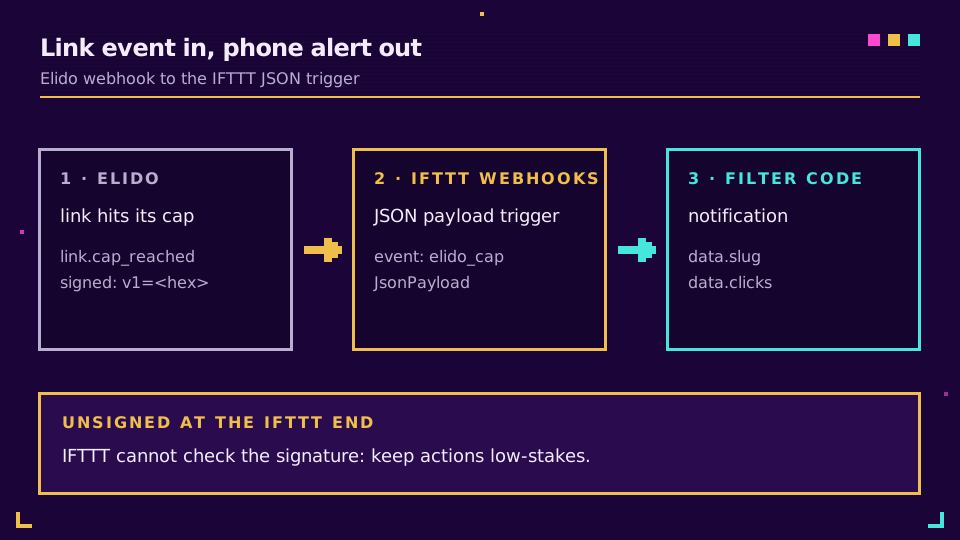
On the IFTTT side, the payload shape decides the plan. The plain Receive a web request trigger only exposes value1, value2 and value3. Elido's payload is an envelope with type, workspace_id, data and timestamp, so those three values arrive empty. On Pro that still works as a bare ping: "a link hit its cap, go look." The JSON payload trigger, note the /json/ in the URL above, hands you the whole body as one ingredient. Parse it on Pro+:
const evt = JSON.parse(MakerWebhooks.jsonEvent.JsonPayload);
IfNotifications.sendNotification.setMessage(
  "Link " + evt.data.slug + " hit its cap at " + evt.data.clicks + " clicks",
);
Elido retries a failed delivery up to three times, minutes apart, and IFTTT answers 200 as soon as it accepts the request. Delivery failures here are rare. Applet failures happen later, inside IFTTT, where Elido can't see them.
Want a cap alert on your next giveaway link? Start a free Elido workspace, set a click cap and wire the applet above in about ten minutes.
Security: Keys, Maker URLs and Unsigned Deliveries
Both directions put a secret in IFTTT's hands. They don't deserve equal worry.
The Elido API key lives in the applet's headers field. Anyone who can edit that applet can read it. Give it its own key, named for IFTTT, with the lowest role that can still create links and an expiry date. Revoking it later then breaks nothing else. A key shared with your billing scripts is a much bigger problem to lose.
The Maker URL is the bigger one. Elido signs every delivery: an X-Webhook-Signature: v1=<hex> header carries an HMAC-SHA256 over the timestamp and the raw body, and a receiver you control can reject forgeries. IFTTT has no step that checks it. The applet fires for anyone who knows the URL, signature or not.
So I'd keep IFTTT applets fed by Elido events to notifications and logs. A forged request can make your phone buzz. Nothing worse. If an event should change something important, like pausing a campaign or editing a CRM record, send it to a receiver that verifies signatures instead. The webhook events write-up shows the check. Self-hosted n8n is one place to run it.
Where IFTTT Stops Being the Right Tool
IFTTT wins on triggers nobody else has. Location, a phone widget, a smart-home sensor, a voice assistant: those are native there and awkward everywhere else. If the job is "when I arrive at the venue, create tonight's short link," it's the right tool, and I'd use it without a second thought.
It stops fitting in four places:
- Anything with a loop. An applet handles one trigger event at a time. Shortening 300 rows from a sheet is a job for bulk import from Google Sheets, not 300 applet runs.
- Retry logic. When the Elido API answers 429 or 5xx, the action just fails and the applet moves on. n8n's HTTP Request node lets you retry with a wait and route errors somewhere visible.
- Response handling on a budget. Reading the slug back costs Pro+. Make and Zapier give you the response on every paid plan, and the Zapier walkthrough shows that route end to end.
- Branching. Filter code can skip an action, but a real if/else across several services belongs in Make or n8n.
If you write code at all, skip the visual tools and call the API from a small script. The rate limits and idempotency guide covers the retry rules any caller should follow, IFTTT included. For the full endpoint list, see Elido's API and SDKs.
Read the cornerstone → URL shortener API and SDKs quickstart
Related on the Blog
- Short link automation with Make and IFTTT - both platforms compared in one pass.
- n8n URL shortener - the HTTP Request node with retries and idempotency.
- Zapier URL shortener automation - the hosted route with response data on every paid plan.
- Webhooks for link events - payloads, signature checks and retries.
- Shorten a URL on iPhone - the manual route when an applet is overkill.
- Make.com URL shortener scenarios - multi-step flows with routers, error handlers and credit costs.
Întrebări frecvente
Is there an Elido service on IFTTT?
No. Elido has no native IFTTT service with its own triggers and actions. The integration is IFTTT's generic Webhooks service calling the Elido REST API with an API key, plus Elido webhooks posting events to your personal IFTTT Webhooks URL. Everything in this guide runs on that route.
Do IFTTT webhooks need a paid plan?
Yes. According to ifttt.com/plans, the Webhooks service is part of IFTTT Pro and Pro+, not the Free plan. Queries and filter code, which you need to read an API response or parse a JSON payload, are Pro+ only. Check the plans page before you build, because tiers change.
How do I get the short URL back into an IFTTT applet?
Use the Webhooks query Make a web request with JSON response instead of the plain action, then parse its Response Body in filter code. The Elido create call returns the link record with a slug but no full URL, so filter code joins your domain hostname and the slug. Both query and filter code need Pro+.
Can IFTTT trigger when someone clicks an Elido short link?
Not directly. Elido webhooks fire on lifecycle events such as link.created, link.updated, link.deleted, link.expired and link.cap_reached, and there is no per-click webhook event. The closest click-driven signal is link.cap_reached, which fires once when a link with a click cap hits its limit.
Can IFTTT verify Elido webhook signatures?
No. Elido signs every delivery with an HMAC-SHA256 signature header, but an IFTTT applet has no step that can check it. Your Maker key inside the IFTTT URL is the only thing standing between a stranger and your applet, so keep that URL private and only attach low-stakes actions to it.
Should I use IFTTT, Make or Zapier to automate short links?
Use IFTTT when the trigger is a consumer service only IFTTT covers, such as a phone, a smart-home device or a location, and the flow is one or two steps. Pick Make, Zapier or n8n once you need branching, retries on failure, loops over many items or real response handling on a cheaper plan.
Încearcă Elido
Lipește un URL, obții un link scurt funcțional
Fără înregistrare. Linkul este activ timp de 30 de zile. Înregistrează-te ca să-l păstrezi pentru totdeauna.
Gratuit, fără înregistrare · 2 pe zi