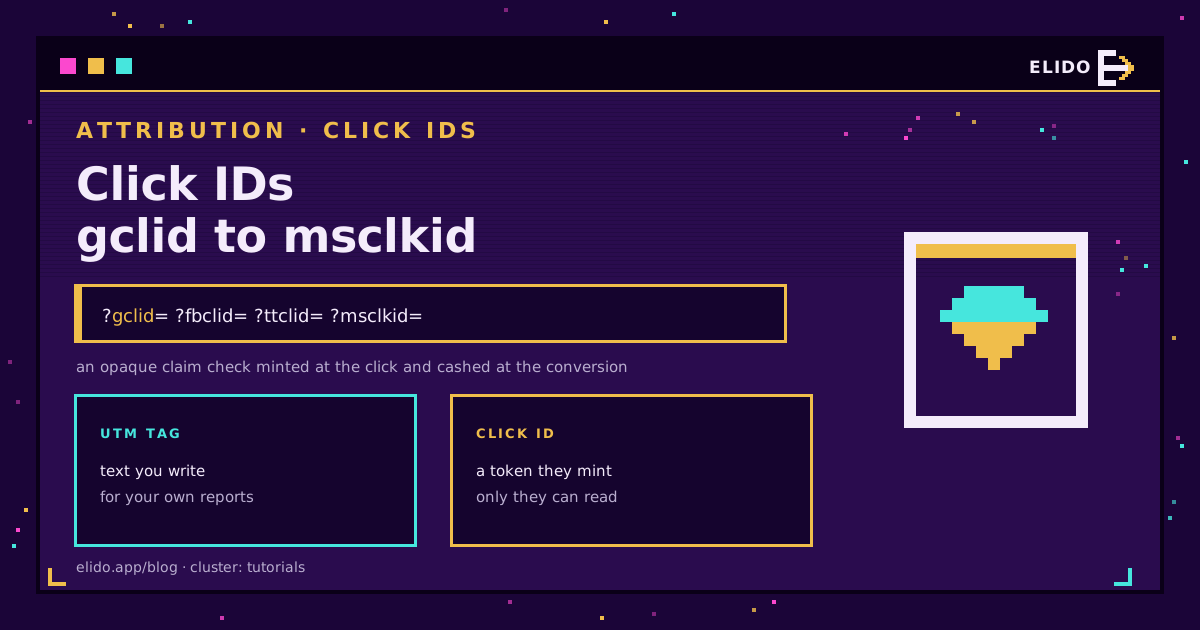
Um ID de clique é um token opaco que uma plataforma de anúncios gera no instante em que alguém clica no anúncio dela, anexa à URL de destino, e lê de volta mais tarde na conversão - para que possa associar uma venda ou um cadastro ao clique exato que a gerou. A versão do Google é o gclid. A da Meta é o fbclid. A do TikTok é o ttclid. A do Microsoft Advertising é o msclkid. Rode campanhas pagas em mais de uma plataforma e você vai se deparar com os quatro, geralmente se perguntando por que a sua URL ficou tão longa.
Cada um faz exatamente o mesmo trabalho para a sua própria plataforma, e nenhum deles é um rótulo que você escreve. Uma tag UTM é um texto que você compõe para que o seu próprio analytics possa agrupar o tráfego por campanha. Um ID de clique não é isso - é uma string que a plataforma gera, e só o pixel ou a API daquela plataforma sabem como usá-la. Você precisa dos dois. Eles respondem perguntas diferentes. É essa a parte que a maioria dos textos explicativos deixa de fora.
O Que um ID de Clique É, de Fato
Pense em um ID de clique como um tíquete de guarda-volumes, não como um crachá com nome. Quando alguém clica em um anúncio do Google, o servidor do Google gera uma string única, associa-a à campanha, ao grupo de anúncios e à palavra-chave por trás do clique, e a anexa à URL como ?gclid=.... A string é ilegível para você ou para qualquer outra pessoa - é um número de referência dentro do próprio registro de cliques do Google. Fbclid, ttclid e msclkid seguem o mesmo padrão: uma origem diferente, a mesma ideia.
O objetivo é fechar o ciclo entre "mostramos um anúncio" e "isso aconteceu no seu site". Sem um ID de clique, uma plataforma só consegue reportar estimativas no nível de campanha. Com um, ela pode dizer: este clique exato, três dias atrás, levou a esta compra exata - um nível de precisão que as UTMs sozinhas não oferecem. É isso que viabiliza a importação de conversões offline, o Smart Bidding e os eventos de servidor no estilo CAPI. Parâmetros UTM explicados é o texto complementar sobre a marcação no nível de campanha que a maioria das equipes usa lado a lado com os IDs de clique.
Os Quatro IDs de Clique Que Você Vai Encontrar
Toda grande plataforma de anúncios tem a sua própria versão, e as diferenças que importam são quem lê o valor de volta e por quanto tempo ele permanece utilizável.
| Plataforma | Parâmetro | Gerado por, lido de volta por | Janela de validade típica |
|---|---|---|---|
| Google Ads | gclid | A marcação automática o gera; a importação de conversões do Google Ads e o Smart Bidding o leem de volta | 90 dias a partir do clique |
| Meta (Facebook, Instagram) | fbclid | Armazenado no cookie _fbc; o Meta Pixel ou a Conversions API o leem de volta na conversão | ~90 dias no lado do navegador, mais tempo se encaminhado pelo servidor |
| TikTok | ttclid | Adicionado automaticamente desde abril de 2024; o TikTok Pixel ou a Events API o leem de volta | 30 dias a partir do clique |
| Microsoft Advertising | msclkid | Marcado automaticamente na URL; a tag UET o lê de volta para a importação de conversões | 90 dias a partir do clique |
Quatro plataformas, quatro nomes de parâmetro, um único mecanismo. Anuncie em todas elas e uma única landing page pode carregar mais de um identificador de clique ao mesmo tempo - um gclid velho, de um clique da semana passada, ao lado de um fbclid recente, de um anúncio de retargeting de hoje.
Em Que um ID de Clique Difere de um Parâmetro UTM
Essa é a confusão por trás de toda busca por "o que é fbclid": ele fica bem ao lado de utm_source na query string e parece um parâmetro de rastreamento, mas faz algo completamente diferente.
Um parâmetro UTM é um rótulo: você escolhe o valor - utm_campaign=spring-sale - e a sua ferramenta de analytics agrupa as sessões pela string que você digitou. Um ID de clique é uma chave de busca. Você não escolheu o valor do gclid; o Google escolheu, e só os próprios sistemas do Google conseguem fazer alguma coisa com ele. Coloque um gclid em um relatório genérico de analytics e ele simplesmente fica ali parado - útil para o Google Ads, inútil para todo o resto.
Essa assimetria importa na hora de diagnosticar problemas. Quando as UTMs param de aparecer nos relatórios, a causa costuma ser o navegador ou um link quebrado - Firefox e Brave estão quebrando a sua atribuição de UTM cobre esse modo de falha. Quando um ID de clique para de corresponder, a causa quase sempre é que ele nunca chegou a tempo ao pixel ou à API da própria plataforma, ou que a sua janela de validade se fechou antes de a conversão acontecer.
Como Funciona, de Fato, o Ciclo Completo de um ID de Clique
Tire a nomenclatura específica de cada plataforma e todo ID de clique segue a mesma jornada de três etapas.
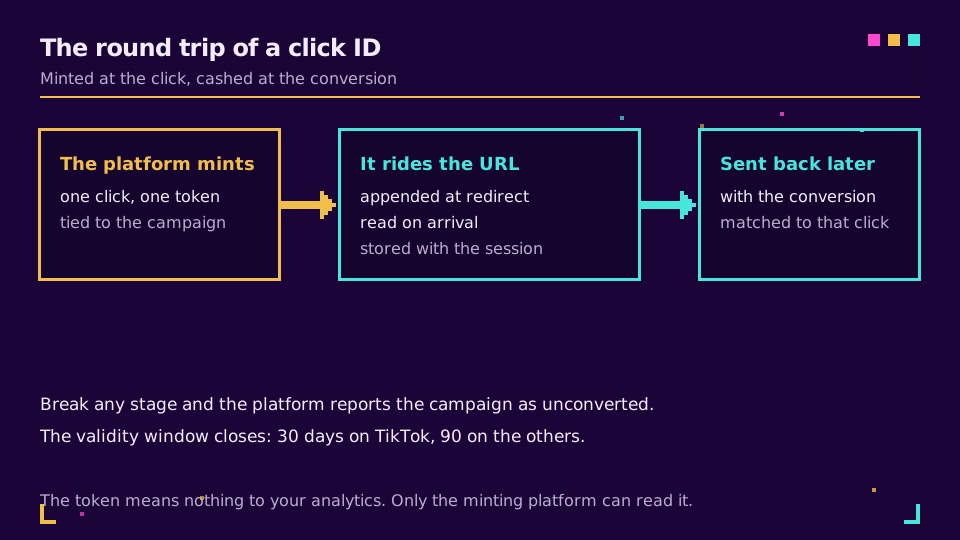
Etapa um, a geração. No momento em que um usuário clica no anúncio, antes mesmo de o navegador solicitar a sua landing page, a plataforma gera o identificador e o codifica na URL de redirecionamento.
Etapa dois, o trajeto. O identificador viaja como um parâmetro de consulta por todos os saltos que existem entre o anúncio e a sua landing page - o redirecionamento da plataforma, depois o seu domínio. Capture-o aqui e grave-o em um cookie, em um campo de formulário oculto ou no seu registro de CRM para usar depois.
Etapa três, a correspondência. Quando a conversão acontece - uma compra, um cadastro, um envio de formulário - o seu pixel ou servidor envia o ID de clique armazenado de volta para a API da plataforma junto com o evento. A plataforma o procura no próprio registro de cliques e, se ainda estiver dentro da janela de validade, credita o anúncio original. É essa a mecânica por trás do envio de conversões para a Conversions API da Meta: capturar cedo, guardar, e enviar de volta depois.
Por Que o Parâmetro Apareceu Sem Ser Convidado, e Se Você Pode Removê-lo
A maioria das pessoas encontra um ID de clique por acidente. A marcação automática vem ativada por padrão no Google Ads e no Microsoft Advertising, e o TikTok tornou o ttclid automático em 2024, sem nenhum opt-in. Ninguém pediu pelo parâmetro; a plataforma simplesmente começou a anexá-lo, porque é assim que o rastreamento de conversões funciona hoje em dia.
Então sim, você pode removê-lo - mas o momento é que decide se isso é uma limpeza inofensiva ou uma lacuna de atribuição autoinfligida. Remover o fbclid de um link antes de compartilhá-lo, ou apagá-lo da coluna de URL de um relatório, não muda nada nos dados de conversão que o seu pixel já capturou. Removê-lo antes de o seu próprio script ou redirecionamento tê-lo lido é uma história diferente: você apagou a única coisa de que a plataforma precisava para creditar o clique, e nenhuma quantidade de dados UTM recupera isso. O hábito mais seguro é capturar o ID de clique no lado do servidor logo no primeiro salto - a abordagem descrita em rastreamento de conversões no lado do servidor - e limpar o parâmetro só daquilo que você exibe ou armazena depois dessa captura.
Veja como o rastreamento de conversões do Elido captura cada ID de clique automaticamente → Se você está lidando manualmente com gclid, fbclid, ttclid e msclkid em quatro contas de anúncios diferentes, é essa dor que isso resolve - uma única camada de redirecionamento que registra o identificador antes de qualquer outra coisa tocar na URL.
Onde os IDs de Clique se Perdem
Um ID de clique é frágil exatamente das mesmas formas que uma UTM é frágil, além de um ou dois modos de falha próprios.
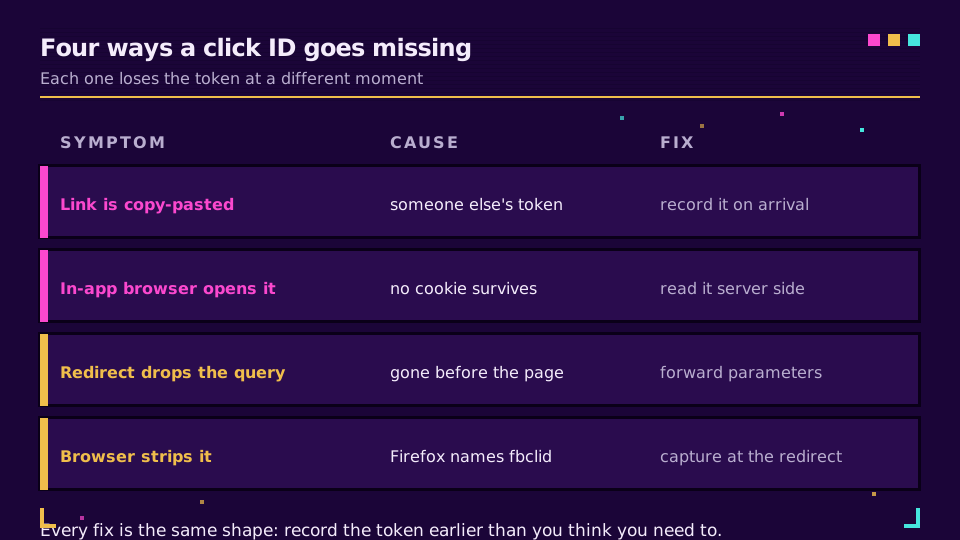
Quatro situações respondem pela maior parte da perda, e cada uma pede uma correção diferente.
Um visitante copia e cola a URL de destino em um grupo de chat. Todo mundo que clicar nesse link colado agora carrega o ID de clique de outra pessoa. A conversão ou casa com o clique errado, ou não casa com nada. Armazene o identificador vinculado à sessão que chegou primeiro, e pare de tratar a URL na barra de endereço como o registro oficial.
O clique abre dentro de um navegador in-app. Instagram e TikTok entregam o toque a uma webview restrita que muitas vezes não consegue manter um cookie próprio além daquela sessão, então o identificador que viaja na URL não tem onde ficar armazenado. Leia o parâmetro no lado do servidor já na primeira solicitação, em vez de depender do navegador para lembrá-lo.
Um redirecionamento reconstrói a URL de destino e descarta a string de consulta. O ID de clique nunca chega sequer à landing page. Ele desaparece antes de o seu pixel carregar, então nada mais adiante consegue salvá-lo. Confirme que toda camada de redirecionamento do caminho encaminha os parâmetros de consulta por padrão.
O navegador remove o parâmetro antes de a página carregar. A remoção de parâmetros de consulta do Firefox cita o fbclid explicitamente no modo Estrito. Capture o identificador no redirecionamento, antes de a página de destino e os scripts dela sequer rodarem.
O caso de copiar e colar é, na verdade, um problema de dark social disfarçado de problema de ID de clique - o link viaja por um canal privado que o seu analytics não consegue enxergar, e atribuição de dark social cobre essa lacuna por completo. Para os limites de cookies específicos do Safari que afetam a persistência do fbclid e do ttclid, atribuição de cliques depois do Safari ITP é a leitura dedicada - não vou repetir aqui.
Mantendo as Conversões Atribuídas: A Checklist Prática
Nada disso exige reconstruir a sua stack. Exige garantir que o ID de clique seja capturado uma vez, cedo, antes que qualquer coisa mais adiante possa descartá-lo.
- Capture o gclid, o fbclid, o ttclid e o msclkid no lado do servidor já no primeiro salto de redirecionamento, não na landing page depois que os scripts carregarem.
- Armazene o ID de clique junto com o registro do pedido ou do lead no seu próprio banco de dados, não só em um cookie que pode expirar antes de a venda se fechar.
- Encaminhe o ID de clique armazenado para a API de cada plataforma - Conversions API, Enhanced Conversions, Events API, importação offline do UET - dentro da janela de validade daquela plataforma.
- Verifique se o seu encurtador ou a sua cadeia de redirecionamento repassa as strings de consulta intactas; teste com um
?gclid=test123fictício e confirme que ele sobrevive ao salto. - Combine IDs de clique com UTMs em vez de escolher só um; rastreando UTMs de ponta a ponta cobre a configuração paralela para a visão em nível de campanha que um ID de clique sozinho não consegue oferecer.
A maioria das lacunas de atribuição que já depurei remonta a esse segundo item: um ID de clique que vivia só em um cookie, em um domínio que mudou, ou em uma sessão que expirou antes de o negócio se fechar. Corrigir esse único hábito fecha mais lacunas do que qualquer configuração de plataforma - é o tipo de correção em torno do qual a seção de tutoriais do blog foi construída.
Relacionado no Blog
Perguntas frequentes
O que é o fbclid?
fbclid é o Facebook Click Identifier (Identificador de Clique do Facebook), um parâmetro que a Meta anexa a uma URL quando alguém clica em um anúncio do Facebook ou Instagram ou em um link de uma Página. O Meta Pixel ou a Conversions API lê esse valor a partir do cookie _fbc ou da URL e o envia de volta para a Meta junto com o evento de conversão, para que a Meta possa creditar o clique exato. Ele não carrega nenhuma informação pessoal por si só - apenas uma string opaca mais um timestamp.
O que é o gclid?
gclid é o Google Click Identifier (Identificador de Clique do Google), anexado à URL de uma landing page pela marcação automática do Google Ads sempre que alguém clica em um anúncio de Pesquisa, Display ou Shopping do Google. Ele é necessário para o rastreamento de conversões offline baseado em importação e para que o Smart Bidding veja qual clique específico levou a uma venda. O Google considera um gclid válido por 90 dias a partir do clique.
Qual é a diferença entre um ID de clique e um parâmetro UTM?
Um parâmetro UTM é um texto legível por humanos que você mesmo escreve, como utm_source=google, para que o seu próprio analytics possa agrupar o tráfego por campanha. Um ID de clique é um token opaco que a plataforma de anúncios gera e lê de volta através do próprio pixel ou API dela para associar um clique específico a uma conversão específica. UTMs descrevem uma campanha; um ID de clique identifica um único clique.
É seguro remover o fbclid ou o gclid de uma URL?
Sim, depois que o seu próprio rastreamento já o capturou. Remover o parâmetro de um link que você compartilha, ou da URL exibida nos seus relatórios de analytics, não desfaz o clique que já aconteceu. O que quebra a atribuição é remover o parâmetro antes de o seu pixel, tag ou servidor ter tido a chance de lê-lo - faça isso e a plataforma não terá mais nada para associar à conversão.
Por quanto tempo um ID de clique permanece válido?
Depende da plataforma. gclid e msclkid são válidos por 90 dias a partir do clique, ttclid por 30 dias, e o cookie de navegador do fbclid costuma durar cerca de 90 dias, embora a Conversions API da Meta possa estender a janela efetiva bem além disso se você armazenar o valor no lado do servidor. Depois que a janela se fecha, a plataforma rejeita uma conversão vinculada àquele ID de clique.
O que são o ttclid e o msclkid?
ttclid é o identificador de clique do TikTok, adicionado automaticamente à URL de uma landing page desde abril de 2024 e válido por 30 dias. msclkid é o equivalente do Microsoft Advertising, um ID de 32 caracteres marcado automaticamente na URL e comparado com as conversões UET por até 90 dias. Ambos funcionam da mesma forma que o gclid e o fbclid: gerados no momento do clique, lidos de volta no momento da conversão.
Experimente Elido
Cole uma URL, obtenha um link curto
Sem cadastro. O link vive 30 dias. Cadastre-se para mantê-lo para sempre.
Grátis, sem necessidade de registo · 2 por dia