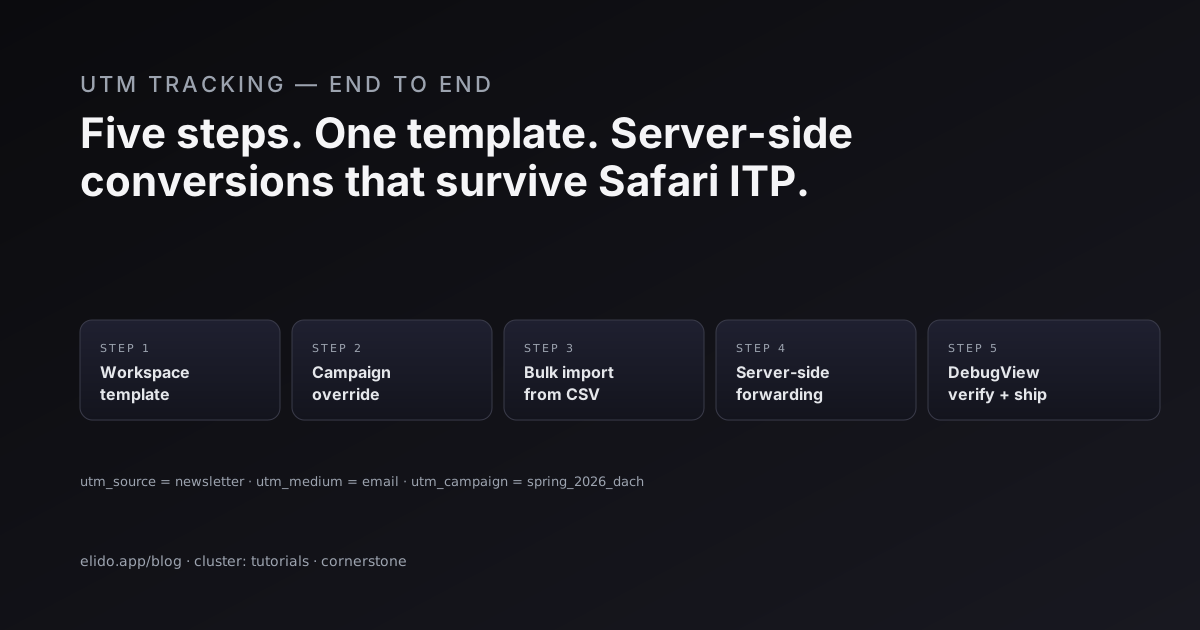
He instalado el seguimiento de UTM de principio a fin en tres empresas. Cada vez, las mismas cinco cosas se rompieron en el mismo orden, y cada vez la solución fue la misma: subir el uso de plantillas al nivel de campaña, bajar el reenvío de conversiones hasta el servidor, y poner un ensayo entre ambos. Eso es la mayor parte de este artículo. El resto es la lista de comprobación de QA que detecta las cosas que no se te ocurrió que podían romperse.
Si todavía no tienes claro qué hace cada una de las cinco etiquetas, los parámetros UTM explicados es la introducción sobre la que se construye este pipeline.
No necesitas una Customer Data Platform para esto. La necesitarás en algún momento si tu problema de atribución se convierte en "unir cuatro toques anónimos en tres dispositivos en un único recorrido de cliente", pero para el caso que veo con más frecuencia (etiquetar cada enlace saliente de forma consistente, capturar el clic, reenviar la conversión a Meta y GA4 del lado del servidor, y sobrevivir a Safari) un acortador de URL con plantillas más una API de conversiones hace el trabajo. A continuación está la versión que funciona, con los modos de fallo que he visto en el camino.
Qué falla con el seguimiento de UTM
Los marketers con los que trabajo no son malos con los UTM. El problema es que las herramientas están diseñadas para que sea fácil escribir un UTM una vez, difícil de imponer en toda una organización, e imposible de arreglar después del lanzamiento. Cuatro modos de fallo aparecen una y otra vez.
Desviación. Una persona escribe utm_source=newsletter, otra escribe utm_source=Newsletter, una tercera escribe utm_source=email. Seis meses después, tu canal "newsletter" está repartido en nueve variantes de texto en GA4. Limpiarlo después de los hechos es un ejercicio de expresiones regulares y esperanza. El script original urchinTracker() que introdujo esta convención (el producto de analítica web pre-Analytics de Google, Urchin, liberado brevemente como código abierto en 2003 antes de ser absorbido) tampoco tenía una capa de plantillas. La convención siempre fue "escríbelo de forma consistente"; las herramientas nunca lo impusieron.
Etiquetado manual a escala. Una campaña de folletos con 80 enlaces cortos en cuatro tiendas regionales son 320 URLs que hay que escribir, pegar en una hoja de cálculo, copiar en tu acortador y esperar lo mejor. La mitad recibe el utm_content equivocado. Nadie se da cuenta hasta que la campaña lleva dos semanas en marcha.
Huecos en la conversión del lado del servidor. El píxel se dispara en la página de agradecimiento, GA4 lo recoge, Meta lo recoge, y te vas a casa. Luego Safari lanza otra versión de ITP, las instalaciones de bloqueadores de anuncios suben, y tus conversiones reportadas caen un tercio. Las notas de la versión ITP 2.3 de Apple explican exactamente el mecanismo: la decoración de enlaces se limita, document.referrer se elimina, y cualquier flujo de analítica que dependa de que el navegador ejecute JS de terceros se degrada en silencio. Las conversiones siguen ocurriendo en tu servidor. Simplemente no están llegando a las superficies publicitarias.
Sin ensayo previo. La primera conversión que fluye por el pipeline nuevo es el primer comprador real. Si algo está mal configurado, te enteras tres días después, cuando el algoritmo de optimización ya ha retirado presupuesto de una campaña que en realidad estaba funcionando.
Este artículo aborda los tres primeros con plantillas + importación masiva + reenvío del lado del servidor, y el cuarto con un paso de verificación fácil de saltarse y caro de saltarse.
Plantillas UTM de workspace y de campaña
Las plantillas suben el problema de consistencia por la pila. Defines tu convención de etiquetado una vez a nivel de workspace, añades anulaciones por campaña donde estén justificadas, y dejas que cada enlace herede. No queda ningún sitio donde pueda vivir una errata.
Define primero los valores por defecto del workspace. Los valores literales fijan las variables que nunca cambian para tu organización (utm_medium = email para campañas de newsletter); los placeholders se rellenan desde el payload del enlace en el momento de la creación:
curl -X PUT \
  https://api.elido.app/v1/workspaces/1/utm-template \
  -H "Authorization: Bearer $ELIDO_TOKEN" \
  -d '{
    "utm_source":   "{{ channel }}",
    "utm_medium":   "{{ medium }}",
    "utm_campaign": "{{ campaign }}",
    "utm_content":  "{{ creative }}",
    "utm_term":     "{{ audience.segment }}"
  }'
Algunos detalles que importan aquí:
- Los placeholders se rellenan en el momento de crear el enlace, no en el momento del clic. Lo que llega a tu herramienta de analítica es lo que se pretendía en el momento en que se creó el enlace, no lo que calculó el destino del enlace en el momento del clic. Esto hace que la reconstrucción del registro de auditoría sea mucho más fácil cuando algo parece raro seis meses después.
- Los placeholders desconocidos fallan rápido. Si a tu importación masiva le falta una columna
creativey la plantilla del workspace referencia{{ creative }}, la API devuelve un 422 con el nombre de la variable sin resolver. Sin aplicación parcial silenciosa. - La referencia completa de plantillas, incluyendo los placeholders
link.tag.<name>que leen del array de etiquetas del enlace (útil para agencias multi-tenant que necesitan incrustar un identificador de cliente en cada URL), está en la guía de la documentación.
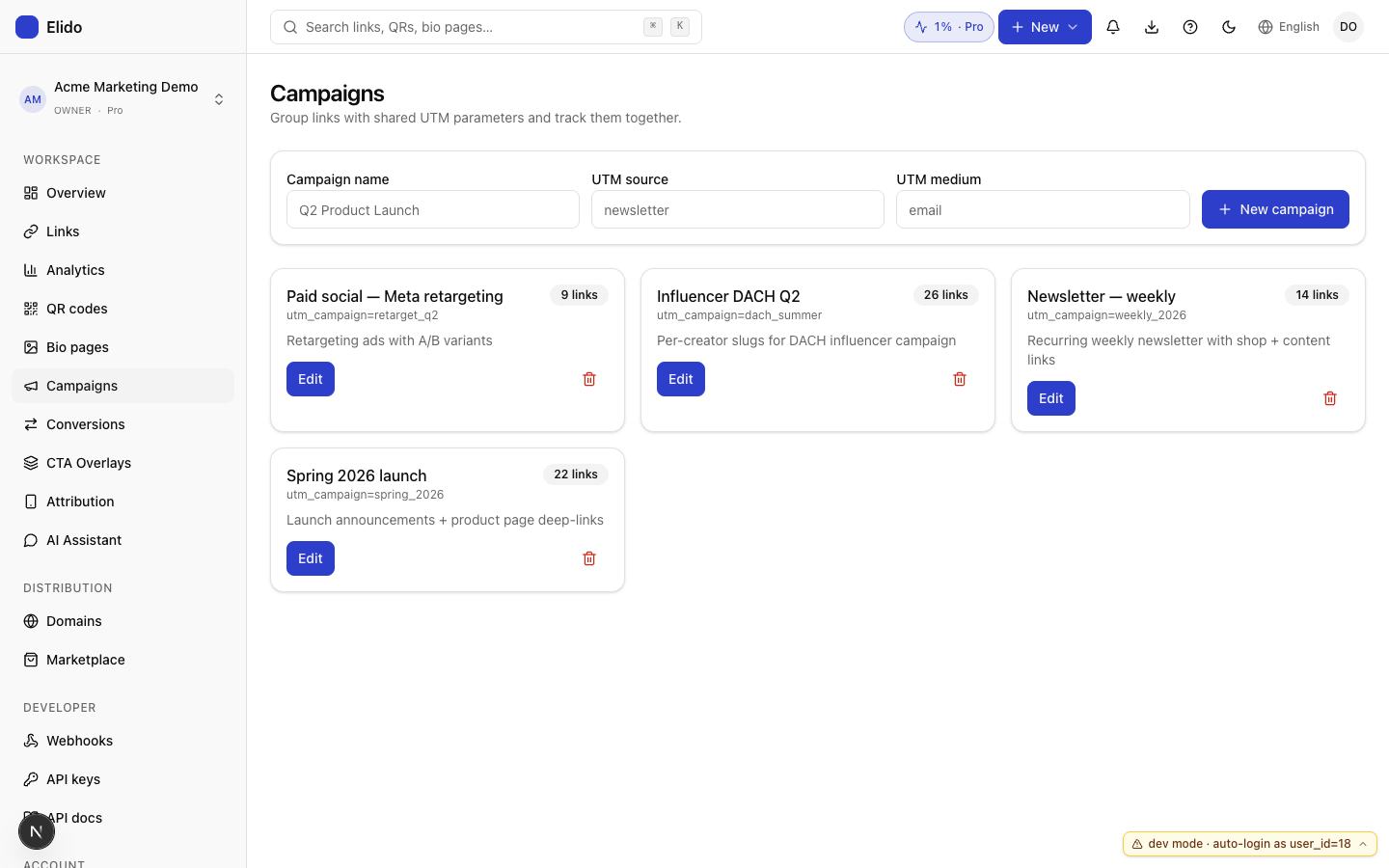
Después añade una plantilla de campaña. Las campañas heredan del workspace y sustituyen el subconjunto específico de la campaña:
curl -X POST \
  https://api.elido.app/v1/campaigns \
  -H "Authorization: Bearer $ELIDO_TOKEN" \
  -d '{
    "name": "Spring 2026 - DACH",
    "utm_template": {
      "utm_campaign": "spring_2026_dach",
      "utm_term":     "{{ audience.locale }}"
    }
  }'
Todo lo que no se define en la campaña cae por defecto a los valores del workspace. Este nivel doble de herencia cubre la mayoría de las estructuras organizativas reales: convenciones compartidas a nivel de workspace, anulaciones específicas de equipo o temporada a nivel de campaña. Si te encuentras queriendo un tercer nivel de herencia, eso es una señal de alarma: normalmente significa que dos campañas deberían ser una sola campaña con valores de placeholder más inteligentes.
Lo que renuncian las anulaciones por enlace: una anulación se dispara sin importar la plantilla. Lo que conservan: la anulación queda registrada en el registro de auditoría con actor + marca de tiempo + la diferencia entre lo resuelto y lo final. Dentro de seis meses, cuando alguien pregunte por qué un enlace de una campaña de 200 enlaces tiene utm_term=manual_override, podrás responder.
Importación masiva desde Sheets: el flujo que realmente usan los marketers
Los marketers no se pasan el día en curl. El brief de la campaña llega como una hoja de cálculo con URLs de destino y metadatos de campaña, la fecha límite de lanzamiento es el viernes, y la pregunta es cómo esa hoja de cálculo se convierte en 200 enlaces cortos sin que nadie escriba la misma cadena UTM 200 veces.
Los nombres de columna del CSV coinciden con los nombres de los placeholders de tu plantilla (sin distinguir mayúsculas y minúsculas). Las columnas que Elido no reconoce se descartan con una advertencia en vez de copiarse en silencio; esto es deliberado. La copia silenciosa es cómo terminas con utm_brand_color apareciendo en GA4 porque alguien añadió una columna para una nota interna.
destination_url,channel,medium,creative
https://shop.example.com/de,newsletter,email,hero_a
https://shop.example.com/fr,newsletter,email,hero_a
https://shop.example.com/de,paid_social,meta,carousel_v2
https://shop.example.com/fr,paid_social,meta,carousel_v2
Envíalo con POST como multipart:
curl -X POST \
  https://api.elido.app/v1/links/bulk \
  -H "Authorization: Bearer $ELIDO_TOKEN" \
  -F "csv=@launch_q2.csv" \
  -F "campaign_id=cmp_8a2f"
Dos cosas que este flujo de validación te da y que una interfaz de un enlace a la vez no:
- Confirmación de todo o nada. Una sola fila incorrecta aborta toda la subida y devuelve los números de línea infractores más el motivo;
row 47: unresolved variable {{ creative }}es un error mucho mejor que descubrir a las 4 de la tarde de un viernes que 47 de tus 200 enlaces resolvieron a una cadena de placeholder. - Vista previa antes del lanzamiento. La fila de vista previa de importación masiva del dashboard muestra la URL resuelta, incluyendo la cadena de consulta
utm_*renderizada, antes de confirmar. Mira el segundo enlace para asegurarte de que tu plantilla hizo lo que esperabas, y luego mira el último enlace para asegurarte de que las filas hacia el final del archivo no se desviaron. Dos vistazos, un minuto.
Si tu hoja de cálculo no tiene una forma estable (los órdenes de columna se barajan, las cabeceras se renombran), el endpoint de importación masiva va a resultar desagradable. La solución no está en nuestra herramienta; la solución es comprometerte con un esquema CSV para los briefs de tus campañas y tratar la desviación de esquema como un bug de proceso. Analizamos el patrón más amplio en la página de soluciones para marketers.
Reenvío de conversiones del lado del servidor a Meta CAPI y GA4
La atribución solo por píxel pierde entre un 20% y un 40% de las conversiones por Safari ITP, bloqueadores de anuncios y banners de consentimiento. La cifra varía según el sector (el ecommerce DTC ve el extremo alto del rango, el B2B SaaS el extremo bajo), pero toda medición que he visto tras iOS 14 sitúa la fiabilidad del píxel muy por debajo del 95% que las plataformas publicitarias asumen. El algoritmo de optimización recibe entradas más ruidosas y tu CPA parece peor de lo que es.
La documentación de la API de conversiones de Meta es explícita al respecto: los eventos del servidor son lo que quieres, el píxel del lado del navegador es el complemento. El Measurement Protocol de GA4 defiende lo mismo. Ambos protocolos aceptan la misma forma: un evento del lado del servidor con los detalles de la conversión, un event_id para deduplicación, e idealmente identificadores de usuario con hash para que las plataformas puedan unir la conversión a un visitante conocido.
La fontanería que cierra la brecha es mecánica. Tres pasos.
Paso uno: captura el click_id. Cada respuesta de redirección de Elido lleva una cabecera X-Elido-Click-Id. Los SDK de TS / Python / Go la exponen en el objeto de respuesta de redirección; el HTTP en crudo también funciona:
curl -sI https://elido.me/launch | grep -i click-id
# X-Elido-Click-Id: clk_01HYZ7T8WV6KQX3M
Guárdalo en una cookie propia en la página de destino (elido_click_id, TTL de 90 días: lo bastante largo para cubrir una evaluación típica de SaaS, lo bastante corto para satisfacer las directrices de ePrivacy). Léelo de nuevo en el checkout.
Paso dos: conecta los destinos. Configura con PUT las credenciales de las superficies a las que quieres reenviar. Cualquier subconjunto funciona; las superficies que falten se omiten en silencio:
curl -X PUT \
  https://api.elido.app/v1/workspaces/1/conversion-forwarding \
  -H "Authorization: Bearer $ELIDO_TOKEN" \
  -d '{
    "meta_capi": {
      "pixel_id": "1234567890",
      "access_token": "EAA…",
      "test_event_code": null
    },
    "ga4_mp": {
      "measurement_id": "G-ABC123",
      "api_secret": "abc_def_ghi"
    }
  }'
Mixpanel no es un destino de conversión. La integración de Mixpanel de Elido reenvía cada clic de enlace corto como un evento link_click, y la conectas por separado en Integrations.
Paso tres: envía la conversión con POST. Cuando se dispara el pedido, envía el evento con el click_id y los detalles del pedido. event_id es tu clave de idempotencia:
curl -X POST \
  https://api.elido.app/v1/conversions \
  -H "Authorization: Bearer $ELIDO_TOKEN" \
  -d '{
    "click_id":   "clk_01HYZ7T8WV6KQX3M",
    "event_name": "purchase",
    "event_id":   "ord_98231",
    "value":      89.00,
    "currency":   "EUR",
    "user": {
      "email":  "[email protected]",
      "phone":  "+4915123456789",
      "external_id": "cust_5128"
    }
  }'
Los campos de identidad del usuario se someten a hash SHA-256 antes de reenviarse a Meta y GA4; esto es lo que exigen ambas plataformas. El contexto UTM se extrae de la fila de clic que coincide con click_id, así que el evento reenviado lleva la atribución de campaña original aunque el usuario haya estado navegando por el sitio durante una hora antes de pagar. La mecánica completa, incluyendo la gestión de reembolsos y el interruptor del modelo de atribución multitoque, está en la guía de reenvío de conversiones.
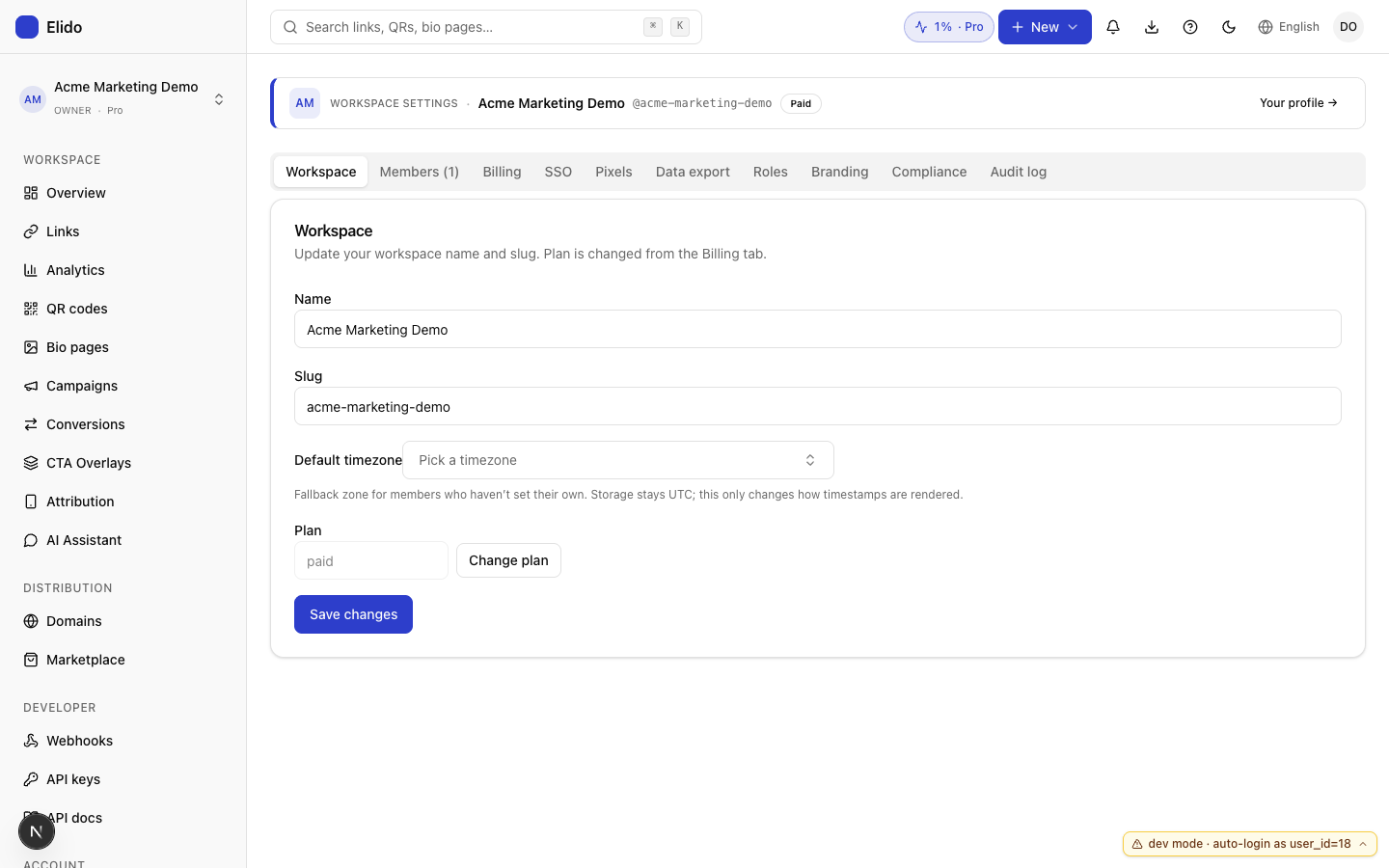
Esto cierra la mayor parte de la brecha. Queda un hueco residual (visitantes que bloquean la cookie de click_id, o que llegan por una vía que no es de Elido), pero para las campañas a las que de verdad diriges tráfico, has pasado de una "fiabilidad de píxel del 60-80%" a una "fiabilidad de servidor del 95% o más".
Tres casos límite que el registro de auditoría te salvará
Las plantillas y el reenvío gestionan el camino feliz. Los casos de abajo aparecen en la tercera semana de cualquier campaña no trivial, y la respuesta correcta a todos ellos vive en el registro de auditoría + el panel de conversiones, no en intentar diseñar una plantilla más elaborada.
Un caso que no está en esta lista porque no puedes resolverlo con una plantilla: un clic que llega sin referrer y con un parámetro de campaña que no configuraste tú. Eso es lo que envían los asistentes de IA, y rastrear tráfico de ChatGPT trata sobre qué hacer con él.
Reembolsos. Se disparó una conversión de compra, el cliente devolvió el artículo una semana después, y tus ingresos reportados ahora son un 8% demasiado altos. La solución es enviar con POST el mismo event_id con event_name: "refund". Meta y GA4 tratan esto como una conversión negativa contra la original. La razón por la que event_id está diseñado así: la idempotencia a nivel de id de evento significa que tampoco puedes contar el reembolso dos veces. El patrón completo está documentado en la sección de casos límite de la guía de reenvío de conversiones; los reembolsos, los reembolsos parciales y el crédito en tienda tienen cada uno una forma ligeramente distinta.
Click_id no encontrados. Se dispara una conversión con un click_id que no coincide con ningún clic conocido: una errata, expirado más allá de la retención, workspace equivocado. La conversión se sigue registrando contra el workspace pero se reenvía con contexto UTM vacío. Esto es intencional: la atribución de última instancia es más útil que descartar la conversión, y la marca click_id_unknown en el registro de auditoría te permite filtrar la porción sin atribuir al hacer informes. Si esa porción es mayor al 5% de las conversiones, algo va mal en cómo persistes el click_id en la página de destino, normalmente el atributo SameSite de la cookie o el alcance de la ruta.
Conversiones que llegan tarde. Una venta B2B SaaS se cierra 47 días después del clic original. La retención de clics por defecto de Elido es de 30 días, así que cuando se dispara la conversión, el clic ya expiró y estás en el caso de click_id no encontrado de arriba. Dos soluciones, según tu ciclo de ventas: sube la retención a 90 días en el workspace (plan Pro en adelante), o captura el click_id en un identificador propio de larga duración (la columna original_click_id del registro de tu cliente) para poder recuperarlo en el momento de la conversión aunque la cookie ya no exista. Hemos visto ambos patrones en producción.
El registro de auditoría muestra la diferencia entre el UTM resuelto y el final por enlace, el código de respuesta de reenvío por destino y por conversión, y el estado de unión entre click_id y conversión. Cuando el algoritmo de optimización retira presupuesto de una campaña que parece rendir mal, el registro de auditoría es lo que te permite decir "no, la campaña está bien; perdimos tres días de reenvío por un api_secret de GA4 rotado". Míralo.
El QA previo al lanzamiento: ensaya todo el pipeline
No dejes que la primera conversión que fluya por esto sea un comprador real. El coste de un ensayo de 30 minutos lo asumes tú por completo; el coste de un pipeline mal configurado lo asume el algoritmo de optimización retirando presupuesto de tu campaña con mejor rendimiento durante dos días antes de que te des cuenta. La asimetría es mala.
Tres pasos, en orden.
Ensayo de importación masiva. El endpoint de importación masiva acepta dry_run=true como parámetro de consulta. Ejecuta la validación, resuelve las plantillas y devuelve los enlaces que se crearían sin confirmarlos. Abre la respuesta en cualquier visor JSON; la URL resuelta de cada fila es visible. Revisa 3-5 filas al azar: el segundo enlace, el último enlace y cualquier fila que anulara los valores por defecto del workspace. Verifica que la cadena de consulta utm_* sea exactamente lo que dice el brief de tu campaña.
Modo de prueba del reenvío de conversiones. Meta CAPI acepta un parámetro test_event_code, que enruta el evento a la pestaña Test Events de Events Manager en lugar de a producción. Configúralo en la configuración de reenvío del workspace, envía entre 10 y 20 conversiones de muestra, y confirma que llegan. La misma idea para GA4: configura debug_mode: true en los eventos y verifica en DebugView. Ambos son en tiempo real. El objetivo no es comprobar de forma superficial que la API funciona; el objetivo es detectar un pixel_id mal configurado o un api_secret que se rotó y nunca se actualizó.
Prueba de humo de principio a fin. Haz clic en uno de tus enlaces cortos reales desde una sesión de navegador limpia. Observa el clic en el panel de clics recientes del dashboard de Elido. Finge que compraste algo: envía con POST una conversión purchase con ese click_id desde tu terminal. Confirma que la conversión aparece en Meta Test Events y en GA4 DebugView con el contexto UTM correcto adjunto. Todo el ciclo dura menos de 10 minutos una vez que lo has hecho una vez.
Después de que los tres pasen, quita el test_event_code, pon debug_mode: false, y lanza. El primer comprador real tendrá un pipeline limpio esperándolo.
Cuándo sí querrías un CDP
Plantillas más importación masiva más reenvío del lado del servidor te lleva la mayor parte del camino. Hay una clase de problemas donde no basta, y ahí recurrir a un CDP es la decisión correcta.
Unión de identidad entre dispositivos. Un visitante hace clic en un enlace desde el móvil, no convierte, vuelve desde el escritorio, se registra. Quieres que ambos toques se atribuyan a la misma persona. El seguimiento de UTM + click_id es a nivel de toque; la capa de identidad de usuario que convierte los dos toques en un solo recorrido es para lo que está construido un CDP (Segment, mParticle, RudderStack). Elido almacena hasta 30 días de clics por visitante y admite atribución de último toque / primer toque / basada en posición dentro de esa ventana, pero la unión entre dispositivos necesita un grafo de identidad que deliberadamente no operamos.
Personalización en menos de 100 ms. Si estás renderizando la página de destino según los toques previos del visitante en tiempo real (extrayendo la cohorte de un feature store y variando el titular principal), necesitas la resolución de identidad cerca del renderizado. Eso es terreno de un CDP o, más a menudo, una plataforma de experimentación como PostHog o LaunchDarkly montada encima.
Atribución multitoque a escala. El último toque es suficiente para la mayoría de las campañas. Si tu ciclo de ventas tiene seis toques a lo largo de cuatro meses y de verdad necesitas acreditar cada uno, estás en el terreno donde la atribución por cadena de Markov o por valor de Shapley empieza a importar. Elido hace último toque / primer toque / basado en posición; cualquier cosa más sofisticada quiere una herramienta con un grafo de identidad propio y una capa de modelo.
Para todo lo demás, y "todo lo demás" es la mayoría de los equipos de marketing con los que he trabajado, el patrón de plantillas + importación masiva + reenvío del lado del servidor es suficiente. Configura la plantilla del workspace una vez, la plantilla de campaña por cada lanzamiento, la configuración de reenvío una vez por cada integración de plataforma, y ejecuta el ensayo antes de cada lanzamiento. Si haces las cuatro cosas, tendrás un pipeline de UTM más ajustado que el 80% de los equipos de marketing que he auditado.
Constrúyelo una vez, ensáyalo antes de cada lanzamiento, y pasa a la siguiente campaña.
Relacionado en el blog
- Parámetros UTM explicados: las cinco etiquetas y cómo funcionan
- Seguimiento del lado del servidor de GA4 a través del nivel de redirección
- Atribución sin cookies explicada: qué sigue funcionando en 2026
- Importación masiva de enlaces cortos desde una hoja de Google (el flujo de campaña real)
- Atribución de clics después de Safari ITP: qué sigue funcionando en 2026
- Cómo rastrear clics en enlaces: qué puedes y qué no puedes ver
- Constructor de UTM gratuito: crea URLs de campaña rastreables
- Qué es el CTR y cómo mejorarlo
Prueba Elido
Pega una URL, obtén un enlace corto
Sin registro. El enlace vive 30 días. Crea una cuenta para conservarlo.
Gratis, sin registro · 2 por día