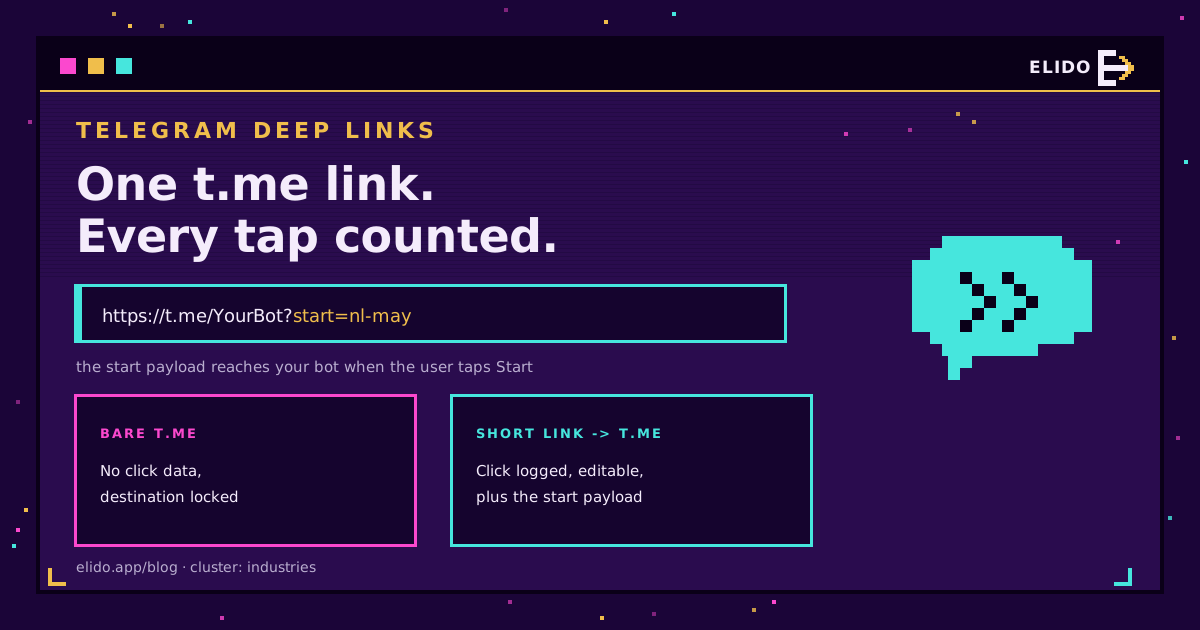
Un deep link de Telegram es una dirección web t.me que abre un chat, canal, grupo o bot específico al tocarlo, opcionalmente con un parámetro que recibe tu bot. Las formas habituales son https://t.me/username para abrir un chat, https://t.me/username?text=Hi para abrirlo con un borrador prellenado, y https://t.me/YourBot?start=payload para abrir un bot y entregarle un payload. Tocas el enlace, Telegram se abre en el lugar correcto, y para un bot el payload llega del lado del servidor.
Esa última parte es lo que hace a Telegram diferente de la mayoría de los canales de mensajería. WhatsApp no te dice qué anuncio generó un toque en wa.me. Los bots de Telegram sí: el payload ?start= se entrega a tu bot cuando el usuario inicia, así que la atribución puede venir incorporada en el propio enlace. Para los enlaces simples de chat y canal todavía necesitas una redirección delante para ver el clic, del mismo modo que con cualquier deep link de mensajería. Este artículo cubre ambos casos.
Los patrones de enlace t.me
Hay una familia de direcciones y unos pocos parámetros. Telegram los documenta en la referencia de deep links (consultado el 2026-07-18).
- Abrir un chat o canal:
https://t.me/username. Funciona para nombres de usuario públicos, canales y grupos. Este es el enlace que pones en una bio o una firma de email. - Prellenar un borrador:
https://t.me/username?text=Hello%20Acme. El mensaje se codifica como URL y llega a la caja de borrador. El usuario toca enviar, Telegram no lo envía por él. - Abrir un bot con un payload:
https://t.me/YourBot?start=spring-promo. Telegram abre el bot, muestra el botón Iniciar, y al tocarlo entregaspring-promoal bot en el comando/start. - Añadir al usuario a un grupo mediante un bot:
https://t.me/YourBot?startgroup=payload. La misma idea, orientada a la configuración de grupos en lugar de a un chat privado.
El esquema tg:// (tg://resolve?domain=username) existe pero es frágil. Los navegadores y las webviews dentro de apps bloquean o eliminan los esquemas personalizados, así que un enlace tg:// impreso falla más de lo que funciona. Usa t.me, que es una URL https normal que se resuelve limpiamente y puede ponerse detrás de un enlace corto. La mecánica de por qué t.me llega a enrutar hacia la app es la nativa del sistema operativo descrita en deep links sin un SDK.
Por qué el parámetro de inicio es la ventaja de atribución
La mayoría de los canales de click-to-chat son de una sola vía: el toque abre la conversación y no te dice nada. Los bots de Telegram rompen ese patrón porque el payload ?start= se entrega al código de tu bot. Facebook Messenger hace lo mismo con su parámetro ref; WhatsApp es el que se queda callado. Telegram lo limita a 64 caracteres y solo permite letras, números, guiones y guiones bajos, y recomienda base64url si necesitas empaquetar datos estructurados, según la documentación de deep linking de bots.
Así que el payload puede llevar una etiqueta de campaña, un id de referente o un id de registro codificado. Cuando el usuario toca Iniciar, tu bot lo lee y sabe que el clic vino, digamos, de la newsletter de mayo y no de la publicación fijada del canal. Sin píxel, sin acrobacias de webhooks, sin leer etiquetas del cuerpo de un mensaje. La señal está en el /start que tu bot ya gestiona.
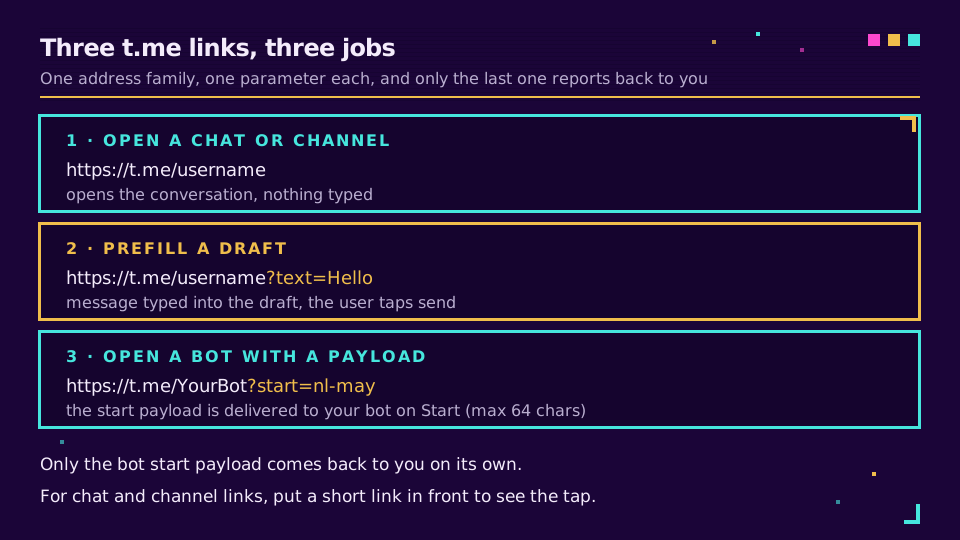
El límite importa. Sesenta y cuatro caracteres bastan para nl-may-hero o un id base64url corto, no para una cadena UTM completa. El patrón que escala es un id compacto en ?start=, con los datos de campaña legibles almacenados contra ese id en tu propio sistema.
La capa de redirección
Para los enlaces de chat y canal, y para unificar el rastreo en todas las superficies de Telegram, pon un enlace corto delante de la URL t.me. El cliente toca s.elido.me/tg, tu edge registra el clic, y después redirige a https://t.me/YourBot?start=nl-may. Desde el lado del cliente, el flujo es idéntico a tocar t.me directamente.
Desde tu lado, tres cosas cambiaron:
- El clic queda registrado. La redirección dispara un evento con marca de tiempo, geo, dispositivo y los parámetros UTM que llegaron en el enlace corto, así que el Start que tu bot registra un segundo después se puede vincular a una campaña específica.
- El destino es editable. Cambia el nombre de usuario del bot, el canal o el payload
?start=sin reimprimir un QR ni editar un anuncio activo. Si mueves una campaña de un bot a otro, cambias el destino una sola vez. - Los datos de campaña son portables.
s.elido.me/tg?utm_source=email&utm_medium=newsletter&utm_campaign=maycaptura las etiquetas en la redirección aunquet.meignore las cadenas de consulta que no reconoce.
Esta es la misma capa descrita en rastrear campañas UTM de principio a fin, y es exactamente el enfoque que usa la guía de click-to-chat de WhatsApp para wa.me. Telegram solo te da una segunda señal encima a través del payload del bot.
Si quieres enlaces de Telegram editables y medibles sin construir la redirección tú mismo, los deep links de Elido se sitúan delante de cualquier destino t.me y registran cada toque. Puedes configurar uno en el plan gratuito.
Una configuración práctica
Tres enlaces cortos cubren la mayoría de los flujos de Telegram:
- Enlace general:
s.elido.me/tga tu bot o canal principal, usado en el pie de página del sitio, la bio y la firma de email. Captura el tráfico entrante genérico. - Enlace de campaña: uno por campaña activa,
s.elido.me/tg-may-nl, apuntando al mismo bot con un payload?start=específico de la campaña. Se usa en el anuncio o newsletter concreto. - Enlace impreso en QR:
s.elido.me/tg-shoppara colocaciones físicas, con un payload que nombra la colocación para que tu bot salude a quien escanea con contexto.
Cada enlace se asocia a una plantilla UTM y una etiqueta descriptiva como surface:newsletter · channel:telegram · campaign:may. Configúralos en /links y las etiquetas alimentan los filtros en analítica. Filtra por channel:telegram para ver cada toque impulsado por Telegram en todas las campañas.
La salvedad del mensaje prellenado
El borrador ?text= es un recorte de fricción genuino: el cliente llega al chat con un mensaje ya escrito y solo tiene que tocar enviar. Pero Telegram nunca lo envía automáticamente, y eso es deliberado. Un enlace que pudiera enviar un mensaje en silencio en tu nombre sería un vector de spam, así que Telegram exige el toque. Redacta el prellenado para que el toque se sienta natural, y no construyas un flujo que dependa de que el mensaje se envíe antes de que el usuario actúe.
Para los bots, no hay ningún borrador visible en absoluto. El payload ?start= es invisible para el usuario y se entrega directamente al bot, lo cual es más limpio para el rastreo porque no hay ningún id de seguimiento incómodamente presente en un mensaje que el cliente pueda ver.
Superficies de código QR
Una gran parte del tráfico de click-to-chat de Telegram proviene de escaneos, no de toques web. Alguien está en una tienda, en un evento o sosteniendo un folleto, y escanea un código que abre tu bot o canal. De impreso a conversación es uno de los usos más sólidos del patrón enlace-corto-y-después-t.me.
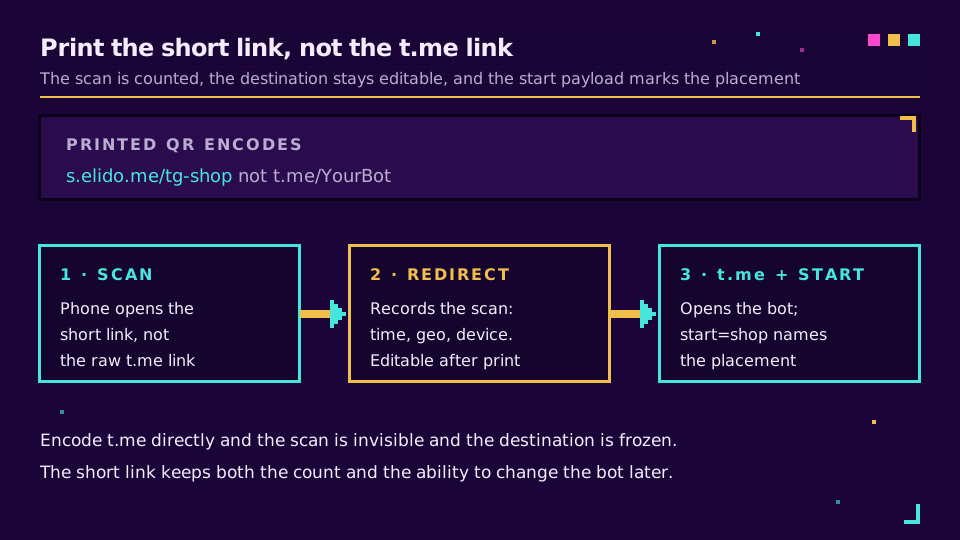
Dos reglas mantienen útil la tirada impresa:
- El QR codifica
s.elido.me/<slug>, nuncat.me/...directamente. Codificart.mebloquea el destino, mata la analítica de escaneos y desperdicia la tirada impresa si el bot o el canal cambian. - Cada colocación recibe su propio enlace corto y su propio payload
?start=, de modo que el código del escaparate, el del folleto y el del empaque son filas separadas que puedes comparar. Las consideraciones de diseño como la zona de silencio, el contraste y la corrección de errores son las mismas que en cualquier colocación, cubiertas en códigos QR dinámicos vs estáticos.
Qué no funciona
Tres patrones que parecen razonables y fallan:
Codificar el enlace t.me en bruto en un QR o anuncio. Sin datos de clics, sin control del destino, y un activo muerto el día que cambie el nombre de usuario. Imprime siempre el enlace corto.
Meter una cadena UTM en ?start=. El límite de 64 caracteres y el conjunto de caracteres restringido la truncarán o la rechazarán. Usa un id corto y resuélvelo a los datos completos de campaña en tu lado.
Depender de tg:// para cualquier cosa impresa o compartida. Los esquemas personalizados son bloqueados por navegadores y webviews dentro de apps, así que el enlace falla para una parte de los usuarios sin alternativa. Mantén tg:// interno y enruta el camino público a través de t.me detrás de un enlace corto, con enrutamiento inteligente gestionando cualquier alternativa por dispositivo del modo en que lo hacen los smart links.
Telegram es el canal poco frecuente donde el deep link puede llevar la atribución por sí solo. Combina el payload ?start= del bot con una redirección delante, y obtienes tanto el clic como el Start, vinculados a la campaña que los generó.
Relacionado en el blog
- Enlaces de click-to-chat de WhatsApp con rastreo
- Enlaces de Click to Messenger con rastreo
- Qué es un deep link, y en qué se diferencia de un enlace normal
- Deep links para apps móviles sin un SDK
- Rastrear campañas UTM de principio a fin con enlaces cortos
- Smart links explicados: un enlace, muchos destinos
Preguntas frecuentes
¿Cómo creo un deep link de Telegram?
Toma la dirección t.me de tu cuenta, canal, grupo o bot y añade un parámetro. Para un bot, https://t.me/YourBot?start=payload abre el bot y le envía el payload cuando el usuario toca Iniciar. Para una persona o canal, https://t.me/username abre el chat, y añadir ?text= prellena un mensaje en borrador. Codifica el mensaje y mantén el payload de inicio en 64 caracteres usando solo letras, números, guiones y guiones bajos.
¿Qué es el parámetro de inicio en un enlace de Telegram?
El parámetro de inicio es una cadena corta en un deep link de bot, escrita como ?start=payload. Cuando alguien abre https://t.me/YourBot?start=payload y toca Iniciar, Telegram entrega ese payload a tu bot en el mensaje /start. Tu bot lo lee y puede saludar al usuario, desbloquear contenido o registrar de dónde vino el clic. Es el único canal de mensajería donde la atribución viene incorporada en el enlace en lugar de añadida después.
¿Puedo prellenar un mensaje de Telegram?
Sí, para un enlace de persona o canal. https://t.me/username?text=Hello abre el chat con Hello escrito en el borrador. El mensaje no se envía automáticamente, el usuario tiene que tocar enviar, lo cual es una característica de seguridad de Telegram, no un fallo. Los enlaces de bot usan ?start= en lugar de ?text=, y el bot recibe el payload en silencio en lugar de mostrarlo como un borrador.
¿Se pueden rastrear los clics en un enlace t.me?
Un enlace t.me sin más no te da ningún dato de clics, porque Telegram no te reporta el toque de vuelta. Pon un enlace corto delante: el cliente toca tu enlace corto, la redirección registra el clic con hora, dispositivo y etiquetas de campaña, y después reenvía a t.me. Para los bots, el payload ?start= añade una segunda señal, del lado del servidor, que tu bot puede registrar cuando el usuario realmente inicia.
¿Cuál es la diferencia entre los enlaces t.me y tg://?
t.me es una dirección web https normal que Telegram resuelve y abre en la app, lo que hace seguro imprimirla, compartirla y ponerla detrás de un enlace corto. tg:// es una URL de esquema de app en bruto que solo funciona si Telegram está instalado y puede ser bloqueada o eliminada por navegadores y apps. Usa t.me para todo lo orientado al cliente, y trata tg:// como mucho como una alternativa interna.
Prueba Elido
Pega una URL, obtén un enlace corto
Sin registro. El enlace vive 30 días. Crea una cuenta para conservarlo.
Gratis, sin registro · 2 por día
Seguir leyendo
- IntegracionesAlertas de Discord para acortador de URL: configuración de Telegram, payloads, errores comunes
- IndustriasCódigo QR para recogida de datos: formularios e inventario
- IndustriasCódigos QR para banca: casos de uso, riesgos y controles
- IndustriasCódigos QR para hoteles: un código dinámico por cada momento del huésped