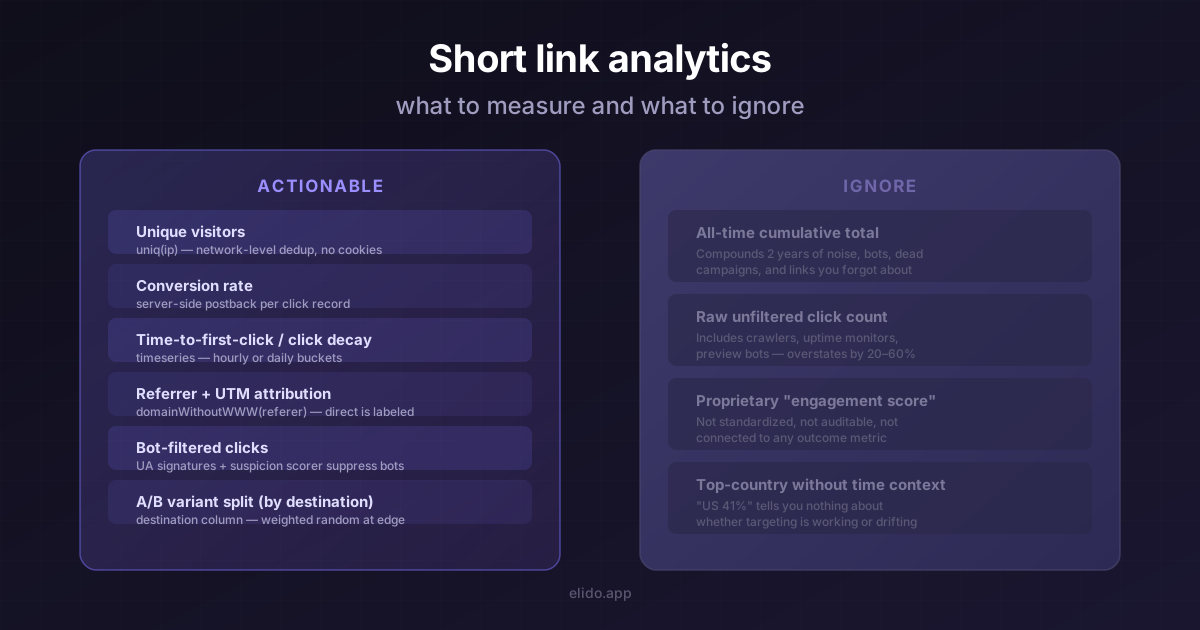
La mayoría de los dashboards de acortadores de URL abren con un número - generalmente uno grande. Clics totales desde la creación, mostrados en una insignia lo suficientemente grande como para capturar en una pantalla. Ese número está ahí porque es fácil de producir y satisfactorio de ver. También es casi imposible de accionar.
Esta publicación trata sobre las métricas que vale la pena medir, las que ignorar y un breve ritual semanal que permite a un solo marketer extraer señal real de una biblioteca de enlaces de cualquier tamaño.
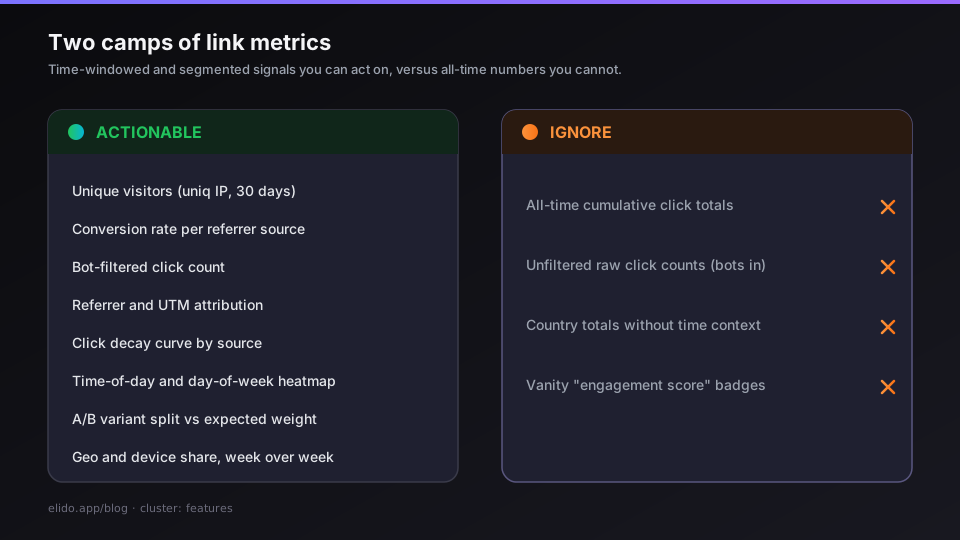
Los dos campos: vanidad versus accionable
El campo de la vanidad contiene cualquier métrica que agregue a lo largo de todo el tiempo sin contexto. "Clics totales: 48.230" te dice que un enlace existe y que la gente lo ha seguido. No te dice si esos clics ocurrieron la semana pasada o se extendieron a lo largo de dos años, si vinieron de visitantes reales o de crawlers de motores de búsqueda y monitores de uptime, si alguno de ellos convirtió en lo que realmente quieres, o si el volumen de clics está creciendo o colapsando.
El campo accionable contiene métricas limitadas por una ventana de tiempo, segmentadas a un nivel significativo, y adjuntas -por más laxamente que sea- a un resultado descendente. "Visitantes únicos desde búsqueda orgánica en Alemania, últimos 30 días, y qué fracción hizo clic de nuevo en siete días" es una pregunta diferente a "clics totales de todo el tiempo". La primera tiene una respuesta que puede cambiar tu próxima decisión. La segunda mayormente confirma que has estado ejecutando un enlace durante un tiempo.
Si estás empezando desde cero, cómo rastrear los clics en un enlace explica qué registra un enlace de seguimiento antes de que decidas a cuál de esos números hacerle caso. La distinción importa porque los dashboards que lideran con números de vanidad te entrenan para ignorar tu analítica. Compruebas el total, sientes algo en la dirección vaga de satisfacción o alarma, y cierras la pestaña. Los dashboards que vale la pena abrir cada semana lideran con métricas con ventana de tiempo que responden preguntas operativas específicas.
Métricas que vale la pena rastrear
Clic versus clic único
Cada evento de clic registrado en la capa de redirección tiene una dirección IP adjunta. Los recuentos de visitantes únicos -la agregación uniq(ip) en las consultas de analítica de Elido- colapsan todas las solicitudes desde la misma dirección de red en un solo visitante. Una sola persona que hace clic en tu enlace cuatro veces en un día es un visitante; cuatro personas separadas que hacen clic una vez cada una también son cuatro visitantes, pero tienen señales diferentes.
La proporción de clics totales a visitantes únicos es tu tasa de engagement repetido. Un enlace con 1.000 clics y 950 visitantes únicos no tiene casi tráfico repetido - la mayoría de la gente hizo clic una vez y se fue. Un enlace con 1.000 clics y 300 visitantes únicos tiene un engagement repetido significativo: algo está trayendo a la gente de vuelta. Si eso es deseable depende enteramente del caso de uso. Para un flujo de onboarding, los clics repetidos pueden significar que los usuarios están confundidos. Para una serie de contenido, pueden significar que el enlace ha sido marcado como favorito.
Una nota sobre el encuadre "conteo sin cookies" que aparece en muchos materiales de marketing de analítica: el conteo único de Elido usa la dirección IP como identificador (una agregación uniq(ip) en la capa de consultas de analítica). Esto no es un fingerprint cross-sesión - es una heurística más burda a nivel de red. Dos personas detrás del mismo NAT contarán como un visitante; la misma persona en móvil y escritorio contará como dos. Para atribución a nivel de campaña es una aproximación razonable. Para resolución de identidad a nivel individual no lo es.
Desglose geográfico y de dispositivo
Las consultas de desglose -ByCountry, ByDevice, ByBrowser en la API de analytics- responden a una pregunta operativa: ¿coincide tu tráfico con la audiencia esperada para este enlace?
Si ejecutaste una campaña de email dirigida a Alemania y el desglose geográfico muestra 80% de tráfico desde fuera de Alemania, o el email fue reenviado, el enlace fue compartido en redes sociales en un mercado diferente, o tu segmentación estaba mal. Si un enlace destinado a un flujo de checkout móvil muestra 40% de tráfico de escritorio, alguien lo está enviando a usuarios de escritorio, y la experiencia en el otro extremo puede no estar diseñada para ellos.
Los datos del dispositivo también son útiles para diagnosticar campañas de códigos QR específicamente. Una campaña QR desde una colocación impresa debería mostrar tráfico casi 100% móvil. Tráfico significativo de escritorio desde un enlace QR significa que el código se está encontrando digitalmente - en un email, en un sitio web, en una captura de pantalla compartida- no escaneado desde medios físicos.
Los datos geo en Elido se resuelven a código de país en el momento de la redirección desde la IP completa, que luego se descarta antes de que el evento se persista. El registro almacenado contiene solo el código de país ISO-3166, no la IP completa. Los datos a nivel de ciudad no están disponibles en el esquema actual.
Atribución por referrer y UTM
El desglose por referrer (ByReferrer) agrupa los clics por la parte del host de la cabecera Referer. Esto te dice qué sitios y aplicaciones están enviando tráfico a tu enlace - no qué campaña pretendías ejecutar, sino qué fuentes de tráfico están realmente activas.
El tráfico directo (sin referrer) es el cubo único más común y el menos informativo. En la práctica es una mezcla de: personas que escribieron o pegaron la URL directamente, tráfico de apps que eliminan las cabeceras de referrer (la mayoría de las apps móviles nativas, clientes de email, apps de mensajería), y el residuo de la atribución que se cae en tránsito.
Los parámetros UTM se asientan en la URL de destino en lugar de en el enlace corto en sí. La redirección los pasa intactos: s.elido.me/spring → https://shop.example.com/spring?utm_source=email&utm_medium=newsletter. Tu plataforma de analítica lee los UTMs de la URL de la página de aterrizaje, no del acortador. El desglose por referrer del acortador te dice de dónde vienen los clics antes de la página de destino; los datos UTM de la página de destino te dicen qué campaña los envió.
La combinación es donde se cierra la atribución. El referrer del acortador confirma que un clic ocurrió; los parámetros UTM en el destino confirman qué campaña lo reclamó. Si ves clics en el log de referrer del acortador desde mail.google.com pero no hay sesiones correspondientes atribuidas por UTM en tu plataforma de analítica, la página de destino está perdiendo los valores UTM - generalmente por una redirección entre la URL de la página de aterrizaje y el destino real, o por un banner de consentimiento que restablece la sesión.
Patrones de hora del día y día de la semana
El endpoint heatmap devuelve recuentos de clics agrupados por hora del día (0-23) y día de la semana (lunes a domingo). Para la mayoría de los tipos de campaña, esta es la visualización única más útil del stack de analítica.
El patrón te dice cuándo está activa tu audiencia en el contexto donde encuentran tu enlace. Los enlaces de boletín alcanzan su pico la mañana en que se envió el email y de nuevo dos o tres días después cuando la gente trabaja a través del backlog de su bandeja de entrada. Los códigos QR en displays de retail alcanzan su pico el sábado a la hora del almuerzo. Los enlaces de redes sociales alcanzan su pico por la noche entre semana y se estabilizan durante el fin de semana. Las ofertas con tiempo limitado -"venta flash de 48 horas"- producen un pico agudo y un acantilado.
El uso práctico es la programación. Si estás escribiendo copy para un boletín que incluye un enlace corto, saber que tu lista lee el martes por la mañana significa que enviar el lunes por la noche a las 9pm no es una intuición, es un patrón que has visto en el heatmap de clics tres veces.
Para campañas donde el destino cambia o donde quieres probar diferentes páginas de aterrizaje en diferentes momentos, el smart routing de Elido admite reglas de hora del día a nivel de enlace. Un enlace puede enrutarse a diferentes destinos antes y después de una hora dada en un día dado. El heatmap te dice dónde está el pico; la regla de enrutamiento te permite actuar sobre él sin reimprimir ni reenviar.
Tracking de conversiones y pixels server-side
El volumen de clics es un indicador adelantado; una conversión es el evento que realmente importa. Los dos están relacionados pero a menudo poco correlacionados. Un enlace con pocos clics y un 40% de tasa de conversión es más valioso que un enlace con muchos clics y un 2% de tasa de conversión.
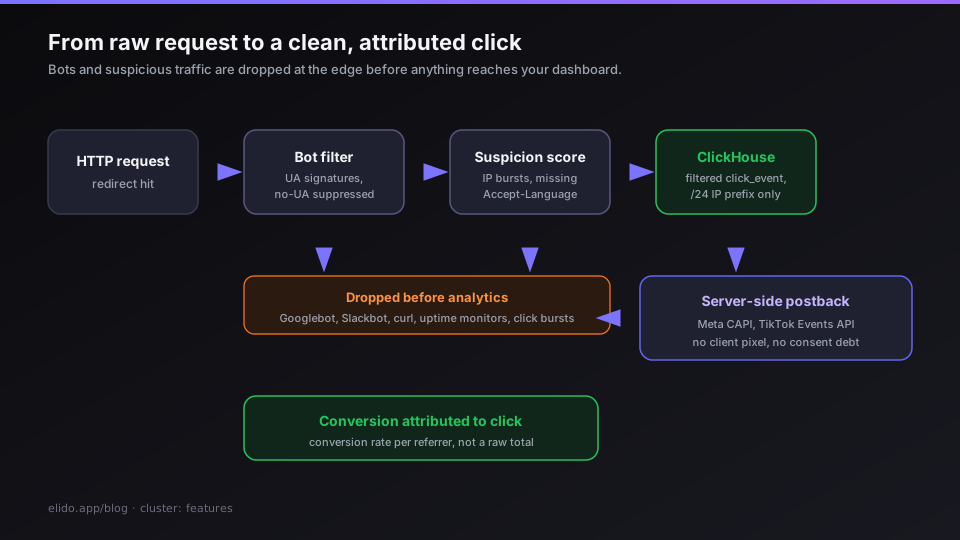
El tracking de conversiones de Elido conecta un registro de clic a un evento descendente a través de un postback. Una compra, envío de formulario o instalación de app en la página de destino dispara una llamada servidor-a-servidor que vincula el resultado al clic originador. Esto se hace del lado del servidor para evitar la pérdida de atribución que viene de ITP de Safari eliminando cookies en redirecciones cross-site.
La configuración de pixel en services/click-ingester/internal/pixels/pixels.go admite Meta CAPI y TikTok Events API. Las credenciales se registran una vez a nivel de workspace; el click-ingester dispara la llamada de API de conversión de la plataforma para cada evento de clic cualificado sin requerir ningún script del lado del cliente en la capa de redirección. La distinción importa: una redirección que inyecta un pixel en el navegador antes de entregar la URL de destino crea una obligación de consentimiento GDPR; una llamada servidor-a-servidor basada en datos que el usuario ya ha compartido con la plataforma de destino es arquitectónicamente diferente. La guía del acortador amigable con GDPR cubre esta distinción en más detalle.
Para tasas de conversión en el dashboard de analytics, la métrica útil no es el recuento absoluto de conversiones sino la tasa de conversión por fuente de referrer. Si el 8% de los visitantes que hicieron clic desde tu boletín de email convirtieron pero solo el 1,2% de los visitantes que encontraron el enlace a través del compartido social convirtieron, la lista de email está impulsando tráfico cualificado y la audiencia social no. Esa es una decisión sobre dónde invertir en la próxima campaña, no una nota al pie.
Conteos filtrados de bots versus brutos
Cada número de analítica que ves en el dashboard de Elido está filtrado de bots por defecto. El servicio edge-redirect ejecuta detección de User-Agent antes de decidir si emite un evento de clic al stream de Kafka. La detección de bots en services/edge-redirect/internal/bot/bot.go coincide contra una lista de firmas de crawlers conocidos -Googlebot, Bingbot, Slackbot, Discordbot, monitores de uptime, curl, wget, librerías de scripting- y suprime el evento de clic para cualquier cosa que coincida. Las solicitudes sin User-Agent también se suprimen.
Una capa separada de puntuación de sospecha en el edge marca el tráfico de aspecto humano pero incierto -solicitudes que carecen tanto de User-Agent como de Accept-Language, ráfagas de clics por IP por encima de un umbral de tasa- con una bandera is_suspicious que se propaga al esquema de analítica como is_suspicious y suspicion_reasons. Las consultas de analytics por defecto filtran las filas sospechosas.
La implicación práctica: si ejecutas un enlace a una página que rankea en la búsqueda de Google, el recuento de clics en el dashboard de tu acortador será mucho más bajo que el recuento de impresiones en Search Console. Todas las solicitudes de verificación de Googlebot - y hay muchas - se filtran antes de que lleguen a tu analítica. El recuento de clics de tu acortador está más cerca de un recuento de redirecciones humanas que de un recuento de solicitudes HTTP brutas. Este es el denominador correcto para los cálculos de tasa de conversión.
Los recuentos brutos que incluyen tráfico de bots pueden sobreestimar el volumen de clics en un 20-60% dependiendo del tipo de enlace. Los enlaces usados en email con URLs cortas planas y los enlaces incrustados en contenido web abierto atraen perfiles de crawlers muy diferentes. "Clics totales" que incluyen bots no son una métrica significativa para ninguna decisión.
Rendimiento de variantes A/B
Cuando un enlace tiene múltiples variantes de destino, el edge de Elido selecciona entre ellas en el momento de la redirección usando selección aleatoria ponderada (o rotación round-robin donde está configurada). La URL de destino seleccionada se registra en la columna destination de la tabla click_events.
La consulta de desglose ByDestination agrupa los recuentos de clics por la URL de destino resuelta. Para un enlace con dos variantes - variante A al 50% de peso y variante B al 50% de peso - el desglose de destino muestra cuántos clics reales recibió cada variante. A lo largo de unos pocos cientos de clics, la distribución debería aproximarse al 50/50; la desviación del peso esperado es en sí misma una señal (un sesgo extremo puede indicar un patrón de clics pesado en bots contra una variante).
Conectar el rendimiento de la variante con los resultados de conversión requiere datos de postback de la página de destino, pero incluso sin ello, los recuentos de clics con ventana de tiempo por destino pueden indicar engagement: si la variante A genera un 10% más de clics que la variante B en un split 50/50, una explicación posible es que la página de aterrizaje de la variante A se está compartiendo o marcando como favorita a una tasa más alta (gente volviendo a la URL de destino directamente), que es una señal sobre la calidad del contenido independiente de la conversión.
Curva de decaimiento de clics
La curva de decaimiento de clics - clics por día representados desde el día en que se creó un enlace - tiene una forma característica para cada tipo de fuente de tráfico.
Los enlaces de email pican bruscamente en la fecha de envío y decaen en 48-72 horas a casi cero. Los compartidos orgánicos en redes sociales pican el día de la publicación y se sostienen a un nivel más bajo durante varios días a medida que la publicación recircula por diferentes zonas horarias. Los enlaces que apoyan el SEO que rankean para una consulta se construyen lentamente y se sostienen a un nivel aproximadamente plano hasta que el ranking cambia. Los códigos QR en materiales físicos muestran tráfico base bajo pero persistente que refleja la circulación continua del artefacto físico.
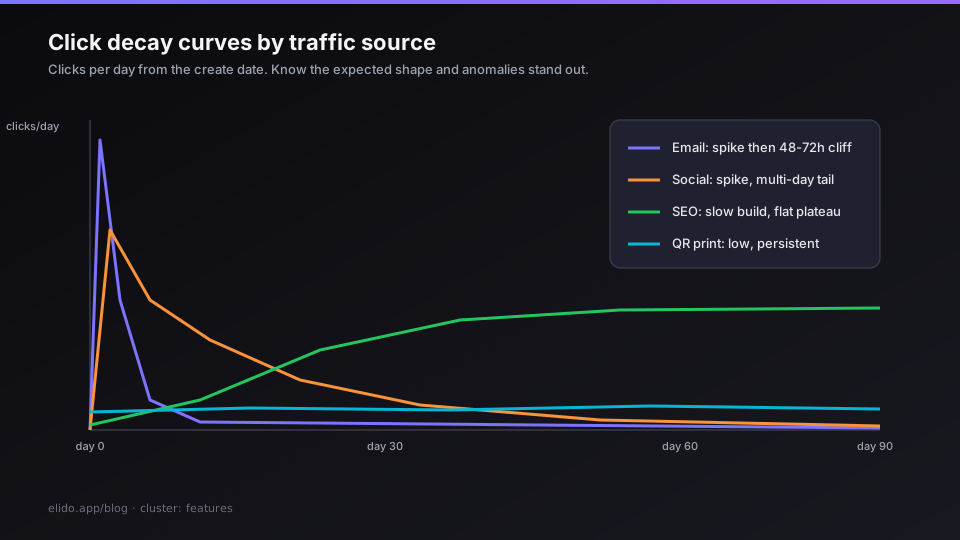
Conocer la forma de decaimiento esperada para un tipo de enlace te permite detectar anomalías. Un enlace de email que muestra un segundo pico 10 días después de la fecha de envío fue o reenviado a escala, mencionado en otra publicación, o recogido por un agregador. Un enlace QR en el empaquetado que muestra una caída brusca en una fecha específica puede indicar una retirada de producto, una liquidación de retail o un cambio de canal de distribución.
El endpoint timeseries en la API de analytics (/workspaces/{id}/timeseries) admite tanto buckets horarios como diarios. Para el análisis de decaimiento, los buckets diarios sobre una ventana de 90 días dan la forma de la curva claramente. Los buckets horarios son útiles para las primeras 72 horas de una campaña donde el patrón intradía importa (optimización del tiempo de envío de email, por ejemplo).
Qué ignorar
Totales acumulados de todo el tiempo. Un contador que ha estado incrementándose durante dos años te habla de tu historia, no de tu rendimiento actual. También compone todo el ruido - tráfico de bots de antes de que tuvieras filtrado de bots configurado, tráfico de campañas de enlaces que ya no están activos, enlaces experimentales que creaste y olvidaste. Corta la ventana de tiempo a los últimos 30 días y el número se convierte en una métrica de ciclo de campaña. Mantén la insignia "todo el tiempo" en tu dashboard y casi con certeza la ignorarás excepto cuando quieras mostrarle a alguien un número grande.
Recuentos de clics brutos sin filtrar. Cualquier métrica que incluya tráfico de bots y crawlers está midiendo tu exposición al tráfico automatizado de internet, no el comportamiento de tu audiencia. Si tu dashboard ofrece un toggle "bruto" versus "filtrado", usa filtrado para todas las decisiones operativas. Los datos brutos pertenecen a tu data warehouse para depurar problemas de infraestructura de enlaces, no a tu pantalla de revisión semanal.
Totales de país sin contexto temporal. "País principal: Estados Unidos (41%)" es dato. "La cuota de Estados Unidos creció del 28% al 41% en las últimas dos semanas, mientras que la cuota de Alemania cayó del 35% al 22%" es señal. El ranking absoluto del país principal en un punto en el tiempo te dice aproximadamente nada sobre si tu segmentación está funcionando o cambiando.
Puntuaciones de engagement estilo social. Algunas plataformas producen una "puntuación de engagement" propietaria o "índice de salud del enlace" que combina múltiples señales en un solo número. Estas puntuaciones no están estandarizadas entre plataformas, no son auditables y no están conectadas a ninguna métrica de resultado en tu stack. Son cosméticos del dashboard. Las señales subyacentes - tasa de clics, fracción de visitantes únicos, distribución de referrer - son los datos reales.
Nota sobre GDPR: medir sin almacenar IPs completas
Cada métrica en esta publicación puede producirse sin almacenar una dirección IP completa. La resolución geo, la detección de bots y el rate-limiting todos se ejecutan en el momento de la redirección sobre la IP completa. La IP completa se descarta antes de que el evento se escriba en el almacén de analítica. Lo que persiste es el prefijo de red /24 para IPv4 y /48 para IPv6 - suficiente para la aproximación uniq(ip) en recuentos de visitantes únicos, insuficiente para identificar a un individuo.
Este es el comportamiento por defecto, no un opt-in. No necesitas configurar el truncado de IP en la configuración de tu workspace; el pipeline está construido de esta manera en la capa de ingestión.
La consecuencia para la analítica: los recuentos de visitantes únicos son aproximaciones a nivel de red, no identidades a nivel individual. Dos personas en la misma red doméstica - el WiFi compartido de un hogar - cuentan como un visitante único. Una persona en móvil y luego en una conexión de banda ancha doméstica cuenta como dos. Para medición a escala de campaña, estas aproximaciones son tolerables. Para atribución a nivel individual, no son la herramienta correcta, y la herramienta correcta para eso (identificadores de primera parte vinculados a usuarios autenticados) requiere una relación directa con el usuario que está fuera del alcance de la capa de redirección.
Para un análisis detallado de qué requiere GDPR del manejo de datos de un acortador de URL, la publicación del acortador amigable con GDPR cubre los artículos 5, 6 y 28 con preguntas concretas de adquisición.
Un breve ritual semanal de analítica
El objetivo de una revisión semanal de analítica es responder tres preguntas en menos de 15 minutos:
1. ¿Está el tráfico tendiendo en la dirección correcta?
Abre la vista de timeseries para tu workspace, establece la ventana a 90 días y mira la forma. ¿Plana, creciendo o disminuyendo? ¿Coincide la línea de tendencia con lo que sabes sobre tus campañas? Si hay un pico que no puedes explicar, rastréalo a enlaces específicos usando el desglose de top-links antes de cerrar la pestaña.
2. ¿Son las fuentes de tráfico las que esperabas?
Comprueba el desglose por referrer y el desglose geográfico para la misma ventana de 90 días. ¿Son los principales referrers los canales en los que estabas invirtiendo? ¿Es la distribución geográfica consistente con tu mercado objetivo? Una fuente de referrer significativa que no esperabas - un agregador de boletines, un foro, un sitio de contenido - vale la pena conocerla. Puede valer la pena cultivarla.
3. ¿Están funcionando los enlaces con tracking de conversiones activo?
Para cualquier enlace con un postback o pixel configurado, comprueba el recuento de conversiones en la ventana de campaña actual. No el total de todo el tiempo - la ventana actual. Si la tasa de conversión ha caído materialmente desde la ventana anterior, hay tres causas probables: la página de destino cambió, el mix de fuentes de tráfico cambió, o algo en el flujo de cumplimiento se rompió. Las tres son accionables y ninguna saldría a la luz mirando solo recuentos de clics.
Este ritual lleva más tiempo cuando algo está mal. Ese es el punto. Las métricas anteriores son herramientas diagnósticas: la mayoría de las semanas, la timeseries está bien, las fuentes son las esperadas y la tasa de conversión es estable. En las semanas en que una de esas cosas está fuera, quieres descubrirlo el lunes, no un mes después cuando el post-mortem de la campaña ya está escrito.
La página de precios tiene el desglose de qué funciones de analítica están disponibles en cada nivel de plan. Timeseries, geo, dispositivo, referrer y desglose de top-links están en todos los planes pagos. Heatmap, embudo, retención por cohorte, tracking de conversiones y exportación CSV están en Pro y superior.
Relacionados en el blog
- Why we use ClickHouse for click analytics (and not Postgres)
- Cookieless attribution explained: what still works in 2026
- GA4 server-side tracking via the redirect tier
- Click attribution after Safari ITP: what still works in 2026
- Cómo rastrear los clics en enlaces: qué puedes y qué no puedes ver
- Cómo rastrear los escaneos de un código QR
- Qué es el CTR y cómo mejorarlo
Prueba Elido
Pega una URL, obtén un enlace corto
Sin registro. El enlace vive 30 días. Crea una cuenta para conservarlo.
Gratis, sin registro · 2 por día