La generación masiva de códigos QR son dos llamadas a la API por fila y una carpeta al final. Crea un enlace corto para cada destino, renderiza un código QR para ese enlace corto y escribe el SVG y el PNG en el disco. Una hoja de cálculo con 5.000 productos se convierte en 5.000 archivos listos para imprimir en unos minutos.
La herramienta no es lo que debes decidir. Lo es el contenido que codifica el código. Codifica el destino directamente y el código queda congelado en el momento de enviarlo a imprenta, así que una sola URL incorrecta en una tirada de 5.000 pegatinas convierte toda la tirada en desperdicio; codifica un enlace corto que controles y el destino seguirá siendo editable para siempre, mientras cada código informa discretamente de sus propios escaneos.
¿Vas a crear un solo código en lugar de miles? Cómo crear un código QR es la guía más sencilla, y Campaña de códigos QR desde cero cubre la ubicación y la medición.
El proceso en cuatro etapas
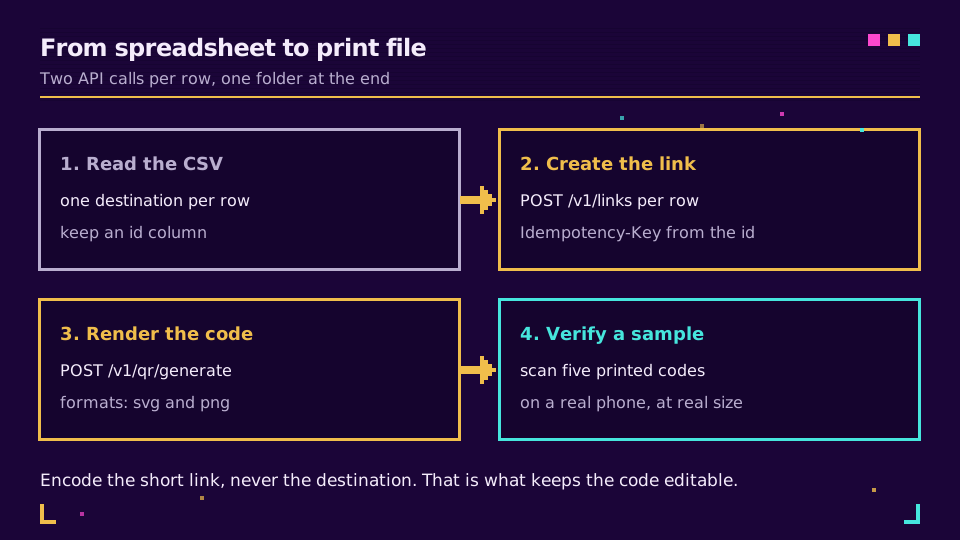
Conserva una columna id en el CSV, aunque parezca redundante. Se convierte en el nombre del archivo, la clave de idempotencia y el dato que usas para identificar el código cuando el equipo de diseño responde que "code 412 is wrong". Sin ella, identificas las filas por las URL, que son largas y fáciles de escribir mal.
import csv, base64, hashlib, pathlib, os, requests

API = "https://api.elido.app"
HEAD = {"Authorization": f"Bearer {os.environ['ELIDO_API_KEY']}"}
out = pathlib.Path("qr-out")
out.mkdir(exist_ok=True)

with open("products.csv") as f:
    for row in csv.DictReader(f):        # columns: id, destination
        key = hashlib.sha256(row["destination"].encode()).hexdigest()

        link = requests.post(
            f"{API}/v1/links",
            headers={**HEAD, "Idempotency-Key": key},
            json={"destination_url": row["destination"]},
            timeout=10,
        )
        link.raise_for_status()
        short_url = link.json()["short_url"]

        qr = requests.post(
            f"{API}/v1/qr/generate",
            headers=HEAD,
            json={
                "content": short_url,          # the short link, never the destination
                "formats": ["svg", "png"],
                "size": 1024,
                "error_correction": "M",
            },
            timeout=20,
        )
        qr.raise_for_status()
        payload = qr.json()

        (out / f"{row['id']}.svg").write_text(payload["svg"])
        (out / f"{row['id']}.png").write_bytes(base64.b64decode(payload["png"]))
        print(row["id"], short_url)
La clave de idempotencia se deriva del destino, así que volver a ejecutar el archivo después de corregir tres filas no crea duplicados ni cuesta nada. Esa propiedad es lo que hace que un trabajo masivo se pueda repetir de forma segura, y conviene entenderla bien antes de apuntar esto a 5.000 filas: límites de solicitudes e idempotencia explica los detalles.
El bucle anterior es secuencial, lo que está bien hasta unos cientos de filas. Después, ejecuta unas ocho en paralelo; las guías de Python y JavaScript tienen un patrón de concurrencia acotada que puedes reutilizar directamente.
¿Quieres ejecutarlo? Crea una clave en el plan gratuito, exporta ELIDO_API_KEY y apunta el script a un CSV de cinco filas antes de apuntarlo al archivo real.
Estáticos o dinámicos, a escala
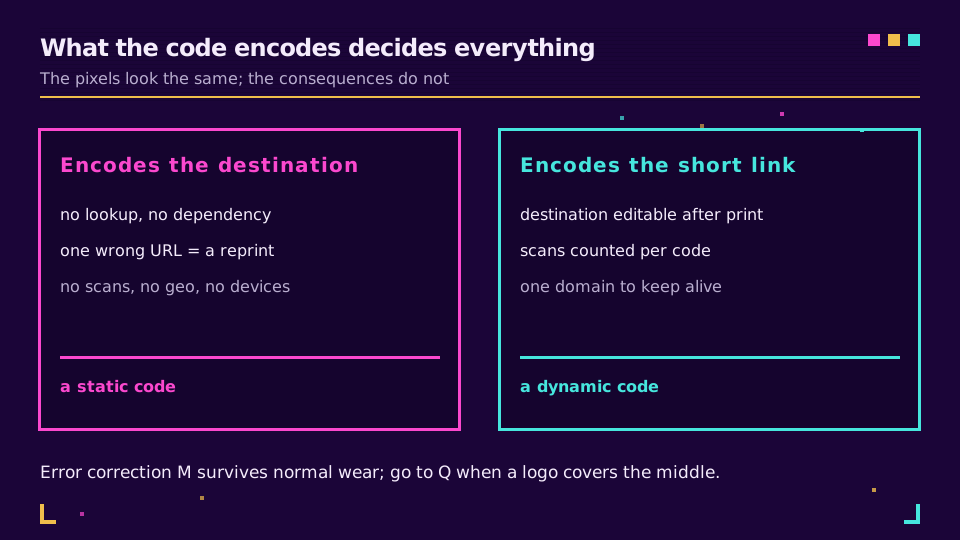
Un código estático tiene exactamente una ventaja: no depende de nada. No requiere mantener un dominio activo ni seguir pagando un servicio. Eso importa para un código grabado en una máquina que sobrevivirá a tu contrato con el proveedor, y casi nunca importa en otro caso.
Todo lo demás favorece a los dinámicos. Recuentos de escaneos por código, que es la única forma de comparar ubicaciones en estanterías o tiendas. Un destino que puedes corregir cuando cambia la página de la campaña. Y códigos más pequeños y dispersos, porque un enlace corto ocupa una fracción de los caracteres de una URL de producto etiquetada. Códigos QR dinámicos frente a estáticos ofrece la comparación completa.
Ajustes de impresión que sí importan
Tres parámetros determinan si el lote se escanea en el mundo real.
Corrección de errores. El nivel M recupera aproximadamente un 15 % de daños y mantiene el código disperso. Pasa a Q cuando hay un logotipo en el centro o el código se va a manipular, rozar o imprimir sobre algo curvado. H suena más seguro y normalmente no lo es: la redundancia adicional añade más módulos, y los códigos más densos son más difíciles de escanear en tamaños pequeños. El estándar QR documenta los cuatro niveles.
Formato. SVG para imprimir, porque escala hasta un cartel sin suavizar los bordes de los módulos. PNG para diapositivas, marketplaces y todo lo que rechace vectores. Pide ambos en una sola solicitud y evitarás el round-trip cuando alguien necesite el otro.
Zona de silencio. El margen en blanco alrededor del código forma parte del código. Cuatro módulos es el mínimo especificado, y los diseñadores lo recortan sistemáticamente porque parece espacio desperdiciado. Un código con un borde demasiado estrecho se escanea mal con cámaras de teléfono baratas y nadie relaciona una cosa con la otra.
Hay otro dato que conviene conocer antes de fijar un tamaño para todo el lote: la cantidad de datos determina la versión, y la versión determina cuántos módulos tiene el código. Denso Wave, que inventó el formato, publica la tabla de versiones y capacidad. Un enlace corto de 30 caracteres está cerca de la parte inferior; una URL de producto etiquetada de 180 caracteres no, y la diferencia se ve en un código visiblemente más denso al mismo tamaño impreso.
El tamaño del archivo importa menos que el tamaño sobre el objeto. ¿Qué tamaño debe tener un código QR? incluye la regla de distancia de escaneo que determina la dimensión física.
Verifica antes de enviar nada a imprenta
Genera un lote y después comprueba cinco códigos al azar. No lo hagas en tu escritorio con el brillo de la pantalla al máximo: imprímelos al tamaño real, pega uno en la estantería o el embalaje y escanéalo desde el lugar en el que se situaría un cliente.
Después, comprueba la redirección. Ejecutar curl -sI sobre tres de los enlaces cortos confirma que devuelven una redirección al destino correcto, lo que detecta el clásico error de desplazamiento de una columna: la segunda columna del CSV se leyó como la tercera y todos los códigos apuntan al producto vecino. Ese error es silencioso, supera todas las comprobaciones visuales y solo se ve en el destino.
Conserva el CSV que produjo el lote, con el id, el destino, el enlace corto y el nombre del archivo. Cuando alguien pregunte dentro de seis meses qué código está en cada palé, ese archivo tendrá la respuesta, y regenerarlo desde el dashboard requiere mucho más trabajo que conservarlo.
Dónde aparecen los escaneos
Cuando los códigos estén activos, cada uno informa por separado. Esa es precisamente la razón de tener un código por artículo en lugar de un código compartido: un solo código te dice que la campaña funcionó, y los códigos por artículo te dicen qué tienda, estantería o SKU funcionó.
Cómo hacer seguimiento de los escaneos de códigos QR explica cómo leer esos datos, y webhooks para eventos de enlaces explica cómo enviar los escaneos a tus propios sistemas en lugar de consultar un dashboard. Para el contexto específico de productos físicos, códigos QR para pasaportes digitales de producto cubre la versión normativa del mismo proceso.
Lee la serie principal
Este artículo forma parte del clúster de funciones. Empieza con cómo crear un código QR para la versión de un solo código y continúa con Campaña de códigos QR desde cero para el diseño de la campaña. La página de funciones de códigos QR cubre las opciones de estilo que este script omite.
Relacionado en el blog
Preguntas frecuentes
¿Cómo genero códigos QR en masa?
Recorre un CSV, crea un enlace corto para cada fila, renderiza un código QR para cada enlace corto mediante la API y escribe los archivos en el disco. Dos llamadas por fila y una carpeta al final. Codificar el enlace corto en lugar del destino es lo que mantiene cada código editable después de imprimirlo.
¿Los códigos QR masivos deberían ser estáticos o dinámicos?
Dinámicos, en casi todos los casos de generación masiva. Un código estático codifica el destino directamente, así que una URL incorrecta en una tirada de 5.000 unidades significa volver a imprimir. Un código dinámico codifica un enlace corto que controlas, lo que significa que puedes corregir el destino después y que cada código informa de sus propios escaneos.
¿Qué nivel de corrección de errores debería usar para códigos QR impresos?
El nivel M es la opción predeterminada sensata: recupera aproximadamente un 15 % de daños y mantiene el código lo bastante disperso para escanearlo rápidamente. Pasa a Q cuando un logotipo cubra el centro o el código vaya a estar en un lugar donde pueda rozarse. H rara vez merece la pena, porque la densidad adicional hace que el código sea más difícil de escanear en tamaños pequeños.
¿En qué formato deberían estar los códigos QR masivos?
SVG para todo lo que vaya a imprimirse, porque escala a cualquier tamaño sin suavizar los bordes de los módulos. PNG para pantallas, diapositivas y cargas en marketplaces que rechacen vectores. Generar ambos a la vez cuesta una solicitud y evita el round-trip cuando el equipo de diseño pide el otro formato.
¿Cuántos códigos QR puedo generar a la vez?
Tantos como permita el límite de solicitudes, así que es una cuestión de rendimiento y no un límite fijo. Ejecuta unas ocho solicitudes en paralelo, envía una clave de idempotencia derivada de cada fila para que una nueva ejecución no cree duplicados y un lote de varios miles terminará en minutos.
¿Necesito un código QR separado para cada producto o ubicación?
Sí, si quieres saber cuál se escaneó. Un código compartido te dice que la campaña funcionó; un código por artículo te dice qué estantería, tienda o SKU funcionó. La versión por artículo no cuesta nada extra de generar y es la única forma de comparar ubicaciones.
Prueba Elido
Pega una URL, obtén un enlace corto
Sin registro. El enlace vive 30 días. Crea una cuenta para conservarlo.
Gratis, sin registro · 2 por día