Acortar una URL en JavaScript es un único POST HTTP. Envías el enlace largo a la API de un acortador con fetch, pasas tu clave de API como token Bearer y lees el enlace corto de la respuesta JSON. Desde Node 18 no tienes que instalar ningún paquete: fetch es global.
La dificultad está en dónde se ejecuta ese código. Una clave de API de un acortador es una credencial que permite gastar cuota, y el JavaScript del lado del cliente es público, así que el navegador queda descartado. Todo lo que aparece a continuación se ejecuta en el lado del servidor: un script de Node, un gestor de rutas o una función sin servidor.
Esta es la versión para JavaScript de la guía general sobre cómo acortar una URL, que cubre el panel de control y el flujo del navegador. Si todavía no has elegido un servicio, la introducción a la API gratuita de acortador de URL explica la forma de la solicitud, el modelo de autenticación y los límites del nivel gratuito que da por supuestos este artículo. Los nombres de los campos son los de Elido, pero la estructura - enviar un POST con un destino y recibir una URL corta - funciona con la mayoría de los acortadores modernos.
La forma más rápida: una llamada fetch en Node
Guarda la clave en una variable de entorno y envía el destino al endpoint de enlaces mediante POST:
const res = await fetch("https://api.elido.app/v1/links", {
  method: "POST",
  headers: {
    Authorization: `Bearer ${process.env.ELIDO_API_KEY}`,
    "Content-Type": "application/json",
  },
  body: JSON.stringify({
    destination_url: "https://example.com/spring-sale?utm_source=newsletter",
  }),
  signal: AbortSignal.timeout(10_000),
});

if (!res.ok) throw new Error(`shorten failed: ${res.status}`);

const { short_url } = await res.json();
console.log(short_url); // -> https://s.elido.me/ab12cd
Ejecuta el script con node --env-file=.env shorten.js y la clave nunca toca el código fuente.
Esa línea if (!res.ok) no es decorativa. fetch solo rechaza ante un fallo de red o una cancelación, así que una respuesta 401 o 500 vuelve como una promesa perfectamente resuelta con ok: false. Omite la comprobación y una clave revocada parecerá un éxito hasta que algo posterior intente usar undefined como enlace. A cualquiera que venga de axios esto le pasa una vez.
AbortSignal.timeout es el otro hábito que merece la pena adoptar. Sin él, una conexión bloqueada espera hasta que el socket muere por su cuenta, lo que en un trabajo cron significa que el trabajo simplemente desaparece.
Por qué el navegador es el lugar equivocado
Pega ese fragmento en un componente de React y se rompen dos cosas. La primera es CORS: una API autenticada con clave no envía Access-Control-Allow-Origin para sitios arbitrarios, así que el navegador bloquea la respuesta. Leer la referencia de CORS de MDN suele hacer que la gente busque un proxy que elimine el error.
El error es el síntoma. El problema real es el segundo: cualquiera que abra DevTools o busque en el paquete puede leer una clave incluida en el código del frontend. Los empaquetadores no la ocultan, los prefijos NEXT_PUBLIC_ la anuncian y una clave pública en una API de pago es cuota gratuita para otra persona.
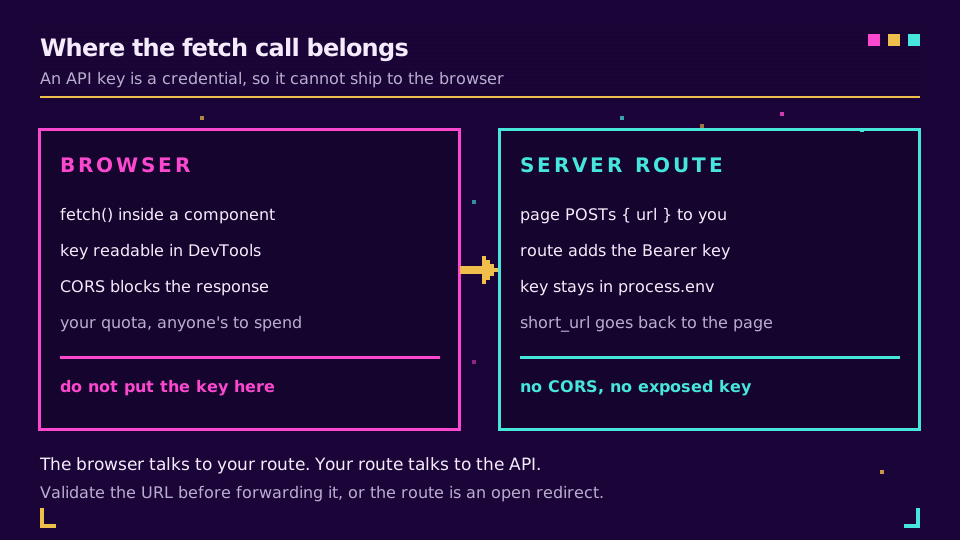
La estructura que funciona coloca una ruta tuya en medio. El navegador envía una URL sin más a tu propio endpoint, tu servidor añade la clave y esta permanece en una variable de entorno que el cliente nunca ve:
// app/api/shorten/route.js  (Next.js App Router)
export async function POST(request) {
  const { url } = await request.json();

  const res = await fetch("https://api.elido.app/v1/links", {
    method: "POST",
    headers: {
      Authorization: `Bearer ${process.env.ELIDO_API_KEY}`,
      "Content-Type": "application/json",
    },
    body: JSON.stringify({ destination_url: url }),
  });

  const { short_url } = await res.json();
  return Response.json({ short_url });
}
Valida url antes de reenviarla. Un endpoint abierto que acorta cualquier cosa que alguien publique es una redirección abierta con pasos adicionales, y el artículo sobre redirecciones abiertas explica qué hacen los atacantes con una.
Añade un tiempo de espera, reintentos y una clave de idempotencia
La ruta correcta ocupa ocho líneas. Un trabajo que se ejecuta sin supervisión tiene que sobrevivir a un 429, a un 5xx transitorio y al caso más desagradable: el POST tiene éxito, pero la respuesta nunca llega. Tu código agota el tiempo de espera, reintenta y ahora hay dos enlaces cortos para un mismo destino.
Una clave de idempotencia cierra esa brecha. Genera una por URL, reutilízala en cada reintento de esa URL y la API devuelve el enlace original en lugar de crear otro.
import { randomUUID } from "node:crypto";

const API = "https://api.elido.app/v1/links";
const sleep = (ms) => new Promise((r) => setTimeout(r, ms));

export async function shorten(destinationUrl, { retries = 3 } = {}) {
  const idempotencyKey = randomUUID(); // one per URL, not per attempt

  for (let attempt = 0; attempt < retries; attempt++) {
    const res = await fetch(API, {
      method: "POST",
      headers: {
        Authorization: `Bearer ${process.env.ELIDO_API_KEY}`,
        "Content-Type": "application/json",
        "Idempotency-Key": idempotencyKey,
      },
      body: JSON.stringify({ destination_url: destinationUrl }),
      signal: AbortSignal.timeout(10_000),
    });

    if (res.status === 429) {
      await sleep(Number(res.headers.get("Retry-After") ?? 2) * 1000);
      continue;
    }
    if (res.status >= 500) {
      await sleep(2 ** attempt * 1000); // exponential backoff
      continue;
    }
    if (!res.ok) {
      throw new Error(`shorten failed: ${res.status} ${await res.text()}`);
    }

    return (await res.json()).short_url;
  }

  throw new Error(`shorten failed after ${retries} attempts`);
}
Una respuesta 401 o 403 nunca se arreglará sola, así que se lanza de inmediato en lugar de gastar tres intentos. Un 429 espera exactamente lo que indica el encabezado Retry-After. Solo los 5xx usan una espera exponencial. El análisis detallado de los límites de frecuencia y la idempotencia explica por qué un bucle de reintentos ingenuo convierte una interrupción de un proveedor en dos.
¿Quieres ejecutar los fragmentos tal como están? Crea una clave en el plan gratuito, expórtala como ELIDO_API_KEY y todos los ejemplos de esta página funcionarán sin cambios.
Acorta URLs en bloque sin tropezar con el límite de frecuencia
La versión obvia para procesar un bloque es Promise.all(urls.map(shorten)). Lanza todas las solicitudes en el mismo instante, así que una lista de 500 URLs se convierte en 500 conexiones simultáneas y la API responde a la mayoría con 429. Un grupo pequeño lo soluciona: un número fijo de trabajadores toma elementos de una cola compartida, de modo que la concurrencia se mantiene estable por mucho que crezca la lista.
export async function shortenAll(urls, concurrency = 8) {
  const queue = [...urls];
  const results = new Map();

  const worker = async () => {
    while (queue.length) {
      const url = queue.pop();
      try {
        results.set(url, await shorten(url));
      } catch (err) {
        results.set(url, `ERROR: ${err.message}`); // one bad URL must not sink the batch
      }
    }
  };

  await Promise.all(Array.from({ length: concurrency }, worker));
  return results;
}
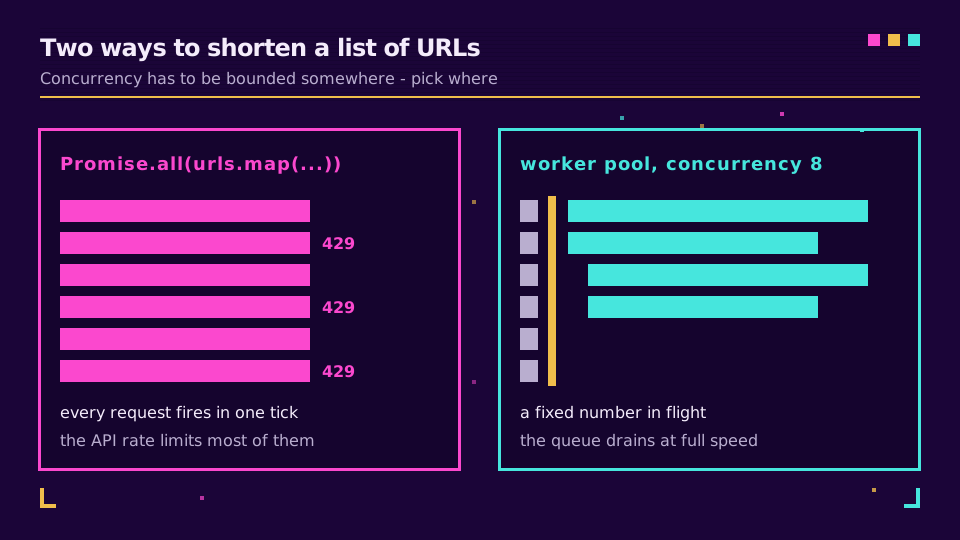
Usar la URL original como clave de los resultados hace visible y repetible un fallo parcial en lugar de dejar un hueco silencioso en la salida. Establece concurrency según lo que documente el plan; ocho es un punto de partida seguro y los encabezados de respuesta te indican cuándo debes reducirlo.
Si prefieres no mantener nada de esto, la API y los SDK ya incluyen conectadas la lógica de reintentos y paginación, y el inicio rápido de los SDK muestra la versión tipada de la misma llamada.
Dónde debería vivir el código
Cuatro ubicaciones cubren prácticamente todos los casos. Un script puntual que acorta un CSV funciona bien como Node puro con --env-file. Un formulario de tu sitio necesita el gestor de rutas anterior, con la clave en el servidor y el navegador hablando solo contigo. Un trabajador de cola encaja con un lote lo bastante grande como para que ninguna solicitud HTTP deba esperar por él. Y un paso de compilación que genera enlaces de campaña pertenece a CI, con la clave como secreto del repositorio.
Hay una salvedad para los entornos perimetrales: node:crypto no está disponible allí, pero crypto.randomUUID() es una API global de Web Crypto en Vercel Edge, Cloudflare Workers y Deno, así que cambia la importación y el resto del código no varía.
La ubicación cambia, pero la lista de comprobación no: clave en el entorno, un tiempo de espera en cada solicitud, leer res.ok antes del cuerpo y una clave de idempotencia en todo lo que pueda ejecutarse dos veces. Los equipos que hacen esto a escala suelen acabar leyendo qué más expone la API - clics, etiquetas y caducidad - y conectando webhooks para eventos de enlaces en lugar de consultar repetidamente.
Lee la serie principal
Esto forma parte del clúster de ingeniería. Empieza con la guía de la API gratuita de acortador de URL para conocer la forma del endpoint y la autenticación, y después lee el artículo sobre límites de frecuencia e idempotencia para comportarte correctamente bajo carga. La referencia actual es la documentación de la API, y acortadores de URL para desarrolladores explica qué debes buscar en una API antes de comprometerte con una.
Relacionado en el blog
- Cómo acortar una URL en Python con la biblioteca requests
- Cómo acortar una URL en PHP con curl, Guzzle y WordPress
- Cómo acortar una URL en Go con net/http
- API gratuita de acortador de URL: estructura de la solicitud, autenticación y límites
- Cómo acortar una URL en Java con el HttpClient integrado
- Cómo acortar una URL en C# con HttpClient y .NET
Preguntas frecuentes
¿Cómo acorto una URL en JavaScript?
Envía un POST HTTP a la API de un acortador de URL con fetch, pasa la URL larga en el cuerpo JSON y tu clave de API como token Bearer, y después lee el enlace corto de la respuesta analizada. En Node 18 o posterior, fetch viene integrado, así que no necesitas instalar ningún paquete: prepara los encabezados, envía la URL de destino al endpoint de enlaces y usa el campo short_url del JSON que recibas.
¿Puedo acortar una URL en el navegador con JavaScript?
No con tu clave de API en la página. Cualquier elemento de JavaScript del lado del cliente se puede leer en DevTools, así que una clave enviada al navegador es una clave pública que cualquiera puede gastar usando tu cuota. Llama al acortador desde una ruta del servidor o una función sin servidor y haz que el navegador llame a esa ruta.
¿Por qué mi solicitud fetch a un acortador de URL devuelve un error de CORS?
Porque la API del acortador no envía un encabezado Access-Control-Allow-Origin para tu sitio, algo deliberado en un endpoint autenticado con clave. El navegador bloquea la respuesta aunque la solicitud pueda haber tenido éxito. Trasladar la llamada al lado del servidor elimina el navegador del recorrido y también elimina el error.
¿Necesito un paquete npm para acortar URLs en Node.js?
No. Node incluye un fetch global desde la versión 18, y una llamada a la API de un acortador es un POST con dos encabezados, así que una dependencia aporta muy poco. Recurre a un SDK cuando quieras respuestas tipadas, reintentos integrados y asistentes de paginación para muchos endpoints, no para una sola llamada.
¿Cómo acorto muchas URLs a la vez en Node.js?
Ejecuta un grupo pequeño de trabajadores en lugar de usar Promise.all sobre toda la lista, para que solo haya unas pocas solicitudes activas en cada momento y no superes el límite de frecuencia. Envía una Idempotency-Key por URL para que una solicitud reintentada devuelva el enlace original en lugar de crear un duplicado.
¿fetch lanza un error ante una respuesta 401 o 500?
No, y esto suele confundir a quienes vienen de axios. fetch solo rechaza ante un fallo de red o una solicitud abortada, así que una respuesta 401 o 500 llega como una respuesta resuelta con ok establecido en false. Comprueba response.ok por tu cuenta antes de leer el cuerpo, o una llamada fallida parecerá correcta.
Prueba Elido
Pega una URL, obtén un enlace corto
Sin registro. El enlace vive 30 días. Crea una cuenta para conservarlo.
Gratis, sin registro · 2 por día